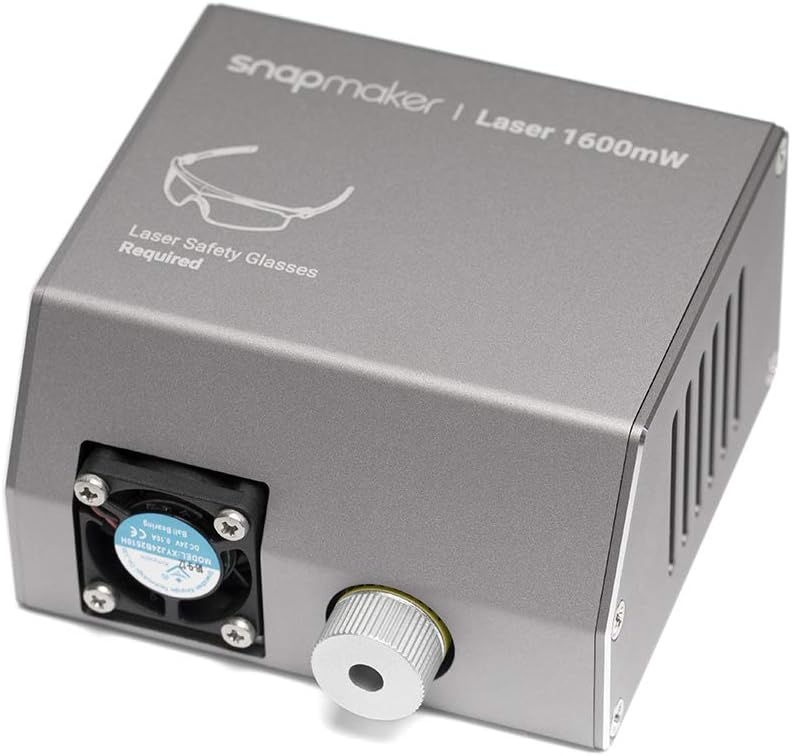


Snapmaker Original Laser Cutting Module
Product ID: 100375053
Details
- BrandSnapmaker
- Item Weight10.56 ounces
- Operation ModeAutomatic
- StyleLaser
- UPC782902240936
Buy Snapmaker 1600mW Laser Cutting Module, Upgrade Kit: Measuring & Layout Tools - desertcart.com ✓ FREE DELIVERY possible on eligible purchases Review: Works really well - Bought this to use instead of the one that came with the Snapmaker and WOW! Get the focus distance right, which isn’t hard to do, and it does what it says quick burn and engrave and cuts the materials I’ve tried so far no problem. Review: Fantastic Beginner Laser - Literally no complaints. The learning curve is in the software and the materials you are using and how to properly engrave on them. Can engrave on a WIDE variety of materials and can etch color off of metals!
| ASIN | B07F86TS6J |
| Brand Name | Snapmaker |
| Customer Reviews | 4.1 4.1 out of 5 stars (55) |
| Item Weight | 10.56 ounces |
| Manufacturer | Shenzhen Snapmaker Technologies Co., Ltd. |
| Operation Mode | Automatic |
| Style Name | Laser |
| UPC | 782902240936 |
A**N
Works really well
Bought this to use instead of the one that came with the Snapmaker and WOW! Get the focus distance right, which isn’t hard to do, and it does what it says quick burn and engrave and cuts the materials I’ve tried so far no problem.
S**N
Fantastic Beginner Laser
Literally no complaints. The learning curve is in the software and the materials you are using and how to properly engrave on them. Can engrave on a WIDE variety of materials and can etch color off of metals!
C**N
Is not cutting easy
Is not cutting thin leaves of wood, I will play with parameters, and there isn’t any manual to figure up how to cut. Butvis awesome how the blue light reallly burns
A**R
Works, once setttings fined tuned
I've finally got it to cut 2.5mm thick, 5 x 5 squares I bought here in Amazon without extremely burnt edges. Don't expect miracles though, it's just enough to do small projects, with caveats. You have to test different settings and the snap makers laser guide is rubbish. First and foremost, get the laser in focus. What I did was gently lower the laser to slightly touch the working material(use a piece of paper like your calibrating the machine for 3d printing, just use small , slow steps so as not to ram it into the base plate, just set to use small increments), once the paper has resistance click Set Work Origin, then manually raise it up to about 30mm, again, Set Work Origin. This will give you a ball park figure once you run fine tune in the snapmaker software. Load up fine tune gcode using snapmaker software on your sample. This will print out a series of squares. You are looking for the square with the finest lines, fine tunes settings as follows: just set it at about 90-100 work speed, 100% power. The squares are labeled, 0.0, -0.5, -1.0 and so on, up to +2.5mm. so for example, mine was at best looking at -1.5mm So I manually subtract 1.5mm from my initial 30mm and manually lowered the z setting -1.5mm, which gave me 28.5mm. Then click Set Work Origin. That should get you real close to focus. (If all the squares look bad, you may have to move Z Axis up or down depending on your fine tune results and rerun the fine tune code again. Just note where your z axis is at before you start moving it, ie, I started at 34mm and I ran fine tune and it looked it looked awful, so I lowered it 4mm and reran fine tune, so now after adjustments, I'm at 28.5mm, after fine tune subtraction. It's important that once squared away and focused, not to touch z setting unless you change material and height. If so, repeat steps above. From this point, you can change x and y setting all day long, and set a new Work Origin, it's fine as long as you didn't adjust or change z settings. With my focus at 28.5mm from material to lens, I'm able to cut 2.5mm thick, 5x5 plywood blocks bought from Amazon, without major burning. My settings are as follows: Jog speed : 3000 Works Speed: 270 Multi pass: 5 Pass Depth: .13 Power:100% In conclusion. It works good enough for the space available. I haven't played with the original laser much, so I can't really comment on it. I'm cutting samples above without major burning, with some inconsistent burn through, however, for example in the picture with the stars. Most stars fall right out as I pick up the sample, others I have to push through with a pen. Could be my material is warped. I've also played around with acrylic using a dry erase board black marker. I've gotten text to etch well, but again, it's getting the settings correct which takes time, and trial and error. This works faster than the original, but for the cost, I'm sure you can buy a more powerful laser and cut better. However, this did plug into the machine and with patience and testing, I've came up with the settings for my machine and it works well. So no regrets here.
T**6
Laser
Nice, more powerful option than the one that comes with the snapmaker. Used to etch on faux leather works well.
D**N
It is by no means compatible with the latest A350 machine
This laser head was listed as totally compatible. By no means is it at all compatible. The power cord connection to the head has a totally different type of connection. No such outlet connection on machine even if a new cord of that type was provided (which it wasn't) with this new head. Total disappointment. The box and head have Snapmaker printed all over it. Not sure what Snapmaker machine this works with? It certainly is not the A350 machine I received just a few months ago. Forget about trying to deal with Snapmaker customer service they have no US reps at all.
M**O
Good laser
Everything ok at this moment.Unboxing and checked outside.Everything ok
S**Z
Dont waste your money, its an engraver that will cut paper, eventually
No support from snapmaker, i did figure out how to use it on my owwn, but a very low power cutter, more of an engraver.
W**.
Nice product
Trustpilot
2 weeks ago
1 month ago