We remain fully operational. Our teams are working around the clock to ensure your deliveries continue safely.

قم بتنزيل التطبيق


معلومات عنا
حقوق الطبع والنشر © 2024 Desertcart Holdings Limited
قم بتنزيل التطبيق

🎥 Elevate your video calls—because your image deserves the spotlight.
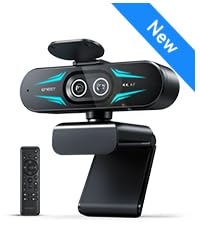
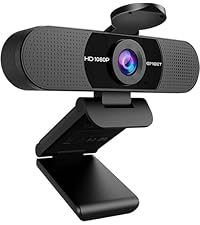
The EMEET C960 Webcam delivers professional 1080P Full HD video with a 90° wide-angle lens and dual noise-reducing microphones. Designed for seamless plug-and-play use, it features automatic low-light correction and a privacy cover, making it ideal for home offices and remote work across all major platforms like Zoom, Teams, and YouTube.





| ASIN | B07M6Y7355 |
| Best Sellers Rank | #2 in Webcams |
| Customer Reviews | 4.4 4.4 out of 5 stars (37,091) |
| Date First Available | April 11, 2019 |
| Is Discontinued By Manufacturer | No |
| Item Weight | 5.6 ounces |
| Item model number | 960 |
| Manufacturer | Shenzhen eMeet technology Co.,Ltd. |
| Product Dimensions | 5 x 0.85 x 3.5 inches |
I**E
Buy it is better than what you expect!
This freak cam is amazing! Must buy for desk set up. It was so clear and the auto focus worked so well my client was fooled into thinking it was apple lol. He was genuinely shocked!(He owns Apple studio products I believe) it’s a fraction of the price works well my Mac mini. Ease to use, privacy functionality works well, connectivity A+, and compatibility A+.
N**A
Great camera
Works great! Easy to install, super lightweight, clear image.
A**E
Solid focus, brightness is a challenge
Camera connects to my PC easily. Basically, plug and play. It works well and the resolution is good as well. Focus seems to work perfectly as I have not noticed any issues at all. The one thing that I wish was better (a big deal) is the brightness. I'm able to adjust the settings using the Microsoft Windows settings but depending on the time of day, the way it displays varies quite a lot. If I adjust the brightness when the ambient light is brighter vs darker, will affect how the video displays and it doesn't seem to auto correct itself or try to compensate for lightning changes. The camera cover is packaged separately and needs to be stuck into position. It works fine for the purpose. Overall, I'm mixed. The camera is good but could be great if the brightness issue was resolved.
T**T
Nice Webcam.
Excellent value!!!! Great build quality. Sound can be a little low at times but it works well and camera is great.
T**D
Nice, clear picture and great microphone!
This is very handy with a very clear picture and the microphone works very well. The mounting is very good for many different types of stands and allows. You to connect to the top of your monitor or computer as well as sit flat on a shelf for desktop.
M**E
No hastle, perfect quality
Insane camera quality. The mount clip can be adjusted so quickly and easily, plug and play without any dumb bloatware, PERFECT compatibility with mac and windows, I love the privacy screen. 10/10 functions exactly as described, no hastle, super high quality.
T**E
EMEET 4k webcam
All I can say is wow, this webcam actually blew me away I thought to myself maybe it’s quality isn’t gonna be the greatest even tho it’s 4k but like wow crystal clear image no lag when you move this is a absolute game changer for streaming with great price I will recommend this to a lot of my fellow streamers and friends!! You will not be disappointed
C**T
Good image and audio quality but no automatic exposure control
This is a nice little camera with great image quality. The microphones seem to work well as well. The only issue with this camera is the lack of an automatic exposure control. It is set for indoor use but if you point it outside (i.e. in a bright spot) it will not automatically adjust exposure so the image will be washed out. However, the APP can be used to adjust exposure manually. The vendor was very responsive to queries.
M**.
They promise a lot with this webcam and the quality was just bad. And as I had to use it to figure that out, I just got 50% refund from them as it was used + I had to pay the return shipment. Don‘t waste your money and time with this product and the seller!
J**G
Once program installed, works great. Clarity fine, smooth video. Works well in zoom meetings
M**F
work really well for its price, and the quality is actually surprisingly good. Obviously the only downside is the mic quality isn’t good and you can’t twist the cam left to right for adjustments, only up and down.
C**Y
I can definitely say, after hooking up this camera, that it does its job perfectly. The video quality for making video calls was perfectly clear. The audio aspect was equally impressive. The microphones seemed to pick up the voice from a couple of feet away from it (sitting at the computer desk) but wasn't overwhelmed by any background noise. Whether this is a design function utilizing noise cancellation or just a matter of it not being a very noisy environment remains to be seen. The snap down cover for privacy is about as basic as it gets. A well fitting plastic lens blocker on a hinge, but really what more do you need to achieve those results? The only complaint I would have (and it's being very very picky I suppose) is the way it "mounts" on the monitor. While it initially sat quite still and steady, as soon as I reached up to tweak the positioning it shifted all over the place. This was very easily rectified, however, with about 5 cents worth of electrical tape to hold the clip solidly to the top/back of the monitor. So in reality, it's not so much a "complaint" about it as a VERY minor inconvenience. In summary, high quality, great sound, great picture, very easy to install and use. I'd certainly recommend it to anyone looking for an affordable camera with built in mic.
M**N
Wow! Very impressive webcam. Plucked into an empty USB port and it started working. Did a self test using Zoom app and was surprised by the crystal clear image of myself and the good voice quality. Exceeded my all expectations.
ترست بايلوت
منذ 3 أسابيع
منذ أسبوعين