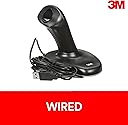
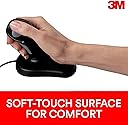
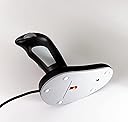
🖐️ Elevate your workflow with comfort that commands attention
The 3M Ergonomic Mouse EM500GPL Large features a patented vertical grip design that keeps your hand and wrist in a neutral, natural position to reduce muscle strain and repetitive stress injuries. Compatible with USB and PS/2 ports, it offers plug-and-play ease across PC and Mac platforms. With a generous 6.5-foot cord and a 2-year warranty, this mouse is clinically recognized by the Arthritis Foundation for its ergonomic excellence, making it the go-to choice for professionals seeking long-term comfort and productivity.


| ASIN | B00008KWWF |
| Additional Features | Ergonomic Design |
| Are Batteries Included | No |
| Are Batteries Required | No |
| Best Sellers Rank | #2,465 in Computer Mice |
| Brand | 3M |
| Built-In Media | EM500GPL-AM |
| Button Quantity | 3 |
| Color | Clear |
| Compatible Devices | Personal Computer |
| Connectivity Technology | PS/2, USB, Wired |
| Customer Reviews | 4.2 out of 5 stars 1,106 Reviews |
| Enclosure Material | Plastic |
| Global Trade Identification Number | 00021200418334, 00021200522642 |
| Hand Orientation | Right |
| Hardware Platform | PC |
| Item Part Number | EM500GPLAM |
| Item Weight | 200 Grams |
| Manufacturer | 3M |
| Mfr Part Number | EM500GPL-AM |
| Model Name | 3M MOBILE INTERACTIVE SOLUTIONS DIVISION |
| Model Number | EM500GPL |
| Movement Detection | Optical |
| Movement Detection Technology | Optical |
| Number of Buttons | 3 |
| Operating System | Windows 95 |
| Power Source | Corded Electric |
| Range | 6.5 feet |
| Special Feature | Ergonomic Design |
| Style Name | Wired |
| UPC | 021200418334 |
| Unit Count | 1.0 Count |
S**E
8 Year Follow-up! A Superb Mouse for Any User -- Mac or Windows. Great For Impaired Hand Function
I use the wired version because with frequent hand tremor and spasticity due to a spinal cord injury. it's not unusual for me to inadvertently knock to the mouse off the desk, and I've arranged the cord to prevent the mouse from hitting the hard ceramic tiled floor of my office. The mouse is quite durable, and survived several such hits before I got the cord management under control. While I recommend this mouse for any user, it's an especially important tool for people with limited hand usage. The hand position is such that the user is encouraged to use arm muscles rather than the hand and wrist, reducing the risk of carpal tunnel damage and permitting better control for people who've suffered neurological damage. I have a second computer set up where because of severe space limitations I am forced to use a trackpad. The difference in my ability to control the cursor is night and day, with this 3M product winning on every count.. ------------------------------ This is a follow-up review written more than two years after my second purchase of the 3M wired ergonomic optical mouse. I gave it four stars in my original review, because as a Mac user I was having trouble getting the third button to function properly. I've long since discovered an inexpensive program called Smart Scroll that has given me great additional functionality with this mouse and made the third button (the one activated by the fingers gripping the upright portion of the mouse) an integral part of my daily use. It's free to download and try, putting up startup reminders to purchase ($14) if you continue to use the program, and can be found at marcmoini.com. So, I've upgraded my review to five stars. For any Mac user with a mouse or trackpad Smart Scroll is a worthwhile addition to your system preferences. It adds numerous capabilities in a manner completely consistent with Apple's thoughtful and well-designed interface. The program is designed to work with any mouse with multiple buttons and with or without a scroll wheel. ------------------------------ This is a second follow-up review, eight years after my original purchase. I'm making the leap from wired to wireless version. My work space is now carpeted, so the occasional spastic arm sweep sending it to the floor is less of a concern. The new mouse arrived today. Bravo to the new rubbery "soft touch" coating. It's easily cleaned and feels pleasant to the touch. The new mouse - in spite of 2 AA batteries (included), feels lighter than the wired model, perhaps even bit too light. My neuro condition means that I have an easier time avoiding tremor when my tools and utensils have a bit of weight. That said, everything I love about this mouse remains true. I've tried dozens of mice over the years, and this remains the best in terms of comfort and hand position. A tech note - this is not a Bluetooth mouse. It uses a 2.4MHz dongle. It requires a usb connection to your computer, though it works fine through a USB hub. It seamlessly auto-pairs. My Logitech keyboard uses a similar 2.4MHz dongle. They do not interfere with each other, but neither will they share a dongle. There is a "connect: button on the bottom of the mouse, as well as an unlabelled button on the dongle. If for some reason the mouse loses its connection, the buttons are there to reset the pairing. Press the unlabelled dongle button, then the "connect" button pin the mouse.
E**L
Instant RSI relief
I felt the difference in my right wrist instantly. According to websites, "Ergonomic design keeps the arm positioned for natural, comfortable movement. It is clinically proven to reduce muscle strain and discomfort associated with Carpal Tunnel Syndrome and repetitive stress injury. The 3M Ergonomic Mouse is compatible using any USB port computer." Ever notice that Gamers don't have carpel tunnel syndrome like most typists even though they likely spend more time at the computer? Well, 3M noticed! Your wrist sits on this ergonomic mouse like it does on a video game joystick. The weight of your hand is no longer carried by your wrist. Rather, your hand is relaxed on the mouse. The relief in pressure on your wrist is instant. The cost may seem high, but it's less than a chiropractic appointment. Comes in 2 different sizes (small/medium and medium/large). This is a RIGHT handed mouse. You can program the left/right clicks if you are left handed, but the "joystick" is angled, so it's not as wonderful if you are a lefty. Added note: The above review was written 2 years ago. It has been 3 years that I have been using this mouse. My wrist pain is completely gone. This mouse is so worth it. That being said, it is a P.O.S. as others have mentioned: the mouse does not travel well (it breaks if not protected in your computer bag) and breaks when dropped on hard surfaces -- I put a carpet under my desk and bought a glue gun to cut down on mouse costs. After gluing them back together, 3 have acquired the "double click" disease. Even with these drawback, I still feel that this mouse is worth it. I have purchased 8 over the past 3 years - I now keep one at work, one on my desk at home, and a "floater" for my home laptop that moves from room to room but does not leave the house unless carefully wrapped in it's original box. For "daily travel", because the 3M mouse has helped my wrist heal, I am now able to use a regular mouse, so I now keep a regular mouse in my backpack.
J**N
Was A 1 Star Until I Adjusted It, Makes It 4 Stars
I received this mouse on September 17th. It is now December 19th, so I have given it three months of use before writing this review. Before purchasing this 3M mouse, I was using just your average, typical, mouse with a scrolling wheel in the center. For work I am on the computer around 13 hours a day. Recently my right wrist, forearm, and shoulder started to ache and eventually became very painful because of the unnatural position my mouse held my hand/arm in. Also I use the scrolling wheel very often and my middle finger (which I used to scroll with), started to swell and experience pain in the joints, with a hard, painful bone-like spur on the underside. After using the 3M Ergonomic mouse, the swelling/pain in my finger joint went away immediately, and the bone spur also dissipated. However, while it did alleviate the pain in my wrist, it actually caused more pain in my forearm and shoulder, and now the bonus of the entire thumb area of the hand - from the wrist up to the tip of my thumb. After a week of looking at the design and messing around with folded towels under my arm, it finally dawned on me why this mouse caused so much pain.... Though I purchased the 'small', the hand shaft is still too long, and with the toggle button at the top of it, it holds the thumb in an unnatural upward position thereby putting strain on that entire bone. When you lay your arm down on a table, with palm facing inward, in the relaxed position a thumb is NOT sticking upwards, but instead it naturally lays level with the index finger. Hence the hand shaft is too tall. The shaft cannot be cut down obviously, so the 'deck', the part that the hand rests upon, had to be raised. To to do this I took a few sheets of paper towels, folded them to the thickness that would give the best height for my hand, then wrapped sturdy packing tape around it, to keep it folded (and makes it easy to wipe clean). Then I made a 'collar' out of paper towel to go around the base of the hand shaft, to which I taped the front part of the folded paper towels to, it helps keep it from shifting. I then put a large piece of rolled tape on the rest of the 'deck' which holds the rest of the folded towels onto the deck. Did it work? Yes, it did. The paper towels have conformed perfectly to the shape of my hand, and is very comfortable. It stays rather clean because of being wrapped in packing tape, which I periodically wipe clean with rubbing alcohol. More importantly, it has elevated all pain in my arm, shoulder, and thumb area. It holds my hand and fingers in a very natural position. So while it is not perfect, and I shouldn't have to make padding for it, I gave this mouse 4 stars because I do like it, even though I had to make adjustments to make it work. It glides smoothly on a mouse pad. The toggle button is smooth, as is the scroll button. It does take some time getting used to scrolling this way, but once I got the hang of it, it's second nature to me now. Some tips: * I found myself 'gripping' the mouse like a joy stick because I was so not used to a mouse of this shape, which makes the four fingers hurt after a while and would make me hit the scroll button inadvertently. I had to keep reminding myself to relax my hand. No need to 'grip' it, it's not going to take you on a 'white knuckle' ride! * Does not move well on thin or hard surfaces. I had a very, very thin mouse pad and it would not glide well on it. I purchased a thicker pad and now it moves smoothly. * Because the hand shaft stands so far up, I have knocked this mouse right off my desk a number of times, my arm would hit it, or walking past my desk my sweater would catch it. So when not in use keep it away from the edge of the desk. At least I know that this mouse can take a beating!
B**S
Great mouse for "tennis/mouse elbow"
I am on my computer all day long at work and using a traditional mouse contributed to tennis elbow (the doctor called it "mouse elbow" since that is one of the common causes) in my right arm. My boss suggested I try to find an ergonomic mouse to help alleviate the problem. I tried both this 3M mouse and the Evoluent VM3R2-RSB Vertical Mouse. I have been using both for nearly a month now. I work from home much of the time and I have one in my home office and the other at work. Both are great at maintaining a neutral hand position and I can now work for hours without additional arm/elbow pain. This 3M mouse provides a more normal, comfortable hand and arm position for me - somewhat like a joystick at an angle. Unlike a joystick, it is fixed - it does not bend but slides on a desktop/mousepad like any optical mouse. The only think I miss is the scrolling wheel. It has a button that acts much as a scroll lock to allow movement to other areas of a worksheet but it seems cumbersome and I have not gotten used to it. The Evoluent Vertical Mouse is very much like a standard mouse tipped on its side and does include a scrolling wheel. The drawback for me is that the angle is a bit too vertical to feel natural or neutral for my hand and arm. Both the 3M and the Evoluent mouse definitely make long-term mousing more comfortable and I can recommend them both.
P**R
Comfortable, but not that user friendly
I purchased this 3M Ergonomic mouse and the Evoluent Vertical Mouse2 at the same time to compare. I really enjoyed the feel of the 3M mouse, but it is limited in what it can do. I need to scroll often with my kind of work. The 3M mouse does not have a scroll wheel it has a scroll button. When you push the scroll button, you then have to physically move the mouse up and down to scroll. The Evoluent Vertical Mouse2 is pretty comfortable. It seems a bit light at times, so it takes a while to get used to it. I really enjoy the scroll wheel and the 5 programmable buttons; Left, Right, Middle, Wheel button (for your fingers) and a Back button (by the thumb) and the scroll wheel. Of course you can program each one to do what you want. You might want to visit Evoluent's web site to get the most up to date driver. Although the 3M is slightly more comfortable then the Vertical Mouse2, with my type of work I need the functionality of the Evoluent Vertical Mouse2. If 3M had a scroll wheel I probably would have kept it, but I'm going to stick with the Evoluent Vertical Mouse2.
M**R
Funky and quirky but works
This mouse is not without it's flaws but it does work as advertised. It takes pressure off your wrist by putting it in a natural position. It absolutely relaxes the wrist. For this, it is worth it, especially if you don't have to do lots of precise clicks in your work.. as moving the mouse with arm movements can take getting used to. It can be just as precise but there is a very long learning curve to fine-movements with your arm. The top button is a left click or right click pivot button and is a bit finicky. It is very easy to click it too long and have it drag-select instead of click. It took me a day to figure out the reason the button was acting funny was because when I was clicking it in the middle it would register as both a right and left click. Once I figured out the top button was a pivot button it worked great. The finger button is a scrolling button. My hand is quite big, I'm 6'2" with a 8" from wrist to middle finger tip and my hand easily rests on the bottom pad and the size of the grip is good. I have to hold it a bit back on my finger tips, but my wrist is fully rested, so it works. It takes a bit of getting use to, but I like it, and I'm going to use it as my main mouse at work. A good ergonomic keyboard is the microsoft natural 4000, if you are looking for something to pair with this for an ergonomic setup. Hope that helps!
N**D
Very disappointing!!! Impractical to Use!!!
First, this product is very difficult and impractical to use. Whatever speed you can work with on a regular mouse, this is 4-5 times slower (for example, if a task takes 1 second on a regular mouse, it will take 4-5 seconds on this mouse). It is so slow and impractical that you will abandon it after a few minutes of use. Second, I purchased this product thinking the joy stick has a joint and you keep the mouse in one, idle positions and push the stick in different direction and move it (like those helicopter commands). There is no moving joint. It is FIXED so you have to move the entire actual thing around. It is not a light mouse to move. Third, moving around is not so much the problem. The real problem is HOW MUCH YOU HAVE TO MOVE IT just to move the mouse pointer across the screener. You will have to get an Extra-Large mouse pad because will not fit on a regular mouse pad; it has to be moved at least 8 inches just to move the pointer across the screen. Fourth, it feels really awkward and unnatural to use. Fifth, 3M does not even offer a specific driver for this mouse. It does not come with a CD and all sorts of Google searches did not yield a legitimate driver software so 3M has not released one. CONCLUSION: In short, you will be moving this mouse over large distance just for simple tasks. It takes 4-5 longer to use than a regular mouse to use, both because of the distances and because it is awkward and unnatural. It's also over-priced relative to what you get. I really don't recommend it at all.
Q**S
Pro's and Con's
update: I ended up tossing mine in the junk drawer. It was just too difficult for me to use comfortably. | I've been using this mouse for about a week now. I use a mouse all day long. I've used lots of different kinds of mice to alleviate finger pains. I didn't buy this one to alleviate any carpal tunnel pains rather I bought it because my index finger was really sore at the last knuckle from left clicking all day long. Here's what I really like: the single button at the top of the stick that does both left and right mouse clicks with the thumb is pretty slick (no more sore knuckle). What else do I like? Not much, by comparison to a regular mouse. Not having a roller wheel is practically a deal breaker. Instead of the wheel, there is a pistol grip style button that is hard to reach and awkward to squeeze. Reaching for the joystick style pointer takes a little re-training, too, because it's taller. Finally, using this as a pointer takes a lot more movement. I wouldn't be able to use this with a mouse pad because it takes a lot of space to maneuver the pointer. Occasionally this sticks to the desktop. If you don't do a LOT of computer usage and are experiencing a lot of pain because of a mouse, this is probably a tool worth trying. It is definitely a pain relieving tool for me. There is a lot of downside to making this a workable replacement over a standard mouse. I am trying still to decide if I can live with what I don't like.
S**E
Souris simple qui soulage immédiatement
J'ai acheté cette souris ergonomique car je souffre d'arthrose au niveau de l'index. La douleur lance jusque dans le poignet. La prise en main est quasi immédiate ! cette souris soulage immédiatement, car l'index n'est plus en tension, c'est le pouce qui active le clic gauche et le clic droit, ainsi que le clic de défilement. La précision est aussi bonne qu'avec une souris classique. Elle est très simple d'utilisation, grâce au petit manuel qui explique l'essentiel. Il y a un confort supplémentaire, dû au fait que le poignet repose sur le socle de la souris, cela repose l'avant-bras. Je suis complètement satisfaite ! Petit bémol, son prix. Si elle avait coûté moins cher, j'aurais équipé l'ordinateur du travail et celui de la maison.
M**.
Bon produit qui soulage les douleurs et facile à prendre en main
J'ai de gros soucis avec les 3 doigts externes de ma main ( auriculaire, annulaire et majeur) et je peux enfin rester plus d'une heure devant mon pc, je l'utilise essentiellement pour surfer et jouer et je ne rencontre pas de problèmes, je n'ai plus les violentes douleurs qui m'obliger à arrêter immédiatement avec une souris normal. Je la trouve facile à prendre en main, mais comme je n'ai jamais pu utiliser très bien une souris normal... Au niveau des points faibles, je la troupve un peu légère et comme elle est très sensible il faut régler la vitesse assez bas. Sinon très bon rapport qualité prix!!
J**A
Desaparece el dolor de túnel carpiano.
Es excelente, es la segunda vez que lo compro. Muy bueno para los que sufren túnel carpiano. Yo lo uso para editar video y fotografía y paso mas 12 hrs al día en la pc.
D**E
Un salvavita per epicondilite
Mi sta aiutando molto causa dolori/ fastidi vari al braccio dovuti ad una epicondolite. Ottimo prodotto, unica pecca è l'assenza della rotellina, ma ci si abitua assieme al diverso tipo di sensibilità col movimento
C**N
Comodidad máxima
Super cómodo y eficaz. Ideal para personas con síndrome del túnel carpiano o simplemente con sobrecarga en dedo indice y/o en antebrazo
Trustpilot
1 week ago
3 days ago