


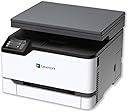
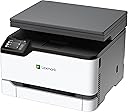
🚀 Power up your productivity with Lexmark’s all-in-one color laser printer!
The Lexmark MC3224dwe is a compact, durable all-in-one color laser printer designed for small businesses and home offices. It delivers fast 24 ppm print speeds with automatic duplexing, supports wireless, Ethernet, and USB connectivity, and features built-in security to protect your data. With mobile-friendly printing and scanning, a sturdy steel frame, and eco-conscious features like recycled paper compatibility and cartridge recycling, it’s a reliable, efficient solution backed by a one-year onsite warranty.


| Additional Printer Functions | Copy, Scan |
| Asin | B07T1DQNNS |
| B W Pages Per Minute | 24 pages_per_minute |
| Best Sellers Rank | #543,112 in Office Products (See Top 100 in Office Products) #731 in Laser Computer Printers |
| Brand | Lexmark |
| Built In Media | MC3224dwe Printer, Starter Toner Cartridge, Power Cord(s) |
| Color | White, Gray |
| Color Pages Per Minute | 24 pages_per_minute |
| Compatible Devices | Laptops, PC |
| Control Method | Touch |
| Controller Type | Android |
| Customer Reviews | 4.0 4.0 out of 5 stars (1,102) 4.0 out of 5 stars |
| Display Type | LCD |
| Duplex | Automatic |
| Global Trade Identification Number | 00734646679855 |
| Hardware Interface | Ethernet, USB 2.0 |
| Ink Color | Color |
| Item Dimensions D X W X H | 15.5"D x 16.2"W x 12.1"H |
| Item Type Name | Multifunction Printer |
| Item Weight | 40.2 pounds |
| Manufacturer | Lexmark |
| Maximum Copies Per Run | 250 |
| Maximum Copy Resolution Black And White | 600 x 600 dpi |
| Maximum Copy Resolution Color | 600 x 600 dpi |
| Maximum Copy Speed Black And White | 24 pages_per_minute |
| Maximum Media Size | 8.5 x 14 inch |
| Maximum Print Resolution Black And White | 600 x 600 dpi |
| Maximum Print Resolution Color | 600 x 600 dpi |
| Maximum Sheet Capacity | 250 |
| Model Name | MC3224dwe |
| Model Number | MC3224dwe |
| Model Series | 3200 |
| Number Of Trays | 1 |
| Other Special Features Of The Product | Auto-Duplex, Network-Ready, Portable |
| Output Sheet Capacity | 250 |
| Paper Size | 15.5 x 16.2 x 12.1 |
| Power Consumption | 385 watts |
| Print Media | Paper (plain) |
| Printer Connectivity Type | Ethernet, USB, Wireless |
| Printer Output Type | Color |
| Printer Type | Laser |
| Processor Count | 2 |
| Resolution | 600 x 600 |
| Scanner Type | Sheetfed |
| Series Number | 3200 |
| Total Usb 2 0 Ports | 1 |
| Total Usb Ports | 1 |
| Unit Count | 1 Count |
| Upc | 734646679855 |
| Warranty Description | 1 year |
| Warranty Type | Limited Warranty |
| Wattage | 385 watts |
User
Simple, Great Quality, and Great Price
We were looking for a good color laser printer that had scan/copy capabilities because, well, COVID means that working and schooling from home result in not being able to use the work copier for the occasional paper-related tasks that seem to come up a handful of times a year.So how did it go? Here is what we found:- Stupid simple to set up. Plugged it to Ethernet and turned it on, and our two Windows 10 computers just saw it and configured it for use. No drivers, no programs, no installation.- AirPrint functionality worked without doing anything. We can now print right from our iPhones and iPads; the printer just magically shows up in the printer list.- Scanning to computers also works without any programs, drivers, or anything. The touchscreen on the printer gives you the option to "Scan to COMPUTERNAME" for each computer on your network. Doing so does a scan and sends it to your default scanning app on your computer, such as Windows Fax and Scan which just popped up and worked. Did I mention no configuration required?- Scan to email works great as well, although we did have to configure the outbound email settings to get them to come through. So like five minutes of effort here, but you can set up shortcut profiles for each person receiving a scan which include image settings, subject line, etc. Now, it is stupid simple to quickly scan to email for myself, my wife, or both of us at the same time.- Copying works reasonably well. The ID card mode helps add more detail when necessary, but my standard for what I need with a copier is pretty low.- WiFi Direct works nicely if you have guests and don't want to have them join your WiFi, but they still want to bum some print jobs off of you. While this is a nice addition, hard to see where this would be used if you are using the other connectivity options.- The web interface for configuring the device is intuitive and very full featured. You could easily use this in a true office environment and have it scan to a network drive if you wanted.- The device is silent when not in use, and it is a bit louder than say a tiny LaserJet. That being said, it spits out your print job and quiets down again VERY fast. Not like other printers that would be loud and do an extended clean cycle after every other print.- Print jobs get sent over very fast. Device spools up immediately on sending print, and the job is complete and you have your print after about 7 seconds. Paper comes out pretty fast!- Duplex works very well. Paper sheet will come mostly out of the printer before it gets sucked back in again to print on the reverse side. We are expecting very light use so this is not an issue. Again, the printer is really haulin' as it is moving the paper around like it knows it has a purpose.We were comparing this to similar HP and Brother models with similar featuresets of laser printing, color, duplex printing, and scanning. Although an auto document feeder (ADF) would be nice, we will never have the kind of volume or usage where having it is any kind of necessity. This AIO device meets all of those needs at a price point $150 to $250 less than the HP and Brother units. And I am staying the heck away from Canon printers given their recent quality issues, so that is out of the question.Overall, insanely impressed with this device! Go Lexmark!
User
Brilliant for that money!
I've bought it because of money - there's nothing to cover! It was with very interesting price, not all of the reviews were fine - but I've bought it. I can say it was the right way: good quality printing, price of $210, no problems installing it. The only small issue: I've spent 30 ins trying to understand how to connect it to my home WiFi - but right after with the help of Lexmark's mobile set up application it was 2-min deal, just connect to the printer's WiFi from my phone directly - set up home Wifi settings - and that's all! Works fine with laptop (Mac), desktop (win 10) and also mobile printing(from phone) and as well scanning. Really recommend to buy it as a good home all-in-one solution!
User
review #2: troubleshooting tips, so u won't need a sledgehammer
I'm glad I have live-in tech support (my 2 sons). Here's my son's report, after our computers suddenly couldn't find the printer and scanner.If A) you can no longer print / printer is no longer connected to computer / printer device driver is unavailable.Solution:1) Go to the Printer & Scanner Manager in System Settings.2) Locate the Lexmark printer.3) Click on it, then click on “Remove Device.” (Really!)4) Once the printer is removed, click on “Add a printer or scanner.”5) Locate your Lexmark printer.6) Click on it and add the printer.7) Print a test page.If B) you can no longer scan but printer is connected to computer and otherwise functioning.Solution:1) Go over to the physical printer.2) Click on “Settings.”3) Click on “Network/Ports.”4) Click on “Network Overview.”5) Click on “IPv6.”6) Write down / memorize this number – it should be 192.168.0.x – the printer’s current IP address. (“x” is the variable part – for some reason our printer changed this number, which then made communication with it impossible.)7) Return to your computer.8) Open the Lexmark Scanback Utility.9) Under “Which MFP do you want to use?”, check if the listed IP address matches the printer’s current IP address that you took down in step 6.10) If it is not, click “Setup…”.11) Click “Add…” or “Edit…”.12) Enter the printer’s IP address from step 6. Give it a description if you so choose (like, “Darn This Printer”).13) Click “Okay”.14) Click “Close”.15) Under “Which MFP do you want to use?”, make sure you have selected the MFP for the printer’s current IP address.16) Click “Next>”.17) Hopefully your problem is solved…until the next time the printer does this. But now you know how to fix it!Why is this happening?I’m not sure. What I’d guess is that at some point the printer lost connection to the local wi-fi – perhaps it was turned off, or the router went on strike, or a power outage occurred, or maybe another device lost connection to the router. Regardless of what happened, the printer was assigned / took a completely new IP Address and, on doing so, failed to update its address so that other devices on the network could keep communicating with it.An analogy: the printer moved to a new house but didn’t tell anyone that it did so or where it moved to. Mail (print and scan requests) would be sent to the printer’s old address but, since the printer did not live there anymore, all the mail senders got in response was silicon silence. So the mail senders (computers) waited. The senders could not know they’d never get a reply because, as far as they knew, the printer still lived there. They’d just assume that, eventually, the fickle printer would get back to them. Meanwhile, the printer would be sitting at its new address, waiting for mail that would never come, twiddling its expensive, ink-covered thumbs.Once the address is updated on the computer’s end, the two can communicate again and printing and scanning can recommence. It should be up to the printer to update that it’s moved (‘tis common courtesy, really), but c’est la vie - one more thing for Lexmark to fix some time in the distant future.
User
Revised second time - down from 2-stars (we should be allowed 0-stars!) Started as 4-stars
After a couple of months of relatively trouble-free use, today we changed a wifi router and the password was updated in the printer. No big deal, right? I'm sorry, I forgot to take pictures of all the broken pieces from the printer that I finally smashed with a sledgehammer. The sledgehammer was to mitigate increasing costs from trying to save something that should never have seen my desk to begin with - silly me, I expected the Lexmark name to shield against such poor quality - at any price point.1. Lexmark has THE WORST support site I've ever encountered with any device and you should not expect to find any useful resources there.2. The printer is incredibly unreliable and slight changes in temperature, atmospheric pressure, ambient light or my wife's mood are enough to cause problems.3. Lexmark cartridges are very expensive and the "final straw" that brought out the sledgehammer resulted from a "Black Cartridge Problem" error message after loading a brand new C331HK0 cartridge and fiddling, web-searching and finally giving up. Of course this was exacerbated by the building frustration from being unable to print anything due to something called "Error" with no codes and no screen indications. Windows Troubleshooter "clear print queue" cleared the error and device manager reports "working properly", which I suppose it does until you ask it to print something...And for those who wonder: yes, cycle power (with appropriate bleed time) factory reset settings, uninstall, reinstall, reset network, etc., etc.4. Previous "PITA" comment downgraded to simply "This is a POS device". The cost of lost time and hassles relating to cartridge problems make this an extremely expensive cheap printer. Back to HP I guess...Previous Update: This printer is a PITA! Freezes and won't respond to anything without power cycling. Paper jam error messages constantly - "COMPLETELY REMOVE PAPER TRAY, CLEAR THE JAM..." --- there is no paper jam. This happens following a power-up and nearly every time I use the paper bypass. I'm regretting the purchase. Otherwise, print quality is good and it's very fast. I do like the smallish footprint, but no doc feeder, no fax and too many interruptions to reset and clear imaginary jams...Original review:First off, I'm an engineer at an automation company and totally speak the language. Nonetheless, I nearly sent this printer back after starting to read faq and hunting through the HORRIBLE Lexmark site. I just didn't want to deal with a bunch of stress simply to setup a desktop printer. That said, it took me all of 5-minutes (Windows 10) to get things up and running: remove tape and tabs that are clearly indicated, load paper, power up and follow instructions on the touchscreen. I did not install the included CD software; I did not do any firmware update - it's working fine, so unless I find something, it'll likely stay this way. Every computer in our office group connected easily (Add Printer, found the Lex immediately, select ...done).This model (MC3224dwe) does NOT have fax; I assumed this was an "all-in-one" device which is how I started my search criteria: "all in one color laser printer". My fault for not reading specs carefully - Amazon search fails like this often and I know better. I purchased because of good reviews and price - so far, so good.
User
Setup WiFi easy use smart phone 1st get the app. Mac user with Catalina 10.15 Yahoo!!
Do yourself a favor get this printer!! Mac users, use it in Catalina iOS 10.15 for sure get this printer you'll be doing yourself a great favor. Set up easy. I set it up in 15min's this is no BS. I love this printer best I ever had.The last printer I paid 350.00 lost it all nothing but problems, Samsung sold to HP. I worked in IT always calling support. When Apple went to iOS 10.15 I could not print at all. I toss the printer out the window pissed off. The best thing I did was get this Lexmart MC3224dwe so easy to use. Quality of the print is great!! Scanning very easy great Quality!! So happy Yahoo!!!! By the way you can tell the printer is made with grate Quality, it's not cheap, light and plastic, it's made heavy and you can tell it's made solid steel.
User
Beautiful prints. This printer is really easy to use - well worth the price!
I've had this printer for about a week and I use it to print phots and print decals on waterslide decal paper. All of the testing I have done has been a wild success. The print quality is so nice, and exceeded my expectations. I printed photos on both matte and glossy photo paper. One caveat is that the printer is VERY heavy so take that into account when deciding where to put it.
User
Love the print quality but it keeps going offline!!
First of all the printer is heavy but small price to pay for good print quality and quantity. When I am able to get the thing to work, it's great. The ONLY problem I have with it is the damn thing keeps going offline. If it's idle for more than 3-4 hours, it goes off line and I can't figure out how to get it back online with out resetting it and starting over.It's just the first week and i ordered a printer cable as it didn't come in the box. We'll see if it works better hardwired!The touchscreen has so many functions which is great but there's no user manual that comes with it. The one I downloaded from the Lexmark site wasn't helpful at all - augh!After about 4 weeks, I thought I set up the printer driver correctly but after 2 days, it isn't connected to my pc anymore. It's driving me nuts! when it was working, it was great but the frustration of set up and staying connected really outweighs the benefits.UPDATE- with distance learning from March- June I literally printed 2000+ worksheets for my three elementary school kids. I’ve figured out printing via the USB definitely works best. I’m giving it 3 stars because the WiFi printing issue of it going offline still persists and I had to buy a separate printer cable- it doesn’t come in the box.
User
Bad product , didn’t even last a year
For the price it didn’t even work well. From the first month I purchased it I’ve always had problems with it. I am a teacher and I use my printer everyday and there wasn’t one day where something wasn’t wrong with it. Doesn’t have great wireless connection either.Paper Jams, my papers come out sideways, the printer doesn’t show up on my computer. Over all not worth the money.
User
Great printer!
I purchased this printer after returning a Brother 2500. It seemed like a good printer but was very awkward to print using hand feed. It also tracked crooked. Brother support was next to useless so I returned it. I then ordered the Lexmark based on reviews and wow, what a difference. Not only is this the first affordable colour laser printer I have seen but also s breeze to set up and use. Hand feeding is simple and tracking is perfect. It takes all kinds of media stock printing out labels with no aggrivation. Quality of print is excellent. The machine is quiet and print speed while not blazing is not slow. A perfect home printer. The only down side is that due to having cartridges for colour, the black toner is small and fairly pricey. I will deal with toner cost though as the rest of the printer is so good.
User
Impresora
Solo no tiene el feeder para el scan
User
Toner excesivamente caro
Es una linda impresora, pero cuando se te acaba el toner estas en un problema son muy difíciles de conseguir y valen más de lo que pagaste por la impresora, si pudiera devolverla lo haría sin pensarlo.
User
performs as advertised
only thing that I missed was the fact there was no autofeed .. otherwise all good, installed okay .. one thing that mfg have to remember is that many PC's no longer have a DVD drive on them.
User
Produit de qualité Lexmark
Acheté pour une amie et elle est très satisfaite et impressionné par la qualité d'impression de ce petit multifonction!
Trustpilot
1 month ago
2 months ago