Desertcart purchases this item on your behalf and handles shipping, customs, and support to OMAN.
🔗 Unlock seamless Bluetooth freedom—small dongle, big connectivity!
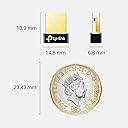
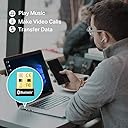
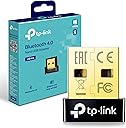
The TP-Link UB4A Bluetooth USB Adapter is a nano-sized, driver-free Bluetooth 4.0 dongle designed to effortlessly add Bluetooth capability to any Windows PC or laptop. Supporting up to 7 devices and a wireless range of 20 meters, it combines ultra-compact portability with broad OS compatibility, making it an essential upgrade for professionals seeking reliable, high-performance wireless connectivity.


| Asin | B07YLDVM6B |
| Best Sellers Rank | 155 in Computers & Accessories (See Top 100 in Computers & Accessories) 1 in Bluetooth Network Adapters |
| Box Contents | UB4A |
| Brand Name | TP-Link |
| Color | Black/White |
| Compatible Devices | Desktop |
| Compatible Operating System Family | Windows |
| Country Of Origin | China |
| Customer Reviews | 4.4 4.4 out of 5 stars (102,005) 4.4 out of 5 stars |
| Data Link Protocol | Bluetooth, USB |
| Data Transfer Rate | 3 Megabits Per Second |
| Global Trade Identification Number | 06935364053307 |
| Hardware Interface | USB |
| Item Dimensions L X W X H | 15L x 7W x 19H millimetres |
| Manufacturer | TP-Link |
| Manufacturer Part Number | UB4A |
| Minimum Required Operating System Version | Windows XP |
| Model Number | UB4A |
| Number Of Items | 1 |
| Number Of Packs | 1 |
| Product Warranty | 1 year manufacturer |
| Unit Count | 1.00 count |
User
Great value and works flawlessly
The TP-Link UB600 Bluetooth adapter has worked brilliantly for me. It arrived well packaged in a sturdy box, and everything was easy to unpack and identify.Setup was straightforward. I plugged it into my PC, and it was recognised immediately. Depending on your computer, you may need to install the driver, but the process is quick and easy, with plenty of online guides available if needed.Once installed, it has worked flawlessly with no connection issues or dropouts. It’s also very compact and discreet, so it doesn’t stick out from the USB port.Overall, this is excellent value for money. It’s reliable, easy to use, and does exactly what it’s designed to do. I’d happily recommend it.
User
Great Small Tool for Connectivity . Happily Recommended
I recently purchased the TP-Link Nano USB Bluetooth 4.0 Adapter for my PC, and it has significantly enhanced my computing experience. The compact design of this adapter is truly impressive – it's so small that it doesn't protrude from my laptop, ensuring a seamless and unobtrusive addition to my setup. Despite its size, the Bluetooth 4.0 capabilities are robust, providing a stable and fast connection for my wireless peripherals. Setting it up was a breeze; it seamlessly integrated with my desktop computer, instantly recognizing my Bluetooth headphones and other devices. The improved connectivity has not only decluttered my workspace by eliminating the need for cumbersome cables but has also given me the freedom to move around while staying connected.What sets the TP-Link Nano USB Bluetooth Adapter apart is its reliable performance and affordability. The Bluetooth range is impressive, allowing me to maintain a solid connection even when moving around my office. The adapter's energy efficiency is commendable, ensuring that it doesn't drain my laptop's battery unnecessarily. TP-Link has once again delivered a high quality product that combines functionality with a minimalist design, making it an excellent choice for anyone seeking an affordable and efficient Bluetooth solution for their PC laptop or desktop computer.
User
This works well, but beware as I found that my Win 10 (Ver 1909) has gap in Bluetooth support
There is nothing wrong with the product itself, and it ought to work well in plug and play with native drivers IF windows 10 Bluetooth support didn't let it down. That's apparently no fault of this product, though, so I haven't marked it down, and there is a workaround.1) WHAT HAPPENED TO ME USING WIN10 PLUG AND PLAY: Product installs immediately. All drivers present and correct. Paired an audio speaker successfully. But wouldn't play, and in sound control panel it persistently said the device was 'disconnected'. The internet is absolutely full of people reporting exactly the same problem, and loads of suggested "solutions" that simply don't work - I tried most if not all of them! After further research - likely cause is that it seems until Win 8 Microsoft left it to hardware device suppliers to provide their own Bluetooth stack software, but from 8 onward Microsoft implemented a plug and play driver solution within windows itself. But this is inadequate/incomplete in some respects and they are currently working on completing it - no immediate solution therefore unless manufacturers provide 3rd party drivers.HOW I SOLVED IT EVENTUALLY: TP-Link claim to provide pre-Win8 drivers for the UB4a but the link on their website doesn't lead to drivers! However they often talk about UB400 at the same time, and UB400 does offer a driver in the support page for Win 7 and below. I decided to risk trying it with this product on Win 10. Result: it installed perfectly first time and the product now works with devices exactly as expected. You just have to right click the Bluetooth icon in the notification area to gain access to the Bluetooth functions, as obviously this software predates win10 and is not integrated into the win10 native bluetooth interface. The driver software is badged as "CSR Harmony Wireless Software Stack" and although it is a bit long in the tooth, it is a perfectly acceptable substitute until Microsoft get round to finally fixing their inbuilt bluetooth software stack driver.UPDATE: I need to revise the above having just taken delivery of super Bluetooth Headphones which I've reviewed elsewhere. These DID connect to this product when using Win10 plug and play mode without any additional driver. My previous attempts had been with an older Bluetooth cube speaker. So, as other reviewers have said - you might be lucky with plug and play. Seems this may depend on newness of Bluetooth item to be connected. Or, probably for older Bluetooth items, you may need to resort to the older driver as described above. I guess it is down to Windows not recognising/supporting older products - another example of software-driven product obsolescence keeping landfill busy and manufacturers happy. Well I don't give in that easily! My Bluetooth cube speaker lives to fight another day.
User
very good
works rly well and its fast but not that durable, its very discreet and easy to hide and theres no led indicator. Its stable, compatible with my windows 11 pc.
User
Good for gaming
Great piece of kit. Does exactly what it says on the tin. Use this with my headset and my controller. No issues at all, quick to set up and reliable connection. Make sure you install the drivers from the tp link website.
User
Good enough
I bought one of these for my neighbors PC that needed a Wi-Fi add-in card/dongle.It's not the best dongle but it works as expected however I would make sure it is plugged into a port that isn't blocked by walls or other hardware as the signal strength of this isn't superb but it's not awful
User
Does exactly what I needed
Title says it all, my PC didn't support Bluetooth as I never installed the receiver, and recently the wired connection for my controller was causing issues during my games, so I got this which was easy to set up and works great
User
Fixes laptops with broken integrated WiFi chips
The integrated WiFi chip in my HP laptop has always crashed after the laptop goes to sleep. After the WiFi chip crashes, the only way to get WiFi running again is to reboot the laptop. However, this WiFi dongle fixes this problem completely!After you install the dongle (make sure you install the driver from TP-Link's website as Windows will only install a "generic" WiFi dongle driver), I recommend going to Window's WiFi settings and turning off your PC's integrated WiFi chip (if your PC has one) since you don't need 2 WiFi connections running at the same time.This dongle works perfectly!
User
Tak çalıştır
Tak çalıştır ♥️
User
Perfect
Dual Band connectivity with plug-in compatibility with Windows 11
User
Platzwunder
Als Benutzer des tp-link UB400 Nano Bluetooth-Adapters für meinen Windows-PC möchte ich meine Erfahrungen mitteilen. Ich habe den Adapter im November 2020 gekauft und bin mit seiner Leistung sehr zufrieden. Der Nano-Adapter bietet eine praktische Möglichkeit, meinen Desktop-PC mit einer erstklassigen Bluetooth 4.0-Verbindung auszustatten, die es mir ermöglicht, verschiedene Eingabe- und Audiogeräte zu verwenden. Der Plug-and-Play-Aspekt, der es ermöglicht, den Adapter einfach anzuschließen und zu verwenden, ist äußerst praktisch.Die Tatsache, dass der Adapter sehr wenig Platz einnimmt und dennoch eine gute Leistung bietet, ist definitiv ein Pluspunkt. Ich habe festgestellt, dass er mehrere Geräte gleichzeitig unterstützt, zum Beispiel einen Controller und einen Bluetooth-Lautsprecher. Außerdem war der Empfang im ganzen Raum sehr zuverlässig, was für mich ein wichtiges Kriterium war.Als negativen Aspekt erwähnte ein anderer Nutzer, dass der Adapter nur für die Verwendung mit Windows entwickelt wurde. Das ist zwar ein Nachteil, aber für mich als Windows-Benutzer kein Problem. Dass er auch auf der PlayStation 4 funktionieren soll, ist zwar interessant, aber ich persönlich habe damit keine Erfahrung.Die Tatsache, dass andere Nutzer den Adapter auch an einem MacBook Pro verwendet haben und von einer einwandfreien Funktion unter MacOS Big Sur berichten, spricht definitiv für seine Qualität und Kompatibilität über die ursprüngliche Zielplattform hinaus.Alles in allem ist der tp-link UB400 Nano Bluetooth Adapter eine praktische und kostengünstige Lösung, um einem Windows-PC fehlende Bluetooth-Funktionalität hinzuzufügen. Ich kann den Adapter daher bedenkenlos weiterempfehlen.
User
Works great !!!
The device was delivered fast and works well! As soon as I plugged it into my computer, Bluetooth started to work and I even screen recorded my pc window to show this. The product is a bit expensive but you only need to purchase it once so it is a good investment. If you bought this and Bluetooth isn't working, look up solutions online as there are many things that can fix it before returning :)
User
Fantastic to use when your pc doesn’t have Bluetooth
Works well for what I need it for
Trustpilot
1 month ago
2 days ago