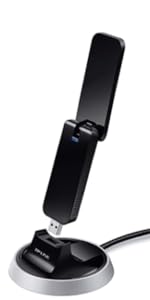
🚀 Elevate your WiFi game—small dongle, big connection!
The TP-Link Nano USB WiFi Dongle (TL-WN722N) delivers up to 150 Mbps wireless speed with a high gain external antenna for enhanced range and stability. Compatible with Windows, Mac OS, and Linux, it offers easy plug-and-play setup via USB 2.0 and includes a USB extension cable for optimal placement. Ideal for upgrading desktops or laptops to reliable wireless connectivity at an unbeatable price.


| ASIN | B002SZEOLG |
| Best Sellers Rank | #287 in USB Computer Network Adapters |
| Brand | TP-Link |
| Built-In Media | Package Contents Wireless AdapterOne USB extension cableResource CDQuick Installation Guide |
| Color | White |
| Compatible Devices | Desktop, Laptop |
| Customer Reviews | 4.3 out of 5 stars 20,872 Reviews |
| Data Link Protocol | IEEE 802.11b , IEEE 802.11g, IEEE 802.11n , USB |
| Data Transfer Rate | 150 Megabits Per Second |
| External Testing Certification | CE, FCC |
| Global Trade Identification Number | 06935364090456 |
| Hardware Interface | USB 2.0 |
| Item Dimensions L x W x H | 3.7"L x 1.02"W x 0.43"H |
| Item Height | 0.43 inches |
| Item Weight | 6.38 ounces |
| Manufacturer | TP-Link IP Cams |
| Product Dimensions | 3.7"L x 1.02"W x 0.43"H |
| UPC | 845973050467 |
| Warranty Description | 2-year warranty |
S**S
Ultra user-friendly, not as sensitive as I expected
I had high hopes for this little dongle, but reviews maybe set the bar a smidge too high. That said, it's a great purchase. I bought it with the hope of amplifying signal reception on my laptop. It doesn't do that. In my living room, I get 4 bars with my laptop, and in my bedroom 1-2. I tried plugging this baby in and while the ease of use is indeed great (lit right up, installed drivers automatically, went right to work), I got no more bars in the bedroom with the antenna than without it. HOWEVER, I put the TP-Link to use on a desktop machine that previously had no connectivity, and for that purpose, it's great. I'm very happy with the purchase. So, if you're hoping to amplify your laptop signal... my experience has been that it's no more powerful than a decent laptop's built-in receiver. Now, I should note that my laptop is newish -- bought November 2010 -- so maybe it's wireless receiver is already pretty good, and if you are trying to get a better signal for an older laptop, you might experience a bump in your signal by using this dongle. ALSO, while the signal remains low on my desktop machine (2 bars) it has been VERY stable and reliable, even when streaming video on Hulu. So that's noteworthy. Maybe a low signal isn't the biggest deal in the world, as long as it's stable! Overall - I'd say you really can't go wrong for the money, as long as you know what it's good for. I did a lot of comparison shopping before picking this one and here's the overview: A++ for ease of use and basic functionality -- converting an offline device into a wireless device works great. (Note, installing drivers was a breeze both with the laptop -- which automatically pulled the drivers off the internet since it was online -- and the desktop machine, which installed off the included CD.) C for extra signal pick-up relative to a decent quality modern laptop. Got the same number of bars on my laptop with/without the dongle. A for signal reliability (signal reliability might in fact be better than the laptop - given equal # bars - I haven't done enough comparison of the relative stability of the signal between the laptop and the dongle with the low signal strength - but so far I've never gotten better than "Low" signal strength from the dongle, and yet I've never had my connectivity fail!). A+ for sleek design -- has antenna, but it's not unwieldy, so you can plug it directly into a laptop or desktop USB port without its being a nuisance, or you can connect it to an extension cable (which I had to do simply because the signal behind the desktop machine was only one bar, whereas sitting on top of the desk was two bars) -- ***IT DOES COME WITH A SHORT (maybe 2 or 3 feet?) USB EXTENSION CABLE to reach from a machine situated under a desk, up to the top of the desk, let's say. A++ for price -- Srsly cheap for such a handsome and functional little piece of machinery. I'd say if you are looking to improve upon your (already quality) laptop sensitivity, probably look at other dongles with clunkier antennae, but if you want to convert an offline (or irritatingly wired) machine into a wireless machine, AND/OR improve the signal STABILITY for a laptop that tends to lose its connectivity frequently due to low signal reception, then this little number is probably a good bet.
A**X
Gets great reception, easy install, external antenna
I noticed my desktop PCI networking card wasn't able to reach my network in my current setup (subletting an apartment for a month, using a friend's wifi from another apartment). I tried two USB adapters, only one of which was able to reach the network I'm trying to connect to, and then not very reliably. This adapter maintains a consistent connection with 40-60% signal strength (which is good enough given the circumstances). It comes with a USB extension that lets you place it in a few different places for better reception. Installation was fairly easy, the drivers come on a mini CD (or DVD?) and install without too much hassle. The external antenna means better signal strength and upgradability (perhaps), which is a plus for me. Also, it works with Linux without any extra drivers which is great. At a great price + Prime shipping I'd give it a go if you need a better network adapter. My minor complaint is that I had to do a good bit of positioning to get the strength I'm getting. I actually have two USB extension cords that let me place this thing on top of my desk. While I understand you can't work miracles for less than twenty bucks I wish I could just leave it plugged into the back of my tower. One other minor complaint is that the wifi utility (which works much better with this than Windows' default) doesn't work too well with fullscreen applications. Netflix/YouTube videos drop out of fullscreen very frequently, and fullscreen games will minimize likewise. In order to play any sort of game I had to exit the utility in the taskbar, which isn't a huge deal once you're already connected. Including the two minor issues above, I hesitated give it 5 stars because whoever was responsible for tendering the package to FedEx did not hand it over for over 24 hours. I ordered one-day shipping on a Thursday afternoon and, because FedEx doesn't normally ship on Saturdays, didn't get my order until Monday. This was either a major oversight or excessive laziness, but support was friendly and refunded my shipping costs (only $4 with Prime, I suppose) so I'm not turning tail on Amazon anytime soon. Plus an adapter like this for $20? I'd wait a full month for shipping.
A**A
Another good TP-Link product
I get this as my third network related TP-Link product, I get first a "TP-LINK TL-WR1043ND Ultimate Wireless N Gigabit Router" (Sorry the new form of amazon to write reviews byte me and I was unable to put the proper link). So this USB Adapter connects easily with the router all the indicators of connectivity are better than good across all my apartment, is an small 3 rooms place but everywhere the signal is strong. I get this to give wireless connectivity to my desktop computer and to this time (about a week) there is no complains about, just works as expected. This comes with an USB extension cable of 1 meter (40") that is enough to take the adapter outside of the back part of the computer to place in better position to take advantage of it high gain antenna. I'm using it on a windows 7 x64 machine, the installation was simple, you need to cancel the auto detect by windows and then use the driver disk that comes with the adapter, in my case I was unable to cancel the auto detect but It was simple to delete the new hardware found and the I use the driver CD. The driver CD will install a software that will auto-start with windows any time but will keep you informed about the quality of the connection and signal. The bottom side of the adapter has a hole that you can use to hang the adapter from a upper side and increase the quality of the signal, this was a really good surprise because allows to place the device in a variety of places in order to improve the connection quality if is needed. The High gain antenna that have the USB adapter is longer than the adapter itself, have great range of movement, you can rotate it 360° on its axis and max 90° of movement the side. Also you can detach the antenna that comes with the USB Adapter to put other bigger antenna, just in case you need that. Overall is a great Wi Fi Adapter, the speed provided is good enough for a home network, so I'm really happy with the TP-Link brand because this is the second piece of hardware I get from them that is cheap, but well done and works as expected.
B**N
it's been working great now. If you have problems with your Computer ...
I purchased the TP-LINK TL-WN722N a week ago and although it gave me quite a headache trying to fix it, it's been working great now. If you have problems with your Computer restarting after TP-LINK TL-WN722N out of your USB PORT, read below. The packaging itself is good, and you don't have to worry about receiving it damaged.Comes with the mini-CD with drivers, instructions, and the USB itself, along with the antenna.The antenna is easily attachable, requiring you to spin it until you can't anymore. I have Windows 7 home premium 64 bit and used the CD driver to install just the driver(no utility).Worked great, had a strong signal, consistent speed. Now when I decided to unplug it from the USB port, the computer would restart/Blue Screen.So I thought maybe it was some previous driver from a different TP Link USB device I had installed. So I went ahead and did a clean install of Windows 7, choosing install and download all Windows updates, OOPS(more on that later!)! So I went ahead and installed the drivers and eventually the TP-Link Driver. I pulled it out and it didn't restart and I thought I fixed it, so I went ahead an download all the optional and important Windows update. After the computer restarted, there was a black screen so I pulled out the TP-LINK TL-WN722N, and so my computer restarted.So I thought maybe it was the CD Driver, so I uninstalled it and tried the other drivers from the TP-Link website but none of those helped. I went through the Clean Install again, except this time, during windows 7 installation, I chose the Install Important Updates only option.Went through installing the drivers, TP-Link Driver from mini-CD, and then Windows 7 updates. Only this time, only chose to install the Important Updates, none of the Optional ones.That seem to have fixed the problem! All in all, I like the TP-LINK TL-WN722N as it has great signal and speed.If you have any trouble with the drivers, try to avoid installing the Windows Optional Updates, that may help.
B**S
Easy to install and works great Windows 7 SP1 32-bit
The TL-WN722N works great under Windows 7 SP1 32-bit for me. Haven't tried it on another OS so far but plenty of other reviewers have. I've dealt with other USB wireless devices in the past on Linux, Windows XP and Vista for years, so I know they don't always play nicely, however in this case no problems. The item came well packaged and seems pretty sturdily built, though I don't plan to drag it around with a laptop, this will just be attached to my desktop via the USB extension cable to get better signal. If you are connected to the internet by other means already, don't bother with the driver CD, just plug in the USB and let Windows install the drivers automatically via Windows Update. Literally 5 minutes for the whole install - opening the package, plug in the USB stick, Windows found and installed the drivers, connected to my wifi (WPA2 on Apple Airport) I unplugged the wired LAN and I was online over wifi, no worries. With the usb extension cable and the item velcro'd to the top of my computer tower I'm picking up access points from a block away that I can't see on any of my laptops, and the network speed to my router easily maxes out my 30mbit internet connection. Downloaded a couple of 600MB ISOs and the connection held smooth, fast and stable. Streaming Netflix also comes in high quality with no glitches, so for qualitative purposes things seem pretty stable as those are usually the sort of things where I see cheaper adapters start to flake. Note - I'm connecting to an Apple Airport router from my Windows 7 machine, which works fine, as expected. I've tested plugging and unplugging the USB a few times while the machine was on, and so far things reconnect fine. Also put the machine to sleep a couple of times and it wakes up properly and reconnects to the wifi, so at this point things I am happy.
R**H
Not actually Atheros
Works finex but is not the Atheros chipset that is advertised in the listing. Instead, it has a Realtek chipset, which does not work for some of the things that the Atheros will.
T**F
This little thing is awesome!
---------------------------------------------------------- UPDATED: August 21, 2013 (Update section below) ---------------------------------------------------------- Installed January 14, 2011 and still excellent. Here's my take on the TP-Link TL-WN722N Wireless USB Adapter: ------------- POSITIVES: ------------- ** It really, really works like mad. ** I get constant download speeds of 12Mbps+, which is close the the max of my internet bandwidth. - It's very cheap cost-wise for the great performance it gives you - It's small(ish), though it will look big connected to your laptop - Comes with a 3' USB extension cable which I definitely recommend using. It helps position the device, and keeps it from crowding your laptop or from being destroyed by being knocked out of your PC's front USB port. - Has a diffused green LED under the white plastic to let you know it's working, instead of the blinding blue LEDs that everyone uses these days. The light turns off when it's not powered (like when you hit Standby on your PC). NOTE: It's still annoying in a dark room when I'm trying to sleep, but a few post-it notes helps that. - The software is relatively simple to install and use, and allows you to use other products to manage your WiFi instead. - The current driver, software, and documents come on a mini CD and are all up to date with what's available on TP-Link's web site - The documentation is good, but it could use some more detail. ---------------------- MINOR NEGATIVES: ---------------------- - The TP-LINK Wireless Client Utility is functional but could be more intuitive. A configuration "wizard" would be a good improvement for manual configs. (It has been updated as of Jan 5, 2012 - see below) - Manual configuration (which you need if your network is securely hidden and requires a pass code) isn't well-documented, though you will be able to get it to work with the document, and maybe a little trial and error. If your setup is totally open security-wise (this would be BAD), you will have no problem with the software. - Even if the driver is installed incorrectly, the client utility may report enough information to make you think it is installed. When in doubt, do a complete removal of the software and drivers and re-install. - The QSS software that comes with the device is ONLY usable with other TP-Link products. Don't bother installing it unless you have a TP-Link Router/Access Point that has QSS built in. (As of the client update on Jan. 5, 2012, it appears to be installed automatically) ------------------------ UPDATED 08-21-2013 ------------------------ Nothing new to add! This thing still rocks. No news is good new, right? Thank you everyone who chose to mark my review helpful! ------------------------ UPDATED 01-23-2012 ------------------------ - I've kept track, and this device has worked well even with interference from Coronal Mass Ejections from the sun (sunspot activity), though I have noticed that the performance decreases (could be other things along that long internet path, as well). - I now have a TP-Link TL-WA901ND 2.0 Access Point, which this device works well with. Unfortunately is does NOT connect at the advertised "150Mbps" potential speed when it's configured to do so, but I never really expected it to. My max internet connection of 13Mbps is far below that high rating, anyway. - The latest WiFi utility for this device is up on TP-Link's web site as of Jan. 5, 2012, and I'm a bit disappointed with it. On the plus side, it is probably simpler to use - which is a good thing for most users, but it's been dumbed down to remove all of the extra connection info power users like me appreciate. The message windows are also annoying and the English grammar is sometimes embarrassingly wrong. It also looks a bit cheesy compared to the previous utility version. At least it works well. - It is difficult to tell if the actual hardware drivers have been updated, because software info on the page for this device is really incomplete. It looks like they are not updated since I originally posted this review. - I still benefit from disconnecting and reconnecting the device once in a great while, but the problem that causes the lowered performance could be my PC, the access point, or electromagnetic interference. Hard to say. - To date, 4 people were helpless in the face of my review - maybe it put them to sleep. Thanks very much to everyone who took the time to click "Yes". ----------------------------- My installation experience ----------------------------- A friend of mine needed a WiFi adapter since she moved to a location that wasn't wired, so I recommended this to her based on the great reviews it's received. She successfully and easily installed this device on her work laptop, and was extremely impressed with it's ability to drag a much better signal out of the almost inaccessible 802.11n WiFi router located down stairs, the signal of which is blocked by many walls and turns. She also needed to install the device on her personal PC. Unfortunately we spent hours over chat trying to get it installed and working, and FINALLY got it done after completely removing the software and drivers that she had installed, and then reinstalling those drivers with my guidance. It was only at this point that she said, "Oh yeah, I kind of passed over that part" where XP asks for confirmation to install an unsigned driver. AHHHHHHH! Well, now it works. :) The signal is not fantastic, but it's 4 times better than it used to be (for her laptop) and is good enough for her PC. It definitely works. So one lesson for you is: Please do yourself a favor, and let your operating system install the driver properly. ;) The night I helped my friend with her WiFi, I received and installed my own TL-WN722N adapter, to help her through the install process and to replace the D-Link 4300 router I was using as a WiFi receiver (firmware v1.8 has bridging). After installing this little thing and adjusting the antenna, I got download speeds almost twice as fast as before to the aging Linksys 802.11b-only wifi router downstairs. I then spent some time replacing that Linksys device with the D-Link 4300, turned on Super-G, and got almost 13Mbit down and 1.7Mbit up, which is more than four times what I was getting before on download and upload. The download speed varies between 8Mb-12Mb - it probably hits 12mb because of Super-G infringing on other people's signal space :P - but the upload speed has been really constant at 1.7Mb or so since I installed it, even to the Linksys router. The download speed is almost as good as I can get by plugging in a 75' network cable directly to the router. So this little thing really rocks! FYI, DSL Reports has an excellent set of speed reporting tools, as well as info on increasing network equipment and WiFi performance. Check it out! I'd enter a link, but Amazon would probably only delete it. That's it, another novel for my reviews. I'll update this over time if anything new happens...
T**N
Poor range
I really wanted this adapter to be good because it was inexpensive and had lots of rave reviews but I find it has very poor range. I am comparing this to an old Linksys WUSB11 wireless B adapter I'm using Linksys...
ترست بايلوت
منذ شهر
منذ 3 أسابيع