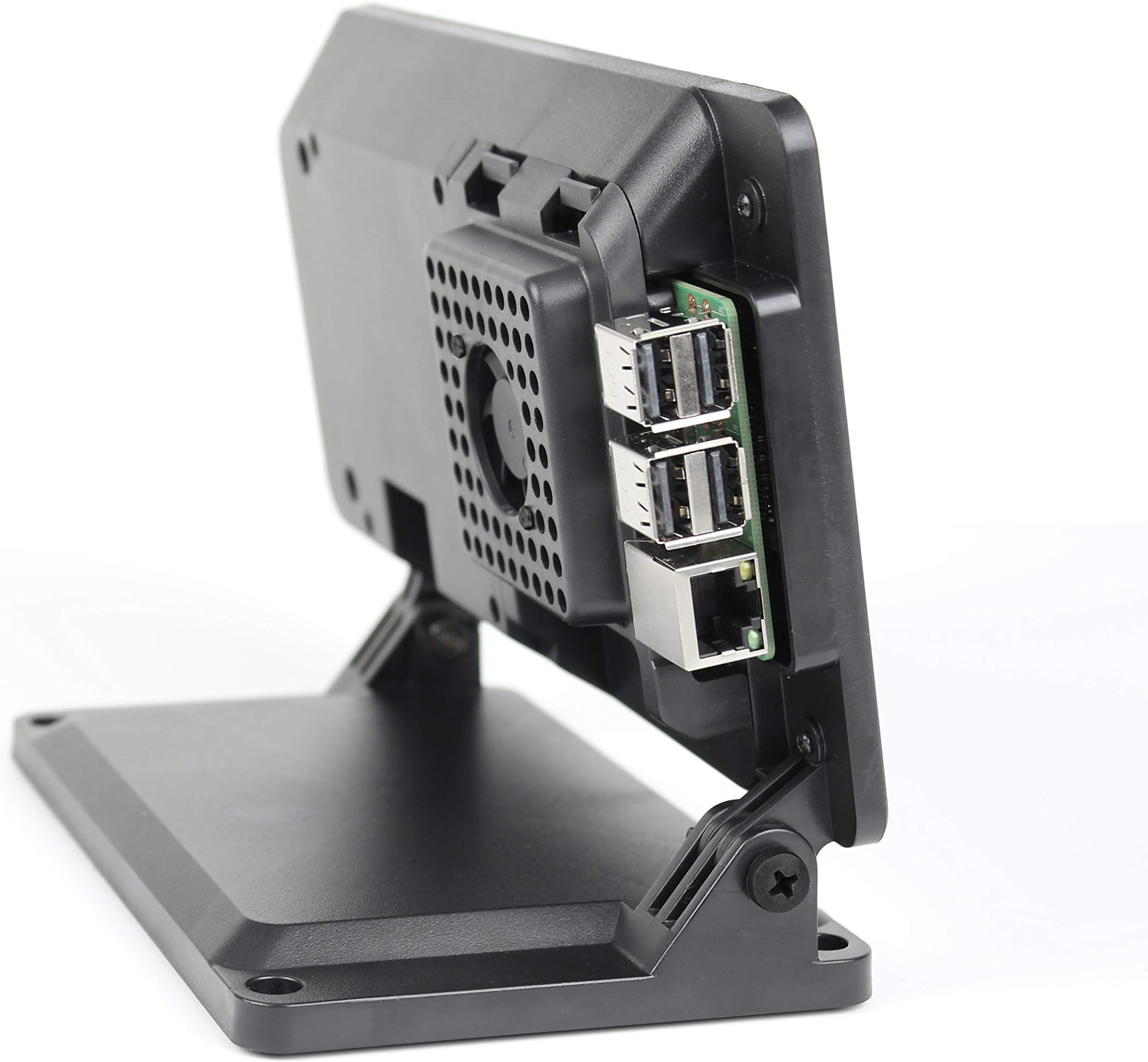
🖥️ Cool, Compact & Customizable — The Ultimate Raspberry Pi Touchscreen Case
The SmartiPi Touch 2 case is a premium, all-in-one enclosure designed for the Official Raspberry Pi 7" touchscreen display. Featuring an integrated cooling fan, compatibility with Raspberry Pi 3, 4, and 5 models plus HAT boards, and multiple faceplate options, it offers a sleek, durable, and customizable solution. With included mounting points for official Pi cameras and all necessary hardware and cables, it’s the perfect portable and professional-grade case to elevate your Raspberry Pi projects.


| ASIN | B07WXK38YM |
| Best Sellers Rank | #381 in Computer Cases |
| Brand | Smarticase |
| Color | Black |
| Customer Reviews | 4.3 4.3 out of 5 stars (1,186) |
| Date First Available | August 23, 2019 |
| Item Dimensions LxWxH | 17.4 x 7.6 x 12 inches |
| Item Weight | 13.8 ounces |
| Item model number | 3458 |
| Manufacturer | Smarticase |
| Number of USB 3.0 Ports | 2 |
| Product Dimensions | 17.4 x 7.6 x 12 inches |
| Series | SmartiPi Touch 2 |
K**H
Great Tool for Portability
I really like this case. It's compact and feels like a quality product - it is solid and heavy, and has a great fit and finish. I used a Pi 3B+ and mounted it to the back side of the screen holder. Installation consisted of several steps: Removing the included display board standoffs (save them for future use on a Pi hat), inserting the display ribbon cable and routing the included camera cables (the camera is optional, I didn't use one), mounting the screen and camera with screws, connecting the Pi board to the cables and bending/routing them until the Pi sits flat on the mounting posts on the back of the screen holder, and inserting the retainer/vent piece into the retaining clips. I attached the bottom platform after that and attached the power splitter cable. The kit requires the appropriate Pi power supply but includes power splitter cables for both the Pi4 with a micro and a USB-C connector, and another one with two micro connectors for everything else. There are some optional parts as well for different configurations like a fan-holding retainer, surface mounts, and several bezels for the camera face covering. All hardware and cables are included, so this is really a convenient kit. Well done!
J**A
The RPI display case the finally fit my case
I had just recently purchased my first Raspberry Pi and it seemed like the cases were piling up faster than anything. When I decided to purchase the official Pi 7” touchscreen display, also discovered smarticase.com. Since this I have only had to purchase one other case, a Smarti Pi Touch 2 Pro. It’s an unbelievably affordable solution. Completely functional out of box and lots of printable upgrade options as well. The build quality is amazing with the simplicity to customize easily if desired. I had an issue with some missing ribbons cables and the customer support was unbelievably quick to respond and solve the issue ASAP. The correspondence from Tom Murray in customer support emails and CAD downloads in menu at smarticase.com that this case would be my best choice.
C**O
It's actually nice ... finally
They try, bless their hearts, to make it easy to assemble but they obviously haven't gotten feedback from a few test users. The official RPi touch screen arrives with the controller already attached with standoffs on top. You have to remove them and use screws or the screen won't fit. It does ... nicely. It seems solid and professional and commercial. Oddly, the swivel legs are not centered - I'm sure for a reason but it looks odd. The instructions assume you have a camera and should have a skip flow. The raspberry pi 4 fits perfectly but the screws are in the frame point up over the board. I started with standoffs and the door wouldn't fit. I messed around with that way too long. I switched out the standoffs with nuts. Have you ever tried to tighten a tiny nut with almost no clearance without a micro nut driver? I picked a baaaad day to have that cup of strong coffee. I messed with the door - a lot - and finally figured nothing fits with the door. I think the door holds the board. But, I had to remove all 4 nuts. Ultimately it came together with the fan and looked like a commercially made product. All the needed parts were there and nicely packaged. It looks great and the frame fits nicely. Beware you have to almost completely disassemble the Pi half to change out SD cards. My time? Way too long even using the instructions. Money very well spent overall.
A**S
Instructions are a little confusing at points
There are a number of alternatives on how to mount the Pi: With a fan, without a fan and no cover over the Pi. Beware that the ribbon cables that go between the Pi and the display (which they provide, thank you!), are difficult to push into the connectors. This is normal. All parts and pieces fit together nicely. In one of the steps they show the base attached to the case, but there is no instruction on how to attach them together. All in all it is a nice case that holds it all together well. I used a Pi 4 and the supplied fan, though it doesn't seem to be needed. The case is cool to the touch.
E**O
Works
This case works great. I found it was a little difficult to put together but that was probably just me. I had taken it a part and reassembled to get the wires routed correctly.
D**O
ONLY A CASE, NO Display included
This is an empty case, there is NO DISPLAY included. Very expensive for just a case and very NOT clear that no display is included.
A**A
Read the instructions! Sturdy and of good quality
First of all, it's worth reading the online instructions that you can access following the link from the box. It's not entirely obvious how to put everything together. Otherwise, the assembly is pretty straightforward using those, and the case is very sturdy. I left the back open, and without the fan, since I'm using the GPIO interface a lot to play around with electronics. But all the material for either setup, with or without back cover, with or without camera, is provided and of good quality (just don't throw away those studs that came with the display) Would recommend!
A**C
Great case, perfect fit, looks nice
Excellent case. Perfect fit for the Pi and the official 7" touchscreen. You can install the fan for overclocking or leave it off if you want to install hats. Ideal for situations where you don't need frequent access to the microSD card. I also had a great customer support experience, even well beyond the warranty period. (I needed to replace screws I had lost.) Highly recommended!
A**C
熱がこもりやすいかな。でもいい感じです。
P**.
Brilliant sturdy case for my Raspberry Pi 4 and 7" display. Assembly was straightforward - thanks to the online instructions. Highly recommended. I'm running piCoreplayer OS with Logitech Media Server on the Pi.
V**F
I wanted one of these to house my RaspberryPi 4 running a weather station monitor web page. I took my time assembling it, and hit a few dead ends, but that was mostly regular trial-and-error on my part. Once I got the Pi into the case and properly wired and placed, everything fit together perfectly. I had some initial setup problems with the touch screen, but that was not an issue with the mounting case at all. I just needed to update the Pi firmware and the touch screen worked fine. In the photo I have it mounted in its final location, and it works great.
R**N
I found that the SmartPi Touch 2 only fits the original Raspberry Pi 7" display not the version 2
H**E
The case is slightly bigger than what I have expected but it is still perfect. The case is in pretty high quality and seem to be very tough. The case comes with 2 different kinds of covers. One for cooling fan application, and one for easy GPIO access. It also comes with 2 ribbon cable, where the longer one for Camera installation, and the shorter one for screen installation. On top of that, the case also comes with two USB splitting cable to power up the screen and you pi at the same time, if you don't want to use GPIO to power your screen. 1) USB-C to USB-C and Micro USB-A for Pi 4 2) Micro USB-A to 2xMicro USB-A for Pi 2, Pi 3 or Pi B+. It's also not too difficult to access your SD card. The Pi can be easily removed from the case by taking off the cover. No tool is required at all. Overall, it's a very solid build case as long as you don't mind the jumbo size. What could have been better is all the ports enclosed inside the case. Currently, in my opinion, the USB Ports and the RJ45 Ports are considered hanging outside of the case.
ترست بايلوت
منذ يوم واحد
منذ أسبوع