


🎯 Level up your game with precision and style — don’t get left behind!
This 2-pack of Motion Plus Wii Remote Controllers with Nunchucks offers enhanced 3-axis motion sensing for superior accuracy, compatible with Nintendo Wii and Wii U. Featuring ergonomic design and easy sync with LED indicators, these controllers deliver a realistic and comfortable gaming experience, perfect for multiplayer fun and seamless integration with popular emulators.
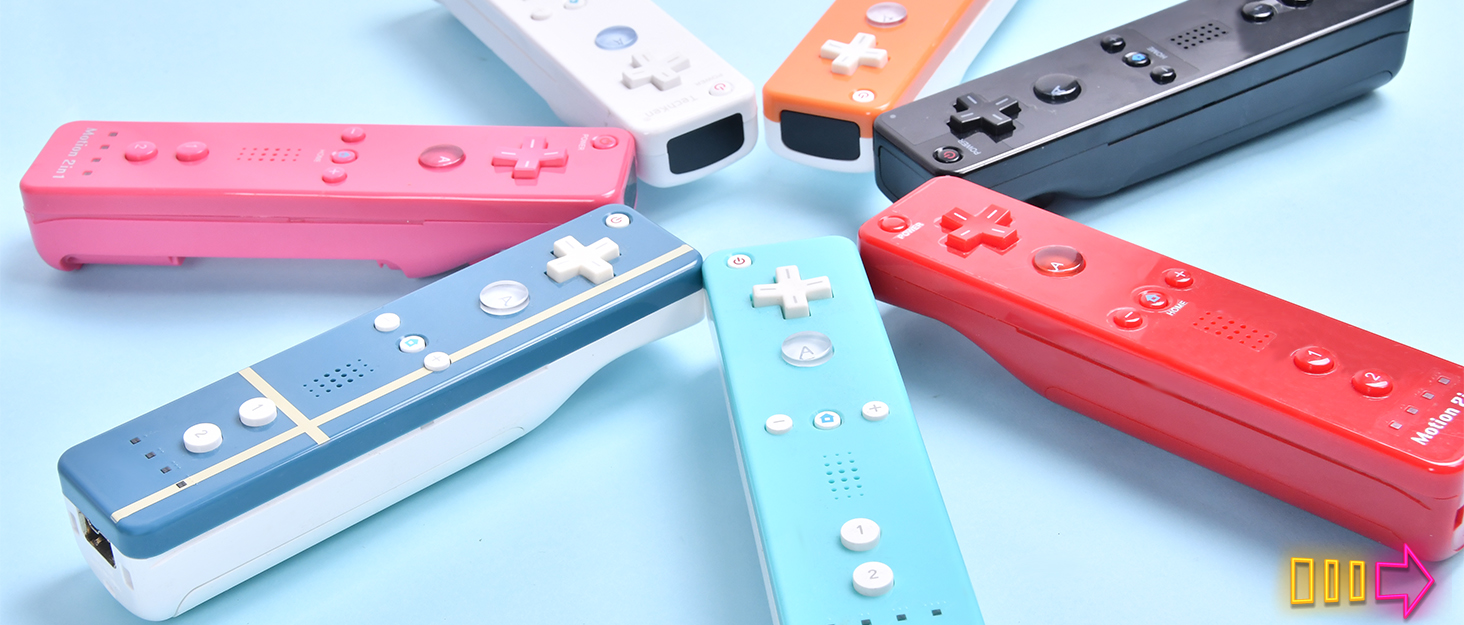


| ASIN | B07ZYGD63V |
| Best Sellers Rank | #305 in Video Games ( See Top 100 in Video Games ) #3 in Wii Controllers #6 in Wii U Accessories |
| Customer Reviews | 4.1 4.1 out of 5 stars (6,075) |
| Date First Available | July 28, 2017 |
| Is Discontinued By Manufacturer | No |
| Item Weight | 14.4 ounces |
| Item model number | TK105 |
| Manufacturer | TechKen |
| Package Dimensions | 6.38 x 4.37 x 2.8 inches |
K**Y
Works Great with Mayflash Dolphin Bar and Dolphin Emulator. First Time Setup is Sometimes be Tricky.
Works great with Mayflash Dolphin Bar and Dolphin Emulator. Though first controller setup can sometimes be tricky. So far testing the controllers they have been working great even the nunchuck. I haven't played with them much yet but I was able to get 4 controllers working fine playing 4 player games on Dolphin. I will be using them to play games more here soon so hopefully, they work for long periods of time without any issues. So far they feel and work just as well as the original Nintendo Wii Motion Plus controllers I have. The first controller was a little tricky to get running. For some reason, the sync button on the Mayflash Dolphin Bar and the controller didn't work the first time. I have to follow some instructions I found to make Windows 10 see the Bluetooth devices of the Wii controller. After the first one was working though. The other 3 only required me to hit the sync button on the Dolphin bar and these controllers. The instructions I used were as follows: How To Get It To Work With Windows 10 and Dolphin. 1) Attempt to connect your Wii controllers via normal Bluetooth. 2) When asked for a code, enter 0000 or any four different codes. This will fail. This is expected. 3) Open up the Windows Control Panel. Click "add device". There, you should see the option to add a Wii controller. Add the controller. When asked for a code, continue without entering one. 4) Launch the Dolphin Emulator. Navigate to the control configurator. Select "real Wii remote" on the player 1 control scheme. 5) launch your game, and it should work. But you may get lucky and not need to do these steps. However, now you know if you have issues.
K**T
They work with dolphin with a dumb sensor bar
I'm not sure what other buyers issues are, but I got these for Dolphin and they work great. I am using a stand alone Bluetooth dongle though and a cheap, dumb sensor bar (the kind that is just IR LEDs hooked up to a USB connector) and everything works fine in Dolphin. I have tested in Windows and Linux and it connects correctly, and the games seem to recognize the Motion plus. Heck, the speaker and rumble even work. I would guess most other reviewer issues stem from trying to use the Dolphinbar. Save yourself the money and get a dongle and USB sensor bar for less than $15 total, and you should be fine. These are a lot of fun and do the trick. I personally like the feel of the buttons and joystick, but I don't have any other first party controllers to compare against. I will likely get another set of these in the near future to play with up to 4 players.
S**E
Does not work with Dolphin Emulator, DolphinBar, or Windows 11
I bought this to use with the Dolphin Wii Emulator to play my old games. My old remotes no longer worked so this seemed like an inexpensive way of getting new remotes. Unfortunately, Windows 11 bluetooth did not recognized it and it would not appear on the bluetooth menu. Due to this I could not use the Dolphin bluetooth pass through. I also bought the DolphinBar, which would connect with the remote but only as a mouse pointer (Mode 1, 2, and 3) and not as a "wii remote controller" (Mode 4). Note when I would connect it as Model 1, 2, or 3, it would work, then if I switched to Mode 4, the remote's lights would go crazy and then it would shut down and not work for a little bit afterwards. I gave it four stars because everything else seems solid about the remotes, but I was not able to test it on an actual Wii console because mine is too old to function anymore. What is a shame is the manufacturer should work with Dolphin or DolphinBar to get it to work with those, especially since the Nintendo Wii is no longer made and people only use the Wiimote with emulators now.
D**S
Grateful grandkids
We have a older WII and it still get played a lot. So was very happy to find parts. Everything works as it should. Delivery was quick. Product seems of good quality
T**X
Absolute trash possible safety concern
Updating my review. After owning these for quite a while now, I've barely gotten any use out of them. Reason being is they are extremely sensitive despite turning all lights off in the room and calibrating the sensor bar appropriately. It's a challenge getting the hand to show up on screen just to make selections let alone having accurate input. The other reason is likely a safety concern. Why on earth are these remotes sucking down brand new AA batteries within 2 days of putting them in? My OEM Wii Remote doesn't do this and is capable of using the same batteries for months. This is no exaggeration. Brand new batteries have to be put in these things constantly, making them expensive to use and maintain. You're much better off buying used OEM Wii Remotes for a premium knowing you're getting a quality product. Literally the only good thing to come out of this purchase are the nunchucks that work. Please, don't waste your money on these. Original review: Big bucket of meh. It works - kind of. It synchronized - kind of. Honestly it was a pain to synchronize and still is at times as I have to remove and put back in the batteries in order for it to actually pair up with the Wii U. Also the IR sensor inside is nowhere near as high quality as in OEM Wii Remotes because its movements are janky when trying to use the menu. But I'm not spending over $70 for an OEM Wii Remote; so, this is what we're stuck with I guess. Also the onboard speaker makes sound. Whether or not it's any good is a total toss up depending on the sound coming from the game. Thankfully the nunchucks work very well, hence 3 stars and not 2.
N**R
Motion Plus works great with Dolphin on Steam Deck
This controller works great. I bought it along with a sensor bar to play Wii games on my steam deck. I had it working at my parents using official wii motes and was worried they wouldn't work. They work perfectly in Dolphin as real Wiimotes, holding 1 + 2 to connect, and the motion plus has worked great for playing with sports resort. Highly recommend. The nu chucks also work but I haven't put heavy use on them.
A**E
The sensor is a little sensitive and the motion is a little off but cannot complain for a 2nd hand controller because it could definitely be worse. All the buttons work great and it’s great to have a controller that works again
S**K
The remotes work as advertised, motion plus and everything, which is the most important part. However the quality control was a mixed bag with widely different feeling controllers even bewteen the two sets I was sent in this bundle. The red remote was noticeably heftier that the blue one, with both being considerably lighter than an official Nintendo remote. I guess if that's a bad thing or not depends on your preference. Both had overly sensitive pointer controls which they have in common with another knock off wii remote I bought from a different manufacturer so that seems to be a commonality with off-brand remotes. It's also worth noting that the blue remote didn't have the hole for the wrist strap fully punched out. I had to take a hobby knife and gouge of the excess plastic to be able to attach the strap. As for the nunchucks. They arguably have a bigger gap in quality than the remotes. The red one felt really stiff ans the plastic was creaky and jagged. The blue one however actually felt better than my OEM Nintendo nunchuck (which to be fair has seen almost 20 years of use so the analog stick is probably a bit looser than it used to be) Tldr. The remotes aren't that impressive, but work as advertised and are. They aren't gonna replace an official Nintendo one as your primary remote/nunchuck but if I was handed them to play with as player 2 at a friends house I wouldn't complain. Perfectly serviceable backup remotes.
T**M
Controllers work great, however we had a pretty big scare when my son swung in the tennis game and the controller went flying into the wall directly above the TV! Immediately I thought he wasnt wearing the strap and there it was still on his wrist. See the photo I attached but would like to have better stronger safer straps so this wouldn't happen again. Hoping the seller will reach out to me.
S**!
Saw the weird mix of reviews and was going to gamble and my gambling kind of paid off? sort of... So I bought the blue and red controller pack with wii motion plus inside and both the remotes connect to my wii just fine but every time I open up wii sports resort on either controller, I get the error of "Please connect the wii motionplus accessory". Overall if you want a wii remote that may or may not have motion plus inside then this is for you but if you NEED motion plus, highly recommend looking elsewhere.
R**A
Got this and when I opened it and inserted the batteries, 2 problems were apparent. 1: The rumble was cranked to the max, I would hover over anything in any game and it would start uncontrollably vibrating. 2. The other remote in the bundle didnt even turn on, and when it did, it only did so to say that the batteries were almost dead, we tested multiple batteries and it said they were all dead or low charge, when they were infact brand new and worked on every other device, including the other Wii remote. Would recommend staying away
ترست بايلوت
منذ 5 أيام
منذ شهر



