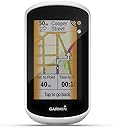
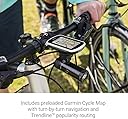
🚴♀️ Own the road, stay connected, and never miss a turn!
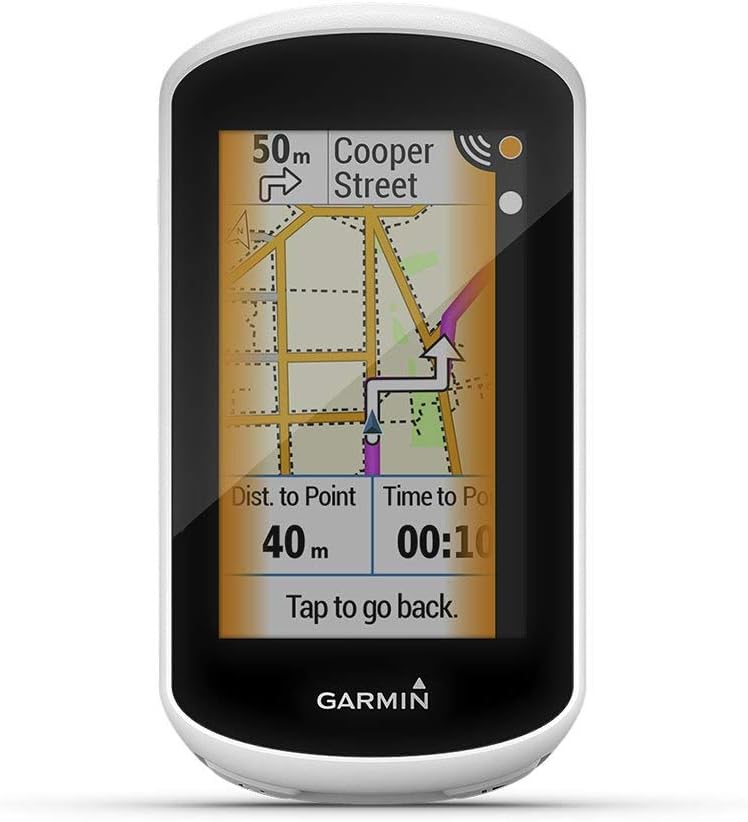
The Garmin Edge Explore is a professional-grade touring bike computer featuring a sunlight-visible 3” glove-friendly touchscreen, preloaded Garmin cycle maps with trendline popularity routing, and built-in GPS tracking. It offers seamless Bluetooth connectivity for live tracking, smart notifications, and rider messaging, while integrating with Varia safety devices. With up to 12 hours of battery life and a rugged design, it’s the ultimate companion for serious cyclists seeking navigation, safety, and connectivity in one sleek device.
| ASIN | B07PX3QCQB |
| Additional Features | Touchscreen |
| Are Batteries Included | No |
| Audio Output Mode | Stereo |
| Battery Average Life | 12 Hours |
| Best Sellers Rank | #165,677 in Electronics ( See Top 100 in Electronics ) #39 in Cycling GPS Units |
| Brand | Garmin |
| Built-In Media | GPS, Sensor |
| Compatible Devices | Smartphone |
| Compatible with Vehicle Type | Bicycle |
| Connectivity Protocol | Bluetooth |
| Connectivity Technology | Bluetooth |
| Control Method | Touch |
| Customer Reviews | 4.4 out of 5 stars 288 Reviews |
| Display Type | 240 x 400 pixels, touchscreen |
| Human-Interface Input | Touchscreen |
| Item Dimensions L x W x H | 4.1"L x 0.7"W x 2.2"H |
| Item Weight | 0.27 Pounds |
| Manufacturer | Garmin |
| Map Types | North America |
| Mfr Part Number | 010-02029-00-cr |
| Model Name | Edge Explore |
| Model Number | 010-02029-00-cr |
| Mounting Type | Wrist Mount |
| Operating System | Android |
| Resolution | 240 x 400 |
| Screen Size | 3 Inches |
| Special Feature | Touchscreen |
| Sport Type | Cycling |
| Supported Satellite Navigation System | GPS |
| Touch Screen Type | Capacitive |
| UPC | 647213764659 |
| Vehicle Service Type | Bicycle |
| Warranty Description | 90 days limited warranty |
G**S
Great Bike Computer
I purchased this after I decided I wanted to get really serious about biking. I live in an area that is littered with bike trails that criss-cross and wind for miles (which makes sense). I tried doing the loops while using a bike app but I still overshot a couple of turns. Enter this unit. It has the option of "building" custom maps that give turn by turn directions which can really come in handy if you are like me and get caught up in pedaling and not watching where you are going. It displays time, distance, speed, etc. You can also link it to your phone and upload your activity to Strava. It can also be expanded to add sensors like heartrate, cadence, etc. The only downfall I have found is it does not link to my Apple Watch for heart rate. Small sacrifice. I got the refurbished unit to save some money and I have found no difference in condition. If you are thinking about it, do it.
B**A
Garmin edge explore
The reason I purchase this refurbished garmin edge explore is because it seem like real good deal and also its says it works like brand new which it does! plus I needed for my mountain bike. I have Magellan cyclo 315 it still works but the front on /off button worn off and I can't get one for it cause they don't make the Megellan bicycle gps no more.
F**Z
A steal for the price and condition!
There are plenty of reviews for features, pros, cons, etc. My experience so far: Bought this to use as a backup to my Garmin Edge 520. If you have had a Garmin in the past then you know the setup process with your phone and how to navigate the unit. It’s easier on this unit to setup the data screens because of the touch screen rather than buttons only. Mine came with the standard mount with bands, no out in front mount which I I already had anyways. I did update my unit from Garmin Express to have the latest maps which for me was 5.40 on a US model. The only things that I use that are missing from this unit compared to my 520 are the Di2 data and having multiple data screens. You can only officially set up 3 screens with data which TBO is more than enough. 2 customs and the map screen can have 2 data fields. You can download IQ apps that have custom data fields but I am ok with the standard ones. If you use a power meter, Di2 or Strava Segments then look elsewhere. The unit itself looks brand new just like others have stated. I was a little skeptical about condition and battery life but have no fear! This unit looks great and the battery is on par with expected life listed. I have done 5 rides totaling almost 6 hours and the battery is at 27%. One ride I used the “navigate to start” to test the feature which worked great. Much better than my 520 with open maps since you can actually get full guidance on the this unit rather than just the base map. I did leave the brightness on the lowest setting but IMO you can see it just fine in most conditions. There is a setting to time out the screen after a few seconds which I imagine would conserve the battery but I didn’t enable that setting for now. Maybe if I really needed to conserve the battery I probably would try it. Overall this is a great purchase. For the price of this unit and the 2 year warranty purchased separately, this should last me until Garmin comes out with a new unit to replace the 530 or 830 that has a bigger screen and one that doesn’t cost $600.
D**D
New device for my ebike
Just what I needed and was looking for and can't wait to use today
J**A
Don't let Refurbished Put You Off
Initially I was concerned that this Edge Explore may not live up to advertised claims (because it was a refurbished unit -- I didn't want to spend between 200-300$ to get a Garmin bike computer - (it replaced a low end Sigma that was not holding its charge). Here's my experience after two days (two rides): 1) very easy to set up - link to iphone 13 with the Garmin Connect; 2) Immediately connects to GPS! 3) Out of the box, couldn't tell it wasn't new (I did not purchase two year extended protection - reviews indicated that it probably wasn't needed); 4) Make sure to download Garmin Express on your PC or Mac -- software was one version between; very easy to update software from computer! 5) After one ride, battery reading was 83% (reason I gave it a 4 and not 5) - not sure if this is good or bad just a little more drain that I expected. Overall, I am very pleased with the this Garmin bike computer -- probably has more features than I will use; my only regret is that I did not get a Garmin a year or two ago! I would definitely buy this (refurbished) product again -- very good price/value!
M**L
A purchase for frustration!
This is a confusing computer to use for cycling. On a two week trip this month, it started going to sleep every 10 seconds. Then it stopped showing distance and avg speed. It also doesn’t show speed accurately when there’s tree cover. I have not used it twenty times and can’t return as the 3 mo period is up. Not user friendly if you ask me.
J**D
Very satisfied
Refurbished product looks like new
Z**T
2.5 Stars – Read for help w battery and sync issues
*** UPDATE *** I’m lowering rating to two stars. Here’s why. Over the weekend I took this device on a 2-day ride. The first day was 112 miles with a couple long stops where I left the device on. I turned on the Garmin at 6:45 AM, battery 100%, loaded the course for navigation, turned the brightness all the way down, and started riding. When the sun was low in the early hours, the display was harder to read, but okay. However, by 2:30 PM, The battery was getting low, about 15%. The device alerted me and prompted me if I wanted to go into battery saver mode, to which I responded yes. From this point on, the screen was off except when alerting me to a turn ahead. I finished the last hour of the ride like this. I’m disappointed that I could not get through the ride without battery saver mode. This is unacceptable. The device was fully charged again for the start of day 2, a 56 mile ride. About half way into the day, the device froze up completely, displaying the same map snapshot and data. I could not figure out how to reset the device while riding; I thought I may have to wait for the battery to die. At this point I had no navigation. The Garmin failed me. Unacceptable. Once stopped, with luck I finally got the Garmin to power down and reset by pushing a couple buttons at the same time. I was, at least, able to bring the course back up and resume navigation. Based on the poor battery life, which won’t even last a long day on the bike, and the device freezing up completely, I can’t recommend it. ORIGINAL REVIEW: For some time I have had the need for a device like this that will navigate me through unknown roads, so when I found this inexpensive refurbed Garmin Edge Explore, I bought it. Over the years I have had many good Garmin devices, they are almost always well designed and engineered. Garmin’s service is also A+. This device came out in (I think) 2018, so it is a few years old now. But, for the most part, it does what I want it to do with a couple of caveats which I will get into. I use the Garmin Connect app on my laptop and phone to create courses that I can then sync to the device to use for navigation. I have also used .gpx files created by others and synced them to the device. I have had trouble syncing several times. The app will recognize the device and start to sync, but fail. Resetting the device has solved this issue, but in doing so you lose any custom setting and any courses you have on the device. So that’s not a great solution! Luckily I found that restarting your phone and the Garmin fixes the issue. The navigation works great and is similar to your car’s navigation, but no voices, just beeps to alert you when turns, etc., are upcoming. The top of the display always shows turn direction, distance, and street name. Which is great. And, if you take a wrong turn, the device will eventually reroute you. (Something earlier devices didn’t do.) For example, if you were to purposely take a detour, the device will initially tell you to take a U- turn. If you continue on, you will be rerouted to get back on course. Nice. You can also use the device in ride mode when you don’t need navigation. For ride mode you can display up to 10 data fields, and customize which data displays where. I customized to 8 fields displaying current speed, distance, timer, average speed, altitude, total ascent, heading, and time of day. Battery life; several reviews have been critical of the poor battery life, and I can see why. With the brightness turned up, five hours is about all I could get. Not enough even get you through a century ride unless you’re Tadej Pogačar. However, I have discovered that, unlike your phone- where you need to max the brightness to see the display in bright daylight, you don’t need to do this with this device. When the brightness is set very low you can actually see it much better in bright light than you can in dim light. For reference, the attached pictures show the device at very low brightness in direct sunlight (one picture is navigation mode, the other is ride mode). This allows you to turn the brightness way down and greatly extend the battery life. I tried this on a shorter ride, I could read the display well, and the battery was still over 90% after an hour. I have yet to test this on a very long ride, but will report back if I am disappointed. In a pinch, touch the battery icon to go into the battery menu and set it to battery saver mode. This turns the display off unless the unit beeps to tell you something (like an upcoming turn) or unless you tap the screen. The user interface is okay. I don’t always find it intuitive to navigate through the various menus, but I can find my way eventually. Once riding you can’t turn the unit off unless you stop your activity, and the only way I found to do this is with a physical button on the bottom, not something on the display. This device is not perfect, but it’s inexpensive and does what I wanted it to do. I hope this information is helpful!
M**.
Garmin
I expected better from Garmin.
R**I
To old to hold the charge ?
A little mixed with it ( I had the same one at the launch ) In the description on amazon, it was sayed renewed AND in the description, '' NEW '' So, not '' as described '' Secondly, the charge do not hold a lot ( probably a 2018 version ) and the battery seems a little '' old '' ? I can barely use it for 5 ours on a ride. ( Bluetooth of and brigthness of the screen at 40% ) Just by going in the menu, settings etc for around 5 minutes, the charge drop of 8%
D**A
Works like new
Great product
J**E
Good product, terrible customer service
Good product, but arrived missing a sensor customer service was terrible and refused to send the missing item
P**K
Bon achat
Solide et efficace mais la batterie ne tient pas si longtemps doit être rechargée avant chaque balade
Trustpilot
2 months ago
2 days ago