We remain fully operational. Our teams are working around the clock to ensure your deliveries continue safely.

قم بتنزيل التطبيق


معلومات عنا
حقوق الطبع والنشر © 2024 Desertcart Holdings Limited
قم بتنزيل التطبيق


🏠 Control your entire smart home ecosystem with one powerful remote hub!
The BroadLink RM4 Pro is a versatile universal remote hub supporting infrared and 433MHz RF devices, compatible with most TVs, ACs, fans, and curtain motors. It enables remote control via a dedicated app over 2.4 GHz Wi-Fi and integrates seamlessly with Alexa and Google Home for voice commands. Users can automate devices with custom scenes and timers, and optionally connect external sensors for temperature and humidity monitoring. Ideal for millennials seeking streamlined smart home control with professional-grade automation.


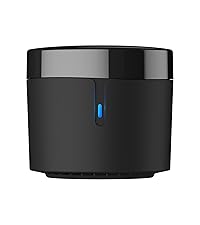


| ASIN | B083LLLVPN |
| Best Sellers Rank | 196,348 in DIY & Tools ( See Top 100 in DIY & Tools ) 92 in Home Automation Hubs & Controllers |
| Guaranteed software updates until | unknown |
| Item model number | RM4 PRO |
| Manufacturer | Hangzhou BroadLink Technology Co., Ltd. |
| Product Dimensions | 0.01 x 0.01 x 3.1 cm; 150 g |
C**L
WHAT'S WITH ALL THE BAD REVIEWS? Works without any issues at all
WHAT IS WITH ALL THE BAD REVIEWS?? Currently setting up smart home and this is a must for the voice control over your TV and set top box and load of other things After reading the bad reviews I knew after reading some of them they were doing soooo many things wrong it was cringy to read and some people should use common sense 🙄 or read the information that comes in the box Package came fast with my prime account I have a split network here from the amazing deco M4 access points where I give my guests assess to my network also I have another split for all my 2.4 smart home stuff so I can jump on the 2.4 and I think this where users are falling flat on their face You need to have the ability to be able to jump onto the 2.4 network in your house and also know how to make your phone join that network just to setup the box and app ******************** IF YOU CAN'T DO THIS DONT BUT THIS ITEM!!! OR leave the company bad feedback its not fair on them or users looking to invest! ******************** Download the app Install and setup using the same email as your home ecosystem you are using for alexa ect in your house Put your phone in the 2.4 network ( android pull down screen and hold down the WiFi logo and then look for your 2.4 network) and turn on Bluetooth and location services while you are there and setup is on screen and super easy to follow make sure your TV is on and your rm Pro is looking in directly at the TV for the moment during the set-up process The setup will ask you tv information if you don't have it to hand don't worry as long as you have the name of the TV it will give you "the most common settings" for that TV.. The rm Pro came up first with my TV remote and infact all other remote templates I asked for in secs You will be asked to try the remote out like volume up and down and menus ect ect and if you are happy just add the remote and give the remote a name... Within 10mins I had installed the app updated everything and installed the skill to alexa I set up a routine on my 4th generation alexa and now I say " TV on" My smart switches turn on power to the TV and freesat box ( I switch them off to save power in todays current situation) and add a small delay of 15 sec for the freesat box to boot and the alexa broadlink skill kicks in and fires the broadlink to turn on TV off standby and freesat to TV guide.. Super easy to do Brilliant value for money 👍 No worries with Alexa and skill setup at all 👍 And added bonus I have a smart extension lead that has a USB on it so I plugged the broadlink into that and don't even need to use a plug space 👍👍 Remote control is super fast like I have pressed it with the factory remote, so they can now be cleared off the sofa table making more room and looking less cluttered.. Honestly it's a win win!!! Stop leaving bad reviews about the product!! Like anyone that trains or walks dogs know "it's not the dog " rm pro" its the owner " new user" that need training I will order another the bedroom TV later so I can turn some rf switches and TV on and off as well Could not have asked for a easier setup and use out the box!!! 👍👍👍
M**S
Unfit for the intended purpose.
This is hard to use and ultimately failed completely for the intended use of controlling blinds. Possibly the blinds use a rolling code. The lack of feedback in the learning process means I do not know. Using 433MHz is a lottery and can be a huge waste of time. The concept is dubious. The IR learning is more often useful but the mini does this just as well.
T**2
Great product just expect to do some working out
I just replaced my RM mini3 with this RM4 Pro, as I have recently installed motorised blinds which use an RF signal which the mini3 (IR only) didn't support. Like the RM mini3 setup is somewhat of a test of technical skills and patience due to oddly worded things in the instructions and app, as well as the app itself overall not being very intuitive. I found setting up the RM4 pro more difficult than the mini3 as the instructions/app seem to describe a setup method that isn't the default setup method when the RM4 pro is first turned on (remember what I said about things not being very intuitive?). Once I overcame this challenge (by resetting the device several times until the lights started flashing the way the app described they should be) things got moving fairly quickly. I managed to re-setup my IR devices (would be a nice feature in the app if these could be moved between devices if you have more than 1) and will be adding my motorised blinds once they arrive. Once setup these devices are a fantastically inexpensive and reliable way to make things work with the likes of Alexa. For example, to get my blinds offically working with Alexa I'd need to purchase a seporate £150 control unit from the manufacturer, but I can do it for a fraction of the cost using the RM4 Pro to simulate the RF remote control being pressed instead. I can also control older IR remote based devices like TV's and ceiling fans which otherwise would not be Alexa controlled at all. As long as you are willing to persist through the not so intuitive setup process you'll be good to go!
A**W
Nice bit of kit
Excellent. I like the timer function. Can schedule it to come on during the night to keep the temperature up in the van on these cold night. Run for thirty minutes then switch off wait an hour then run again for thirty minutes
C**N
Perfecto, sirve a la perfección para controlar de forma remota una puerta de garaje particular online. Ya tengo dos dispositivos en diferentes partes de la casa. Funciona a la perfección.
B**B
Heel handig toestel om via home assistant infra rood te schakelen. Leverfunctie werkt goed. Jammer genoeg verliest het toestel soms zijn config na een spanningsprobleem. Ik svhakel mijn pelletkachel, beamer, oprolbaar scherm, licht en audio bar mat dit toestel.
م**ل
يعمل بديل لجميع الريموت
J**T
Great product at a reasonable price. Works like a charm in my setup. Sometimes the app crashes, but I am sure that this will be fixed soon
M**L
Sadece garaj kapısı açma sistemini tanımadı ama tv ,klima, müzük sistemi için müthiş tavsiye ederim
ترست بايلوت
منذ 3 أيام
منذ شهر