


Replacement
Product ID: 182928277
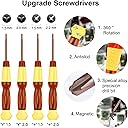
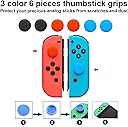
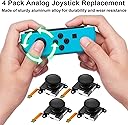
Product description Practical Repair Kit Make the Joyful Back to Life 6 extra screws prevent you from damaging or losing original screws. Scientific Design Our screwdrivers have a non-slip handle for a comfortable grip. The drill bit is made of high-quality stainless steel with high strength and toughness, so you can be relieved to repair the joycon joystick without damaging, weak magnetic adsorption screws to avoid screw loss. Right Touch Thumb Stick Caps Protection for your joystick, prevent scratches, corrosion, spalling or other damage; Made of premium-quality silicone material, safe, soft, and comfortable, making it have the right touch. Spudger Pry Tools Open your tech device and safely remove components with ease. Anti-Static ESD Tweezer This ESD Precise tweezer is made very well with sharp round pinted tip, sturdy and pricise, you even can use these tweezers to grab the hairs easily.Easy Operation Easy Operation Providing you a detailed installation instruction, let your operation become easier! Review: Great, cheap alternative to replacing joycons! - I've gone through two joycons already and replacing them was getting expensive. This option is far cheaper, not too difficult, and it comes with 4 analogue sticks! My tool kit came in a very cheap looking case with a rubber band holding the kit together, which was not a great first impression. But the tools themselves work well, the smaller screwdrivers are magnetized which is very helpful, and it came with several goodies which I didn't expect but are nice additions, like a pick to help ease open the Joycon casing. The analogue sticks themselves work great and to me feel identical to the original. The kit also came with optional rubber joystick covers which feel surprisingly excellent and which I hope will slow future drifting from occurring (they also fit original/legitimate Joycon analogue sticks). The kit does not come with any instructions, instead directing you to look up tutorials online. If you're comfortable with screws and ribbon cables, this is a much cheaper alternative to buying replacement joycons and the peace of mind of having 3 additional analogue stick replacements in case of future drift issues is well worth the price! Review: Great Value, try this before you buy joy-cons! - Great kit for anyone looking to fix the drift problem on their joy-cons! I bought the 4 pack so I could fix the problem with the 2 switches I have. The kit itself comes with great quality tools that will help you to open up your joy-con controller with ease. I forgot to take a picture of the kit before but this is what I was left with afterwards, I ended up using the black thumb-stick covers as they are comfortable to play with. There were also a lot of extra screws that I didn’t end up using but were nice to have just incase since it was very easy to lose track of them when I was taking the controller apart. The 4 replacement thumb-sticks all worked perfectly as soon as I put them in and I didn’t even have to calibrate them! If you are replacing your thumb-sticks I would also recommend changing out the shell on your joy-con as well! It was easy to follow along to a YouTube video and do (and you have to open the controller anyway), bonus is that both my switches feel brand new! The seller was great and I got everything I needed quickly! 100% would recommend this to anyone who is patient and has a couple hours of free time, it saved me from having to buy 2 new sets of joy-cons.


| Customer Reviews | 4.4 out of 5 stars 2,604 Reviews |
M**K
Great, cheap alternative to replacing joycons!
I've gone through two joycons already and replacing them was getting expensive. This option is far cheaper, not too difficult, and it comes with 4 analogue sticks! My tool kit came in a very cheap looking case with a rubber band holding the kit together, which was not a great first impression. But the tools themselves work well, the smaller screwdrivers are magnetized which is very helpful, and it came with several goodies which I didn't expect but are nice additions, like a pick to help ease open the Joycon casing. The analogue sticks themselves work great and to me feel identical to the original. The kit also came with optional rubber joystick covers which feel surprisingly excellent and which I hope will slow future drifting from occurring (they also fit original/legitimate Joycon analogue sticks). The kit does not come with any instructions, instead directing you to look up tutorials online. If you're comfortable with screws and ribbon cables, this is a much cheaper alternative to buying replacement joycons and the peace of mind of having 3 additional analogue stick replacements in case of future drift issues is well worth the price!
A**R
Great Value, try this before you buy joy-cons!
Great kit for anyone looking to fix the drift problem on their joy-cons! I bought the 4 pack so I could fix the problem with the 2 switches I have. The kit itself comes with great quality tools that will help you to open up your joy-con controller with ease. I forgot to take a picture of the kit before but this is what I was left with afterwards, I ended up using the black thumb-stick covers as they are comfortable to play with. There were also a lot of extra screws that I didn’t end up using but were nice to have just incase since it was very easy to lose track of them when I was taking the controller apart. The 4 replacement thumb-sticks all worked perfectly as soon as I put them in and I didn’t even have to calibrate them! If you are replacing your thumb-sticks I would also recommend changing out the shell on your joy-con as well! It was easy to follow along to a YouTube video and do (and you have to open the controller anyway), bonus is that both my switches feel brand new! The seller was great and I got everything I needed quickly! 100% would recommend this to anyone who is patient and has a couple hours of free time, it saved me from having to buy 2 new sets of joy-cons.
R**I
It works..but see images and description
First off, Yes!!! It Worked! And after calibration I tested with a couple games that drifted a bit, such as Terraria, Dragons Dogma, and Rune Factory. They now work Perfect now. But..... The kit was difficult and needed better tool choices. This was hard to install. Especially for an overthinker. Even after watching a few YouTube vids. *The battery male side needed a thinner plastic lifter than what came with the kit to be able to pry from socket. I tried plastic forks, then I found an older kit I had and found a thinner removal stick. *There was no indication of what analogs are for right or left controllers. *The male side of ribbon looks different, in sizes and there was a black plastic that is not on the original that seemed to prevent yes I'm gonna say it, it seemed to prevent insertion. See images of analogs Blue ribbon=Original, Middle=Short,Right=Long, Top = Short with removed glass tip that may no longer work. After trying to figure out similarities I found that the left analog ribbon was longer so I figured the longer glass ribbon analog is the one to use. But wait..do I take the glass off to match, or was it something important? I decided to leave it on after removing it from the shorter "now assuming" right side analog ribbon. Next problem, I forgot how the ribbons looked and did not know how deep they where In the sockets. *Note, It will only go in half of what you think, that is how I left mine and hope they don't slip out after time. *And yes, leave the black glass tip thing on. * Also, the R button kept slipping off the top and almost kept loosing the spring that is between the button and the bed it lays on. * Do not put any pressure on top of controller when replacing analog or you will slide the R button and spring off as I did multiple times. After killing myself over wondering if I was gonna have to start over and open back up to change to shorter analog or try taking glass tip off, or if the ribbons where all the way inserted, I said *Forget it* and reassembled and whooo it worked as I navigated menu system to calibrate the controller. Then I tried my games and Yes!!! Works now, no drifting!!!!!!!! Ahhhhhhh! In conclusion *Yes, replacement worked! Why not 5 stars * Wrong plastic lifter In kit, needs smaller lifter. *Need some kind of lables, we don't all know what is normal for parts fresh from the factory. I will admit difficulty should not represent the value of product or the star level since it is based on user level, but people should be aware of what they are getting into. I appreciate the value, and extra colored covers, and extra screws. I like that the seller provided a thank you note and personal message and I feel bad not leaving a perfect 5 stars. But this is my review and how I feel about this product.
A**A
Great kit for replacing the joy stick!
The + screw driver was magnetic which was very helpful in getting the really small screws out and back in! The Y was unfortunately not magnetic but those screws were a little bigger so it was not a huge deal. Both of the screw drivers I used had a twist end so you could put pressure with one hand and spin with the other which helped to not strip the screws! Plus it came with extra screws just in case some were lost or stripped, I didn’t personally need them this time but it’s great to have a back up! The large tweezers came in handy when plugging everything back in and flipping the little latches. The pry tools were great for getting the battery out and the controller shell opened. This kit also came with some joy stick covers and two extra screw drivers that are different sizes than the ones I used. The broken joysticks have a blue connection and the new ones have a brown connection. This was my first time opening up a joy con but replacing the joy sticks was relatively easy; so long as you have patience, a YouTube video and a steady hand. It took me about a half hour to do both of my broken left controllers. The one left controller was a little off center at first but I calibrated it and now it works perfect! The YouTube video I watched was called “How You Can Fix Your Drifting Joy-Con Stick - Nintendo Switch” by Nintendo Life. He was very helpful and informative!
D**E
It's easy when you know how.
After reading enough about JoyCon drift, I decided that I need to learn how to replace my JoyCon sticks every couple years, because they are just going to start drifting and there's nothing that can be done to prevent it. This kit includes the screwdrivers you need, pry tools, tweezers, all the fiddly parts that you need to accomplish the goal. I used it to replace the stick in both a Right JoyCon and a Left JoyCon, both of which suffered from terrible drift that could not be corrected by calibration. It took about an hour to go through the process of careful disassembly, replacement, and reassembly, and I'm proud to say that both sticks now work perfectly, with no calibration needed. The worst part of the process was when I unplugged a ribbon cable that was in my way during disassembly of the Right JoyCon. Do not make this mistake! Just fold the upper half out of the way and leave the cable connected. You can still replace the stick, and it will save you the horrendous task of trying to reconnect the cable in such a small, tight space. The Left JoyCon didn't present me with any such challenges, and was straightforward to replace the stick. These sticks are inexpensive to replace using these kits, and I will be replacing them again in a couple years, I am sure. So far, two weeks later, both sticks are still operating perfectly. I'm quite happy with my purchase.
A**D
Works great and extremely cost effective
This kit was perfect. It comes with more tools than you need to complete the repair and even includes extra screws in case you accidentally strip one. My joy-con has sever drift and now works perfectly. This was a great purchase especially now when you can’t find joy-cons at retail. There it comes with all you need to replace up to four joysticks. Please note, when you pull up an instructional video on YouTube make sure you watch one specifically for the left or right controller as the internals are different for each. Also you must go into settings and recalibrate the joystick once you’re done with the repair.
S**A
Highly Recommend
Perfect. My 8yos Switch joysticks had started drifting to the point he could not play his favorite game. I tried to purchase him new controllers, but 1. They are outrageous in price, 2. Everyone is currently sold out. Ugh, so I was desperately looking for another option. By chance I found this repair kit. I honestly didn't know it could be repaired, and I know NOTHING about gaming or electronics. I dont even know how to turn on my child's switch console. I took a chance, assuming I would be swindled, but desperate to make my child happy. The kit comes in a simple and functional tool box with everything I needed... tweezers, screwdrivers, pry tool, screws, and joy sticks. I am not going to lie... it didn't come with instructions and I didn't use the YouTube link that they included. I am from the south and we believe in winging it. So with no direction, no knowledge of what I am doing, and under the harsh gaze of a protective child... I took apart the controllers. In less then 5 mins I had taken apart, repaired, and then put together both controllers. I then did a calibration in the settings. It worked WONDERFUL. They both are better then new!! I highly recommend. It was tons cheaper then new controllers and I have all the tools and stuff for later. PS, thank you for the charming hand written note. That is a lost art and a beautiful gesture. God bless!
T**S
Acceptable joy sticks, good tools
Amazing tool kit. Came with everything i needed to do the repairs although i did use my own set of precision tweezers for the ribbon cables. Now to the joy stick replacements themselves. The new sticks are a bit stiff. The bit of covering between the joy stick cap and the underside is shorter than the original joy sticks. I worry this will leave a bigger gap for dirt and debris to get in, causing the drift issue all over again. 2 of the replacement joy sticks were having drift issues after replacement. I was able to get one of those two working to an acceptable level (not perfect but acceptable) by working in the joy stick with wd40 and a Qtip. It could just be that the mechanism is stiff and needs time but not what i was hoping for from a brand new joy stick. Overall the tools are a good value, joy sticks are ok. Hopefully you won't need all 4 so you can weed out the duds. Contacting the company and will update review after a couple months if use...
K**様
小4の男子でもJoy-Con修理ができました
小4の息子の希望で購入。説明書は感覚的でわかりやすく、4台直しました。パーツが足りなくなったらリピートしたいです。
Trustpilot
3 days ago
5 days ago