We remain fully operational. Our teams are working around the clock to ensure your deliveries continue safely.

قم بتنزيل التطبيق


معلومات عنا
حقوق الطبع والنشر © 2024 Desertcart Holdings Limited
قم بتنزيل التطبيق


Buy anything from 5,000+ international stores. One checkout price. No surprise fees. Join 2M+ shoppers on Desertcart.
Desertcart purchases this item on your behalf and handles shipping, customs, and support to OMAN.
🚀 Elevate your WiFi game—coverage and speed that your neighbors will envy!
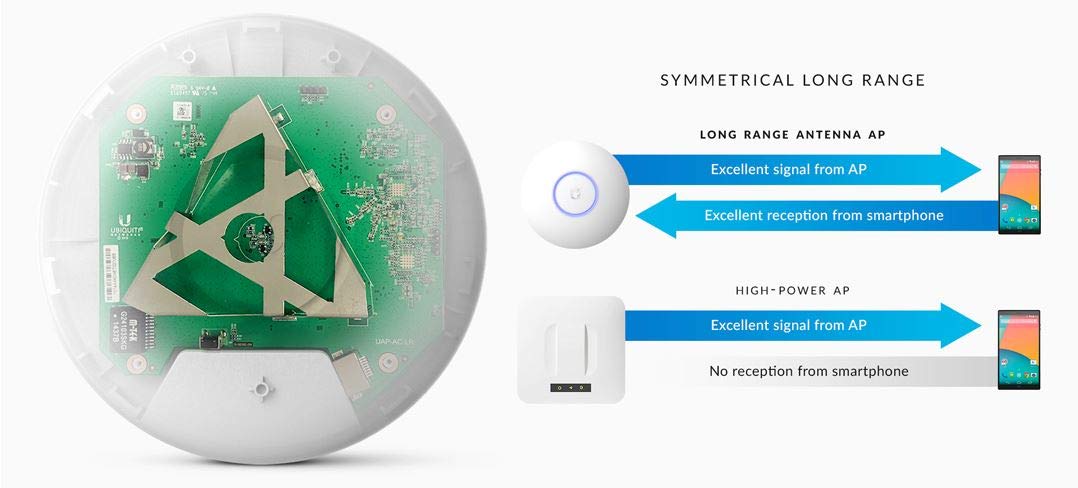
The Ubiquiti UniFi AP-AC Long Range is a high-performance wireless access point delivering up to 867 Mbps over 802.11ac with a powerful 600-foot coverage radius. Designed for both enterprise and advanced home users, it features WPA2 security, a single Gigabit Ethernet port, and is managed via UniFi OS software for scalable network control. Ideal for eliminating WiFi dead zones and boosting connectivity in large spaces.


| ASIN | B015PRCBBI |
| Antenna Location | Business |
| Antenna Type | Fixed |
| Best Sellers Rank | #375 in Computer Networking Wireless Access Points |
| Brand | Ubiquiti Networks |
| Built-In Media | Part |
| Color | White |
| Compatible Devices | Laptop, Personal Computer, Smartphone, Tablet |
| Connectivity Protocol | Wi-Fi |
| Connectivity Technology | Wi-Fi |
| Control Method | Touch |
| Controller Type | Software |
| Coverage | 183 meters (600 feet) |
| Customer Reviews | 4.6 4.6 out of 5 stars (2,971) |
| Data Transfer Rate | 867 Megabits Per Second |
| Frequency | 5 GHz |
| Frequency Band Class | Single-Band |
| Global Trade Identification Number | 00810354023422 |
| Has Internet Connectivity | Yes |
| Has Security Updates | Yes |
| Is Electric | Yes |
| Is Modem Compatible | No |
| Item Type Name | Ubiquit UniFi AP AC Long Range |
| Item Weight | 6 Ounces |
| LAN Port Bandwidth | 1 Gbps |
| Manufacturer | Ubiquiti |
| Maximum Upstream Data Transfer Rate | 867 Megabits Per Second |
| Mfr Part Number | UAP-AC-LR-US |
| Model Name | UAP-AC-LR |
| Model Number | UAP-AC-LR-US |
| Number of Antennas | 3 |
| Number of Ports | 1 |
| Operating System | Unifi OS |
| Other Special Features of the Product | WPS |
| Security Protocol | WPA2 |
| UPC | 810354023422 053926223954 |
| Voltage | 24 Volts |
| Warranty Description | Year |
| Wi-Fi Generation | 802.11ac |
| Wireless Compability | 802.11ac |
D**N
Mind=Blown. Best WiFi Signal I've Ever Had!
I purchased the Ubiquiti UAP-AC-LR Networks Enterprise Wi-Fi System because I was tired of intermittent problems, poor range, and crappy interface of my existing wireless solution. Now, don't get me wrong, I had a very nice Buffalo AirStation HighPower N600 Gigabit Dual Band Open Source DD-WRT Wireless Router (WZR-600DHP). It's truly a fantastic router, but even the best router and wifi unit can't compare to separate units. Here's the simple truth... routing network traffic is hard work that requires some pretty clever firmware to function properly. If you have to take that firmware and join it together with an access point (wifi) and rewrite the firmware to accommodate everything, it just isn't easy to get it to work perfectly all the time. That's why some of the worst reviews on wireless devices are the Cable Modem/Router/Wifi AP all in one single unit. They get really hot, they have terrible reliability and they are kind of expensive typically too. SO, after a co-worker purchased the Ubiquity UAP-AC-PRO (he bought the Pro version) and started raving about incredible coverage, never dropping out, not having to be rebooted, etc etc etc... I thought it was too good to be true but was curious enough to see it for myself. After minimal research I learned that my existing wifi router would typically be much more reliable as JUST a router once I turned off the wifi output. So all I had to do was plug the ubiquity UAP-AC-LR into an open port on the back of my buffalo router and connect to it with my computer. Now, my computer is plugged directly into the router that my Ubiquity AP is plugged into so the two devices can talk to one another. I downloaded and installed the management software and searched for devices. It found the Ubiquity device quickly and gave me some options to configure a guest network, setup security, etc... At this point, I am working in a basement. I have not mounted the Ubiquity on the wall yet, and just set it on top of a speaker to do my configuration. All of five minutes later it was ready to use so I checked my phone, saw it, connected to it with the key I created a minute ago, and got straight on the internet. No issues whatsoever. I then went upstairs to test the range a little bit. I got full signal strength in my living room (2200 sq-ft house by the way) and then proceeded upstairs to do more testing. Even in the farthest spot away from the router I had one bar less than full signal strength and was still pulling amazing download speeds. The next day I downloaded a wifi-scanner app so I could test the range even more and I put the Ubiquity AP on the wall in my basement. For the first time ever, I have full wifi signal in my SHED in the farthest corner of my back yard on a 1/2 acre lot! That was a HUGE milestone for me. I didn't stop there however... I then went walking up the street watching the signals appearing and disappearing of all of my neighbor's networks and even two houses up the street I still had signal. It wasn't much by this point, but my goodness... for a single access point mounted in my basement I think that is nothing short of outstanding! After my verbal praise to people around me my dad bought one for his house and I just heard yesterday that another friend bought one for his house too. Seriously, if you have unreliable wifi or signal that doesn't go as far as you think it should you absolutely positively need to try the Ubiquity UAP-AC-LR. Good luck!! Please let me know if my review was helpful. Sorry it was so lengthy, but I am pretty excited about this thing in case you can't tell.
S**N
Solid wifi; Great range
While this product is target towards businesses and networking consultants it works great for home environments like mine. This review is firmly aimed at home users like me who do not work in networking. I grew frustrated with flaky and spotty WiFi in my two story home and had finally had enough and looked for solution. I had read about the Ubiquiti access points on ArsTechnica.com but also compared it to other access points and wifi routers on the market before pulling the trigger. So far I am quite pleased with the performance. With the UAP-AC-LR mounted on the ceiling on the second floor, I have 4-5 bar wifi through out my 2400 sq feet home. Setup was rather simple, although I did download their management software, UniFi (using an Android or iOS app is also an option) : (1) choose a network name (SSID) and password & (2) choose a user name and password & supply email address. I choose to run a RF scan to see how busy the 2.4Ghz and 5Ghz bands are in my area and to turn on band steering so that devices will prefer the faster 5Ghz band, but that is completely optional. I can now surf with an iPad in bed and not loose internet connectivity! The management interface exposes many more options and data, but I have not yet done any other tweaking. I ran the third party firmware DD-WRT on my previous wireless router, but UniFi exposes a different, if partially overlapping, set of advanced options. I will say the UI is attractive, but I have not yet learned my way around yet. UniFi is capable of managing dozens or hundreds of devices across many different locations. Obviously a home user with one or a few (for very large homes) in one place will not stress UniFi at all. I did disable WiFi on my old router so as to not compete for precious RF space with the new AP and it is critical to note that this unit is just an Access Point (AP) it does not act as a modem, router or firewall. But if you like me are happy with your existing router/firewall but found the WiFi irksome this is a great and cost effective way of achieving wireless bliss.
ترست بايلوت
منذ شهر
منذ 3 أسابيع