Desertcart purchases this item on your behalf and handles shipping, customs, and support to OMAN.
🔌 Power Up Your Productivity with Speed & Safety!
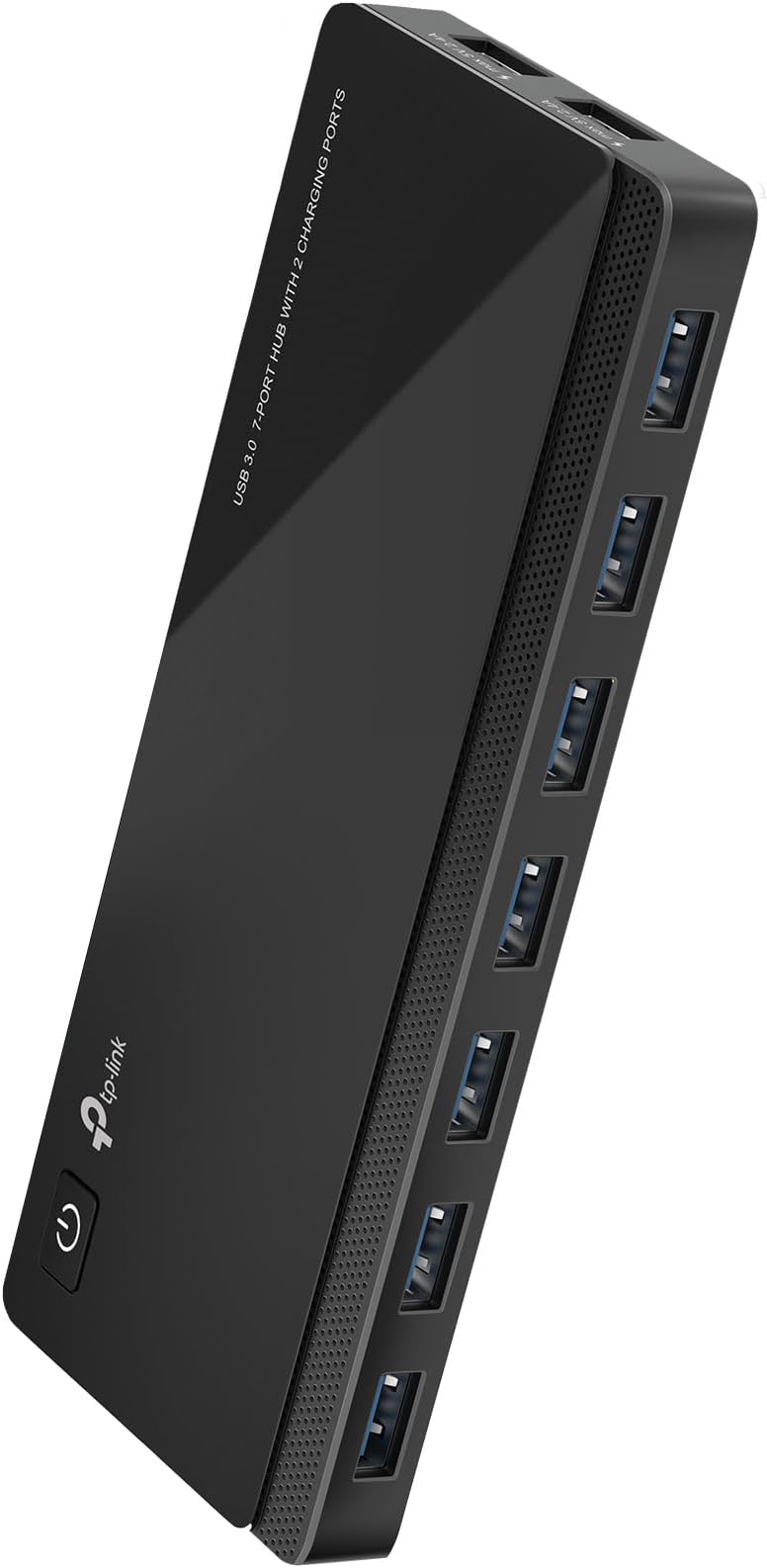
The TP-Link UH720 is a robust 9-port USB hub featuring 7 USB 3.0 data ports with ultra-fast 5Gbps transfer speeds and 2 dedicated 5V/2.4A smart charging ports. Compatible across major operating systems, it offers plug-and-play convenience, advanced surge and overload protection, and a handy power on/off switch, making it the perfect hub for professionals seeking efficient device management and rapid charging in one sleek package.


| ASIN | B00SCX6I8A |
| Additional Features | Play, Plug, Powered |
| Best Sellers Rank | #45 in USB Hubs |
| Brand | TP-Link |
| Built-In Media | power adapter, USB Hub |
| Color | Black |
| Compatible Devices | Desktops, Keyboards, Mouse, Printers, Smartphones, Tablets |
| Customer Reviews | 4.5 out of 5 stars 5,084 Reviews |
| Data Transfer Rate | 5 gigabits_per_second |
| EU Spare Part Availability Duration | 2 years |
| Enclosure Material | Plastic |
| Hardware Interface | USB 3.0 |
| Item Dimensions L x W x H | 7.8"L x 5.8"W x 2.8"H |
| Item Part Number | UH720 |
| Item Weight | 500 g |
| Manufacturer | TP-LINK |
| Mfr Part Number | UH720 |
| Minimum Required Operating System Version | ChromeOs 134, Mac OS X 10.6 Snow Leopard, Windows 8.1 |
| Model Number | UH720 |
| Number of Items | 1 |
| Number of Ports | 7 |
| Operating System | Windows, Mac OS X and Linux systems |
| Special Feature | Play, Plug, Powered |
| Total USB Ports | 9 |
| Total Usb Ports | 9 |
| UPC | 845973010041 |
| Warranty Description | 2 years |
T**R
No more spaghetti wires
Review: TP-Link Powered USB 3.0 Hub (7 Ports + 2 Charging Ports) I don’t usually write reviews, but this one earned it. This is one of the few USB hubs I’ve bought that is actually true USB 3.0. And that matters more than most people realize. A lot of hubs claim “3.0,” but if they don’t have the proper 3.0 cable and you’re not plugged into a real 3.0 port on your computer, you’re not getting 3.0 speeds—period. This one does it right. As soon as I hooked it up properly, I noticed an immediate difference. Devices responded faster, file transfers sped up, and everything just felt more stable. No lag, no weird disconnects, none of the usual nonsense you get with cheap hubs. The powered aspect is a big deal too. Running multiple devices off a non-powered hub is asking for problems—things drop out, drives don’t spin up right, etc. With this, everything stays solid. The extra 2 charging ports are a nice bonus for phones or accessories. Build quality is good, setup is simple, and most importantly—it actually performs like it’s supposed to. If you’re tired of hubs that say “USB 3.0” but don’t act like it, this is one of the few that delivers. Bottom line: If you plug it into a real USB 3.0 port, this thing just works—and it works fast. Ignore the spaghetti wires in the video—this hub is actually what’s going to let me clean all that up. Now that everything’s running through one solid, powered 3.0 hub, I can finally reroute things properly instead of patching cables everywhere.
L**P
Excellent Quality and Easy Installation
These combination switches are well made, easy to install, and work perfectly. They have a clean, modern appearance, and both the switch and outlet feel sturdy and reliable. Great quality for the price, and I would definitely purchase them again. Highly recommended!
E**O
Best USB Hub From My Experience (MUST HAVE!)
Now a days it seems harder and harder to find a computer with enough USB ports to be able to accommodate the amount of devices you need in your daily workflow. Being a music producer and content creator this hub has saved my life. I am going on my third year since I’ve purchased this USB hub and I do not regret it one bit. I purchased another around the same time and this was the keeper between the two. The way it sits on my desk I sleek and out of the way. I have a few external hard drives attached, my audio interface, midi devices, and my gaming controller adapter. I love the fact that I didn’t have to keep swapping devices while putting my cables and USB ports on my tower in jeopardy. As time has gone on I found this hub to be very, very useful and reliable. To top things off it has a dedicated fast-charging port that works great for my GoPro when I am recording on it with no battery. It is plug-n-play with no need for any drivers. It has a power button for easy turn off or reset, if needed for whatever reason. I have zero heating issues with it and the lighting on the buttons and ports are subtle yet visible. I’m not going to lie. I did buy another hub recently thinking I would save a couple bucks, but I might have made a mistake by not buying another one of these by TP-Link… Definitely recommend.
S**E
Works well
This hub is simple and does what it needs to do. I'm able to plug low powered devices (keyboard, mouse, ethernet adapter, data transfer cable) and everything functions properly. I have a USB vacuum fan for my laptop vent that plugs into the charging port to save an extra data port and it works at maximum speed. The only thing I didn't notice before I bought it was that they removed the individual lights for each port that the older models had. Because of this it's a bit difficult to see where you're plugging things in a dark room.
J**G
Very good piece of gear
This is exactly as pictured on Amazon's page. I've been using this for just about 2 years now and it's been great the whole time. I've got 6 USB devices connected and all work well together. Only thing was I had to make sure it was connected to my MINI PC via the correct USB port. USB 2 & 3 work differently. Had to move the plug around a couple times before it all came together.
F**Y
Old powered hub just couldn't take my DAC
My old 3.0 powered hub which had served me well over the years started to suddenly malfunction when I connected a Toppings USB DAC to it. For those who don't know, DAC stands for "Digital to Analog Converter" and is considered a better sound source for listening. Well I read that it could be helpful to run a USB DAC off a independent USB powered hub instead of directly connected to the computer for even better sound. Snake oil...Hmmm, I'm not sure but I thought I would try it. Well my old hub started acting wonky from the first moment I connected my DAC . The DAC's front led screen wouldn't start up correctly and the sound wouldn't work 3/4 of the time, especially when I booted it up with my computer. But this DAC was working and still would work when I plugged into my computer directly! I assumed the hub had a power problem. So I bought this TP-Link Powered USB Hub 3.0 and It has had no problem handling the DAC being connected to it. This TP link has plenty of power and It hasn't "wonked" yet when booting up and it has almost twice the inputs of my old hub. Now my DAC is working great (better sound?) and the hub has given me more cord length so I moved the DAC to the other side of my large work station. TP Link is a trusted brand and if you need a good powered USB hub I think this is a good bet!
P**S
Good hub. Wish I had read the fine print on the two charging ports (just charging; no data).
I bought this because I needed a hub that could power my Litera Beam. The one I own doesn't have a separate power cable, so it gets all its power from the USB connection, which is also its data connection. Unfortunately, most hubs, even powered hubs, don't provide enough juice to let the Beam get up to 100% brightness. My old powered hub only gave the Beam only enough power to get it up to 37% brightness. I bought this hub thinking the charging-capable ports would give me enough power, but after plugging the Beam into it, the computer didn't see the Beam. Then I realized and saw in the instructions that the charging-capable ports are *just* for charging. They don't have any data capabilities. I didn't see that on the Amazon page originally, but found it buried down in the details. That's my bad for missing it, so I can't fault the hub. Thankfully the data ports on this provide a lot more power, and my Beam can now get up to 89% brightness, which is good enough. I did have a little trouble keeping the a USB cable connected on the upstream USB port (it kept slipping out), but once I switched to the one that came in the hub's box, the problem seemed to go away. Overall, I'm pretty happy with it, especially for the price.
N**A
Total junk
EDIT: I ended up returning this to Amazon it was so bad. ***ORIGINAL REVIEW*** This is complete garbage. First off, they use an extremely cheap proprietary (hard drive) USB cable instead of USB-C or even standard USB-A. Secondly, when I plugged in the cable, it is so extremely flimsy that it would not stay plugged in, even in a very stationary and calm environment. It completely stopped working within 5 minutes. I ended up buying a second USB-B cable, thinking that I had a bad cable or broke it, but nope, it's the port. There's an issue where the cables don't fit snugly and it's nearly impossible to get them to stay. Also, the "wall wart" charger is the absolute biggest, most awkward charger I've ever seen and will take up 2-3 spaces on your outlets. Also, the provided charge cable is about 3 feet long. So, let's see the logic in that. You're buying this because you obviously need several connections to reach over several feet. However, your MAIN hub has to be within 18" of your PC, unless you use -- checks notes -- another hub! That's not logic; that's just cheaping out -- completely. There are no lights at all to let you know if your port is working or receiving/sending data. It's noisy. It's not worth $5. Sorry if you read this after buying it. If you're reading before, skip it.
N**O
4th time buying this
This is great as it has 7 ports and 2 charging ports as well. Works well. I bought the first one several years back, since then have bought 3 more - one for my son and another for my PC and one more for my Mac. Works well with both Macs and Windows PCs.
I**S
USB HUB
Moltoefficiente perchè ha i led per ciascuna porta e capire quale periferica USB non funziona è molto più rapido senza dove passare su "info su questo Mac"
D**.
Data copy/ transfer speed and additional power supply.
I liked the product - excellent because of power supply support - all 7 nos USB ports and charging ports work well and the data transfer / copying speed is fast.
M**Z
Top!
Reaktion, Kompatibilität, alles voll in Ordnung. Habe, wie fast alles im Arbeitszimmer an WLAN-Steckdosen hängen, um nur dann Strom zu verbrauchen, wenn ich es auch benötige. Funktioniert dort auch sehr ohne Probleme. Passt alles.
C**N
FACILIDAD DE USO
INTRODUCCIÓN: Exsiten millones de estos aparatos "Hubs" pero es complicado encontrar uno de buena calidad, este HUB TP-LINK cumple perfectamente mis necesidades, es una calidad excelente, llevo aprox. 2 meses usandolo y es realmente bueno. INSTALACIÓN: Sólo conéctalo a la pc con el cable que también va incluido y ya estas listo para conectarle tus periféricos favoritos, quieres carga rápida? conecta el HUB a la luz con su eliminador que también va incluido y ya estás listo para cargar tu teléfono o lo que quieras. CALIDAD: Tiene una calidad de construcción realmente sólida, muy buena, lo único malo es que en la parte superior se raya bastante ya que es de un plástico brilloso, de allí en más no he tenido ninguna clase de problema. EXTRAS: Me encanta que tenga un botón de Encendido, esto es útil por si ya no quieres cargar tus periféricos o desactivarlos de tu computadora sin tener que desconectarlos, es un detalle asombroso. Ya incluye el eliminador que sólo es necesario si quieres cargar rápida en los 2 puertos USB dedicados, pero puedes usar el HUB perfectamente sin conectarlo a la luz con los otros 7 USB Restantes. Ya incluye el cable USB que va del HUB a la PC. He utilizado el HUB en su máxima operación y no he notado sobrecalentamientos o ningún funcionamiento raro, todo muy bien. El precio está un poco más elevado que el promedio de HUBS pero realmente vale la pena pagar un poco más por este por las ventajas que da y la calidad
Trustpilot
3 days ago
2 weeks ago