We remain fully operational. Our teams are working around the clock to ensure your deliveries continue safely.

قم بتنزيل التطبيق


معلومات عنا
حقوق الطبع والنشر © 2024 Desertcart Holdings Limited
قم بتنزيل التطبيق
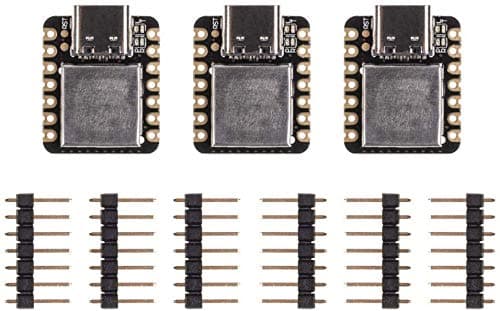
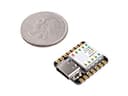
🚀 Tiny Board, Massive Potential: Power Your Next Wearable Revolution!
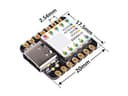
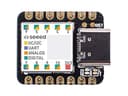
The Seeed Studio XIAO SAMD21 is the smallest Arduino-compatible microcontroller board, featuring a powerful 48MHz ARM Cortex-M0+ CPU, 256KB flash memory, and 32KB SRAM. Despite its ultra-compact 20mm x 17.5mm size, it offers rich interfaces including 14 GPIO pins with analog/digital channels, I2C, UART, SPI, and a modern USB Type-C port. Fully compatible with Arduino IDE, it’s designed for wearable devices, rapid prototyping, and innovative small-scale projects, delivering high performance with low power consumption.


| ASIN | B08745JBRP |
| Best Sellers Rank | #104 in Single Board Computers (Computers & Accessories) |
| Brand | seeed studio |
| Built-In Media | / |
| CPU Model | None |
| Compatible Devices | Devices compatible with Arduino IDE |
| Connectivity Technology | I2C, UART, SPI, USB |
| Customer Reviews | 4.5 4.5 out of 5 stars (748) |
| Manufacturer | seeed studio |
| Memory Storage Capacity | 256 KB |
| Mfr Part Number | 110010004 |
| Model Name | Seeeduino XIAO |
| Model Number | 110010004 |
| Operating System | Windows, macOS, Linux |
| Processor Brand | ARM |
| Processor Count | 1 |
| Processor Speed | 48 MHz |
| RAM Memory Installed | 32 KB |
| RAM Memory Technology | SRAM |
| Total Usb Ports | 1 |
| UPC | 886268758132 |
| Warranty Description | / |
| Wireless Compability | 802.11b |
L**Q
Great Tiny Microcontroller...
The Xiao was easy to setup in my Arduino IDE. Once I installed the correct "Board" in "Board Managers", I was able to upload code to the chip. Worked great.... for a day. Then the board stopped responding to USB. I'm not sure if it was a bad batch or what happened. It was promptly replaced with a new one. So far so good. I will update a review in the replaced purchase item listing. These boards are a great way to implement controllers, into a tiny project case. UPDATE: The new board works great. Have had no problems. I would highly recommend this board to anyone that needs a microcontroller that fits into a small project enclosure. I will be buying more, for future projects.
R**S
My go to for sooo many reasons
I bought 3 of these a couple years ago to play around with. At the time, it was just because they were cheap and quick to get on Amazon. I quickly fell in love. Though they aren't perfect. Pros: Size. They're tiny. Even 2 years on, most microcontrollers are *at least* 2 to 4 times the size. The small size makes them easy to fit into almost any project. They're literally the size of a postage stamp. I can cover one with my finger. Which brings me to the next pro: I/O. Even at this tiny size, you still have tons of I/O, with support for hardware interrupts, UART, I2C, SPI, and true analog pins with DAC. The big one for me, though, is HID support through the USB type C port. That's a much less common feature than you'd think. If you want to make devices that can talk to other devices as an input device, you need this. Speed. You don't really think that a simple Arduino device needs to be fast, but having a 48mhz processor and 32mb of SRAM to work with open up a LOT of possibilities. Take, for example, my most recent project. I wanted to make a vintage laptop keyboard work with a modern laptop motherboard. But I wanted to do so without damaging the original keyboard. So to interface the two, I needed the Xiao to be able to read the PS/2 protocol that the keyboard was talking in, and give USB HID protocol commands to the computer. Reading the PS/2 protocol takes very precise timing. Your code has to execute within a certain number of microseconds, otherwise the command will fail. Because of the speed of the processor, I could have more code executing in the interrupts while still staying under the threshold. Cons: Storage. While I've never run up against the limit, the Xiao has 256 kB of flash memory. That's not the smallest, but it's certainly not the biggest I've seen on a microcontroller. So I do get a little nervous when I start importing a bunch of libraries. So far, my most involved project, the keyboard that I talked about earlier, only uses about 25% of that storage. And that's importing two different libraries plus my custom code. But if you have a large project that takes many libraries or a whole lot of code, you might run into problems with storage. Bootloader Corruption. I've only had it happen once and it was after hundreds upon hundreds of code uploads. These guys saying they're bricking after 50 uploads have to be doing something wrong. Or maybe it's because they're on Mac hardware, I don't know. But I've had to upload 50 times pretty much everyday I've worked on this project and so far it's not been a problem. But like I said, I did have one of my original three stop responding to USB. So the problem does exist. The device itself still does what the last upload of code told it to do, but I can no longer get it to talk with the Arduino software. And resetting the unit didn't resolve it. So you're mileage may vary.
J**A
Awesome tiny microcontroller!
This tiny microcontroller is great for small projects. Actually, it's quite powerful for what it is and has plenty of I/O pins. My son uses it for Star Wars props and Cosplay. It's great for wearables, controlling LEDs, and just about anything an Arduino can do but just more. The setup can be a little confusing at first, but the documentation on the SeedStudio site is really good. It will walk you through with setting up the Arduino IDE or setting up Circuit Python, since the setup is very different from each other. I've programmed this little microcontroller with both the Arduino IDE and with Circuit Python. Circuit Python might be more beginner friendly. I really like that it has USB Type-C connector because then I can use the same cable as my Mobile Phones. It's annoying to have so many different cables around. One thing to make note is that these microcontrollers are not 5v tolerant. Yes, you can power it with 5 volts, but the inputs and outputs are 3.3 volts. The one thing I wish it had was a reset button, but it's so small I'm sure it would be impossible to fit. You can add a reset button because there are soldering pads for it, but it doesn't have one on the board it self. So, if you are making wearables this would be great. Actually, you can use it to control servos, led light strips, and a ton more. It even has a DAC so you can technically make it produce sound too!
6**6
Great... but missing stickers
I love these little things. Perfect microcontrollers for small spaces. The user should be aware it works 3.3v and not 5v. It also has a USB Type C connection which is different from many microcontrollers like the Arduino Nano. Since it is small, pins are labeled on the underside of the board. I was disappointed that mine did not come with the stickers for the top side marking of the pins. Wish I had the stickers rather than having to refer to a printout to figure out pins.
A**E
Mostly good, but some quirks.
Very good Stamp sized controller. Best in the series, the ESP32S3 chip is one of the best performers. My application involved an I2S interface to a microphone and four RMT interface outputs to SM2812B leds. Issue #1: The 3.3v regulator on this board has fluctuating output and I need to run my microphone on a separate regulator or I can 'hear' the CPU processing as noise in the microphone. Other arduino boards do not have this issue. The oscilloscope revealed that this chip makes it's power rails rather noisy! Issue #2: Pin 7 (GPIO43) has a part on it that makes the bandwidth poor. This pin isn't usable for high bandwidth control. It's a design choice on their part. Darn good board. Five stars.
N**N
Very satisfied with the purchase, all 3 SAMD21 board tested and confirmed working. I will be able to prototype easily with these spare boards
A**R
The SAMD21 device have some sort of bug where you can upload a new program to them a few times, and it's somehow no longer listening, so the uploader times out. This doesn't affect CircuitPython because that's not the same kind of upload. I'd love to see a fix for this so I can relentlessly send changes to it without issue.
S**N
Super petit très content : ) !
海**神
商品説明の写真にははんだ付けされたピンが付いているが 届いた物にはピンが付いていなかった。付属すらしていない。 返品するにも時間がもったいないからピンは自分で付ける。 SeeeduinoXIAOは悪くないけどSHOPがダメ。
C**N
I really like this tiny board for its quick processor and large memory. It’s awesome for small projects or wearables. I did have some trouble getting started with it because I am still a Windows 7 user. Minimum system requirements is W10. After some searching I did find an unsigned driver for W7/8 that worked, but you have to manually install it. Once past that hurdle I got the board working on the Arduino IDE (1.8.8). The next challenge because of the Samd21 architecture was finding out which Arduino libraries were compatible. I managed to make work: FastLED, RC-Switch, Adafruit RTC, and u8g2 to drive a SSD1306 0.96” OLED display. I tried to make the Adafruit SSD1306 and Adafruit GFX libraries to work for the OLED but had compiling errors, so you might have to find alternatives for certain libraries. Next thing is something I have seen several here complain about: bricking the board. I ran into this situation where it locked up and became a unrecognized USB device. The solution I found was very simple… double short out the reset solder points until the orange LED on the board fades in and out, which puts the board into bootloader mode. Now it will show up as a USB storage device in windows, then in the Arduino IDE check the port shows XIAO and it checked off and hit “upload” again. This will unbrick the board and make it function normally again, provided you have fixed your program error that made it freeze up in the first place. Other then that amazing board that I have been able to upload to over and over and over again without any failure. Hope this information helps others.O
ترست بايلوت
منذ أسبوعين
منذ 3 أسابيع