Buy anything from 5,000+ international stores. One checkout price. No surprise fees. Join 2M+ shoppers on Desertcart.
Desertcart purchases this item on your behalf and handles shipping, customs, and support to OMAN.
🎯 Dominate every click with precision and power — the wireless mouse that means business.
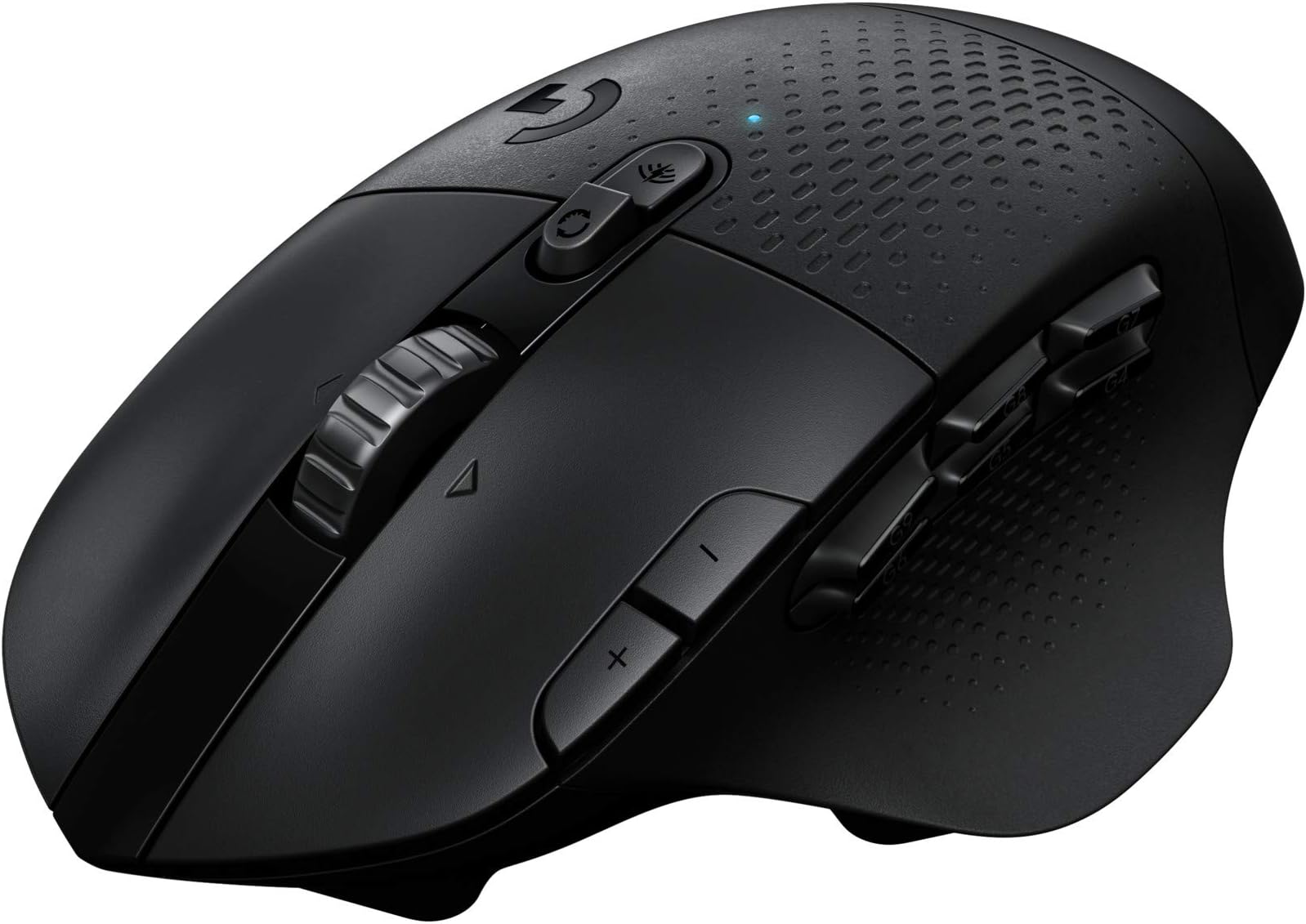
The Logitech G604 Lightspeed Wireless Gaming Mouse combines 15 programmable buttons, dual wireless modes (LIGHTSPEED and Bluetooth), and the advanced HERO 25K sensor for ultra-precise tracking up to 25,600 DPI. Designed for gamers and professionals alike, it offers a hyper-fast scroll wheel and an industry-leading battery life of up to 240 hours on a single AA battery, delivering unmatched control and endurance without the clutter of wires.
| ASIN | B07W8RKK5R |
| Additional Features | Wireless |
| Antenna Location | Gaming |
| Are Batteries Included | Yes |
| Are Batteries Required | Yes |
| Battery Average Life | 5 months |
| Best Sellers Rank | #37,775 in Video Games ( See Top 100 in Video Games ) #284 in Mac Gaming Mice #1,209 in PC Gaming Mice #3,432 in Xbox Legacy Systems |
| Brand | Logitech G |
| Button Quantity | 15 |
| Color | Black |
| Compatible Devices | Personal Computer |
| Connectivity Technology | Bluetooth, Wireless |
| Customer Reviews | 4.0 4.0 out of 5 stars (1,720) |
| Enclosure Material | Plastic |
| Global Trade Identification Number | 05099206084247 |
| Hand Orientation | Ambidextrous |
| Hardware Platform | PC |
| Item Dimensions L x W | 5.12"L x 3.15"W |
| Item Weight | 135 Grams |
| Manufacturer | Logitech |
| Model Number | 910-005650 |
| Mouse Maximum Sensitivity | 25600 Dots per Inch |
| Movement Detection | Laser |
| Number of Batteries | 1 AAA batteries required. (included) |
| Operating System | Windows |
| Power Source | Battery Powered |
| Range | 10.0 meters |
| Style Name | Modern |
N**T
The perfect mouse going extinct.
This is the best mouse ever. Truly upset that I didn't buy many of them. Wish I would've known they would stop making them. Love the feel, button config. and locations, connection, etc. Everything about it is perfect. Not too few buttons, and not too many. Use it for my mechanical engineering job using Solidworks. Logitech, bring it back!
L**S
Great mouse
This mouse has fifteen programmable keys that eliminate so many point-and-click movements, and the battery life is amazing.No lighting (flashing or always on) to be a distraction to me. The price has gone way up, but still worth it.
M**K
Great mouse
This is my third or fourth mouse of this model. Only reason I've gone through so many over the years is because I play wow a lot and wear out the left click button. I'm sure it's an easy enough fix but I honestly can't be bothered so I just buy a new one. Been using this since the g602. The battery life on Bluetooth lasts me for MONTHS. I'll be sad when I can't get this mouse anymore. It's legit best on the market
M**I
Terrible software
the software is terrible, G602 is much better... G604 even can not program "Alt+F4" to close the current window...G602 has much better software... when I'm tying to record "alt+f4" for one of buttons, it close the program!!!
J**.
Better than the G602? I don't think so.
As a long time user of the G602 I was hesitant to try the newest "version" in the series. Recently, my middle mouse button died on my old G602 so the opportunity finally presented itself. G604 Pro's: Onboard storage compartment for the usb connector, only uses a single AA battery, comfortable in hand, infinite scroll wheel locking option and bluetooth (if that's your thing). Cons: Spongey side buttons (hard to tell if your even pressing down), horrible middle mouse button (the wheel itself is a monstrosity), minimal rubber grip on top, and the worst of all the new button configuration software. Alittle bit about the new software: I think it's actually quite nice the features that it does have and setting mappings for different games is quite easy and clear to configure. HOWEVER, the bound keys don't appear to register if this app isnt running in the background. The G604 never had that requirement, you would set the button mappings and close it out and that was it, your good to go forever until the dawn of time. Overall, I'm a bit disappointed. I'm glad they made another mouse with the same button style as the G602 and I think they got some things right with the new mouse. Sadly I just reordered a new G602 for myself (which is more expensive than the G604 at the time of writing this)
S**O
No other like this one
I always come back to this mouse. The main things I love are: 1. Wireless with both dongle and Bluetooth - makes it easier to share between computer 2. Uses AA battery so I can use a good one and it lasts a lot 3. Enough programmable buttons 4. SIDE SCROLL BUTTONS #4 is my favorite. It's a small thing but I have become so used to having those side-clicks that I only get mice with them and a lot of the popular ones don't have it or if they do they are wired. For some reason Logitech decided on discontinuing the G604 so I recommend either get one now or start saving because they will become more expensive with time.
L**1
Not as durable as G602
just 2 years, its skin starts to peel off. I have to use a type to fix it. Not as durable as the previous generation G602
P**R
AWESOME mouse with some issues
Love the LiteSpeed series of Logitech mice, as I've had a few. This newest one, the G604 is amazing! Tracks on any surface, lift-off is great, no noticeable lag between the usb wireless or the bluetooth (an that is a plus for me to use on my main computer an laptop without having to swap a dongle), single AA battery life is well on par with spec, an the USB dongle is as tiny as you could make one, an even has a place under the palm-wrest to put it whilst traveling an throwing it into a laptop bag, which is why I got this in the first place! If there is a VERY slight niggle on my part, is the lack of a pinky rest on the right side. My right pinky is left to drag on the surface. I feel this would have been a no-brainer were the whole mouse wider. Another thing I whish Logitech would bring back is the way the switchable wheel clicks are used. In the past, you double-clicked the scroll wheel to make it either free-spinning, or with the clicks. With this one, there is a button underneath that would, IMO, be better served as a macro button. Can't think of much else without comparing to dedicated "gaming" mice. The 6 side buttons are in a great position for me, even more than my last 3 iterations of the Razer Naga series or the Corsair MMO mouse. Logitech just get's it done every time, though a bit slow to respond to the market. You can't go wrong.
R**S
o tenía reservado para el día 27/09 pero al final se retrasó y me llegó hace una semana. Venía de un Logitech G403 con el que estaba encantado, pero le comenzó a fallar el botón central y he tenido que cambiarlo. Probé un Corsair Dark Core RGB SE hace un mes y lo devolví porque no me convenció nada (una pena porque tenía pintaza). El G604 acaba de salir y de él, destacaría positivamente: 13 botones programables con el software de Logitech (6 en el pulgar). Los 6 del pulgar están bien, no es algo exagerado como el Razer Naga que tiene demasiados y le resta practicidad. Excelente autonomía tanto en modo lightspeed (240h) como en modo bluetooth (5,5 meses). Son las cifras que indica el fabricante pero bueno, digamos que le dura mucho la pila. En mi antiguo G403 que ya tenía bastante autonomía (unas 30h) era un poco rollo cargarlo cada 3 días, sobre todo si trabajas y juegas con él. Rueda de scroll con doble modo (normal y rápido) Sensor hero con 16000 dpi (aunque todos los logitech g decentes lo están incorporando) Funciona con una pila AA (incluida) por lo que es fácil sustituirla En el aspecto negativo, no es mucho lo que hay que comentar, pero algo hay: Se nota pesado, son 136 gramos con la pila (135g indica el fabricante). El G403 eran 107 gramos. Los botones G4 y G7 del pulgar no son fáciles de presionar. En parte es normal pues tampoco hay mucho sitio físico donde ponerlos. Los botones + y - del índice, si los programas, tampoco son muy accesibles (por lo pequeños que son). Por defecto aumentan y reducen los DPI. La rueda de scroll en modo normal se nota pesada (es de metal, eso es bueno) y ruidosa. Por lo demás responde muy bien con 1ms, una gozada usarlo con monitor de 240Hz. El cambio entre el modo bluetooth y el lightspeed es prácticamente instantáneo y el botón de cambio está situado arriba con lo cual es muy sencillo usarlo con dos equipos alternando entre lightspeed y bluetooth. La rueda tiene scroll horizontal, son dos botones que se activan al presionar la rueda horizontalmente (también son programables) El apoyo del pulgar y la palma es de goma del mismo color negro que el resto del cuerpo del ratón. En la parte más próxima a la muñeca tiene un compartimento para cambiar la pila y para guardar el receptor usb. Esto último se agradece mucho para transportarlo sin perderlo. El software de logitech, un poco regulín, han cambiado y ya no se usa el logitech gaming software de toda la vida, ahora es otro y le llaman G Hub. No me acaba de convencer el cambio pero bueno, al menos no es tan malo como el de Corsair. Permite hacer macros, cambiar los botones, etc… el tema perfiles no me queda muy claro, pero bueno…supuestamente puedes utilizar perfiles por software que se cambian automáticamente, por ejemplo al lanzar un juego X se activa ese perfil o usar los perfiles integrados de la memoria interna del ratón (tiene 5). El ratón carece de luces y leds. A algunos no os gustará pero a mi esto me encanta. Los leds es lo típico que está muy chulo al principio pero luego cuando ves que te quita horas de autonomía es lo primero que desconectas. Como accesorios sólo trae la pila AA de Duracell y un cable alargador por si no es posible enchufar directamente el receptor USB. Yo la rueda de scroll la tengo puesta a rápida. En este modo no tiene resistencia con lo que se hace scroll casi sin esfuerzo, es ideal para trabajar. El inconveniente que le veo, hasta que me acostumbre, es que es muy sensible y a veces lo muevo sin querer cuando presiono el botón central o muevo rápidamente el ratón. Los botones del pulgar se pueden programar con macros para aumentar la productividad. Es bastante práctico (Ctrl+Z, Ctrl+V, macros complejas…) No es sólo un ratón de “gaming”. Yo desde que me llegó lo uso más para trabajar, la verdad. Comentar que existe la posibilidad de asignar un botón que cambia entre un doble perfil denominado G-Alt, es decir, al presionarlo cambias la programación con lo cual tendrías un número doble de botones. Yo no se lo activé porque me llegan y me sobran con los que tiene. Por último comentar que, como muchos ratones de este estilo, el diseño es para diestros. Los zurdos que conozco que usan este tipo de ratones al final se han acostumbrado a usarlos con la mano derecha con los años... El precio es caro, pero es un ratón top y eso se paga. En fin, espero que me dure lo mismo que otros de la marca que tengo, desde hace más de 20 años (aún tengo operativo el Mouseman Dual Optical y alguno de bola).
D**K
After changing clicker few times, my G402 finally died. Love the ergonomics, a slight twist of the wrist, plenty of buttons and a great sensitivity. It has all that I need, plus I'm familiar with the design. On the bad side, the mouse is all plastic. From a longevity standpoint, it is good, but it feels cheaper in hand compared to G402. Additionally, the wheel in restricted mode is very 'cranky'. The turning feedback is very harsh and not pleasant at all. Besides the above I highly recommend this mouse as a daily driver.
M**I
Används dagligen utan bekymmer.
D**R
Vorerst nur eine Kurz-Review, da ich die Maus erst seit zwei Tagen benutze: Die Ergonomie dieser Maus ist phänomenal gut: • 6 programmierbare Side-Buttons ist großzügig, und gleichzeitig kein Overkill (wie bei der alten „Keypad“-G600). Alle anderen Buttons sind natürlich auch programmierbar. • In Kombination mit der Daumenablage sind die Side-Buttons perfekt platziert: Sie sind sehr nahe am Daumen, aber durch die Daumenplatte stört das nicht. Man kann den Daumen so weit weg oder so nah wie man will an den Buttons halten. Durch die Daumenplatte hat man sehr viel Spielraum. • Ich hab viel Negatives über das Scrolls-Rad gelesen. Ich finde es genial. Es ist massiv aus Metall, es läuft flüssig - nicht ruppig – und hat gute Haptik. • Das Scroll-Rad kann senkrecht, links oder rechts gedrückt werden. Das ist gut, und erwähnenswert, da manch andere Mäuse (auch solche von Logitech) keinen Links-/Rechtsdruck erlauben (nur Senkrecht-Druck, aka Middle-Click). Einziger Negativ-Punkt: Die Software (GHub) ist buggy auf dem Mac. Logitech schafft es leider nicht, zumindest nicht in den letzten 20 Jahren, saubere Software für den Mac zu schreiben. Aber die Bugs halten sich in Grenzen, und man kann damit arbeiten. Trotzdem ärgerlich. Trotzdem werde ich keinen Stern für die verbuggte Software abziehen, da die Maus einfach zu genial ist. Und ich hatte schon ziemlich viele Logitech-Mäuse. Für die Gamers: Ich benutze die Maus auch für World of Warcraft, und sie ist die beste WoW-Maus, die ich je hatte.
O**N
g700s kullanıyordum. Ona en yakın nu mouse buldum. Logitech de normal olarak diğer markalara uyup kalitesini düşürmüş ama sanıyorum ki bu fiyata alabilecek olduğum en iyi mouse.
ترست بايلوت
منذ أسبوعين
منذ 3 أسابيع