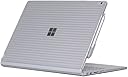
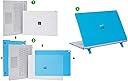
🖥️ Elevate your Surface Book’s style and safety—because your work deserves the best!
The mCover Clear Case is a precision-fit, shatter-proof polycarbonate shell designed exclusively for the 2016-2022 13.5" Microsoft Surface Book 1, 2, and 3 with detachable tablet display. Weighing just 9.2 ounces, this lightweight two-piece clip-on case protects all corners while maintaining full device functionality, including charging and pen use. Its crystal-clear design preserves the Surface Book’s sleek aesthetic, making it the perfect blend of professional-grade protection and minimalist style.


| ASIN | B01AW7UF2I |
| Additional Features | Not_Performance_Used |
| Age Range Description | Adult |
| Best Sellers Rank | #1,028 in Laptop Hard Shell Cases |
| Brand | mCover |
| Built-In Media | 1 |
| Color | Clear |
| Compatible Device Size Maximum | 13.5 Inches |
| Compatible Devices | Laptops |
| Compatible Phone Models | ONLY Compatible for 2016 ~ 2022 13.5" Microsoft Surface Book 1 / 2 / 3 with Detachable Tablet Display |
| Customer Reviews | 4.2 out of 5 stars 1,857 Reviews |
| Enclosure Material | Polycarbonate |
| Form Factor | Clip-On |
| Item Dimensions | 12.4 x 9.24 x 0.9 inches |
| Item Weight | 9.2 Ounces |
| Manufacturer | mCover |
| Material | Polycarbonate |
| Mfr Part Number | mCover-MS-SurfaceBook13-Clear |
| Model Number | mCover-MS-SurfaceBook13-Clear |
| Pattern | Solid |
| Shell Type | Hard |
| Theme | Game of Thrones |
| UPC | 649242004164 |
| Unit Count | 1.0 Count |
| Warranty Description | Limited warranty |
| Water Resistance Level | Not Water Resistant |
A**B
Fits perfectly
I had read some conflicting reviews on whether or not the case fit well - some people said the top didn't fit completely or that they couldn't charge with the cord above the laptop with the bottom part on - I found both of these to be incorrect, but I can see why people made these comments. I was hesitant on buying it because of these reviews (but there aren't many other options, honestly!) so I wanted to clear up any confusion. The bottom is very straight forward to install - you just slide it on - but the top takes some more finesse and effort. I tried sliding it on at first, but that didn't work well for me, so I resorted to popping it on. If you pop it on, as most people probably do, it will appear that one side fits perfectly and the other side does not, leaving a gap so that the case is not 'flush' with the laptop. This is not true, however. It is just that the case fits very snugly, so if you do not push the laptop into the case on the 'fitting' side as far up against the case as it will go, then the other side will not be able to fit in, if that makes sense. There are these little latches that are meant to latch onto the side by the screen - if they are getting stuck in the middle of the laptop and not going all the way down so they can latch onto the side by the screen, then you need push the other side of the case more until the other side is fit in as snugly as it goes. I gather some people took to sawing off the extra plastic bits after concluding they would not fit... this is not necessary! Also, you CAN charge from the top with the case - again, you just need to make sure the bottom of the case is pushed snugly in as far as it can go. If there is extra 'room' so to say, at the bottom by the touch pad (as in, space in between the laptop and the case), then you will not be able to charge from the top because the case is not on correctly and will get in the way of the charger. I took pictures to try to demonstrate the small latches on the side of the case that need to latch on by the front of the screen - if they are getting stuck in that black groove in the middle of the top of the laptop, then you need to make the other side of the case fit more snugly. Also, the pen attaches with the case on without issue. Altogether, good case for the price, and I expect it to protect well from scratches as well as making it easier to handle in tablet mode! I hope this is helpful for people who were uncertain about the case like me.
G**L
iPearl-Old or New?
While I can't find anything similar to this design and it is exactly what I wanted I was surprised to see differences in design according to color. I purchased the green and pink covers. I noted to my wife how she plugs in her power cable into the Book. She pointed out a notch by the power port. I looked on mine and it didn't have one. Then I Ask her how she keeps hers from sliding, and she showed me the rubber feet on the bottom of the case. I looked on mine and it didn't even have cutout for the rubber feet, and there was no rubber feet of any kind. Then I explained to her my concerns of the case covering the many vent holes on the side, she once again pointed out to me that there were some cutouts on the side that looked like it would allow venting. I looked at mine and there were no cutouts. Long story short, seems like there is a mixed lot of old and newly designed stock at Amazon. The older green design has the flaws as mentioned above. The newly design Pink one seems to address those issues. Overall, I really enjoy the case even with its major flaws. It really protects the book. The functionality of the book does not seem affected by the cover including reversing the screen and closing it shut. A few more adjustments, purging old stock and addressing more vent hole support will make this a great product. For now I am still keeping this one and will wait to see what new design they come up with later. UPDATE: I failed to mention the pros with this cover. First, like I said, this is a very unique product. Can't find anything like this anywhere. The cover is very durable and hard, just what is needed to protect the Surface Book or any other device. The colors are beautiful and translucent which allow for the original surface to show through. Installation is very easy and snaps into place with no movement at all. If you want to protect your case I would get this case. And with the new designed cases this case will rock your Book.
T**S
Great case with nice features. Peace of Mind.
I've owned my Surface Book for 3 years, and just discovered this product. I use it for real estate for daily work, and obtaining client signatures. This often means handing it to clients who may or may not handle it the way I do for signatures. I also use it for notes and measurements. This case prevents scratches, though I doubt it would do much if dropped. It's extremely useful when carrying the tablet portion. The case seems durable enough to prevent scratching while carrying. It doesn't cover the hinge, so you'll still need to mind that. The case clips into place well, and is a nice snug fit. I use multiple monitors with the surface dock at my office, and one display port at home. The back right clip just barely blocks the power cord from fitting perfectly when the cable faces to the back of the base. It must be used thus way to run the display port simultaneously. The dock plug sticks out a bit straighter, with more space from the body and does not have this problem. The factory charger is made to fit very close, and has to be played with a bit to ensure its actually charging as it's just a hair from inserting all the way into the port. It's close and can still work, but it's not perfect. The case has flip out feet to raise the back of the base to an angle - which I love. It's enough to be a nice addition. Unfortunately they feel like small thin plastic feet (which they are) so at times it feel like it's a hard push from breaking. With more than 2 months of daily use they are still working like day 1, so maybe it's in my head more than need be. In a nutshell, it's a nice fit and protects against scratches. It also adds nice rubber feet that hold better than factory while not making it much heavier or thicker. For the price it's a great buy and adds peace of mind.
C**D
Snug but already bent it????
Fits amazingly snug, haven’t tried using the charger with it yet. Only thing that’s a little discouraging is I haven’t owned it for even 24 hours yet but somehow already managed to get some white spots from what I assumed was it getting bent (clear plastic becoming white as it bends). Anyways, wouldn’t trust this with taking any heavy bangs or drops but definitely will keep it protected from light taps and scratches. Definitely wouldn’t be taking it off once it’s on to keep it from getting damaged anymore than I somehow managed to.
A**N
Looks nice, fits well (after a modification)
Pros: Looks nice, fits well (after a modification), should protect the book from some scratches and dents. It is nice and light and slim so it still fits in the Maroo leather sleeve that I already bought. Cons: I had to file off one of the tabs on the top part of the case since it wouldn't fit straight out of the box. When I open up the surface book all the way the case keeps the hinge from hitting the table so it is off balance and will not sit flat on the desk/table. Hinders cooling a bit since it blocks off the top vents but it shouldn't be an issue unless you're doing something very CPU heavy. Overall this is a fine product if you own a nail file and want something that's light, looks nice, and provides a bit more protection than a skin would.
T**Q
Fits Perfectly! Don't listen to other negative reviews
I was hesitant to purchase this cover originally due to other reviews saying it doesn't fit flush. These reviews must have been by people who couldn't figure out how to properly install the case. When I first took the case out of the packaging and attempted to snap it on to my surface book 2, I had to do it making sure that one side was place on first before snapping the other side. When you purchase one and go to install, you will understand what I am talking about. There is one snap-on prong that looks like two individual prongs. That needs to be slid on first, with the prongs fitting in the grill groove. After that you just simply snap the other-side down. The case, top and bottom, fits perfect and snug if installed correctly. This is the best case I have seen for the surface book 2. Hard plastic appears to be of good quality. Get yourself one, you won't be disappointed.
K**T
so I was expecting the worst. The cover arrived as expected and it simply ...
I have no reason not to give this item 5 stars. The mCover fits on my Microsoft Surface Book exactly as it should and I had no (none at all) trouble getting the cover installed. I read several reviews where the person said they had a very difficult time installing, so I was expecting the worst. The cover arrived as expected and it simply clicked onto the Surface Book. At the same time I ordered the the mCover, I ordered a dock for the Surface Book Microsoft Surface Dock (Compatible with Surface Book, Surface Pro 4, and Surface Pro 3) . I only mention this because for my current setup I use the display port on the Surface for an external monitor. The power connector on the dock needed to be routed towards the back of the surface so the cord does not cover the display port. The mCover has a clip to hold the bottom portion of the case onto the surface that was about 2 millimeters too long and kept the power connector from sitting flat. If you don't use the display port, this is not a problem. In my case, I simply used a file to "shave" down about 2mm off that clip so the power cord could face backwards and sit flush against the edge of the Surface. I don't see this as a design flaw as the normal Power Adapter that ships with the Surface fit just fine. If anything, Microsoft should not have put the display port so close to the power connector on the Surface. I am enclosing a picture of the modification for reference and how the power cord now fits flush.
K**E
If I could give it a 4.9, I would
This case is really fantastic. It keeps my computer safe without adding a ton of unnecessary bulk like all the other surface book cases. I picked the clear case and I have a skin on my SB2 so it can still be seen. It doesn't interfere with sound or cooling at all and it still fits perfectly in my backpack sleeve. It is definitely a bit of work to get the top piece on. I had to apply a good amount of pressure to snap it into place; some of the tabs go on to the lip of the screen and some of them snap into the ridge where the air flow/speakers are. The bottom piece is super easy to get on/off. Although I've not had any issues with charging since putting this case on, it is easy enough to remove the bottom that it shouldn't be too big of a problem. The bottom piece did cause the corner of my skin/decal to peel up just a little but I took it off and put it on again and it's good as new. I expected that the wavy texture would bother me but honestly I kind of like it. It gives the SB a little more grip for carrying which I greatlt appreciate. I did not think the bottom would also be wavy but it is, if you care. The only thing I would dock it for is that it's a little uncomfortable to use as a tablet now. The case only "grips" the screen in 4 locations and they're not obvious unless you're looking for them. When note-taking I have to be a little creative about how I place my writing arm or they jab my forearm. I tried the folio case which was fantastic for notetaking but sucked in every other aspect. If you don't mind a little (2 minutes maybe) work to get it on and adjusting to use it as a tablet then this is a phenomenal case. It's definitely worth trying for only $20!
ترست بايلوت
منذ يومين
منذ شهر