We remain fully operational. Our teams are working around the clock to ensure your deliveries continue safely.

قم بتنزيل التطبيق


معلومات عنا
حقوق الطبع والنشر © 2024 Desertcart Holdings Limited
قم بتنزيل التطبيق
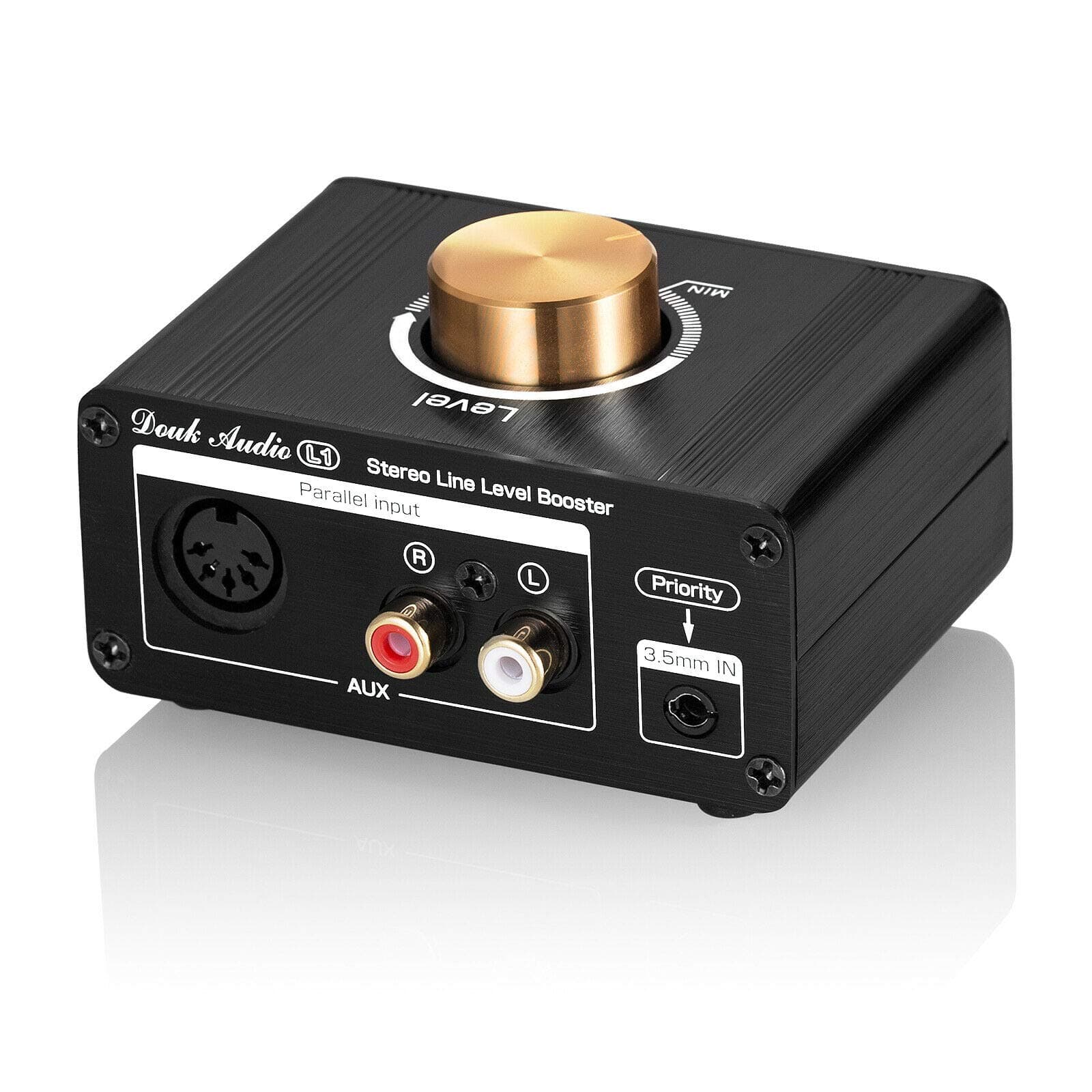
🎧 Elevate Every Note — Boost Your Audio Game Like a Pro!
The Douk Audio L1 Mini Stereo Line Level Booster is a compact, high-gain preamp designed to amplify low-volume audio sources by up to 20dB. Featuring multiple input/output options (3.5mm AUX, RCA, 5-DIN), a robust ±12.5V output voltage, and a DIY-friendly pluggable op amp socket, it delivers clear, warm sound with ultra-low distortion. Its durable all-metal build with electromagnetic shielding makes it ideal for diverse environments—from home audio systems to live stage events—ensuring enhanced volume and pristine audio clarity for professional and enthusiast users alike.




| ASIN | B08L4WYSZ4 |
| Best Sellers Rank | #24,569 in Electronics ( See Top 100 in Electronics ) #123 in Audio Component Amplifiers |
| Brand | Douk Audio |
| Brand Name | Douk Audio |
| Customer Reviews | 4.1 out of 5 stars 327 Reviews |
| Manufacturer | Douk Audio |
| Maximum Supply Voltage | 26 Volts (DC) |
| Minimum Supply Voltage | 26 Volts (DC) |
| Model | XZ-L1 |
| Mounting Type | Surface Mount |
| Number of Channels | 2 |
| Output Power | 12.5 Volts |
C**C
How to get this to work great with Pro Tips!
This product does exactly what it says it does, it will boost your audio line signal by around 20 decibels. My own measurement put this at 17.2 DB louder from 15 feet away before you start to get distortion. It can go up to around 19 DB or so but you get distortion. Even 15 db is plenty to make a stock stereo in a car really loud, but be warned you won't be pumping mass bass as the power output isn't there to drive your Fosgate 12s for example, obviously anyone installing quality equipment like that won't be using this thing. The product is cheap and has multiple inputs and outputs available (see pro tips below). It also comes with a USB-A power cable so you'll need a USB-A port available or otherwise supply your own power. Many of the complaints about this product seem to be curable but do require extra work and or parts. Pro Tips on how to get this to work great: 1. Take into account where you will be installing this. If you are installing this around unshielded cable, high voltage etc, because of its cheap nature, it will pick up a hum, this thing is not insulated at all really. It is best to keep it away from other devices and power it cleanly off a dedicated USB or power supply. See below for ideas how to fix if you get a hum. 2. The 3.5MM input will be priority and no other inputs will work at the same time if you use the 3.5MM input, however, if you use RCAs and the 5-Din this thing will take in both and mix them evenly (There is no way to to mix or boost one more than the other). The output is both 5-Din and RCA, you can use either or both at the same time. 3. Since this thing isn't driving that much power, I found even the cheapest cables work fine. Normally you want to use higher quality cables for the best sound with the least leakage but in this case we are going cheap, so even cheap cables will work. 4. If you are installing this in a car, you're probably like me and installing it on an old or stock in-dash stereo and those are horrible for grounding and will usually pick up a hum because of ground issues so here is: How to fix the dreaded hum that people complain about: First, you can try to ground your stereo better if you can. This can help, but if you are just hoping to plug it in and not mess around try a Ground Loop Isolator like this: https://www.amazon.com/dp/B06XQYN77L?psc=1&ref=ppx_yo2ov_dt_b_product_details The linked isolator uses the 3.5MM input on the amp and takes in a 3.5MM connection. An over simplified explanation is that by using an inductor that then creates a magnetic field, a ground loop isolator can essentially force any differences in current (caused by a bad or different resistance ground) to be nullified because this is what causes the hum. Please realize you'll need to get the correct kind of isolator for your inputs and outputs. Just search Ground Loop Isolator here on amazon and you'll find many. Since this isn't putting out that much power, cheap ones usually do the trick. Also keep in mind that there are two schools of thought and which one works for you depends on your situation: 1. Place the isolator between the head unit (a stereo for example) and the amp. In other words place the isolator on the input side of this amp. This is the typical way of doing things and works for the vast majority of cases in car audio although not all. 2. Place the isolator after the amp but right before the speakers if there are other components in the system like a game console, or another stereo component etc. This case is more specialized but you can pick up hum caused by the amplifier itself and it bleeds on the output side but this is less likely. The amp usually get's hum fed into it and you can eliminate that on the input side and the amp will output a clean signal. 3. Place an isolator on the input AND the output side. This is really rare and only happens in extreme instances where there are a lot of electronics at play causing problems for one another OR there are powered devices after the amp that are picking up hum from the combination of sources. In this case you'd add one on the input side as close to the amp as possible, and then one on the output side as close the speakers as possible. Good luck! This thing is a steal at the price for what you can do with it using a little know how.
G**N
Has Done An Excellent Job EVERY DAY For The Last 2.5 Years
Has Done An Excellent Job EVERY DAY For The Last 2.5 Years For My Office Stereo Setup With ZERO Problems. I use it just about everyday. For the last 15 years I've had The Logitech Z623 2.1 THX 330watts RMS System with Two 3'' Satellite Speakers and a 7'' Subwoofer that everyone swears is a 10" Sub, it's really impressive and would recommend it to anyone. I can hear it booming and pounding hard clear across the street but that's a whole different story. I just purchased a brand new LOGI Z623 about 6 months ago as the Subwoofer finally started to go out. I also have a Sound Bar above my monitor mounted to the wall. I had to split the Audio with and a 3.5mm Audio Splitter so the audio signal reaching each of the Speaker Setups which are The Logitech System and The Sound Bar, the audio signal is cut in half by the time it reaches them. This reduces or cuts the overall volume signal to each audio component by 50%. Everything was still nice and loud for the most part but the volume would frequently be at 100% to listen to my music which i listen to loudly. Many times it just wasn't enough though, i needed more- It was "almost but no quite" so I bought this Signal Amplifier and WOW! what a difference it made. My System is Super Loud Now. Louder than it ever has been. I'm getting every last bit of audio sound i want and then there's dump truck load more behind it - i just make sure to not turn it up too loud bc I could blow all of these speakers very easily and quickly. I never turn my system up to 100% bc i'd destroy it with this Singnal Amplifier and remember, My Audio Signal is already cut in half so this thing Amps the signal EXTREMELY WELL. The PreAmp Signal Booster has been doing a great job day in and day out. Sound Quality is great too. It's just nice to have all the sound i want when i want it. This is one of those purchases that i don't think about very often bc it's tucked away but when i think about it - it's one of the best purchases i've ever made. It's made in China so you never know what you're going to get but going on 3 years of nearly daily use and i would even say punishment bc i push it hard and it's held up well. So yeah, i'd recommend this as it's built well and built to last. It has a sturdy and solid construction.
J**M
The good and not so good
I purchased this item to use between my componet CD player and a Stereo Tube Power Amplifier. Because my componet Preamplifier is awaiting shipment of a new power switch. I thought this would be a good inturn solution allowing me to still listen to my CDs. The not so good. The unit has a set of RCA inputs and a stereo 3.5mm input jack. The signal chain goes from the RCA jacks through the 3.5mm input jack. Unfortunately the RCA jacks did'n't work on my unit meaning the internal contacts in the jack were not connecting properly. The 3.5mm jack did work and with the proper adapter cable and I was able to get it working in my system. It is a pretty cool little device. I did remove the covers to investigate the problem. I was surprised to see this. It will run from single 5Vdc USB power supply. Inside the unit is a small power inverter that takes that 5Vdc and generates a +/- 12Vdc isolated power supply to power the NE5532 Dual OpAmp. It provides 20 db of gain ( voltage gain of 10). It has a slight rolloff of -3db @40Hz which is not quite ideal. Otherwise the unit has excellent fidelity and for my purpose it works fine.
M**.
Sound would cut and have alot of interference
Worked good for a while, then would cut out and have interference, it was hooked up from a tv to a stereo on about 75%, didn't want to blow my speakers out so I used something else
K**E
The Icing on the cake 🎂
Ignore all the reviews that says that this device requires a separate USB power source from a phone charger etc… these newer units are shipping out with their own DC power that plugs directly into an outlet. Most of the reviews that say that you have to find your own power supply are completely outdated and should be taken down. It’s truly misleading to a lot of potential buyers in 2026. You can also ignore the reviews that say that the unit doesn’t have proper markings to tell you where the gain or volume is. Take a look at my pictures and you’ll see that the updated models come with their own power supply and proper markings so you can perfectly dial in your volume/gain. I needed this unit to boost the signal on my Buttkicker BKA-1000N amplifier in order increase the power going to my Buttkicker LFE that I installed in my couch. The factory signal or voltage from my “subwoofer out” port is naturally too weak to send a strong enough signal to the to the Buttkicker BKA-1000N Class D amplifier. Even when the amplifier is maxed out, I would have to significantly increase my volume in order to start feeling the vibrations from the buttkicker LFE. Now that I added the Douk Audio line level booster 🗣️THAT PROBLEM IS SOLVED!!! I was very nervous that it will introduce a hum or buzzing noise like some other reviews have stated, but I could gladly say that this unit caused no issues in my home theater system. It simply did exactly what it was advertised to do. IT WILL BOOST any weak RCA line level signal to the proper volume or power level that you are looking for. All the people that made complaints about the older version of the Douk Audio line L1 should definitely consider purchasing the newer model of this unit. It’s definitely worth $40 bucks You can’t beat that price and it doesn’t feel cheap at all.. It’s made out of all metal and feels extremely solid. The knob feels well dampened and turns smoothly. If this device was manufactured from a well-known brand, it would have cost at least $100-$200. I would give this device 10 stars if I could. All the negative reviews are from people that purchased the old models OR they don’t know how to use the device properly. Douk Audio listened to their customers and made this new model flawless. I’m just not sure why THE COMPANY IS NOT ADVERTISING THE NEW FEATURES OF THE UPDATED MODEL. I would give this device 10 stars if I could. Excellent device, excellent sound, excellent build quality, and excellent price. ⭐️⭐️⭐️⭐️⭐️
W**D
Excellent signal booster/preamp
"Mini Stereo Line Level Booster Amplifier Audio Preamp 20dB Gain Volume Control" fulfills every word of its title! Construction and finish are fine. As a preamp, it easily makes it into "hifi" performance. Maximum gain was about 20 dB. Measured performance using RightMark Audio Analyzer indicates 20-20k Hz frequency response that is very flat in the high end and rolls off gradually to -2 dB on the low end. Dynamic range is excellent, -93dBA. Total harmonic distortion is miniscule at 0.002 %, while intermodulation distortion measures 0.01%. These were measured using an ASUS/Xonar sound card and some of the specs are close to the sound card's limits. The only limitation that I see that could occur in some cases is that the output impedance is 100 kohms. If it is feeding an amplifier with low-ish input impedance, the audio performance could be degraded. Make no mistake: this is not capable of driving headphones, unless a headphone amplifier follows it to provide the required drive energy. The unit comes with a USB cable that can be used to provide +5 V power from a laptop or a cheap power adapter such as that used for charging many battery-operated devices. I haven't tested it with any other power supply, though it claims to be able to use anything from 5-20 VDC. Highly recommended to fulfill the need for boosting a line-level signal.
B**N
May have GND loop problems in your system.
First connected with RCA cables. Load pulsing hum. Used 3.5 m connector and made separate chassis GND cable to main stereo preamplifier . Humming stopped. Works fine now.
D**E
Fixes MX49/61 Synth Wimpy Output !!!
If you own an Yamaha MX49 or MX61 synth, then you know how wimpy the output levels are. Yamaha bumped up the output in the newest firmware, v1.01, by 6db. I have this version (see pic), but the levels are still so wimpy that a decent output level is only attainable by cranking the synth's volume knob, and the mixer's gain and all EQs to max. This is simply not acceptable, and it shocks me that Yamaha would release a product with such an issue. The fix = Douk line level preamp :: I connect the MX49's stereo outs to "Priority IN" using a shorty dual 1/4" TS (mono) to stereo 3.5mm (TRS) cable ... then ... connect "To Amp" RCA outputs to a stereo line level channel on the mixer via stereo RCA to dual 1/4" TS (mono) cable. I set the Douk volume knob to MAX. This affords adequate levels with overall sane settings :: synth's volume knob = 50%, mixer gain = 50%, all EQs = 0db. The sonic properties are great! All the synth voices sound every bit as good! Powering the Douk preamp is a little weird. It states "5 - 24V", but that CANNOT true. I initially used a 19V PC supply and the preamp went into some bizarre flashing mode and sent popping spikes to the board. Now I'm using a "smart" USB wall wart that can deliver 5-15 Volts at 2.4 Amps. Operation is perfect.
ترست بايلوت
منذ 5 أيام
منذ أسبوعين