We remain fully operational. Our teams are working around the clock to ensure your deliveries continue safely.

قم بتنزيل التطبيق


معلومات عنا
حقوق الطبع والنشر © 2024 Desertcart Holdings Limited
قم بتنزيل التطبيق
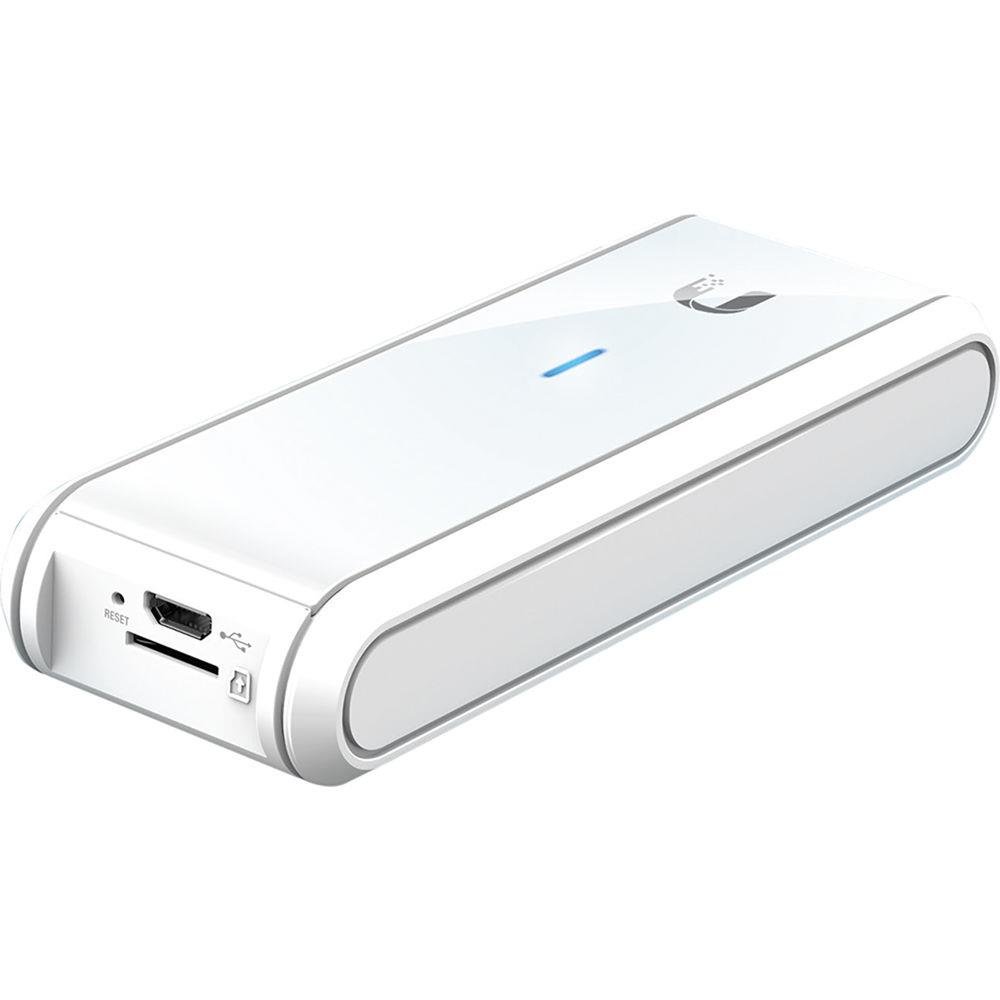
🔑 Unlock seamless, secure network control — anytime, anywhere.
The Ubiquiti Networks UC-CK UniFi Controller Cloud Key is a compact, powerful device featuring a quad-core processor and 2GB RAM, designed to run the latest UniFi Controller software with secure hybrid cloud technology. It offers remote private cloud access, easy plug-and-play setup, and future-proof expansion support, making it an essential tool for professional-grade network management.


| ASIN | B017T2QB22 |
| Are Batteries Included | No |
| Brand | Ubiquiti Networks |
| Color | White |
| Customer Reviews | 4.4 4.4 out of 5 stars (2,313) |
| Date First Available | 14 November 2015 |
| Hardware Platform | CONSUMER_ELECTRONICS |
| Item Weight | 175 g |
| Item model number | UC-CK |
| Manufacturer | Ubiquiti |
| Processor Count | 4 |
| Product Dimensions | 2.16 x 4.34 x 12.19 cm; 175.77 g |
| RAM Size | 2048 GB |
| Series | UC-CK |
| Standing screen display size | 1 |
| Voltage | 5 Volts |
| Wattage | 5 watts |
| Wireless Carrier | 3 |
| Wireless Type | 802.11a, 802.11ac, 802.11n |
S**D
Great device, perfect condition will buy again.
Quick delivery and in perfect condition. The cloud key is essential if installing a Unify network. Control all the devices from a PC or mobile app using the cloud key device.
A**H
Pricing Was Good Because of Amazon Discount
Product was good , This was for my Business activity & working Fine
S**.
Great
As mentioned
T**N
Update 30.12.17: Inzwischen läuft mein Unifi Netzwerk seit 9 Monaten stabil und ich habe es erst die letzten Tage erweitert. Es zeigt sich für mich dass es absolut die richtige Wahl gewesen ist, von der Fritzbox auf Unifi umzusteigen. Hauptgrund war ja, dass ich gesehen habe dass bei zunehmendem Alter meiner Kids der Anspruch an ein funktionierendes Netzwerk im Haus rapide ansteigt. Youtube, gestreamtes Fernsehen und Musik, Online Games usw. fordern Performance im Netz. Bei über 12 WIFI-Geräten, die permanent an den Accesspoints hängen und dabei vor allem Multimedia streamen hat die Fritzbox evtl. mit Repeater keine Chance mehr. Mein Setup ist jetzt wie folgt: Modem: Vigor Draytek Router/Firewall: Unifi USG Switch: 2x Unifi Switch 8 - 60W Accesspoints: 1x AP AC LR, 1x AP AC Lite Telefonie: Fritzbox als reiner IP-Client Netzwerkteilnehmer: ca. 20 Geräte Ich habe mein Netzwerk in 3 Netze aufgeteilt: 1x LAN-Management (wo die Unifi-Komponenten drin laufen) 1x Home-Netz 1x Netz für die Kinder Die Netze habe ich aus Sicherheitsgründen untereinander geblockt. Allerdings ist es möglich den Router so zu konfigurieren, dass trotzdem die Kids den Drucker im Home-Netz nutzen können. Die beiden Accesspoints decken das gesamte Haus über 3 Stockwerke mit einem genialen WLAN-Signal ab. Ich habe keine Verbindungsabbrüche mehr, Roaming zwischen den beiden AP's merke ich bei keinem der Geräte. Die Performance ist erstklassig und zu 100% stabil. An der unten stehenden Begeisterung hat sich nichts geändert. Im Gegenteil: Die damals noch empfundenen Nachteile sind durch regelmäßige Softwareupdates inzwischen aufgehoben. Ein VPN-Zugang ist möglich, DynDNS wird durch das USG gestellt. Der zweite LAN-Ausgang am USG ist inzwischen nutzbar. Ich kann jedem, der den Invest nicht scheut, absolut nur zu diesen Komponenten raten. Durch die Nachbesserungen habe ich jetzt 5 Sterne vergeben. ********************************************************************************************************* Ich schreibe diese Rezension gleichlautend für alle meine Unifi Komponenten: Ein Unifi Security Gate (USG), einen Unifi Switch 8 60W, einen Unifi Access Point AP AC LR und einen Unifi Cloud Key als Controller des Netzwerkes. Ich bin über das Internet (Youtube) auf Unifi aufmerksam gemacht worden. Nachdem ich selbst inzwischen im Haus über 150 qm und 3 Stockwerke mit der Abdeckung durch Powerline, Repeater und Fritzbox bei insgesamt 20 Endgeräten am Netz an die Grenzen gekommen bin, weil vor allem die Kinder mehr und mehr Datenvolumen durch Youtube, Games und Video-Streaming ziehen, musste ich etwas an der Netzwerkkonfiguration ändern. Die oben genannten Komponenten arbeiten hervorragend miteinander zusammen. Ich behaupte, wir befinden uns hier schon im semi-professionellen Bereich was die Performance angeht. 1.) Der Access Point deckt das gesamte Haus lückenlos ab - ohne Repeater (wenn auch das hinterste äußerste Eck etwas knapp ist, aber wenn ich ein Signal habe, dann bleibt es stabil) 2) Ich habe vor Umrüstung und nach Umrüstung einen Helios Test laufen lassen, bei dem Daten auf meine Diskstation geschaufelt wurden und die Zeiten gemessen worden sind. In beiden Fällen war die angeschlossene Hardware exakt dieselbe (iMac -> Synology Diskstation 916+) und dazwischen einmal die Fritzbox und dann das neue Unifi Netzwerk. Ergebnis: Das Unifi Netzwerk war doppelt so schnell in den Ergebnissen (jetzt weiß ich nicht ob die Diskstation eventuell die Performance ausgebremst hat und der Unterschied noch krasser gewesen wäre mit einer schnelleren DS). Auch bei meinen Kids ist beim Online-Gaming über Powerline festzustellen, dass das Netzwerk deutlich stabiler eine gleichbleibende Leistung bringt und die Latenz nicht mehr zwischen 25 und 150 ms schwankt, sondern konstant bei 25-30 ms bleibt. Das war bei absolut gleichen Hardware-Komponenten vorher über die Fritzbox nicht der Fall. 3.) Der Preis ist meines Erachtens für die gebotene Leistung in Ordnung ABER: Einen Stern ziehe ich ab, denn Unifi ist einerseits absolut nicht selbsterklärend. Das Manual ist nichts anderes als eine Referenz-Buch und die Software ist noch sehr stark in der Entwicklung. Heißt, es erfolgt zwar eine hervorragende Produktpflege und laufend kommen Updates mit tollen neuen Features, aber bis jetzt gibt es in der regulären Controller Software noch ein paar Lücken, die erst über das Stable Candidate gelöst wurden und dort dann noch BETA-Status haben: - Anbindung über VPN - DynDNS, hier gibt es nur minimale Auswahl an Anbietern (gut das kann ich über die Diskstation lösen, wer das nicht hat -> Pech) - Funktion des zweiten LAN-Ausgangs am USG ist noch tot (außer im BETA) - Software zwar in Deutsch, Dokumentation komplett in Englisch Man muss also schon ein gewisses Grundverständnis für Netzwerke mit bringen, sonst ist man m.E. hoffnungslos verloren. Aber Unifi hat auch einige enorm positive Punkte: + Performance, Performance, Performance + der Switch ist "gemanaged", heißt, man kann die Zuweisung auf den Ports detailliert editieren + VLANs können easy eingerichtet werden + Sehr gute Benutzeroberfläche + extrem gute Statistiken und grafische Darstellungen der Datenströme + Extreme Leistung des WIFI Access Points + Trotz der nur englischen Dokumentation und der aktuell stark in der Entwicklung befindlichen Software ist aber die Community und der Support (auch nur in Englisch) hervorragend und super schnell und damit sehr sehr hilfreich Und das sind nur die Pluspunkte, die ich als Laie empfunden habe. Ich würde jedem, der drüber nachdenkt sein Netzwerk schneller, größer und leistungsfähiger zu machen, empfehlen, Unifi anzuschauen. Vorausgesetzt Sie haben ein solides Grundverständnis für Computer und auch ein wenig für Netzwerke. Wer dann Spaß daran hat, ein wenig auszuprobieren und auch neues zu lernen - dem sei Unifi wärmstens empfohlen.
A**O
Facile la installazione. Su un sistema Unifi già funzionente e configurato, sono passato dal controller Unifi software installato su un pc alla Unifi Cloud Key in modo rapido e semplice. Ho provveduto ad effettuare il back up della configurazione con il controller sul pc, ho chiuso il controller, e dopo ho collegato la Cloud Key. Il wizard di configurazione di quest'ultima, mi ha consentito di aggiornare la Cloud Key all'ultima versione del software e successivamente mi ha proposto di configurarla o recuperare la configurazione dal back up salvato in precedenza. Cosa quest'ultima che ho fatto, con il risultato che la Cloud Key è risultata perfettamente configurata e funzionante con la stessa configurazione, stesse password di accesso, etc. del sistema come lo era in precedenza. La Unifi UC-CK, non è indispensabile per il sistema Unifi, che può essere configurato con il software apposito e gratuito fornito da Ubiquit installabile su un pc, in quanto il sistema, una volta configurato funziona senza la necessità che il controller sia sempre attivo. E potrete far ricorso al controller solo in occasione di necessità di modifiche di configurazione. Tuttavia la UC-CK consente, in quanto sempre attiva, di avere il controller sempre attivo, e ad esempio avere le statistiche di traffico continuative nel tempo, senza interruzioni, e l'accesso al controller da remoto sempre disponibile. Risulta inoltre indispensabile per utilizzare i servizi di Hot Spot con controllo di accesso per gli ospiti, che richiedono il controller sempre attivo. La UC-CK richiede lo switch Poe che vi consiglio, molto comodo per alimentare oltre la UC-CK anche gli AP in modo semplice e ordinato.
J**N
Como siempre el envío llegó un día antes de lo previsto. El cacharro funciona muy bien y es muy estable y apenas se calienta, si no quieres tener un ordenador dedicado encendido todo el tiempo al menos que tengas un servidor para otras cosas, esta es la solución perfecta para configurar tu red UniFi. En mi caso tenemos un pequeño hotel familiar con 1 antena UAP-Pro y 2 UAP-AC-LR y sin problemas. Es fácil de configurar y pude traspasar toda la configuración del PC al CK sin perder nada. Recomiendo 100%
M**L
I initially started using the Unifi products after YouTube reviews, but had a Windows PC designated as the control panel. This control panel allows you to access the whole network locally on the LAN (Unifi products talk to each other, they are not blind link conventional home user "off the shelf" stuff). After reviewing the Cloud Keys (this one and version 2), I opted for the first version, as I don't need the additional benefits, and this cloud key becomes your new control panel. You just access it via a web browser (Windows/Linux) or Ubiquiti Mobile app, from anywhere with network access. NB: If you are at home, and you don't have internet access, you have the option to access the cloud key via its LAN IP, just select from the menu. The web browser still shows options (the Windows PC and the Cloud Key), but since using the cloud key, very impressed. Lastly, if you are given the opportunity to manage someone else's Unifi network, you can add them to this key. Very impressed with the Unifi gear, was sick and tired of other brand names having gear that looked nice, GUI's looked great also, but lacked either/both the options, or seemed like they were old tech that just did the job, but don;t expect too much after that. Also, that device did not care about other devices on the network. These Unifi devices always communicate, IE: the access points automatically change their network channels so there is no conflicts. Start of with their Unifi Security Gateway, feed into it your WAN or ADSL service (from an existing ADSL modem as pass through), then perhaps an 8 port PoE switch or access point if you dont have wired devices. That's what I tried, and got hooked, and purchased another PoE switch, 4 other AP's, and then the cloud key. ...................I don't think I'm done yet......! LOLS!
Q**T
DISCLAIMER: Ubiquiti sent me a Cloud Key free of charge if I agreed to write a review. I’ve been using the Cloud Key for a few days now. My impression of it so far is very positive. As expected from the UniFi line, it pairs nicely with my Unifi Security Gateway, PoE+ switch, and AP PRO. As of this writing (07-09-2016) my only minor issue with the Cloud Key is the lack of advanced options in the controller UI, though that is more of the controller firmware than the Cloud Key itself. Most of the advanced options are already available in the controller beta firmware so I’m confident Ubiquiti will really flesh out the capabilities of the Cloud Key and their whole UniFi line. For those that don’t know, the Cloud Key is a small SoC (system-on-chip) that can run the UniFi controller software. It’s a GREAT alternative for those that don’t have a server racked or don’t really have a need for one. For those that do, just run the UniFi controller on the server. The GUI runs smooth, provides a lot of nice stats for your LAN/WAN, and makes basic management of your other UniFi devices a breeze. It even comes with a MicroSD card for those that are comfortable with the CLI and would like to save configs/other miscellaneous things to it. Speaking of which, if you are familiar with Linux you will feel at home on the CLI since almost all of the UniFi devices are running a Debian derivative (at least from what I can tell). TL;DR – Do I recommend the Cloud Key? If you don’t have a server racked, 100% without question. It’s a great little tool for the price (<$100). I’ve had no issues with the device and it’s made this network engineer very happy. I love when things are simple, cheap (in price, not quality), and just work.
ترست بايلوت
منذ يوم واحد
منذ أسبوعين