


Desertcart purchases this item on your behalf and handles shipping, customs, and support to OMAN.
⌨️ Elevate your workspace comfort and style—because your hands deserve the best.
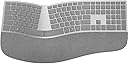
The Microsoft 3RA-00022 Surface Ergonomic Wireless Keyboard combines durable mechanical keys rated for 10 million actuations with Bluetooth 4.0 connectivity offering up to 32 feet wireless range. Designed with a natural arc and slope, it features a double-cushioned palm rest covered in luxurious Alcantara, ensuring ergonomic comfort for long hours. Compatible with Windows 10 and optimized for Surface devices, this sleek gray keyboard balances professional aesthetics with high-performance functionality.


| Additional Features | Bluetooth |
| Antenna Location | Office |
| Asin | B01MFCTRZM |
| Best Sellers Rank | #62,984 in Computers (See Top 100 in Computers) #1,631 in Computer Keyboards |
| Brand | Microsoft |
| Built In Media | Keyboard, batteries, quick start guide, warranty guide |
| Button Quantity | 78 |
| Color | Gray |
| Compatible Devices | PC |
| Compatible Operating System Family | Windows |
| Compatible Tablet Computer Models | Microsoft Surface Pro 4 |
| Connectivity Technology | Bluetooth |
| Customer Reviews | 4.1 4.1 out of 5 stars (933) 4.1 out of 5 stars |
| Enclosure Material | Alcantara |
| Generation | 1st Generation |
| Global Trade Identification Number | 00889842160284 |
| Hand Orientation | Ambidextrous |
| Item Dimensions L X W X H | 46L x 22.9W x 3.5H centimeters |
| Item Type Name | Microsoft Surface Ergonomic Keyboard |
| Item Weight | 1.01 kg |
| Keyboard Backlighting Color Support | Single Color |
| Keyboard Description | Ergonomic, QWERTY |
| Keyboard Layout | QWERTY |
| Manufacturer | Microsoft Surface Accessories - PC |
| Mechanical Keyboard Switch Model | Microsoft Mechanical |
| Mfr Part Number | 3RA-00022 |
| Minimum Required Operating System Version | Windows 10 |
| Model Name | Ergonomic Keyboard |
| Model Number | 3RA-00022 |
| Number Of Batteries Required | 2 |
| Number Of Items | 1 |
| Number Of Keys | 104 |
| Number Of Packs | 1 |
| Number Of Sections | 1 |
| Power Source | Battery Powered |
| Style Name | Modern |
| Switch Type | Mechanical |
| Theme | Office |
| Upc | 889842160284 |
User
The most beautiful keyboard ever
Pure excellence.
User
Keyboard received was in French!
Product not as in picture/description. It wasn’t mentioned neither on the pictures or the description that the keyboard is in French. Luckily I speak French... 2 stars were efficient delivery and the keyboard otherwise looks and feels nice.
User
Good
The space bars are sticky but functions good with both mbp as well as a surface
User
Perfecto para Surface Pro
Perfecto teclado para oficina. Ergonómico y silencioso. Altamente recomendado para Surface Pro. No se desconecta, rápaida respuesta y muy ligero. Este es un teclado premium para productividad, no para jugar videojuegos.
User
Awesome Keyboard!
This keyboard is an edge above the Microsoft Sculpt Ergonomic Keyboard only because the number pad is attached. what it lacks in connectivity options ( bluetooth only ) it makes up for in use once you get a USB bluetooth adapter (if needed). I beat the heck out of my equipment as I am a hard hitting typer. the wicked action of the low profile keys allows me to mitigate the mashing effect I am known for on a regular keyboard. if you want to type faster this is the keyboard for you! I have owned 4 of the Sculpt keyboards and then i found this pne and life returned to the relaxing options offered with a number pad. The heavens opened and angels sang the day it arrived!
User
What I was looking for
I have tried many keyboards on several brands, basically looking for the functionality that I had with Natural Keyboard 4000 but with the addition of wireless. This one meets my expectations so far because of this:- Lock lights. I REALLY need to know when Caps Lock is on, Num Lock, Function Lock, in that order of importance.- My last one before this was Microsoft Sculpt. I love the keys distribution on the Sculpt (which is practically the same as MS Surface Ergonomic) and the soft keys (same as MS Surface) but, as much as I see it useful for others, I hate that the numeric keypad is separated (And I travel often). I also hate that the function (FN) switch is not a key but a hard switch that constantly forget to move back and that there are no indicator lights for FN, CAPS, Num. MS Surface has all that. Many times I press a function key with the sculpt and end up doing something totally different just because that switch is in the wrong position. It's a matter of just looking at the switch but it's a small switch and not as easy to tell in which position it is.- Surface uses bluetooth. With my other keyboards, I was using a dongle. Sometimes when I travel I would forget the dongle and the keyboard was rendered useless. Once, one of such dongles got broken. I researched in many sites and some people would say there was a way to get a replacement. I never found one (For the MS Sculpt). Without that dongle, the keyboard cannot be used. I was able to open the dongle and do do some minor soldering to fix it. With the Surface Ergonomic, I connect to my laptop without the need of a dongle.- If the computer doesn't have bluetooth then I, again, would need a USB to bluetooth dongle BUT if I forget that dongle while traveling or if it gets broken, I just buy a new one and most of them range from $6 to $15 dollars and they are NOT tied to one keyboard, which was the problem with the other keyboards I used.- The function keys are not too small like in the Sculpt. I can use them way easier- With the Jelly Com KE 68 (another keyboard I tried), I had many features exactly like the Surface but the navigation keys (Home, End, Pg Up, Pg Dn, arrows) were being shared with the numeric keys. I use both the navigation keys and the numeric pad a lot. It was awful. On top of that, there was no indicator for the Num lock so I was always having a hard time trying to know whether that part of the keyboard was ready for navigation or for numbersWISHLIST- Please offer one in black- I didn't find a mouse that comes in combo with this keyboard. I had to get it separately- Please offer a base to put underneath the keyboard, like the one that Natural 4000 and Sculpt have. That or extensible legs or anything equivalent. I'm borrowing the base from SculptCONS- If I go inside CMOS setup, the keyboard doesn't work (at least on my machine). On those rare cases that I need to go to CMOS setup, I use another keyboard- One of the laptops I tried has symantec security login which intercepts the boot up (This is before Windows loads). For that one, the keyboard didn't work (I'm assuming there was no equivalent driver outside of Windows. Same situation as with CMOS setup). In the morning, when I turned on the computer, I had to temporarily use another keyboard for that laptop. It's a minor for me but, if somebody uses one of those pre-boot security measures and / or restarts the computer often during the day, that might become annoying.
User
Great keyboard. Stylish.
Connected easily and works great. Takes a little getting used to, but much more comfortable when you do.
Trustpilot
1 day ago
3 days ago