🎨 Elevate Your Digital Art Game!
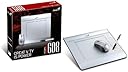
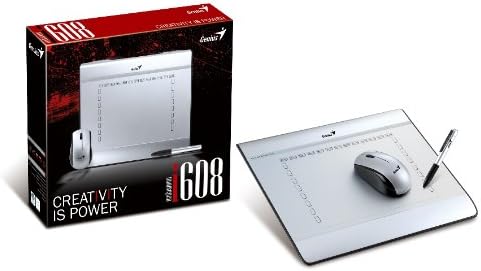
The Genius MousePen i608 Graphics Tablet features a generous 6-inch x 8-inch working area and 1024 levels of pressure sensitivity, making it perfect for artists and professionals alike. Its 3-button cordless wheel mouse enhances navigation, while the pen clip design offers convenient storage, ensuring you stay organized and ready to create.
| ASIN | B002HHLI0K |
| Customer Reviews | 3.4 3.4 out of 5 stars (58) |
| Date First Available | August 1, 2009 |
| Item Weight | 2 pounds |
| Item model number | 31100057100 |
| Language | English |
| Manufacturer | Genius |
| Product Dimensions | 10.39 x 11.81 x 0.98 inches |
R**U
Quality tablet at a great price
Let me preface this review by saying I am not the primary user for this tablet. I got it as a gift for someone who is just getting into graphic design but already exels with a mouse. I figured, hey, a tablet could work wonders. I will update this review once the intended recipient has given me more feedback on it, but from my own testing I was pretty impressed. I'll highlight my major points: Pros: - Price (can't stress this enough, you get more than what you pay for I am sure of it) - Works on Windows and Mac - Lightweight - Responsive (pen and mouse) - Sleek design (looks pretty) - Lots of features (i.e. hotkey customization which I have yet to try out) - Bundled with trial digital editing software (CS4 and Corel) - If you get the most recent driver, it has a nifty note-taking tool that lets you draw on whatever is on-screen - Very compatible with recent software. I have it functioning on Manga Studio EX4, Photoshop CS5, and Adobe Sketchbook Pro 2011. It works like a charm. Cons: - Holding the pen takes some getting used to without accidentally clicking the buttons - MOST IMPORTANT "CON": Installation of drivers. I must have spent 2 or 3 hours trying to figure out why it wasn't working with the most recent software. I'm relatively tech-savvy so when I saw that the package of the tablet itself was labeled "Please download drivers online before connecting tablet" (or something to that extent), I did just that. The problem is, when you search "Genius i608 drivers", it takes you to an official webpage with *outdated* drivers. I was wondering why I was having problems that (upon research) people were having 2-3 years ago. ***This is probably the most crucial thing to take from this review*** This tablet works just fine if you get the correct driver. To do this navigate to the official site yourself (geniusnet.com), go to Products > Graphics Tablet > MousePen i608x. Then on the left column, click Download, go to the Driver tab, and there should be just one official up-to-date driver there (well, two, one for Mac, one for Windows). Download and install that driver and you should be all set for your modern digital editing compatibility needs. I only wish I could have saved myself a few hours of searching and troubleshooting if the site was organized a little better (or if they labeled old drivers with more details or else archived them entirely). That was my only problem with this device. Otherwise, it works great and I highly recommend it.
R**H
Perfect for the money
I'll start out by saying that I relatively high expectations for this product when I purchased it, and I have not been let down. This is the only tablet I've owned, and the only one I've used for an extended period of time, and for my needs it works great. The workspace seems to be the perfect size, and has blank space all around it. I thought the blank space would be an issue, but it's really important for comfortability. The high LPI picks up deft movements quite well, the pressure sensor is wonderful, and the pen feels quite comfortable in my hand. The mouse is decent, but I prefer using the mouse I was using before (and still can with no hassle.) The mouse and pen do feel a little flimsy, I'll admit, but not so much that it would cause a problem. I have 4 issues with this tablet - no eraser end of the pen, the pen and mouse require batteries, the shortcuts on the pad don't open programs correctly (might be my fault) and there is no tilt control on the pen. However, I can grab some rechargeable AAA batteries, select the eraser tool in the program itself, and launch programs the old fashioned way. The lack of tilt is the only key aspect for me. Overall, I would highly recommend this tablet for newcomers to digital art, even just for touching up photographs in Photoshop. I don't believe I have the expertise to recommend it to a professional, but I don't see anything barring it's use in a professional application. For the money, I believe you get the best bang for your buck here.
L**B
Terrible Terrible And Will Fall Apart On You
This unit is horrible and it failed on me after light and minor use. First the pen stopped working and fell apart then the mouse stopped worked and then I had to throw it away and buy a new mouse because I could not afford to buy another tablet after you guys sent me such a poor product, I was broke. I feel really bad that I wasted my money on this unit and it didn't even last me. Not HAPPY AT ALL
U**N
A nifty tablet for first-time user
Summary: This tablet performs incredibly well at the price. I changed a few applications to make better use of the device, and am completely satisfied by the performance. Since it is less expensive than the top of the line tablets, I expect it will miss some features. The second negative (focus rolls off screen when using multi-desktop) was the reason I took one star off the review. The Good: 1) The price - I was a bit hesitant about buying the tablet when compared to its more famous (and expensive) competitors (Wacom tablet). However, I was pleasantly surprised by its responsiveness and ease of setup. 2) Mouse and pen - While I use a different wireless mouse, it is good to know I have a backup option that comes in handy when the battery runs out on my main mouse. 3) Pen buttons - there are buttons on the pen that can be used to perform quick actions (right click/undo action). 4) Easy to setup - The software works very well and it was easy to setup and use. The Bad: 1) No bluetooth: While this was not something I expected, I feel it would help if they added bluetooth linkup with a computer to save a USB port (or you could get an extender) 2) Screen to Pad translation - The pad has buttons on three sides of the tablet (top, left and right edges of the pad area). These buttons can be assigned for various functions. However, since they are on the edge of the pad, and I use multiple desktops, the mouse switches monitors before I can get to these buttons. Sofware: I found the following software incredibly useful with a tablet 1) PDFViewer - unlike Adobe Acrobat Reader, I can take notes and save them on PDF using this tool. 2) OneNote or EverNote - These allow me to take class notes directly into the computer without converting to text (useful for equations and diagrams) 3) Corel Painter - For those (like me) who never got the hang of Adobe Photoshop, this easy to use (and relatively inexpensive) program is very nice to draw and sketch
ترست بايلوت
منذ أسبوع
منذ شهرين