Buy anything from 5,000+ international stores. One checkout price. No surprise fees. Join 2M+ shoppers on Desertcart.
Desertcart purchases this item on your behalf and handles shipping, customs, and support to OMAN.
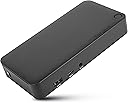
Expand your workstation and connect to virtually any laptop with the Universal USB-C DV4K Docking Station with 65W Power. When it comes to choosing a USB C docking station dual monitor compatible, this dock outshines the rest. Designed to support and power a wide variety of USB-C laptops and operating systems, including Windows, macOS, Android, Chrome OS, and Ubuntu, this patented dock packs all of the ports and power you need. A great Windows or Mac docking station dual monitor capability will deliver the monitor quality you expect from Targus. Enjoy sharp 4K video while supporting a connection up to two monitors with its two HDMI 2.0 ports. Satisfy everything you want in a USB-C docking station, plus connect all your favorite accessories – like a mouse, keyboard, hard drive, and more – with a combination of USB-A (3x USB 3.2 Gen 1 Type-A ports) and USB-C (3x 3.2 Gen 2 Type-C), plus Ethernet and audio ports. These additional ports make this the dock that beats all other docks. You'll have all the connectivity you want to keep you satisfied for year. Plus when you buy a Targus product, you get our 3 year limited lifetime warranty. This means we've got you covered. With a universal docking station, you can go from laptop to desktop with a single USB connection. Thanks to the power and versatility of USB-C, you can connect your accessories, including peripherals and monitors. And with Targus, you get docking stations fully-tested for a wide variety of platforms and operating systems. You can be confident our docks will be compatible with your workstation! Not only is it compatible with your workspace, it transforms it. If you’re trying to connect to external monitors and peripherals with just your laptop, you’ll get a mess of wires that clutter your workspace. With Targus docking stations for both Mac and PC computers, your desk becomes composed and organized. Review: Parfaite station d’accueil pour mes besoins! - Parfait pour mon utilisation personnelle à la maison. À mon travail, on utilise la même station d’accueil! C’est parfait pour alterner entre mon portable personnel et celui du travail. Review: Great docking station! - I bought this to use at my home office when I work from home. Allows me to hook up multiple monitors to my laptop. And also provides extra USB ports. In addition, I can use it to power my laptop through the same docking station cable (USB-C). That means I only have to hook up one cable to the laptop when I come home from the office. It does require that it be plugged into an outlet though. My only complaint is that when the laptop first goes to sleep, it keeps beeping. It's the noises that it makes when you plug in and unplug a USB device. It will do this over and over for about a half an hour before it finally stops. For some reason when the computer goes to sleep, the docking station makes it think that USB devices are being connected and unconnected repeatedly. You can unplug it of course. But that also disconnects power to the laptop.


| ASIN | B08PMH27YL |
| Best Sellers Rank | #76,428 in Computers ( See Top 100 in Computers ) #424 in Laptop Docking Stations |
| Brand | Targus |
| Built-In Media | Adapter, AC to DC, Output: 20V, 5A, 100W, Desk Type, Input: C6, O/P Barrel: 7.5mm, Level VI, Cable, Input US AC Cable Cord Set, 3pins, 1.8M, C5 Connector, Dock E. USB-A to USB-C Tether with 1m USB-C M-M Cable for DOCK310, Quick Start Guide, USB-C/F to A/M Adapter, Universal USB-C DV4K Docking Station with 65W Power Delivery |
| Color | Black |
| Colour | Black |
| Compatible Devices | Laptop |
| Compatible devices | Laptop |
| Customer Reviews | 4.5 out of 5 stars 78 Reviews |
| Global Trade Identification Number | 00092636346782 |
| Hardware Interface | Ethernet, HDMI, Thunderbolt, USB |
| Hardware interface | Ethernet, HDMI , Thunderbolt , USB |
| Input Voltage | 5 Volts (DC) |
| Item Dimensions L x W x H | 22.2L x 18W x 8.9H centimeters |
| Item Type Name | Docking Station |
| Item Weight | 2.24 Pounds |
| Manufacturer | Targus US LLC |
| Mfr Part Number | DOCK310USZ |
| Model Number | DOCK310USZ |
| Number of Ports | 9 |
| Product dimensions | 22.2L x 18W x 8.9H centimeters |
| Smart Home Compatibility | Not Smart Home Compatible |
| Total Number of HDMI Ports | 2 |
| Total USB ports | 4 |
| Total Usb Ports | 4 |
| UPC | 092636346782 |
| Unit Count | 1 Count |
| Wattage | 100 |
J**N
Parfaite station d’accueil pour mes besoins!
Parfait pour mon utilisation personnelle à la maison. À mon travail, on utilise la même station d’accueil! C’est parfait pour alterner entre mon portable personnel et celui du travail.
A**R
Great docking station!
I bought this to use at my home office when I work from home. Allows me to hook up multiple monitors to my laptop. And also provides extra USB ports. In addition, I can use it to power my laptop through the same docking station cable (USB-C). That means I only have to hook up one cable to the laptop when I come home from the office. It does require that it be plugged into an outlet though. My only complaint is that when the laptop first goes to sleep, it keeps beeping. It's the noises that it makes when you plug in and unplug a USB device. It will do this over and over for about a half an hour before it finally stops. For some reason when the computer goes to sleep, the docking station makes it think that USB devices are being connected and unconnected repeatedly. You can unplug it of course. But that also disconnects power to the laptop.
A**A
Seamless Connection of network and 2 displays
Bought two low end Samsung displays and connected these to the hub together with my MacBook - the USB-C connection gives me access to any devices connected to the hub. Seeing, setting up and configuring how the displays worked with my mouse was straightforward. MacOS recognized all the devices (as did Windows 11 on a Dell Business Latitude 2-IN-1 13.3" Touch, Intel 8th Gen i5, 256GB NVMe SSD). It pays to buy this Targum model or the next above!
H**F
Used to connect to 2 monitors
Used with a Lenevo Ideapad. Worked well from the start. Was used to allow multiple monitors. Charging function of the computer when connected to the docking station did not work.
L**S
Docking
Excelente lo recomiendo
Trustpilot
3 weeks ago
3 weeks ago