Buy anything from 5,000+ international stores. One checkout price. No surprise fees. Join 2M+ shoppers on Desertcart.
Desertcart purchases this item on your behalf and handles shipping, customs, and support to OMAN.
⚡ Power up your game with effortless wireless charging!
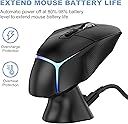
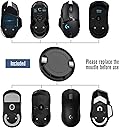
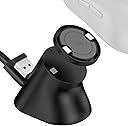
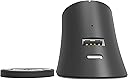
The Soarking Charging Dock is a compact, USB-powered wireless charging station designed exclusively for Logitech’s premium gaming mice lineup including G Pro X Superlight, G502X, G703, and G903 Lightspeed models. Featuring continuous wireless charging technology, a non-slip base, and a travel-friendly design, it ensures your mouse stays charged up to 80% with overcharge protection, making it an essential accessory for professionals and gamers who demand readiness and style.


| Additional Features | Multiple Compatibility, Non-slip, Continuous Charging Technology |
| Amperage | 0.1 Amps |
| Asin | B08JFXFSJ2 |
| Best Sellers Rank | #18,926 in Computers (See Top 100 in Computers) #568 in Computer Mice |
| Brand | Soarking |
| Built In Media | Station de chargement pour souris Logitech, 1.5m cable, spare wireless receiver, and 10g weight block. |
| Color | black |
| Compatible Devices | Mouse G Pro X Superlight,G502 Lightspeed, G703, G903 Lightspeed and G PRO Wireless Mice |
| Compatible Phone Models | Logitech G Pro X Superlight, G502 Lightspeed, G703, G903 Lightspeed, G PRO Wireless |
| Compatible Power Plug Type | Type C |
| Connectivity Technology | USB |
| Connector Type | USB |
| Current | DC |
| Customer Package Type | FFP |
| Customer Reviews | 4.2 4.2 out of 5 stars (2,101) 4.2 out of 5 stars |
| Enclosure Material | Plastic |
| Input Voltage | 5 Volts |
| Item Type Name | Fashion |
| Item Weight | 10 g |
| Main Power Connector Type | USB Type C |
| Manufacturer | Soarking |
| Mfr Part Number | USSKLGTMSSB |
| Model Name | USSKLGTMSSB |
| Model Number | USSKLGTMSSB |
| Mounting Type | Tabletop Mount |
| Number Of Items | 1 |
| Output Current | 0.1 Amps |
| Output Voltage | 5 Volts |
| Plug Type | USB Type C |
| Portable | Yes |
| Power Plug | No Plug |
| Power Source | USB Powered |
| Specification Met | CE, FCC |
| Total Usb Ports | 1 |
| Unit Count | 1 Count |
| Upc | 616859794061 |
| Wattage | 1.00 |
| Wired Charging Connector Type | USB Type A |
User
هزاع
مونتج جميل وفادني بشكل خورافي انصحكم به 👌
User
Dejo de funcionar
Ya no carga… funcionó por varios meses y ya no funciona
User
Does the job well [2 year update] + [4 year update] Edited November 2025
November 2025 Update: its the end of the road guys, the dock no longer charges my G502 Lightspeed. HOWEVER, I will investigate whether this is an issue with the Soarking dock, or my mouse itself, as my mouse is getting quite old now. I still feel this product is 5 star-worthy because of its performance record.][Update after 4 years: yes, it's still working great, no issues!][Update after 2 years: still going strong, no issues at all.] Had this for over 8 months now, has faithfully charged my G502 lightspeed mouse. The included charge puck (necessary for charging the mouse) fits exact and is well made, doesn't snag on my mousepad. The dock has some decent weight to it, but the magnets are quite strong, and usually requires 2 hands to remove the mouse from it. [If you pull the mouse down and off, you can take it off with 1 hand and the puck will stay in the mouse.]Many people miss this detail: the dock charges the mouse to 80-90% only!!! This is a battery protection feature from Logitech. The charging pins on the bottom of the mouse were designed for their expensive Powerplay mat, so it will never charge the mouse to 100%, because keeping the mouse at 100% always would harm the battery eventually. If you want to charge to 100%, you'll have to plug in the mouse directly to charge.[Update: I've let my mouse hit 0% multiple times now, and 30 seconds on the charger dock nets about 5-7 minutes of use, and 2 minutes of charging gets me well over 15 minutes! Using a G502 Lightspeed. The Soarking dock is plugged into a POWERED USB hub, so mine charges fast, yours may charge slower if connected directly to motherboard USB.]Overall, 80/80
User
Fantastic Charging Dock for Logitech G Pro X Superlight!
I recently purchased the Soarking Charging Dock for my Logitech G Pro X Superlight gaming mouse, and I couldn't be more pleased with its performance. As an avid gamer, having a reliable charging solution for my mouse is crucial, and Soarking has genuinely delivered.Firstly, the dock's design is sleek and modern, seamlessly complementing the aesthetics of my gaming setup. The impressive build quality provides a stable and secure base for my mouse to rest on while charging. Attention to detail was a priority in the design process.Its intelligent charging capability is one standout feature that sets this charging dock apart. I appreciate the fact that it charges my Logitech G Pro X Superlight up to 80% and then stops, preserving the battery life over the long term. This ensures that my mouse is always ready for action and extends the battery's overall lifespan. It's a thoughtful feature that demonstrates Soarking's commitment to enhancing the user experience.The installation process was a breeze, and the dock is conveniently powered by USB, eliminating the need for additional outlets. The LED indicator on the dock provides a clear visual cue of the charging status, making it easy to monitor.Overall, the Soarking Charging Dock for Logitech G Pro X Superlight is a fantastic investment for any gamer who values convenience and wants to extend the life of their mouse battery. I highly recommend this product to fellow Logitech G Pro X Superlight users – it's a game-changer!
User
Hace lo que promete pero no es facil de usar
la base cumple lo prometido, carga el mouse pero quitarlo y ponerlo tiene su truco y hacerlo mal hace que la tapadera se quede sobre la base, aparte que el adesivo que trae la base es muy potente, cuidado donde lo pongan, lo puse sobre escritorio de madera, y cuando quise moverlo se trajo la madera consigo.
User
Convenient charging dock for Logitech mouse
Works well and makes charging the mouse much more convenient. The mouse sits securely on the dock and it looks cleaner on the desk compared to plugging in a cable every time. Simple accessory but very useful if you use the mouse daily.
Trustpilot
1 week ago
2 months ago