
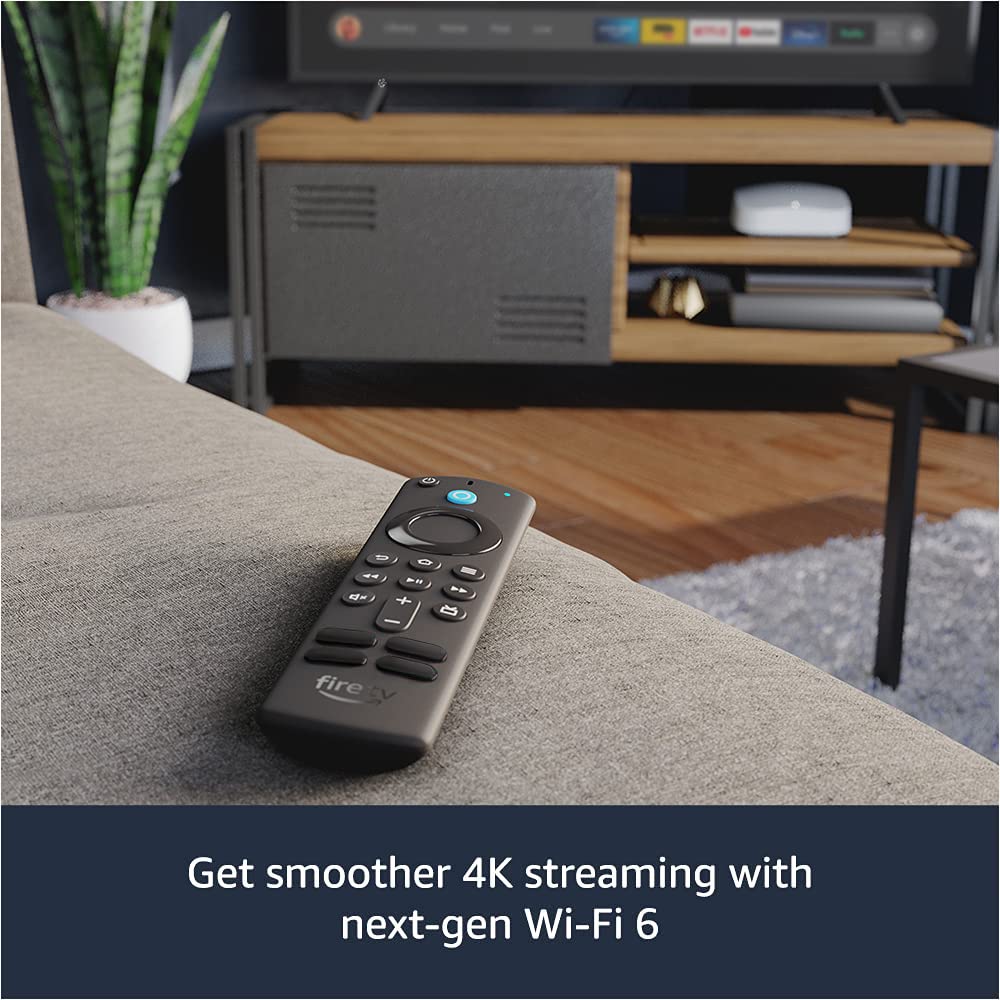


🔥 Stream smarter, faster, and sharper with Fire TV Stick 4K Max!
The Amazon Fire TV Stick 4K Max is a powerhouse streaming device featuring a quad-core 1.8GHz processor and next-gen Wi-Fi 6 for ultra-fast, smooth 4K Ultra HD streaming. It supports Dolby Vision, HDR10+, and immersive Dolby Atmos audio, delivering a cinematic experience at home. The included Alexa Voice Remote offers seamless voice control for entertainment and smart home devices, while the 750MHz GPU enables fluid gaming and multitasking. Compact and lightweight, it connects easily to any compatible 4K UHD TV, unlocking access to over a million movies, shows, and live TV options.
| Size | 99 mm x 30 mm x 14 mm (only housing) | 108 mm x 30 mm x 14 mm (including the connector) |
| Weight | 48.4 g |
| Processor | Quad-core 1.8GHz MT8696 |
| GPU | IMG GE9215, 750MHz |
| Storage | 8 GB |
| Wifi | MT7921LS. Supports 802.11a/b/g/n/ac/ax (Wi-Fi 6) networks. |
| Bluetooth | Bluetooth 5.0 + LE. Pair with compatible Bluetooth speakers, headphones, video game controllers, and more. |
| Voice support | Yes, with the Alexa Voice Remote (included) or free Fire TV app (available for download on Fire OS, Android, and iOS) |
| IR device control with included Alexa Voice Remote | The included Alexa Voice Remote can control Fire TV Stick 4K Max and certain functions (such as power and volume) on a wide range of compatible IR-enabled devices, including TVs, soundbars and A/V receivers. Note: Certain functions may not be available on some IR-enabled devices. |
| Cloud storage | Free cloud storage for digital content purchased from Amazon |
| Ports | HDMI ARC output, micro USB for power only |
| Audio support | Dolby Atmos, 7.1 surround sound, 2-channel stereo, and HDMI audio pass through up to 5.1. Dolby Atmos is available on select Netflix, Prime Video, and Disney+ titles when connected to compatible equipment. |
| 4K Support | To watch movies and TV shows in 4K Ultra HD, you need a compatible Ultra HD TV. All services may not be available in 4K/HDR. Certain services are subject to change at any time, may not be available in all areas, or in 4K/HDR, and may require separate subscriptions. Learn more about services. |
| Content formats supported | Video: Dolby Vision, HDR 10, HDR10+, HLG, H.265, H.264, VP9, AV1 Audio: AAC-LC, AC3, eAC3 (Dolby Digital Plus), FLAC, MP3, PCM/Wave, Vorbis, Dolby Atmos (EC3_JOC), Photo: JPEG, PNG, GIF, BMP |
| Output resolution supported | 2160p, 1080p and 720p up to 60 fps |
| System requirements | High-definition television with available high-speed HDMI input, high-speed internet connection via Wi-Fi. Wi-Fi 6 router needed for Wi-Fi 6 support. Auto-Low Latency Mode is included in the HDMI 2.1 standard. |
| TV compatibility | TV must support minimum HDCP requirements for protected content playback. Compatible with 1) 4K UHD TVs with HDMI capable of 2160p at 24/25/30/50/60 Hz and HDCP 2.2 or 2) high-definition TVs with HDMI capable of 1080p or 720p at 50/60 Hz. Learn more about high-definition. |
| Warranty and service | 1-year limited warranty and service included. Optional 2-year and 3-year extended warranty available for U.S. customers sold separately. Use of Fire TV is subject to the terms found here. |
| Content availability | Certain apps and services are subject to change or withdrawal at any time, may not be available in all areas and languages, and may require separate subscriptions. |
| Accessibility features | VoiceView screen reader enables access to the vast majority of Fire TV features for users who are blind or visually impaired. Watch videos and TV shows with closed captioning displayed. Captions are not available for all content. You can also listen to Fire TV with compatible Bluetooth headphones. Learn more about compatibility. |
| Included in the box | Fire TV Stick 4K Max, Alexa Voice Remote (3rd Gen), USB cable and power adapter, HDMI extender cable for Fire TV Stick 4K Max, 2 AAA batteries, Quick Start Guide |
| Software Security Updates | Learn more about these software security updates. If you already own a Fire TV, visit Manage Your Content and Devices for information specific to your device. |
| Size | 38 mm x 142 mm x 16 mm |
| Weight | 43.4 g (without batteries) |
| Batteries | 2 AAA (included) |
| Technology | Bluetooth |
| Compatibility | Fire TV Stick (3rd Gen), Fire TV Stick 4K, Fire TV Stick 4K Max |
R**R
AMAZON 4K FIRE STICK outperforms satellite, cable and internet TV with 5G compatibility
Excellent AMAZON quality 4K FIRE STICK works perfectly on a 10 year old 40” 1080P legacy SAMSUNG HDTV and 5 year old 22” 1080i VISIO HDTV providing a higher resolution than SATELLITE TV, CABLE TV, or TERRESTRIAL digital HDTV antennas! AMAZON’S 4K FIRE STICK is 5G COMPATIBLE with no video lag on fast motion, complex animations, and outdoor live news coverage! AMAZON PRIME programming is so easy to use with colorful menus and groups of programming categories like sports, news, music videos, PRIME AMAZON MGM studios, and classic movies.
S**N
Good product
Product quality very good easy to use compatible with our TVs. Nice size remote control controller is very functional.
Y**S
Best for older TV's to Bring back to LIFE!
Setup took 10 minutes, you have to add your amazon account. Sometimes it's already linked and it will only take like 2 minutes. picture is crisp, remote actually works. Just plugged the Fire TV Stick 4K Max into my 15-year-old Samsung TV and had Netflix running in under 2 minutes. Brings life to older TV's that I use in spare bedrooms or basement when working out. Pros: Setup can be fast Fast Menus 4K HDR looks sharp Wi-Fi 6 for fast internet Alexa remote controls TV power/volume + the stick—finally one remote for everything Finds stuff across apps when I ask (“Alexa, play The Office”) 3rd party apps Cons: Amazon home screen pushes their stuff hard (just ignore it) you can get apps that will change the UI If you buy this for someone else... your amazon account can be linked and they will buy things on your credit card. (Dad seriously you don't need AMC+, history plus, Disney + just pick 1) Replaced a slow smart TV interface and couldn’t be happier. If your TV is dumb or sluggish, grab this. Worth every penny.
W**R
Bu Chrome box . More programs and reall easy to download load what ever you want !!!
Worked great until Amazon hacked my download program , the started charging rental fees for old movies ☠️☠️ Throw them out and buy the chrome bot. More memory and easier to program. Amazon, stay out of my TT
C**.
Good Device, Impressed this Apple user
Being an all Apple household I have to say this device impressed me quite a bit. I purchased a Firestick Lite over a year ago to take with me for travel but it had a bit of lag and seemed to have network drop outs on hotel WiFi (I know hotel WiFi is less than desired but it was annoying). In December this device was on sale for over half off and I decided to try it out. This was after I had gotten the previous Firestick 4K which was a decent product but I found out it for whatever reason cannot get the latest software (but the "less capable" Firestick Lite can, baffling I know). I purchased this one and sent back the FireStick 4K as the refund on the Firestick 4K covered the cost of this one and then some. Things that impressed me (with caveats): 1. Ability to use captive portal internet. Currently the tvOS on the AppleTV does not allow for this unless you go through a process to spoof the MAC address of a device on the captive portal or somehow get a hold of the internet provider's help desk to have them add the MAC address. A "dance" I successfully completed once but by the time I was complete it was too late to watch anything. Caveat, this will be resolved with the upcoming release of tvOS 15.4 as the beta version has the ability to connect to captive portal internet in hotels. 2. Ease of use - plug it into the HDMI port and power via the Micro USB port via the TV or power brick. Then sign into your Amazon account. 3. Picture is really good on both 4K TVs and 1080 TVs 4. Responsive when going through menus and applications - caveat, if there is enough storage available to make memory and swap cache available. (See below). 5. Main screen is customizable and you are able to set your favorite applications there. Especially helpful for use by kids. 6. Ability to set multiple profiles. I have two daughters and was able to add the kids profiles that they use on their Amazon Fire Kids tablets. We will not go into the annoyances with the Kids interface. Caveat related to limited storage and having to "download" applications to the Kid's profile is counts towards the storage limit. Annoyances: 1. Amount of storage is only 8GB? It's 2022 Amazon could afford to add more storage to these devices without adding much to the cost. Even 16GB of flash storage would be better. Having to offload applications in order to make cache available to applications can properly run gets old. Yes, I understand you can attach an external device to this for giving it more storage via a hub for applications but that negates the "throw it in your backpack and go" idea I bought it for. 2. Not being able to easily close down applications to make more RAM and storage available (see above). I know this device is more or less running Amazon's version of Android, but even a quick way to shut down applications from the remote would be convenient. 3. The constantly running ads in the main interface and now the ads that pop-up when using live streaming applications like DirectTV Stream. We've come accept commercials are annoying enough when watching broadcast TV but an ad that takes over the screen in the middle of the program is a bit too far. 4. No geo-location ability. This means applications that have the ability to "know" where it is based on the IP address of the internet will automatically know which channels to load (or allow you to "spoof" your location with a VPN). If this is not present services like DirectTV Stream default to the billing zip code and you are locked to the channels for your billing zip code. 5. Kid's Profile cannot be sorted and customized in the same way the regular profile can. Unlike the AppleTV, it is not a profile set with age restrictions and purchase restrictions and it being there same interface as the adult profiles. It might be cute to have a kids interface but it's annoying for kids who already know how to navigate the regular interface. It is the same type of profile that the tablet has and more or less shows what "Amazon thinks they would like" based on habits. Applications cannot be pinned and in addition to this they have to be re-downloaded after being added to their profile instead of just appearing on the profile. This counts towards the used storage. Amazon needs to fix this across all of their devices and do what iOS and tvOS does and have a data partition for a user with applications be available to all users so you do not have to re-download applications. The above said, I've deleted the kids profiles. My kids only go to the pinned applications and access their profiles continued in those applications. 6. All of the privacy settings are automatically set to "allow" - location, watching history, targeted ads, application downloads etc. You have to go into every application as well as the settings for the device and the application setting on the device to turn all of this off. Unless you really "dig" the settings are kinda hidden which is the point as Amazon makes a ton of money off of selling the data provided by the device and applications to 3rd parties. 7. Updates are a PITA. Update notifications are given but not for how many or what they are for. Usually it takes several attempts to check for and run all of the updates. Several times I have thought I bricked the device as it seems to hang when "installing". Backing out of the update, restarting the device and running the scan for updates then shows the update completed and another update is showing. This is a common theme with all Android based devices. Conclusion: If you are an Apple user and looking for something that give you access to your streaming services (Disney+, Netflix, Hulu, DirectTV Stream, PBS etc) on the as well as AppleTV+ this device will do the job. If you are like me this will more than likely be your travel and secondary device that gets tossed in or stays in a bag. DO your due dillgence and turn on all of the privacy settings to "off" or "do not allow" for the FireOS and each application, this usually stops the ads during live TV streams.
A**S
Outstanding streaming device that completely transformed our home entertainment!
This Amazon Fire TV Stick 4K Max has been absolutely incredible and revolutionized how we consume entertainment in our household - the quality is exceptional with lightning-fast performance that loads apps instantly and streams 4K content smoothly without any buffering or lag, and the Wi-Fi 6 compatibility means rock-solid connection even when multiple devices are using our network simultaneously. The functionality is phenomenal as it gives us access to virtually every streaming service we want while the Alexa Voice Remote makes finding content effortless with simple voice commands, and I love how the included TV controls eliminate the need for multiple remotes cluttering up our coffee table since this one device handles everything from volume to power. It looks great with its compact, sleek design that disappears behind our TV while delivering premium performance, and the setup process was incredibly simple - just plug it in, connect to Wi-Fi, and start streaming within minutes without any complicated configuration or technical headaches. At this price point, it's amazing value compared to expensive smart TVs or cable subscriptions that cost hundreds more while delivering far less content variety - this little device has given us access to thousands of movies, shows, and apps while actually improving our viewing experience with faster navigation and better picture quality, and the Alexa integration has made controlling our entertainment so convenient that we can't imagine going back to traditional remotes, making this one of the smartest technology purchases we've made for enhancing our daily relaxation and family movie nights.
A**R
Easy Setup
Functions good, compatible with various TV brands
B**.
THE MOST FLUID AND COMPLETE DEVICE
✨2023 - EXCELLENT FiRESTiCK 4K MAXX STREAMING PRODUCT, CONNETION VIA WiFi 6, EASE OF USE customizable MENU - Can get a special price if you upgrade from your old to newer model✨ 🎇PROs : 1. Ability to use captive portal internet. Currently the tvOS on the AppleTV does not allow for this unless you go through a process to spoof the MAC address of a device on the captive portal or somehow get a hold of the internet provider's help desk to have them add the MAC address. A "dance" I successfully completed once but by the time I was complete it was too late to watch anything. 2. Ease of use - PnP HDMI port and power via the Micro USB port to power adapter. Then sign into your Amazon account to customize. 3. Picture / Streaming speed is excellent on both 4K and 1080P 4. Responsive when going through menus and applications - caveat, if there is enough storage available to make memory and swap cache available. 5. Main screen is customizable to set your favorite applications there. Especially helpful if you have in kids room. 6. You can add/use a remote app to your iPhone or android device if you like to control your Firestick from your phone which is pretty fun & cool if u like other apps. 🔴CONs : 1. Only has storage amount of 8GB ??? It's 2023 Amazon could afford to add a adapter or more storage to these devices without adding much to the cost. Even 16GB of flash storage would have been great! 2. Not being able to easily close down applications to make more RAM and storage available for apps wanted. This device is running Amazon's version of Android, but even a quick way to shut down or uninstall applications from the remote would be convenient & useful. 3. All of the privacy settings are automatically set to "ALLOW" - location, watching history, targeted ads, application downloads etc. You have to go into EVERY application as well as the SETTINGs for the device and the application setting on the device to TURN ALL OF THIS OFF. Unless you really "DIG" into the settings are kinda hidden which is the point as Amazon makes a ton of money off of SELLING DATA provided by the device and applications to 3rd parties. 4. The constantly running ads in the main interface and now the ads that pop-up when using live streaming applications like DirectTV Stream. We've come accept commercials are annoying enough when watching broadcast TV but an ad that takes over the screen in the middle of the program is a bit too far. 5. No geo-location ability. This means applications that have the ability to "LOCATE" where it is based on the IP address of the internet will automatically know which channels to load (or allow you to "spoof" your location with a VPN). If this is not present services like DirectTV Stream default to the billing zip code and you are locked to the channels for your billing zip code. 5. Updates are a PITA. Update notifications are given ( how many ? what for? ). Usually it takes 4-7 attempts to check for and run all of the updates. . Backing out of the update, restarting the device and running the scan for updates then shows the update completed and another update is showing. This is a common theme with all Android based devices. CONCLUSION: It is a excellent little 4k device that get the job done , unit runs very smooth surprisingly even with stock apps, just hopefully in future updates give user optional control to uninstall / stop running apps not wanted or used to free up RAM space. Definitely recommend getting 1 or 2 if you dont have a smart tv or want a external 4k streaming device capable of running over WiFi6 technology.
ترست بايلوت
منذ يوم واحد
منذ 3 أيام



