Desertcart purchases this item on your behalf and handles shipping, customs, and support to OMAN.
🎶 Elevate your audio game—because your sound deserves the spotlight!
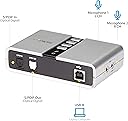
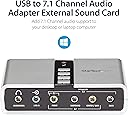
The StarTech 7.1 USB Audio Adapter (ICUSBAUDIO7D) is a compact external sound card that upgrades your PC or laptop audio to immersive 7.1 surround sound via a single USB 2.0 port. Supporting both analog and digital outputs with sampling rates up to 48KHz, it offers plug-and-play installation on Windows systems, easy volume and mute controls, and multi-input capability, making it an ideal solution for home theater, gaming, and professional multimedia presentations.


| ASIN | B002LM0U2S |
| Audio Output Mode | Surround |
| Best Sellers Rank | #23 in External Sound Cards |
| Brand | StarTech.com |
| Built-In Media | 1x external sound card, 1xUSB Cable, 1xInstallation CD,1xInstruction Manual |
| Compatible Devices | Desktop, Laptop |
| Customer Reviews | 4.0 out of 5 stars 1,985 Reviews |
| Global Trade Identification Number | 00065030835466 |
| Hardware Connectivity | USB |
| Hardware Interface | USB |
| Hardware Platform | PC |
| Item Dimensions L x W x H | 3.9"L x 2.4"W x 1"H |
| Item Highlight | External sound card for laptop/PC, up to 7.1 surround sound, Digital SPDIF, Analog 3.5mm |
| Item Type Name | External Sound Box |
| Item Weight | 0.09 kg |
| Manufacturer | StarTech.com |
| Maximum Sample Rate | 48 KHz |
| Mfr Part Number | ICUSBAUDIO7D |
| Model Name | 7.1 USB Audio Adapter External Sound Card |
| Model Number | ICUSBAUDIO7D |
| Number of Items | 1 |
| Number of Packs | 1 |
| Platform | Windows 10, Windows 11, Windows 8, Windows 8.1, Windows Vista |
| Signal-to-Noise Ratio | 120 db |
| Surround Sound Channel Configuration | 7.1 |
| UPC | 065030835466 |
| Unit Count | 1 Count |
| Warranty Description | 2 Year |
B**8
Works Great
I have Linux Mint operating system (OS), just plugged the sound card in, no drivers, it works flawlessly. It is compatible with Ubuntu OS I heard. I was thinking no way the sound quality would be great for a cheap sound card, however the sound is fantastic. Value for money, this is where I got much, much more quality than I expected. I only used the regular desktop speakers, no more, I don't need 7.1 for web browsing. The box is the size of a deck of cards. I didn't use the software disc since my desktop doesn't have a CD/DVD drive. My integrated desktop computer sound card was partially damaged during a lighting storm , I only had sound coming from the right speaker, that is why I got this USB sound card. Now both speakers have sound.
C**H
Works great with minor configuration requirements (Windows 11)
Device as expected and was extremely reasonable priced. The programs and drivers seem old and the UI looks like its from win95. It isn't necessary for use and can just be a generic usb 2.0 device configured thru windows. It takes a min to configure in win11 but does produce 5.1 surround. Isn't just plug and play, you have to configure it in windows and windows doesn't seem to want to allow you to the menu necessary (No fault of device). I couldn't find the location of the configs in basics system settings menus. WHERE YOU HAVE TO GO TO CONFIGURE: 1-"Open Sound Settings: Type mmsys.cpl into the Windows search bar and press Enter to open the classic Sound control panel.". 2-click on device. 3-configure. Device is great for my use. Computer->EKL Switch->This Device - to transfer my surround between 2 computers using a Logitech 5.1 THX surround. From a gaming standpoint, this functions great and I don't notice a difference between direct motherboard and device sound output. Device shows as DVD quality output.
K**R
Underpowered - you may need a powered USB hub
This device was working fine for about 2 months on a Windows 11 machine and then quit. I tried uninstalling and reinstalling in Device Manager and updating drivers, etc. The thing that fixed it was a powered USB hub, which is odd because it was the same USB port I had been using previously without issue. The price is right, and it functions well, but you might need a powered USB hub to go with it.
R**Z
AMAZOn's rule of 30-day not being able to ship something back when it's damaged
Zero Stars you can't even hook up the StarTech.com I have had it over the 30 day mark because I couldn't get anybody to install it so I tried installing it a couple days after the window I didn't know the window was like that but it is incompatible with my system and which the item says that it is compatible I read reviews everywhere and people cannot hook it up and they say it's garbage and now I realize it's garbage too Amazon does not seem to have a place on the website to speak to a representative about this problem hopefully I can call them or figure out another way to get this item returned to them because I don't think it's right got with all the reviews I read and with myself trying to hook it up that you're stuck with something that don't work Amazon has been good for me but this left a bad case in my mouth for Amazon
L**K
A Splendid External Computer USB-to-Digital/Analog Sound Card
I have a home theater in which I have a media center computer; this uses a GNU/Linux operating system (Xubuntu). Its default sound is good (it has a TosLink output) but I wanted something better, to wit, USB sound output. (This review will be of most interest to those who also use Linux.) I received this StarTech.com 7.1 USB Audio Adapter External Sound Card with SPDIF Digital Audio Sound Cards ICUSBAUDIO7D yesterday and I now have it set up. Frankly, it is not quite as easy to use as one might think; this has nothing to do with the product itself which is nothing short of superb. Rather the difficulties are due to the nature of your computer and just how knowledgeable you are about changing parameters. The default in almost all computers is for the sound to be routed through the computer's internal sound card to the line or headphone output jack. These are analog jacks. The quality of the computer's sound card determines the quality of the sound you will hear. Unfortunately, most internal computer sound cards are mediocre. Of course there are some which are superlative but these are few and far between (not even to mention very expensive). This little inexpensive device allows complete bypassing of the computer's sound card in favor of your amplifier or receiver. If you have a high quality one, it and it alone will determine the quality of the sound you hear (of course this also depends upon the quality of that to which you are listening!). As stated, I use a GNU/Linux operating system on my media center computer located in my home theater (it is a ZaReason MediaBox 5330 model with the Intel i5 processor and 16 GB RAM). Hooking this device to a computer is very easy. You merely take the included USB cable, plug one end into your computer, and the other end into this device. Then you connect one end of a Toslink cable to the S/PDIF output on the back of this sound card and you plug the other end into the appropriate Toslink connection point on your amplifier/receiver. Will you then immediately hear digital sound? No. First you must go into your sound settings section and change the settings from the default analog to the appropriate USB digital setting. After you do this, will you then hear digital sound? Again, no. You must go into the sound settings section of the programs you use to play media. In my case, I use three: VLC Media Player, SM Player, and Audacious. Each of these has its own settings menu (in VLC's case, you'll want to use the advanced menu rather than the simple one). Once all of THOSE are set properly, will you THEN hear digital sound? You bet!!! And it's just great. The sound in my theater, whether playing music (FLAC files) via Audacious, or movies (videos), especially ones with "surround" tracks, through VLC or SM Player, is so much better than the analog (surround) sound I previously used as to make such a comparison meaningless. There is no comparison! My wife can easily hear the difference and I would guess that almost ANYONE would hear the difference. DTS (regular or lossless)? Not a problem. Dolby Digital (regular or lossless)? Not a problem. 7.1 output? Again, not a problem. Just a pleasure! Why would I need a device such as this? It is because my receiver, a Yamaha RX-Z9, was made just before the introduction of HDMI connections. If you have a receiver AND a computer with modern HDMI connections, you don't need this. One HDMI cable will carry picture as well as audio. But if you want digital sound output from your computer, with all of its advantages, and your computer does not have an HDMI output, and/or you have a receiver which does not have HDMI but DOES have digital audio connections, then this is your device. And, at 33 bucks or so, it won't break the bank! It also has analog outputs which carry up to 5.1 analog channels if your receiver has those inputs. Naturally it will also output straight stereo. It even has a headphone jack as well as an analog line input jack. It's quite a versatile instrument! By the way, the changes in audio configurations I mention above apply to ALL computers regardless of the operating system (Windows, Mac, Linux, etc.). It may be a bit trickier to use with a Windows computer (a CD with the necessary drivers for Windows is included; no special setup is required for Mac or Linux) but it still shouldn't be too difficult for fairly knowledgeable people. Its specifications claim it supports 16-bit 44.1/48 kHz sound output. But I can tell you that playing a 24-bit 48 kHz sound file sounds tremendous. I played a "record" downloaded from a company called Pristine Classical. It has several pieces within it: all of the experimental stereo recordings made by Arturo Toscanini and the NBC Symphony, recorded in 1954. I chose to buy the 24-bit 48 kHz FLAC file and I played it through this device just this morning. I need not say any more than that it sounded as if it had been recorded yesterday! For all practical purposes, no one need worry about any "limitations" in this unit's specifications. Just please take my advice: if you are comfortable about changing parameters within a computer, or, if you know someone who is, or even if you are willing to spend money to hire someone who can install this properly, then by all means buy this item if you have need for such a device. If you are not comfortable, for any reason, then merely use the default sound settings of your computer. Frankly, they are adequate for many people. But I truly am extremely happy I bought this StarTech device. (It is not the first item I have bought from this company; in my experience, their products are first-class in every way.) I give it my highest recommendation for anyone who has need for it. Thank you very much for reading this. Lawrence H. Bulk
M**Y
I wish it worked as advertised
With a new Dell XPS computer that lacks a Line-In jack, I have been looking for an effective way to add this function. This looked like a winner, with the Line-In as well as two microphone jacks on the side panel for right and left channel. I was hopeful that it would be the solution to my problem., Ordered from Amazon and received promptly. But when I plugged it in, there was a base hum on the microphone inputs, more on the left than the right. And the Line-In did not work at all. Contacted Amazon, the they promptly send a replacement. Plugged in the replacement, the Line-In does appear to work perfectly. But there is still a low level sound on the microphone input. And the left microphone input seems to be a bit distorted compared to the right. One other problem, with my previous computer, using the sound card, while recording with the Line-In I could monitor the recording through the speakers. With this box, whether using the internal sound card or the box's speaker output, there is no sound from the speakers while recording. Makes editing and producing difficult. Sum total is that the replacement box may be performing as well as it can, but that is still not satisfactory. I likely will return it and opt for an internal sound card.
G**N
Works for me
Works great with my new Dell PC running Windows 11. My old internal Creative Sound Blaster audio card didn’t work w my new pc. This one works well and I can also use it with a laptop if needed. Glad I didnt buy an internal sound card which would have cost 3 times as much. Sounds great w my 5:1 spkr system. Good price too.
M**T
Fantastic!
Finally, I can replace my onboard sound card (Realtek). The onboard card was fine until I had to find new drivers after a reinstall, and couldn't find any compatible with Windows 10. Tried several and they were all unstable at best and caused random system freezes. I even tried a new Creative Labs sound card and had the exact same problem finding stable drivers with Windows 10. So, I uninstalled all those failed driver attempts manually with Autoruns (MS Sysinternals app) then when I had a clean stable system again, I did this... Now that things were back to onboard sound disabled in BIOS and system stable with the default Windows sound driver, I thought I'd try this StarTech USB sound card, because I was out of options frankly and didn't want to buy a new system board (cpu, memory, etc), and I'm very glad I did. Install was as simple as plugging it into my Logitech G51 (5.1 Surround system) and I had sound again. Well, at least stereo sound from Left/Right. At this point, I didn't install the StarTech USB drivers that came with it figuring I'd run into the same issues with old drivers from circa 2008 running on Windows 10, so I went a totally different direction. This is what works for me. Instead of the StarTech drivers I downloaded the "Dolby Access" App from the Windows Store (you can get it from Dolby.com too) and voila! I have Dolby Atmos sound playing on my 5.1 surround speakers! Sounds fantastic! You will have to turn on Spacial Sound and set it to "Dolby Atmos for Headphones" in the Sound Tray Icon (not quite intuitive). I think it's treating my Logitech 5.1 setup as if they are a set of headphones. Sound is very immersive. I liked it so much I purchased the "Dolby DTS Headphone:X" app as well. Since I can control the EQ through the Logitch G51 Console it works amazingly well for me.
M**Z
It just works
It just works! Before buying this I extracted the 7.1 channel audio from HDMI signal. I needed to use a dummy screen and it caused numerous headaches under Win11 as you can imagine. I was considering buying the Sound Blaster X4, but all the reported problems were giving me pause. I decided to give this thing a chance due to the price and that was a great decision. It just works. No hassle, no problems. Just remember to use the old audio settings console in windows (mmsys.cpl)
N**A
少し値は張るがばっちり。
似たような他社製品で価格の安いものを使っていたが、ドライバーが古いWindows用の物しかなかったり怪しい中国語だったり、動作も不安定だった。 最近ノイズが入るようになったり認識もされないことも多々発生するようになって、こちらの製品に買い替え。 少し値は張りますが、安定動作、ドライバーの提供も問題なく安心して使用できる。 専門家ではないので感覚でしかないのですが、音もよくなった気がします。
R**T
Helt flawless, bara att slå till!
Köpte två stycken för ett halvår (jan 26) sen och båda har rullat på helt felfritt, så de jag har räcker gott och väl. Sjukt stabil kvalitet. Synd bara att den är slut i lager just nu. Hoppas säljaren tar in den igen, för det är verkligen bara att slå till om man funderar. Jag kommer definitivt hålla koll på det här märket framöver.
R**O
Startech scheda esterna usb 7.1 Davvero efficiente!
Mi serviva una scheda audio, stabile, per pilotare almeno 3/4 canali audio separati di output, per un impianto da 6/8 bass shaker; Lo fa, ed anche bene; - i segnali sono puliti, molto più potenti della scheda audio Realtek; - altre schede audio esterne hanno ceduto dopo 1-2 giorni di utilizzo, ed è stato un tribulare tra resi e rimborsi per via del tempo perso; - Invece questa scheda audio, leggermente più costosa, è stabile, sta facendo il suo dovere, precisa e potente; -Ottima come sostituta di una scheda audio interna; è plug & play 7.1; io l'ho connessa ad una Usb 3cavi tutti inclusi nella confezione, insieme al cd di installazione; -Importante: ricordatevi di disabilitare l'audio Realtek di Windows 10; altrimenti questa scheda, non può prendere il controllo totale dell'audio del vostro Pc, ed è quello che vi serve per poter accedere a tutti i canali; - Forse esteticamente non è il massimo e sembra plasticosa; anzi a dire il vero è bruttina, (mi ricorda Blender di futurama) ma se funziona e anche bene, non mi importa dell' estetica; anzi mi sono affezionato; - Vale tutti i soldi che costa; meno di 60 euro; Dopo un mese di utilizzo, funziona, sembra instancabile; Non scalda in nessun modo; in pieno esercizio lavora a temperatura ambiente; Vedremo quanto dura; Per ora un prodotto serio, e funzionale; Dopo 1 anno continua a pilotare i bass shaker della mia postazione con efficienza, Consiglio vivamente Saluti Rio
T**U
5.1
Fonctionne à merveille, enfin mon laptop joue en 5.1
Trustpilot
3 days ago
2 weeks ago