Desertcart purchases this item on your behalf and handles shipping, customs, and support to OMAN.
⌨️ Elevate your workspace with compact, secure, and unstoppable typing power!
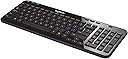
The Logitech K360 Wireless USB Desktop Keyboard is a sleek, compact keyboard designed for professionals who demand efficiency and reliability. It offers a 20% smaller size than standard keyboards, a remarkable 3-year battery life on 2 AA batteries, and a no-lag 2.4GHz wireless connection with a 10m range. Programmable hotkeys streamline your workflow, while 128-bit AES encryption ensures your keystrokes stay secure. Compatible with Windows and Mac, this keyboard blends convenience, security, and performance in a glossy black finish.


| ASIN | B007PJ4PN2 |
| Additional Features | Programmable Hotkeys, No-lag Connection, Compact Size, Cross-platform Compatibility |
| Antenna Location | Personal |
| Best Sellers Rank | #1,111 in Computer Keyboards |
| Brand | Logitech |
| Built-In Media | USB Cable |
| Button Quantity | 104 |
| Color | Black |
| Compatible Devices | Desktop and laptop computers with available USB port that support external keyboards and run Windows 10, 11 or later Compatible Devices Desktop and laptop computers with available USB port that support external keyboards and run Windows 10, 11 or later See more |
| Compatible Operating System Family | MacOS, Windows |
| Compatible Tablet Computer Models | AAUB P30 |
| Connectivity Technology | Logitech Unifying protocol (2.4 GHz) |
| Customer Reviews | 4.4 out of 5 stars 8,746 Reviews |
| Enclosure Material | Acrylonitrile Butadiene Styrene |
| External Testing Certification | Não aplicável |
| Global Trade Identification Number | 00088020616562, 00097855085368, 10097855085365 |
| Hand Orientation | Ambidextrous |
| Item Dimensions L x W x H | 14.96"L x 14.96"W x 6.14"H |
| Item Type Name | Keyboard |
| Item Weight | 480 g |
| Keyboard Backlighting Color Support | Single Color |
| Keyboard Description | The Logitech K360 Wireless Keyboard is a compact, glossy black, wireless keyboard with programmable hotkeys, a no-lag connection, and 128-bit AES encryption. |
| Keyboard Layout | QWERTY |
| Language | English |
| Manufacturer | Logitech |
| Mfr Part Number | 920-004088 |
| Minimum Required Operating System Version | Windows XP |
| Model Name | K360 |
| Model Number | 920-004088 |
| Number of Batteries Required | 2 |
| Number of Items | 1 |
| Number of Keys | 104 |
| Number of Packs | 1 |
| Number of Sections | 1 |
| Power Source | Battery Powered |
| Recommended Uses For Product | Personal |
| Series Number | 920004088 |
| Special Feature | Programmable Hotkeys, No-lag Connection, Compact Size, Cross-platform Compatibility |
| Style Name | Compact |
| Switch Type | Membrane |
| Theme | computer accessories |
| UPC | 617407426977 887594248502 172302696790 088020616562 665392051414 803982778918 804067406283 168141472688 151903014288 611101340751 132017926315 745449838950 097855085368 |
| Unit Count | 1 Count |
M**T
A Perfect Size -- Compact With Everything I Need
I have purchased this Logitech wireless keyboard (K360) several times for my Windows desktop. It is perfect, compact, easy to use, and has all of the keys and features I need. I work in the tech field and especially love, and use every single day, multiple times a day to take screenshots, the gold function (FN) key with black letters by pressing it, then the Print Scr (Home) key. That combination takes a screenshot of whatever is visible on the page. Then I paste it (Ctrl-V) into one of my two image editors and crop it to my needs. I have tried many keyboard types, and not every style has that the FN key/feature. Since I can't live without it, I don't waste my time or money buying other models. Also, many other keyboard types and styles are either too large or have a curved bottom edge for "wrist support" that is uncomfortable, or they have too many other features I don't need and will never use. For that reason, I have worn out this particular model (Logitech K360) more than once by using it so often that portions of the white letters for capital N and capital M are not fully visible. Two other benefits of this keyboard are that it has an On/Off slider button you can turn off to save battery power, or as a convenience when traveling and packing it in a suitcase or shoulder bag. Another feature I appreciate is the Windows key (bottom left) between Ctrl and Alt. Every night, I put my computer to sleep (Start - Sleep), and in the morning, I press the Windows key to wake it up to enter my password. I highly recommend this product and will continue using it until it is no longer compatible with Windows.
W**?
Death to the unifying receiver! But other than that it's a great keyboard.
The key spacing is a bit wide. Not a turn off... it will actually probably (no scientific backing, just what I think..) improve typing accuracy for most people in the long run and I know most people need that kind of help (no offense. I can probably do over 100 WPM with generally good grammar, but most people can't...). I also like the media keys and that, unlike many other cheap bluetooth keyboards, the F1-F12 keys REQUIRE you to press the FN key to access their alternative functions. Which this is priced very competitively to said keyboards. One competing product is the more expensive AmazonBasics keyboard. Said keyboard automatically assumes you want to use the alternative functions of the F1-F12 keys by default. A bit silly if you ask me, but then again it is technically made for Mac users. I'm using it (and now this keyboard) on my Surface Pro and my desktop computer (which, thanks to what the Z87 MPower motherboard comes with, has bluetooth connectivity built in). TL;DR: Overall the keyboard works just fine. The only annoying thing, the little "unifying receiver..." Basically if you want to use a Logitech mouse with the receiver that comes with this, you NEED software that this doesn't come with (that I saw...). Re-pairing something with this is not plug and play. So for instance in order to use my M505 mouse with this, I needed to download the Unifying software from Logitech (thankfully only about 4 megs), and then turn my mouse off and on. Overall not a hard process but I REALLY wish this would be made more clear somewhere on the product page. They just claim that you can use it like this and then give you a list of compatible devices. Maybe I just skipped over that section, but it's not really clear that you need anything beyond what Windows installs this as. Furthermore, I don't think this can be used with android devices. At least not easily. Pretty big con if you want to use this with all of your devices. I have a little micro usb to USB port cable somewhere. Long story short I almost returned this because I though the unifying thing was plug and play, but then decided to read up on it a bit more and found out that it was not. Afterwards, all is well (except, I suppose, my very probable lament that this likely will not work with my non-stock android device through USB). Edit: Actually, I was very pleasantly surprised. The Unifying USB receiver actually does work with my Android smartphone! I simply hooked in my MicroUSB to USB host adapter and then connected the receiver. Both the keyboard and mouse worked just fine. Now this is still a bit of an inconvenience because I need to carry around a little adapter with me, but still... I suppose this Unifying receiver does have some advantages in that it can also be used in the BIOS whereas bluetooth cannot. I'm bumping up my rating to 5 stars.
D**N
Ideal keyboard on many levels, for both PC and Mac
I work from home and this is my primary keyboard. I am a minimalist, so I don't like cords and I don't like "stuff" on my desk. This is perfect for me. I was first drawn to the small size. I can shift the keyboard anywhere on my desk or hold it in my lap if I wanted. It leaves plenty of room for my mouse to roam. I was skeptical about the feel and the battery life. I use Mac and PC laptops as well as a PC desktop. I have always been most comfortable on a full size PC keyboard - the key spacing, the feel, the general ergonomics. Laptops always feel cramped and some of the keys are often in the "wrong" location compared to a desktop keyboard. That is the one downside of this keyboard. A couple of common keys are moved to save space - namely the page up and page down, which I use heavily to switch browser windows or Excel sheets. Everything else is decent as far as location. I was really afraid of how the keys would feel coming from full size desktop keyboards. If I had it my way, they would bring back the mechanical click keyboards from the 80's and 90's PC's. This actually feels pretty good. It is a solid click and feel when buttons are depressed, great feedback. These don't feel anything like laptops with the mushy key strokes. This feels solid. I've had it for months, and I always leave it on. It is smart enough not to drain the battery when not actually being typed on. It may be a small inconvenience to some to simply switch it on and off, but the convenience of not thinking about it is great. In this way, it functions like a wired keyboard without the unsightly cords. I always prefer corded peripherals because I hate thinking about charging devices. We all have enough rechargeable products to think about. With this, it's not an issue at all. I have no problem charging or replacing the batteries once or twice a year when I use this device for most of the day, every day. Aside from feel and battery life, this has a couple more things going for it. It looks real nice with the piano black color. It's small and the back is adjustable. I leave it flat for my preference, but maybe not for everyone. Also, the media keys are quite helpful. It's clumsy to click through to volume on the screen. This is much more intuitive. A lot like a laptop in that respect. Speaking of which, the function keys are useful as well. I haven't messed around too much with the programming as I don't need the function keys too much, but I do use some of them. This is easily used on both PC and Mac. This is a natural PC keyboard, but you can customize for a Mac when you first pair it. I didn't do any customization and use it just fine with the Mac. I use both OS's pretty heavily and use the same desktop setup (monitor, mouse, keyboard, etc.) on both of them pretty seamlessly. Finally, this is a great value. I was willing to spend much more on a keyboard because I spend so much time and make my living on the computer. I wasn't convinced I would like this but gave it a try because it was only about $23. For that price, I expected it to be low quality and disposable, and I would simply try another if it didn't work out. Looks like I found what I was looking for and will be keeping it for a while.
P**N
I like the way how they optimized the space and made ...
I bought this keyboard as a replacement for my Logitech keyboard which I have owned for about 5 years. The one that I used to have was a full size keyboard and so goes with it the bulky size that it normally comes with. This time I was looking for a compact size keyboard with a numeric keypad. I rarely see any keyboard with this design where the numeric keypad is just beside the standard keys. I like the way how they optimized the space and made it compact without having the need to get rid of the numeric keypad. As far as the feel of using it, I would have to compare how it feels with the Apple Bluetooth keyboard that I have been using for the past 2 years. In my opinion, the apple keyboard is by far my favorite in terms of how smooth the keyboard feels when you press on it. I would describe the Apple keyboard as being effortless when you press on it. This Logitech keyboard is a bit stiff compared to the apple keyboard. It is still soft and responsive but just a bit stiffer compared to the apple keyboard. As for the size of the keys, I am also going to compare it with the apple keyboard as well. The size of the Logitech keys are a bit smaller than the apple keyboard. I have average size hands and I wear a medium size gloves so I would say my finger size is average. Even so, I feel the Apple keyboard key sizes are optimal compares to this one. I am not much of a typer so I could not say how it is to use it for a long period of time. The lack of concavity on the keys doesn't really bother me as much. I keep my nails short all the time so it works for me. The orientation of the arrow keys and the location of the delete, insert, home, etc. buttons are a bit different than the standard keyboard but I have gotten used to it. I am just glad that they decided to actually keep it rather than get rid of it. The keyboard click sounds are louder than the apple keyboard. It is not really that annoying but you notice it. I also like how the media control buttons are actually separated and visually noticeable. I like it because I don't need to press any function key to actually access it. I didn't have any issues with connecting it to my computer. I have Windows 7 and I used the Logitech software that I downloaded from their website. I unified it my Logitech M325 mouse which I also love by the way. It's pretty much a plug and play device out of the box but you need to use the Logitech software if you want to use the unifying function of the USB receiver. Overall I am very happy with this Logitech keyboard considering the price range. It would have been perfect if it came with an illuminated version and came with bigger keys, but keep the overall compact size of the keyboard. I wouldn't mind paying a bit extra for such added improvements.
C**D
Best keyboard in this price range.
This is the 3rd K360 Wireless Keyboard I have purchased. Myself and my wife love this form factor. It included the number keys but keeps a size similar to a keyboard without the number keys. The chiclet style keys are reminiscent of the MacBook keyboard. It is not an exact replica but for a keyboard meant to be used with Windows it is pretty close. These keyboards work on Windows and Mac but the key layout is for Windows. The battery life on this is impeccable. I can only remember changing the batteries on these once in the last 3 years. That is a lot of battery life for a daily driver keyboard. We use these keyboards for at least 8 hours 5 days a week. Connecting the keyboard is so easy even a cave man can do it. All you have to do is download and run the unifying software from Logitech and then turn the keyboard off and then on. The software takes care of the rest. On this latest purchase, the software didn't detect the keyboard but it was working any way. The unifying receiver allows you to use another mouse with the same receiver. This is great for cube dwellers in corporate environments. You can attach the small receiver to your notebook and carry your mouse with you. Then when you get back to your desk your keyboard will work with no fuss. The keyboard comes packaged nicely. It is very simple to open and requires no tools other than removing the sticker that keeps the box closed. Included in the box are the keyboard, nano receiver, and the batteries. If you are looking for an inexpensive, work horse keyboard then look no further. This is the one you want.
G**T
Excellent Quality at an Affordable Price
My old wireless keyboard finally met the end of its days and I was on the lookout for a reasonably priced but quality wireless keyboard to use with my Mac Mini (which I use as a home theater pc). I wanted something compact but large enough to use comfortably and type away emails and papers... All these qualifications were met with the Logitech K360. My initial hesitation was in the fact that it seemed uncertain whether the keyboard would be compatible with a Mac. Having read some other reviews and having done some research, there seemed no good reason why it shouldn't have worked. And let me tell you, it works great!! I already had a logitech mouse (which also uses the same type of USB receiver as this keyboard), and setting it up with the mac was very easy. You basically need to download the Logitech Unifying Software for mac (a google search brings it up pretty quickly). Use this software to help connect the keyboard with your mac within seconds (I'm using OSX version 10.9.4). All the "previous/play/pause/next" buttons and "mute & volume up/down" buttons on top of the keyboard work flawlessly with my Mac. The keyboard does have a windows key rather than the usual mac "command" key, but it's easy to re-configure these buttons via settings >> keyboard >> modifier keys to switch the functionality of alt/windows key/ctrl buttons around to your liking. I can type and use shortcuts on the keyboard as with any other mac now without having to glance down at what keys I'm typing. I also have grown to appreciate the number pad on the right of this keyboard... it makes it easy to crunch numbers but really doesn't add much bulk to the size of the keyboard. The keyboard itself feels like it's make of a lightweight but quality plastic. Corners and the back are sleek and smooth and the glossy black appearance suits the living room nicely. In sum: Excellent wireless keyboard with excellent typing response and quality build. Also a big plus on appearance. I highly recommend it to anyone looking for good wireless keyboard.. for PC or Mac.
A**E
Another Solid Performer from Logitech! (...and some help with Unifying receiver setup.)
As a data systems analyst, I use a laptop at work for a solid 8-10 hours a day. My laptop doesn't have a dedicated numeric keypad, so I was relegated to using the wired USB keyboard that came with the setup. My laptop is usually latched into the dock when at my desk, and I have an additional 22" monitor attached. One of the problems I encountered with my stock setup was the wire on the keyboard kept getting in the way and moving my keyboard out of the way when I had to review paper documentation was a real pain. I have several full-sized wireless Logitech keyboards (the Wave being my favorite!), but they are too bulky for my particular application and workspace limitations. I saw this keyboard while shopping on Amazon and thought I would give it a try. I liked the fact that it has a small form-factor for a keyboard with a numeric keypad and it also utilizes Logitech's Unifying receiver so I could use my Logitech M510 mouse with this keyboard and only take up one USB port on my PC. I am used to full sized keys on a standard keyboard so I wasn't too sure about how well I could type with the "chicklet" keys on this keyboard. I must say that this is a GREAT keyboard and it hasn't slowed me down one bit while typing. I have owned this keyboard for almost a year now without any problems and, like I said before, in using it for 8-10 hours a day, 5 and 6 days a week, I have only changed the batteries in it one time. I would offer a bit of advice for those who don't have administrator rights to your work computer and want to use multiple Logitech devices on a single Unifying receiver. The keyboard will come already synced with it's own Unifying receiver, so you can use it right out of the box. But, like I mentioned earlier, I also have a wireless Logitech mouse that had it's own Unifying receiver, but I was unable to pair them to one receiver on my PC at work since I don't have admin rights. What I did to overcome this obstacle was to bring my devices home with me one day and pair them to one Unifying receiver on my PC at home using Logitech's Unifying software. I then took them to work the next day and plugged in the single Unifying receiver and was up and running instantly with both keyboard and mouse on one receiver. So, if you're looking for a compact full-sized keyboard for your PC, look no further and get this one. I'm certainly glad I did!
A**R
Cheap feel, clunky/loud key action
After only using it a day or two, I ended up returning the Logitech K360 and buying an Apple bluetooth keyboard that is a million times better. I bought the Logitech K360 keyboard after I had been through THREE replacements (free from Logitech over a period of about two years) because I bought their solar K750 and they kept failing. There are two reasons I went ahead and bought another Logitech, despite my terrible experience with the K750: 1. since I also have a Logitech mouse and unifying receiver I like the seamlessness of that setup and also it keeps one more USB port free; 2. Logitech did take care of me for the most part when the solar keyboards kept failing, replacing it more than once at no cost to me, although the final replacement was more of a hassle than it should have been. But right out of the box, I am immediately disappointed with the K360 keyboard. It has a very cheap feel (though granted also a very cheap price). From the photos and reviews stating that it has "flat keys" I was expecting similar key feel and action to the K750. This is not even close. The K360 is LOUD and awkward and requires a lot more force to hit the keys compared to the Logitech solar keyboard I've gotten used to, and it's unfortunately a lot easier to accidentally hit multiple keys at once while typing. It's so different that I am making many typos per sentence right now while writing this review, and I have to keep going back and fixing them! The other problem, though this is minor, is that Logitech doesn't make this model for Mac, so of course I'm having to make adjustments of my use of keyboard shortcuts and function keys. Though this is something I can easily get used to, and I would not complain about it if the keyboard was otherwise good. On the plus side, this keyboard was a snap to link to the unifying receiver. I wish Logitech made a wireless version of the K750 that is battery operated instead of solar b/c it would be a really nice keyboard if it weren't for the solar battery failing every 8 months or so. After these most recent experiences with Logitech, I'm just giving up on them and will spend more to get products that work better.
D**B
Awesome low budget keyboard that fits all my needs - way to go Logitech
Love this keyboard. Logitech has always proven to be durable and highly efficient to me. I own and have been using my Logitech mouse for years and still like it. Ergonomics, weight, ease of use and low price is a must. This keyboard was inexpensive through Amazon (around 25.00) and I needed it at work to plug into my laptop so I get to put my laptop higher for my neck and back. I was looking for a small keyboard with numbers pad on the right, lighweight and smooth keys that don't make much noise. I am served. The keyboard has about the same width than my 15 inches laptop. About 2-3 inches shorter than the clunky usual work / desktop keyboards. All the keys are there, and numbers pad on the right, and even though I will need to get used to some keys placing, it's pretty natural and easy right from the start. It's lightweight. No effort on carrying or moing it. Like a feather (or two). The keys are fairly smooth and they can make subtle click noise but not much more than the laptop keys, so really good. And the bluetooth connection is flawless (even though the dongle is inches away). Easy to use. High quality for the price. Impressive. I am totally satisfied and I recommend this product.
A**R
とても使いやすい!
評価★3.5と微妙な商品ですけど、使った感じ、自分的には★5でした。とくに不満等ありません。ちょい小型で、ワイヤレス接続で、US配列で、テンキー付き。まさに自分にはピッタリの良い商品でした。
P**T
Great compact keyboard but five keys mislabelled
I love the Logitech K360 keyboard and have done since it first came out although I appreciate it might be a tad too compact for some. It’s size and layout are perfect for me but finding new ones as the old ones wear out is becoming harder and harder so you can imagine my joy at finding a seller who lists new units. Even though the asking price is quite high I nevertheless ordered one but when it failed to arrive after a week I contacted the seller and they replied in less than an hour. After a few messages back and forth that same day the matter was sorted and they advised that a new one was being posted. It arrived by Royal Mail four days later with batteries already fitted and, after locating the dongle in the lid of the box, it was up and running with no problems (for me). There was one slight issue in that 5 of the keys are mislabelled and that is why I have dropped a star: - number 2 key shows (@) but shift produces (“) - number 3 key shows (#) but shift produces (£) - the apostrophe key (‘) is normal but shift produces (@) - the strange looking key below the backspace button is for (#) and shift for (~) - below Esc the key shows ( ` ) and (~) but the shift actually produces (¬) The listing’s images are true and clearly show that the keys are not where they would be expected to be however such basic errors does suggest that the keyboard hasn’t actually come from Logitech. Other than that all else seems fine and the typing is as smooth and quiet as expected. As I’ve been using the correct layout for years I automatically go to the correct key so can live with the errors although I imagine new users might consider it a deal breaker. The level of service I experienced from reApp was exemplary and despite the cost (£55) I intended ordering a few more mislabelled units in the coming days. Update: I will unfortunately not be ordering any more because the day after writing my review the cost shot up to £70 and they have therefore priced themselves out of the market. Shame.
B**T
Tap away
Excellent for a small space
O**Z
Buen teclado
Esto es lo que andaba buscado, perfeto para cargarlo dentro del backpack, estaba usando otro teclado que apenas cabia dento de la mochila, ojo el teclado estaen ingles, asi que la letra ñ no existe en el teclado, pero eso no me afecta en lo personal. Tengo varios teclados de la marca y siempre me han gustado
Trustpilot
1 week ago
2 months ago