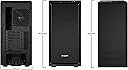
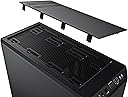
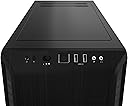
🖤 Silence Meets Power: The Pure Base 600 is the stealthy backbone your next build deserves.
The be quiet! Pure Base 600 ATX Midi Tower PC Case combines whisper-quiet dual Pure Wings 2 fans with versatile, customizable interior features including repositionable HDD slots and a removable ODD cage. Designed for serious builders, it supports up to 360mm radiators for advanced water cooling and offers professional cable management options. Engineered in Germany and backed by a 3-year warranty, this sleek black case is the perfect silent powerhouse for gaming and professional setups alike.


| ASIN | B01N7PGIPS |
| Antenna Location | Gaming |
| Best Sellers Rank | #50 in Computer Cases |
| Brand | be quiet! |
| Built-In Media | be quiet! PURE BASE 600 BLACK CASE |
| Case Type | Mini-Tower |
| Color | Black |
| Compatible Devices | ATX, micro ATX motherboards, 3.5-inch hard drives, USB devices, radiators up to 360mm for water cooling |
| Cooling Method | Air, Water |
| Customer Reviews | 4.7 out of 5 stars 1,823 Reviews |
| Enclosure Material | Acrylonitrile Butadiene Styrene (ABS) |
| Global Trade Identification Number | 04260052185414 |
| Hard Disk Form Factor | 3.5 Inches |
| Internal Bays Quantity | 3 |
| Item Dimensions D x W x H | 19.37"D x 18.5"W x 8.66"H |
| Item Type Name | be quiet! PURE BASE 600 BLACK CASE |
| Item Weight | 7440 Grams |
| Manufacturer | be quiet! |
| Material | Acrylonitrile Butadiene Styrene (ABS) |
| Model Name | Pure Base 600 |
| Motherboard Compatability | ATX |
| Number of Fans | 2 |
| Power Supply Mounting Type | Bottom Mount |
| Recommended Uses For Product | Gaming |
| Supported Motherboard | ATX |
| Total USB 2.0 Ports | 2 |
| Total Usb Ports | 2 |
| UPC | 710931111026 |
| Warranty Description | 3 |
B**T
Great looking quiet case with excellent cable origination
This is a review for the be quiet! Pure Base 501 Black ATX Case (Non Air-flow version, solid front). I wanted a subtle looking case without lights that was roomy and quiet for my PC build. I used this case with an ASRock X870E Nova WiFi ATX Motherboard, XFX 9070XT GPU, AMD 9950X3D CPU with Noctua NH-D15 fans and a 1,200W EVGA Power Supply. Everything fit perfectly. My PC sits about 3' from me on the floor. Unless I am playing a game, I want my PC to be virtually silent. This case has 2 super quiet 140mm fans pre-installed. With the Noctua CPU fans and a slightly adjusted GPU fan curve my PC is mostly silent unless I am playing a game. The case provides ample airflow and I never have heat issues, even when the room reaches 75° on the hotter days. The CPU and GPU never reach their max TDP which is all I really care about these days. The case provides an excellent array of cable management options and routes allowing you to run and tuck nearly every cable so it looks neat and tidy and keeps airflow unrestricted. The backside has several cable tie locations so you can keep everything neat and secured. If you have 2.5" SSD hard drives, they mount out of sight on the back panel with a well thought-out cable path. The front panel comes with USB 3.2 Gen. 2 ports which was rather difficult to find (at the time) for the price and quality of this case. I also really like the 45° angle of the front panel and the solid feeling larger power button. The USB ports feel snug and not flimsy so they should last a long time as I use them almost daily. If you're looking for a no non-sense, quiet case for your next PC build and you don't care about lights this is an excellent case. The quality and features are top notch and it feels like it'll hold up for several years’ worth of component upgrades.
S**T
One of the best, if at MSRP
This review is for the newer Pure Base 500FX sold in this listing page, not the 500DX also being listed, though they are almost identical except for the 500FX having better fans and lighting. It's a fairly long review, so the TL;DR version is it's mostly a great case with only a few non-deal breaking downsides. For starters, this is my first full build, which I transplanted from another case. The instructions are lackluster with just a few photos and little explanation of the parts. That said, it's not a deal breaker for anyone that has been inside a case before doing upgrades or generally a computer enthusiast. The only other con in this case is the fans being connected to a single hub in the stock configuration mean there are no independent controls for them. All 4 fans (3 intake, 1 exhaust) are going to be locked to the same speed, though that speed can be controlled with third party software like Fan Control. It's not really a problem for me, but would've been nice to have the option for independent control. I do wish it had a second Type-A USB connection on the front instead of the Type-C. The thing that really drew me to the case was the aesthetics and being pleased with he Be Quiet! Pure Rock 2 I already own. The stock RGB patterns include one of the best I've seen among other stock and third party light patterns, and I love the back side ring light design on the fans. The down side here is not all RGB platforms play well with each other, as I found out the hard way. Be Quiet! is compatible with Signal RGB, but my motherboard isn't compatible with the case hub or Signal. At best, I get minimal control through Asrock's own lighting software, but that is limited to solid colors only. I'm also unable to pass the case light control into Razer Chroma. This seems to be a problem with Asrock's implementation of RGB control rather than the case itself, as others don't seem to have this problem. Performance wise, I don't have a very powerful system, so my temps didn't change much. I think I only saw a 1-2 degree drop at best, but this is from already low temps and could also be due to normal variance. On the up side, the fans can be set to zero RPM with a custom fan curve in the third part Fan Control software. I now have a custom curve set that lets my system idle without the case fans running, only ramping them up when under load and temps increasing. This will help keep dust out of the system and reduce cleaning frequency of it and the filters. When setting the fans to full speed, I can't hear a thing from them. The front mesh opening is large enough and far enough away from the fans that I don't feel any air moving through it (in other words, no significant air restriction). These fans are great at what they do, and I have a very quiet system even when running under a full load. Cable management was not very difficult. The only concern I had was the thick 24-pin motherboard connection from the PSU. The decorative cover plate has a cutout with a bend to route cables to the right side of the mobo, but my 24-pin cable was too thick to make that turn and then turn a second time to plug in. What I was able to do instead is route that cable out of the top of the cutout and back down, making for a fairly simple and unobtrusive routing that still let me keep the cover plate in place. I think I may like this better than the typical routing that comes through and makes a big u-turn that reaches half way to the side panel before coming back to plug into the mobo. Panel securement may be a bit dated by using thumb screws instead of spring loaded latches like many other cases, but this isn't a big deal. Most people are not going to be in the case working around often enough to become an issue worth complaining about. Everything goes together smoothly and securely, which is what really matters here. I like that there are two HDD mounting locations, and that the HDD cage is adjustable. In the default position, the cage is mounted right behind the bottom intake fan. If you don't have tons of extra cables needing to be hidden, you can shift the cage back about an inch and get a bit more air from the bottom fan into the main compartment. Accessing the filters is a bit hit and miss, depending on your perspective. The bottom PSU intake filter is easily removed from the front as a slide out filter. The top filter is in a sturdy frame that is secured with good magnets. The front intake filter requires removing the front mesh panel, which is where the complaints come in. A lot of people complain pulling that panel takes a concerning amount of force. This may be true, but there are no cables to worry about yanking out (yay push pin and pad connectors for the lighting), and the locking tabs may loosen up over time to become more reasonable. All in all, the 500FX is a nice case that was fairly easy to build in. They even include a handy standoff tool in case you need to move those around for different mobo configurations (stock is ATX, but I have a micro-ATX mobo). If RGB isn't your thing, this may still be worth choosing over the 500DX simply for the extra fan if the price is right. You can turn the lights off if you don't want them. Their customer service was also very responsive to a concern I had.
S**Y
Amazing retro pc gaming case
big fan of be quiet! fans and now i have a sweet looking pc case, Pure Base 600. *Airflow is great because fans are powered from the top front Switch (positions are Low-Med-High) *this pc case met all my needs: 1) the cd/dvd rom player in 5.25" drive bay(s), 2) padded walls to dampen sound (my legacy pc system cpu/gpu fans were quite noisy, 3) i could rearrange the interior bays to suit my needs by adding extra HDD 4) plenty of room! 5) the best part... extra 140mm and 120mm fans! Now, the downside that prevented me from giving 10stars and a gold smiley... top cover can accidentally be smashed in and bend or break off the top lid tabs. keeps the dust out and i love the top lid feature! my retro gaming (offline) build: mobo: MSI 760GMA-P34 GPU: ASUS GTX770 DirectCU II 2Gb AMD FX 6300 w/ SilverStone KR01 cpu cooler really old CODEGEN 500X (550W) 3 Hard drives (but i'm testing more in future for total of 3 different OS builds) i hope i'm worthy of praise from be quiet!
B**B
Great minimal computer case!
Loved upgrading to this for my gaming computer! Was mostly in the market for a gaming chassis that had a minimalist design and room on the inside, and this case delivers! One thing I liked from the get go is that the case came with cable management! As advertised, the computer is quite silent. I think this in part due to the fan quality as well as padding on the side of the case doors which could contribute to sound dampening. Well done!
M**N
Acceptable, but would be nice to know about the flaws ahead of time
Overall I'm pleased. It fits the gigabyte aolus ultra motherboard with a noctua NH-U14S. It is quiet even with a total of eight fans running (three front, one back, two CPU, one chipset, one power supply), and the damping material on the case sides seems to be at least somewhat effective. I like the just plain black case with no place for multi-color LEDs. The power button is centrally located on the top front bezel and is easy to get to, and the reset button is small and unlikely to press accidentally. The tall feet on the bottom are a good idea especially if you mount the power supply to use the bottom vent. (I know other reviews complain about a motherboard standoff without the thread hole, and mine had that too, but I think it's intentional and not considered a mistake.) Unfortunately, there were a few downsides. The thumbscrews are cheap, and on my unit screw arrived slightly bending the thin steel it was screwed into. At this price point I expected quality screws throughout, engaged with standoffs or bushings. All the screw are cheap, inside and out. They thread into tapped holes in thin metal. I expect these to cross-thread and strip out easily, even handled with care. Cleaning the filter in the front panel is going to be inconvenient, because I can't pop the front panel off to get at the captive air filters without taking off the side panels to release the front panel tabs. I prefer cases where the front panel can be popped off without taking the case apart. It comes with three drive trays, and five slots to hold those trays, and no one has the extra be quiet HDD cage in stock. The 2.5" cages on the back of the motherboard tray are jokes. I'm not sure what drives they would actually fit. Maybe the 5mm ultra thin drives? The 7mm drive I tried certainly wouldn't fit at all. In any case, there is no effective air flow in that location behind the motherboard tray anyway, so I would consider those cages to be there only for show. The USB 3 slots in the front are not color-coded blue, and I wish they were. There is no USB-C connector on the front, nor any convenient way to add one. It would be nice to have a USB-C 3.1 connector with a type-e connector on the other end to work with modern motherboards. If you want that installed nicely in the front, you'll probably want to use a 5.25" drive bay adapter, in which case you can't have a fan mounted in front of the 5.25 drive bay. It looks as if you could fit 3 of the be quiet Pure Wings 2 140mm fans in the front, there are references to being able to add fans, and I thought somewhere I had seen a reference to placing three of them in front, but you can't actually fit three. It comes with one in the middle, which you could move to the top or bottom of the front, or you can have one fan at the top and one fan at the bottom, but you can't have three covering the front. I bought two extra Pure Wings 2 140mm fans, and then discovered that only one of the two extra would fit. I solved this by putting the third fan in the middle, but inside the case closer to the hard drive cages, and used four M4x60 bolts through the middle-most mounting holes in the upper and lower fans, through the mounting holes in the case, and then through the mounting holes in the inner, middle fan. Also, the fan switch on the front can control three fans. It comes connected to the 120mm fan in the back and the 140mm fan in the front, and there is one extra header for a second fan in the front. I have connected all three 140mm fans to the motherboard instead, and have the fan control switch connected only to the fan in the back.
S**S
Phenomenal Case, Good Vallue, Amzing Performance, Extremely Quiet and Cool!
I have always been a fan of Fractal cases for their quality and used them exclusively for my own builds. I am a very sound conscious person so my last case that this Be Quiet has now replaced was the Define 7 Mini. I think it's a great case, but it was a hot box for sure and caused me concern for my components life span. So I bought this Be Quiet 501 Airflow which had a lot of great Youtube reviews. One in particular is Matt Lee, he does the airflow smoke tests after a build, and this was impressive. Yesterday I finally swapped out my Fractal case for this Be Quiet and OMG, the difference in sound and temps alone were huge. Even though the Fractal case was a silent case, the fans kept ramping up because of the heat. No exaggeration I dropped 8 to 10c and my fans barely ramp up under gaming load, including my GPU which will shut the fans off when not needed. I am shocked at how performant this case is for what I have in it. My system is a Ryzen 7 5800x, RX 6700XT 12GB, 750W PSU, 2-Nvme's, 2 - 2.5" SSD's, a Mugen 5 Cooler with 2-Fans (push/pull), and wifi card. The case insluded 2-140mm fans, I added a second front fan. Sadly, I do hear a faint tick out of the original front included fan and will be replacing it. My only other very minor two issues are the rear space could have been just slightly more for cable management. Even so, it was very easy to do, and I love, love, love the single front IO header connector and the single USB 3 connector to run all the ports. And I would have liked to see a second front fan included in the same cost as it was only $12 retail. Those aside, I would with out hesitation highly recommend this case and even invest in another I ever found need for one. I love Be Quiet. The case is good value for what you receive.
C**R
Fantastic Case!
This case is spacious, thoughtfully designed, and designed to keep cool air flowing in from almost all directions. As the name implies, it is also extremely quiet (actually silent), but third party fans or coolers may add a bit of noise. It is simple, which in my opinion is exactly what the main unit should be - no flashing rainbow LEDs that distract from your monitor. Excellent case for the money.
R**T
Great case, good price; silent and performs well
Case has been fantastic for this build, nice and quiet, great airflow. I wasn't really wanting a clear side panel, was a mistake in my order; but it's working out. I don't need RGB, but this is working out with the minimalistic lighting present.
ترست بايلوت
منذ أسبوع
منذ أسبوعين