We remain fully operational. Our teams are working around the clock to ensure your deliveries continue safely.

قم بتنزيل التطبيق


معلومات عنا
حقوق الطبع والنشر © 2024 Desertcart Holdings Limited
قم بتنزيل التطبيق

💼 Elevate your data game with PROBOX — storage that works as hard as you do.
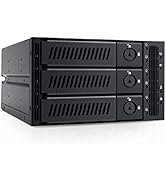
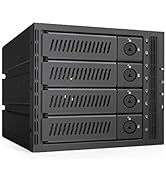
The Mediasonic PROBOX 4 Bay DAS enclosure supports up to four 3.5" SATA drives with a combined capacity of 120TB, leveraging SATA 3 6Gbps speeds and dual USB 3.0/eSATA connectivity. Featuring smart temperature monitoring and fan control, it ensures reliable, cool operation. Compatible with Windows and Mac, it offers a flexible, scalable storage solution ideal for professionals managing large data sets or repurposing legacy drives.






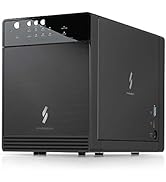

| ASIN | B09WPPJHSS |
| Best Sellers Rank | #69 in Enclosures |
| Compatible Devices | Desktop, Laptop |
| Connectivity Technology | SATA |
| Customer Reviews | 3.9 3.9 out of 5 stars (4,040) |
| Data Transfer Rate | 6 Gigabits Per Second |
| Date First Available | March 28, 2022 |
| Hard Disk Form Factor | 3.5 Inches |
| Item Weight | 4 pounds |
| Item model number | HF2-SU3S3 |
| Manufacturer | Mediasonic |
| Material | Metal |
| Max Number of Supported Devices | 4 |
| Memory Storage Capacity | 72 TB |
| Product Dimensions | 8.5 x 4.9 x 6.5 inches |
| UPC | 629329002368 |
P**L
So far so good
Title sums it's up, as a lot of folks here seem to have had problems. Product arrived two days after ordered. Install was simple. I don't have an ESATA port so I used USB as planned. I have read the complaints about USB 3.0, and can't speak to that as I only have 2.0 ports on my machine. That said, attaching the device to a USB 2.0 port worked fine and was recognized immediately. I first installed two older drives that I had pulled from a dead machine that was not being used. One of the drives I had used and at one time was holding the OS, so I knew it was good. The second drive I had never used before. I installed the two drives without much issue. The structure of the device is not all that heavy duty, but for the cost I found it more than adequate. Once the face plate and the cover we put back on, I hooked into the USB port, and the drives appeared in disk manager, and then cut out. In, out, in, out every few seconds. Pretty frustrating and I began to think that I had a bad controller on the box. I then removed one of the drives leaving the one that I knew was good and the device worked fine. Adding the second drive caused the same problem. I then tried the second drive on it's own and also had the same issues. At that point, I figured it was the Mediasonic, but needed another drive to test and make sure. I do not have a spare controller port to test the drive that I was not sure of. The next day I bought a small used drive a local place to test with. I added it as the second drive in the box and it went in, and then worked perfectly. The second drive was now recognized by drive manager and everything working fine. I guess the the second drive I had has something wrong with it. At some point I'll find a way to test it, but for now I am convinced that the Mediasonic works, and does what is promised. Thoughts: Works fine with USB 2.0 - I know everyone wants faster drive access, but I am using it to stream from that drive, over the USB 2.0 cable, to a Win 7 box, over my network to a WD Live HUB to my TV. Works fine, and is fast enough to watch movies across my network. I don't have a 3.0 port or ESATA so cannot comment on those issues This is not RAID - I assume anyone reading or buying this device knows that already but it is an important aspect. This is exactly what I was looking for, four independent drives. I am using a software product to merge drives and it accesses the Mediasonic device without any problems. For me this is basically a USB HUB with a container for the drives. You want RAID, look elsewhere. A bad drive will make the device act screwy - Based on the issues I had, if you buy this and it keeps connecting and then disconnecting, it may be worth trying each drive individually. I found the one that was causing the problems and removing it solved everything So Far So Good - Just the like the title says. We all know that until you really put some stress on drives and controllers, they may appear to work fine, but really be on the verge of dying. Since I have only had this running for three days, it's hard to say if it is really as good as it has been working so far. Conclusion: At this point I would definintley recomend purchasing one of these. I intend to buy another at this price. I like external drives, and the ability to buy the internal of my choosing, and then be able to stack four in pretty small space is very appealing to me. If your goal is to get some additional storage and have the ability to upgrade the size as you go along, this is a good way to go. Alternately, if you have a bunch of older SATA drives that are not being used, here is a decent way to get them into use on your newer computer. All in all, a good purchase for the price. -P
V**R
Mediasonic 4x RAID with USB Hub Enclosure (HFR7-SU31CH) — Fast, reliable, and great value
The Mediasonic 4x RAID with USB Hub Enclosure (HFR7-SU31CH) is a very solid four-bay enclosure with excellent performance once it’s set up correctly. Initial configuration can be a little tricky, especially if you’re using mixed SSD brands, but it’s absolutely worth the effort. I set mine up with two 2TB SSDs in RAID 0. Although the drives were similar in specs, they were different brands, and the enclosure initially refused to create the RAID. After fully wiping both drives using macOS Disk Utility, the RAID built successfully and has been stable ever since. Performance is outstanding. I’m seeing sustained transfer speeds of around 830 MB/s, which is a huge upgrade from traditional HDDs. I installed macOS Tahoe on it as a secondary boot drive, and it works beautifully. It’s now my everyday storage drive, and the lack of spin-up time compared to hard drives makes everything feel instant. Build quality is excellent, and the enclosure offers a strong feature set, including four bays and a built-in USB hub for added flexibility. Reliability has been solid. There is no need to spend more money on higher-priced alternatives like the OWC Gemini. This Mediasonic enclosure delivers speed, capacity, and reliability at a much better value. Highly recommended if you want a fast, well-built, multi-bay RAID enclosure without overpaying.
A**N
Nice enclosure for the price, but not really recommended for hotswap with Linux+ZFS in USB3 mode - YMMV with eSATA mode
( Note: this review is for the ProBox HF2-SU3S2 4-bay JBOD USB3/eSATA Mediasonic model // Non-RAID ) --I purchased this 4-bay enclosure to test Linux + ZFS drive hotswap and see if it would make a decent DAS (direct attached storage) for an old PC. In conjunction with the "StarTech.com 2 Port PCI Express SuperSpeed USB 3.0 Card Adapter with UASP - SATA PEXUSB3S24" (also available here on Amazon) this enclosure has some limitations for ZFS. Environment: Ubuntu 14.04-64-LTS on an underclocked Dual-core (2.1GHz) PC with 4GB of RAM; CPU is not capable of hardware virtualization, but makes a decent ZFS+Samba fileserver/testbox. Enclosure: starting with 1 drive, adding 2 more on the fly, attached with USB3 cable to USB3 PCIe card o 1st try, 1 WD500 Blue drive, not all the way in - ' fdisk -l ' Kernel panic (drive will not slot) Reboot o 2nd try, tried a different drive of the same model and it slotted OK into the enclosure. Drive was detected in both cases when the USB3 cable was hot-inserted into the USB3 PCIe card (enclosure on), AND when the USB3 cable was already in and the enclosure was powered up separately. *NOTE* - there are a couple drives that I have that would not slot into the SATA backplane of this enclosure. YMMV. I was unable to determine why. --The good news is, you CAN insert multiple drives one at a time and they will be detected as separate drives by Linux. --The bad news is, the enclosure DETACHES from the USB bus when you do this, so if you have any Probox-mounted drives you may be risking file/system corruption. (CAVEAT) Test hotswap: semi-FAIL - added 3rd drive, Green, enclosure disconnected existing drives and re-added: Jun 30 06:24:01 p2700dual1404 kernel: [ 636.100286] usb 2-1: USB disconnect, device number 2 Jun 30 06:24:20 p2700dual1404 kernel: [ 654.344522] usb 2-1: new SuperSpeed USB device number 3 using xhci_hcd Jun 30 06:24:20 p2700dual1404 kernel: [ 654.363691] usb 2-1: New USB device found, idVendor=152d, idProduct=0567 Jun 30 06:24:20 p2700dual1404 kernel: [ 654.363697] usb 2-1: New USB device strings: Mfr=10, Product=11, SerialNumber=5 Jun 30 06:24:20 p2700dual1404 kernel: [ 654.363702] usb 2-1: Product: USB to ATA/ATAPI Bridge Jun 30 06:24:20 p2700dual1404 kernel: [ 654.363706] usb 2-1: Manufacturer: JMicron Jun 30 06:24:20 p2700dual1404 kernel: [ 654.363710] usb 2-1: SerialNumber: 152D00539000 Jun 30 06:24:20 p2700dual1404 kernel: [ 654.365802] usb-storage 2-1:1.0: USB Mass Storage device detected Jun 30 06:24:20 p2700dual1404 kernel: [ 654.366189] usb-storage 2-1:1.0: Quirks match for vid 152d pid 0567: 5000000 Jun 30 06:24:20 p2700dual1404 kernel: [ 654.366227] scsi host12: usb-storage 2-1:1.0 Jun 30 06:24:21 p2700dual1404 kernel: [ 655.364678] scsi 12:0:0:0: Direct-Access WDC WD50 00AAKX-221CA1 0125 PQ: 0 ANSI: 6 Jun 30 06:24:21 p2700dual1404 kernel: [ 655.364907] scsi 12:0:0:1: Direct-Access WDC WD50 01AALS-00E3A0 0125 PQ: 0 ANSI: 6 Jun 30 06:24:21 p2700dual1404 kernel: [ 655.365122] scsi 12:0:0:2: Direct-Access WDC WD50 00AADS-00L4B1 0125 PQ: 0 ANSI: 6 Jun 30 06:24:21 p2700dual1404 kernel: [ 655.365614] sd 12:0:0:0: Attached scsi generic sg4 type 0 Jun 30 06:24:21 p2700dual1404 kernel: [ 655.365961] sd 12:0:0:1: Attached scsi generic sg5 type 0 Jun 30 06:24:21 p2700dual1404 kernel: [ 655.366296] sd 12:0:0:2: Attached scsi generic sg6 type 0 Jun 30 06:24:21 p2700dual1404 kernel: [ 655.369464] sd 12:0:0:0: [sdd] 976773168 512-byte logical blocks: (500 GB/465 GiB) Jun 30 06:24:21 p2700dual1404 kernel: [ 655.369559] sd 12:0:0:1: [sde] 976773168 512-byte logical blocks: (500 GB/465 GiB) Jun 30 06:24:21 p2700dual1404 kernel: [ 655.369687] sd 12:0:0:2: [sdf] 976773168 512-byte logical blocks: (500 GB/465 GiB) Jun 30 06:24:21 p2700dual1404 kernel: [ 655.369857] sd 12:0:0:0: [sdd] Write Protect is off Jun 30 06:24:21 p2700dual1404 kernel: [ 655.369865] sd 12:0:0:0: [sdd] Mode Sense: 67 00 10 08 Jun 30 06:24:21 p2700dual1404 kernel: [ 655.370006] sd 12:0:0:1: [sde] Write Protect is off Jun 30 06:24:21 p2700dual1404 kernel: [ 655.370012] sd 12:0:0:1: [sde] Mode Sense: 67 00 10 08 Jun 30 06:24:21 p2700dual1404 kernel: [ 655.370155] sd 12:0:0:2: [sdf] Write Protect is off Jun 30 06:24:21 p2700dual1404 kernel: [ 655.370162] sd 12:0:0:2: [sdf] Mode Sense: 67 00 10 08 Jun 30 06:24:21 p2700dual1404 kernel: [ 655.370330] sd 12:0:0:0: [sdd] No Caching mode page found Jun 30 06:24:21 p2700dual1404 kernel: [ 655.370338] sd 12:0:0:0: [sdd] Assuming drive cache: write through Jun 30 06:24:21 p2700dual1404 kernel: [ 655.370603] sd 12:0:0:1: [sde] No Caching mode page found Jun 30 06:24:21 p2700dual1404 kernel: [ 655.370608] sd 12:0:0:1: [sde] Assuming drive cache: write through Jun 30 06:24:21 p2700dual1404 kernel: [ 655.370624] sd 12:0:0:2: [sdf] No Caching mode page found Jun 30 06:24:21 p2700dual1404 kernel: [ 655.370630] sd 12:0:0:2: [sdf] Assuming drive cache: write through Jun 30 06:24:21 p2700dual1404 kernel: [ 655.469253] sdf: sdf1 sdf2 sdf3 sdf4 < sdf5 sdf6 sdf7 > Jun 30 06:24:21 p2700dual1404 kernel: [ 655.487575] sde: sde1 sde2 sde3 sde4 < sde5 sde6 sde7 sde8 > Jun 30 06:24:21 p2700dual1404 kernel: [ 655.520648] sd 12:0:0:2: [sdf] Attached SCSI disk Jun 30 06:24:21 p2700dual1404 kernel: [ 655.541244] sd 12:0:0:1: [sde] Attached SCSI disk Jun 30 06:24:21 p2700dual1404 kernel: [ 655.562694] sdd: sdd1 sdd9 Jun 30 06:24:21 p2700dual1404 kernel: [ 655.580201] sd 12:0:0:0: [sdd] Attached SCSI disk # fdisk -l /dev/sdd;fdisk -l /dev/sde;fdisk -l /dev/sdf Disk /dev/sdd: 500.1 GB, 500107862016 bytes 256 heads, 63 sectors/track, 60563 cylinders, total 976773168 sectors Units = sectors of 1 * 512 = 512 bytes Sector size (logical/physical): 512 bytes / 512 bytes I/O size (minimum/optimal): 512 bytes / 512 bytes Disk identifier: 0x00000000 Device Boot Start End Blocks Id System /dev/sdd1 1 976773167 488386583+ ee GPT Disk /dev/sde: 500.1 GB, 500107862016 bytes 255 heads, 63 sectors/track, 60801 cylinders, total 976773168 sectors Units = sectors of 1 * 512 = 512 bytes Sector size (logical/physical): 512 bytes / 512 bytes I/O size (minimum/optimal): 512 bytes / 512 bytes Disk identifier: 0x000afbb5 Device Boot Start End Blocks Id System /dev/sde1 2048 41945087 20971520 83 Linux /dev/sde2 41945088 83888127 20971520 83 Linux /dev/sde3 83888128 125831167 20971520 83 Linux /dev/sde4 125831168 976773119 425470976 5 Extended /dev/sde5 125833216 130027519 2097152 82 Linux swap / Solaris /dev/sde6 130029568 197138431 33554432 83 Linux /dev/sde7 197140480 406855679 104857600 7 HPFS/NTFS/exFAT /dev/sde8 406857728 976773119 284957696 83 Linux Disk /dev/sdf: 500.1 GB, 500107862016 bytes 255 heads, 63 sectors/track, 60801 cylinders, total 976773168 sectors Units = sectors of 1 * 512 = 512 bytes Sector size (logical/physical): 512 bytes / 512 bytes I/O size (minimum/optimal): 512 bytes / 512 bytes Disk identifier: 0x0005094a Device Boot Start End Blocks Id System /dev/sdf1 * 2048 52430847 26214400 83 Linux /dev/sdf2 52430848 104859647 26214400 83 Linux /dev/sdf3 104859648 157288447 26214400 83 Linux /dev/sdf4 157288448 976773119 409742336 5 Extended /dev/sdf5 157290496 161484799 2097152 82 Linux swap / Solaris /dev/sdf6 161486848 228595711 33554432 83 Linux /dev/sdf7 228597760 976773119 374087680 83 Linux # ls -al /dev/disk/by-id |grep -v part lrwxrwxrwx 1 root root 9 Jun 30 06:14 ata-SAMSUNG_HD322HJ_S17AJB0SA23730 -> ../../sda lrwxrwxrwx 1 root root 9 Jun 30 06:14 ata-ST3320620AS_9QF4BMH8 -> ../../sdc lrwxrwxrwx 1 root root 9 Jun 30 06:14 ata-TSSTcorp_CDDVDW_SH-S222A -> ../../sr0 lrwxrwxrwx 1 root root 9 Jun 30 06:54 ata-WDC_WD5000AAKX-221CA1_WD-WMAYUL461873 -> ../../sdg lrwxrwxrwx 1 root root 9 Jun 30 06:14 usb-Samsung_Flash_Drive_FIT_0355715090021777-0:0 -> ../../sdb (The following sde,sdd,sdf are the enclosure drives): lrwxrwxrwx 1 root root 9 Jun 30 06:42 usb-WDC_WD50_00AADS-00L4B1_152D00539000-0:1 -> ../../sde lrwxrwxrwx 1 root root 9 Jun 30 06:42 usb-WDC_WD50_00AAKX-221CA1_152D00539000-0:0 -> ../../sdd lrwxrwxrwx 1 root root 9 Jun 30 06:42 usb-WDC_WD50_01AALS-00E3A0_152D00539000-0:2 -> ../../sdf lrwxrwxrwx 1 root root 9 Jun 30 06:54 wwn-0x50014ee6acf2d9c8 -> ../../sdg lrwxrwxrwx 1 root root 9 Jun 30 06:14 wwn-0x50024e920140f1b7 -> ../../sda --Drive read speed on the WD500 Black in the enclosure is VERY good (copying to a motherboard-attached SATA drive): # blockdev --setra 16384 /dev/sdf # read more sectors at once / I/O optimization # time (dd if=/dev/sdf1 of=/dev/sdg1 bs=1M;sync) 20480+0 records in 20480+0 records out 21474836480 bytes (21 GB) copied, 187.885 s, 114 MB/s real 3m12.755s --With straight read speed, I/O is still really good; on average (monitored with iostat) I was getting ~110MB+/sec sustained from partition 1 on the WD 500 Black drive: # time dd if=/dev/sdf1 of=/dev/null bs=1M 20480+0 records in 20480+0 records out 21474836480 bytes (21 GB) copied, 186.264 s, 115 MB/s real 3m6.268s --Good news: The enclosure drives also respond to " hdparm -y /dev/sdX " (instant spindown) and should also respond to " hdparm -S (sleep time) " --The other bad news is that you will not be able to see or do SMART testing on the enclosure drives (from Linux, anyhow): # smartctl -a /dev/sdf smartctl 6.2 2013-07-26 r3841 [x86_64-linux-4.2.0-36-generic] (local build) Copyright (C) 2002-13, Bruce Allen, Christian Franke, [...] /dev/sdf: Unknown USB bridge [0x152d:0x0567 (0x205)] Please specify device type with the -d option. --I need to do some further testing (zfs RAID10 with some disposable 500GB drives) and will update this review as necessary, but so far pretty impressed with this device. It's working with a mix of WD Blue, Green and Black 500GB drives. UPDATE: Further testing with ZFS on USB3 --OK, so I created a ZFS RAIDZ1 pool out of the mixed (3)xWD500 drives: # zpool create -f -o ashift=12 -o autoexpand=on -O atime=off -O compression=lz4 zproboxRZCOMPR raidz \ usb-WDC_WD50_00AAKX-221CA1_152D00539000-0:0 usb-WDC_WD50_00AADS-00L4B1_152D00539000-0:1 usb-WDC_WD50_01AALS-00E3A0_152D00539000-0:2 # zpool status pool: zproboxRZCOMPR state: ONLINE scan: none requested config: NAME STATE READ WRITE CKSUM zproboxRZCOMPR ONLINE 0 0 0 raidz1-0 ONLINE 0 0 0 usb-WDC_WD50_00AAKX-221CA1_152D00539000-0:0 ONLINE 0 0 0 usb-WDC_WD50_00AADS-00L4B1_152D00539000-0:1 ONLINE 0 0 0 usb-WDC_WD50_01AALS-00E3A0_152D00539000-0:2 ONLINE 0 0 0 errors: No known data errors --I then copied ~16GB of data to the pool and ran a test scrub to verify no data issues; I/O was really pretty good, getting ~33MB/sec sustained from each drive and the scrub finished quickly: scrub: Pool: zproboxRZCOMPR - scrub started: Thu Jun 30 09:36:54 CDT 2016 scan: scrub in progress since Thu Jun 30 09:36:55 2016 11.9G scanned out of 23.5G at 102M/s, 0h1m to go 0 repaired, 50.51% done Thu Jun 30 09:38:54 CDT 2016 scan: scrub repaired 0 in 0h3m with 0 errors on Thu Jun 30 09:40:48 2016 o Scrub zproboxRZCOMPR start: Thu Jun 30 09:36:54 CDT 2016 // Completed: Thu Jun 30 09:40:51 CDT 2016 --With everything still powered on, I then removed the middle Green drive(!) --This Failed the whole pool - after the enclosure "bounced", drives were re-added to the system as sdg,sdh: # la /dev/disk/by-id |grep -v part lrwxrwxrwx 1 root root 9 Jun 30 08:45 ata-SAMSUNG_HD322HJ_S17AJB0SA23730 -> ../../sde lrwxrwxrwx 1 root root 9 Jun 30 08:45 ata-ST3320620AS_9QF4BMH8 -> ../../sdf lrwxrwxrwx 1 root root 9 Jun 30 08:45 ata-TSSTcorp_CDDVDW_SH-S222A -> ../../sr0 lrwxrwxrwx 1 root root 9 Jun 30 08:45 usb-Samsung_Flash_Drive_FIT_0355715090021777-0:0 -> ../../sda lrwxrwxrwx 1 root root 9 Jun 30 09:45 usb-WDC_WD50_00AAKX-221CA1_152D00539000-0:0 -> ../../sdg lrwxrwxrwx 1 root root 9 Jun 30 09:45 usb-WDC_WD50_01AALS-00E3A0_152D00539000-0:1 -> ../../sdh lrwxrwxrwx 1 root root 9 Jun 30 08:45 wwn-0x50024e920140f1b7 -> ../../sde --I tried copying more data to the pool and it hung hard: # zpool status pool: zproboxRZCOMPR state: ONLINE status: One or more devices are faulted in response to IO failures. action: Make sure the affected devices are connected, then run 'zpool clear'. see: http://zfsonlinux.org/msg/ZFS-8000-HC scan: scrub repaired 0 in 0h3m with 0 errors on Thu Jun 30 09:40:48 2016 config: NAME STATE READ WRITE CKSUM zproboxRZCOMPR ONLINE 0 439 0 raidz1-0 ONLINE 0 4 0 usb-WDC_WD50_00AAKX-221CA1_152D00539000-0:0 ONLINE 3 4 0 usb-WDC_WD50_00AADS-00L4B1_152D00539000-0:1 ONLINE 3 2 0 usb-WDC_WD50_01AALS-00E3A0_152D00539000-0:2 ONLINE 3 2 0 errors: 439 data errors, use '-v' for a list ( had to reboot here; left the green drive out to simulate failure ) pool: zproboxRZCOMPR state: DEGRADED status: One or more devices could not be used because the label is missing or invalid. Sufficient replicas exist for the pool to continue functioning in a degraded state. action: Replace the device using 'zpool replace'. see: http://zfsonlinux.org/msg/ZFS-8000-4J scan: scrub repaired 0 in 0h3m with 0 errors on Thu Jun 30 09:40:48 2016 config: NAME STATE READ WRITE CKSUM zproboxRZCOMPR DEGRADED 0 0 0 raidz1-0 DEGRADED 0 0 0 usb-WDC_WD50_00AAKX-221CA1_152D00539000-0:0 ONLINE 0 0 0 10918954850413458013 UNAVAIL 0 0 0 was /dev/disk/by-id/usb-WDC_WD50_00AADS-00L4B1_152D00539000-0:1-part1 usb-WDC_WD50_01AALS-00E3A0_152D00539000-0:1 ONLINE 0 0 0 errors: No known data errors ( re-inserted green drive in the enclosure here - Hotswap ) ( tried ZFS scrub -- hung hard ) [ 221.415966] WARNING: Pool 'zproboxRZCOMPR' has encountered an uncorrectable I/O failure and has been suspended. # zpool scrub -s zproboxRZCOMPR cannot cancel scrubbing zproboxRZCOMPR: pool I/O is currently suspended ( reboot again, leaving green drive in ) pool: zproboxRZCOMPR state: ONLINE status: One or more devices has experienced an unrecoverable error. An attempt was made to correct the error. Applications are unaffected. action: Determine if the device needs to be replaced, and clear the errors using 'zpool clear' or replace the device with 'zpool replace'. see: http://zfsonlinux.org/msg/ZFS-8000-9P scan: resilvered 24K in 0h0m with 0 errors on Thu Jun 30 10:02:17 2016 config: NAME STATE READ WRITE CKSUM zproboxRZCOMPR ONLINE 0 0 0 raidz1-0 ONLINE 0 0 0 usb-WDC_WD50_00AAKX-221CA1_152D00539000-0:0 ONLINE 0 0 0 usb-WDC_WD50_00AADS-00L4B1_152D00539000-0:1 ONLINE 0 0 1 usb-WDC_WD50_01AALS-00E3A0_152D00539000-0:2 ONLINE 0 0 0 errors: No known data errors --After rebooting with the missing drive in again, ZFS now sees the whole pool and responds OK to scrub: Pool: zproboxRZCOMPR - scrub started: Thu Jun 30 10:05:40 CDT 2016 pool: zproboxRZCOMPR state: ONLINE status: One or more devices has experienced an unrecoverable error. An attempt was made to correct the error. Applications are unaffected. action: Determine if the device needs to be replaced, and clear the errors using 'zpool clear' or replace the device with 'zpool replace'. see: http://zfsonlinux.org/msg/ZFS-8000-9P scan: scrub repaired 0 in 0h3m with 0 errors on Thu Jun 30 10:09:35 2016 config: NAME STATE READ WRITE CKSUM zproboxRZCOMPR ONLINE 0 0 0 raidz1-0 ONLINE 0 0 0 usb-WDC_WD50_00AAKX-221CA1_152D00539000-0:0 ONLINE 0 0 0 usb-WDC_WD50_00AADS-00L4B1_152D00539000-0:1 ONLINE 0 0 1 usb-WDC_WD50_01AALS-00E3A0_152D00539000-0:2 ONLINE 0 0 0 errors: No known data errors o Scrub zproboxRZCOMPR start: Thu Jun 30 10:05:40 CDT 2016 // Completed: Thu Jun 30 10:09:37 CDT 2016 Conclusion: At least in USB3 mode, I would not recommend this particular enclosure for Linux+ZFS unless you are willing to put up with reboots in case of drive failure. It's probably fine to use with new drives that have been burned-in/tested as long as you have everything backed up; for all I know it may be more reliable with swapping drives under Windows. I wish the manufacturer had some kind of update that would not cause the whole enclosure to essentially "reboot" in case a drive is removed or inserted, the whole point of having a SATA backplane is for hotswap. If you're serious about your data, I would also recommend plugging this into a UPS instead of just a power/surge strip. Just MHO. UPDATE: The enclosure DOES work as you would expect in eSATA mode - hotswap on a 3-drive RAIDZ1 works without unmounting/faulting the whole ZFS pool. AND you can access the SMARTCTL data on individual drives. :-) Might be a slight performance loss, but certainly merits further testing. And of course, you need to attach it to a SATA port that supports port multiplication (which my old Gigabyte motherboard does.) Very happy now. UPDATE 2017.April: I'm very happy with this enclosure - it's still going strong and I've been using it for laptop ZFS demos in eSATA mode :)
L**O
I got this to declutter the shelf where my home media server lives. Instead of having 4 USB drives sitting on the shelf I now have this one box connected via USB-C to a mini-PC with no internal storage beyond an NVMe SSD. It's very quick and works perfectly well but does NOT support hardware RAID. One could make a software RAID using Windows 10/11 Professional, note that the specs state this enclosure does not work with Linux. I have not tested it with Linux. The sync button is interesting. With sync turned on the enclosure powers up and down with the computer to which it is attached but will not recover from a power failure, that requires a human intervention to push the power button on the front. I cannot really fault this enclosure, for the price it is a great deal.
T**A
Bought 2 of these, one to serve as it's intended purpose and the other as a hardware backup should the first fail. The main unit has been in coninuous operation (i.e. 24/7) for over 2 years now without any issues. I initially tested out various scenarios for recovery - what actions to take if a drive or hardware fails with a bunch of small drives before setting up the 4x16TB drives in a RAID-5. For anyone interested: Device Failure 1. Connect the new unit to a computer. This is WITHOUT any hard drive in it. 2. Turn the unit on and set the same Raid mode as you had before. Hold Mode until RAID indicator flashes Press Mode until correct RAID level indicated. Hold RAID confirmation button until unit turns off. 3. Turn the unit ON, WITHOUT any hard drives in it. 4. While unit is ON, insert the old set of HDD in the new unit in the same order as you had before starting with Drive 1 at the top. 5. Wait for the unit to recognize the old Raid setting HDD Failure: Device powered on: (or if device is off) • HDD Error – Red • Rebuild – Off • HDD Status – Off 3 blue, 1 off • HDD internal indicator – Red 1. Remove failed drive 2. Insert replacement 3. Turn on if device was powered off • HDD Error – Red • Rebuild – Red • HDD Status – Slow Flashing Red/Purple 3 fast flashing Purple 1 slow flashing Red/Purple • HDD internal indicator – Red Takes about 5hrs / TB When complete HDD Error, Rebuild, and internal Off.
N**P
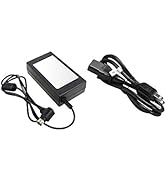
The Mediasonic HF2-SU3S2 works as advertized. The unit I received is the new model supporting 24TB (6x6TB). Since I am using both 3TB and a 6TB I can say it works for this size drives. The US3, ESATA and power cord are all 1 meter long (39 inches). If you need longer cables the power cord can be replaced by any old PC or monitor 6 foot cord. As for ESATA the official standard maxes out at 1 meter. So, if you need a longer interface cable, you can get a USB3 cable up to 15 feet, the maximum allowed by the standard. The unit does not manipulate the data, so the drives can be freely inside a PC if need be. If you intend to populate the unit with drives from external drives like the “My Book” you will need to transfer the data from that drive to some other drive before using the bare drive since these are specially encoded by their controller and should be reformatted for use in the Mediasonic. If you use the ESATA interface, you can dismount drives on an individual bases like you do for USB drives. For the USB interface, the drives get grouped under one group name, which means they can only be dismounted as a group. Windows explorer sees the drives as individual units in both cases. The speed is dependent on the slowest link, USB2/USB3/ESATA2/ESATA3 interface and/or drive, so it will vary. As for the insertion or removal of drives it’s easy.
A**G
Awesome case and works great for either SSD or mechanical drives. Highly recommend
り**ぐ
Broke in 6 months qnap is better to have
ترست بايلوت
منذ أسبوعين
منذ 5 أيام