Buy anything from 5,000+ international stores. One checkout price. No surprise fees. Join 2M+ shoppers on Desertcart.
Desertcart purchases this item on your behalf and handles shipping, customs, and support to OMAN.
🚀 Elevate your workspace with wireless precision and unstoppable battery life!
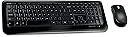
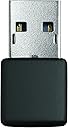
The Microsoft Wireless Desktop 800 for Business combines a compact keyboard and precision mouse with a secure 2.4 GHz wireless connection offering up to 30 feet of range. Featuring Microsoft Optical Technology at 1000 DPI, smart snap-in USB transceiver storage, dedicated hotkeys for productivity, and an impressive battery life of up to 15 months, this combo is engineered for professionals seeking reliable, efficient, and clutter-free work environments.
| ASIN | B004SUO1R6 |
| Antenna Location | Gaming, Office |
| Are Batteries Required | Yes |
| Best Sellers Rank | #1,510 in Computer Keyboard & Mouse Combos |
| Brand | Microsoft |
| Built-In Media | Strategic 2VJ-00003 Microsoft Wireless Keyboard |
| Color | Black |
| Compatible Devices | Personal Computer |
| Compatible Operating System Family | Windows |
| Connectivity Technology | Wireless |
| Customer Reviews | 4.2 out of 5 stars 726 Reviews |
| Global Trade Identification Number | 00885370277890 |
| Hand Orientation | Ambidextrous |
| Item Type Name | STRATEGIC SOURCING 2VJ-00003 Strategic Microsoft Wireless Keyboard |
| Item Weight | 1.95 Pounds |
| Keyboard Description | USB |
| Keyboard Layout | QWERTY |
| Manufacturer | Microsoft |
| Mfr Part Number | 2VJ-00003 |
| Minimum Required Operating System Version | Windows 10 |
| Model Number | 5SH-00001 |
| Movement Detection | Optical |
| Movement Detection Technology | Optical |
| Number of Batteries | 4 AAA batteries required. (included) |
| Number of Keys | 104 |
| Operating System | Microsoft |
| Power Source | Battery Powered |
| UPC | 807032927554 885370277890 680299879428 069060133943 |
| Unit Count | 1.0 Count |
| Warranty Description | 2-year limited hardware warranty |
C**N
Excellent!
The keyboard and mouse arrived and when I opened the package, I was surprised to find batteries included. I simply installed the batteries, turned on the power switch for the mouse and plugged in the usb adapter and bingo, everything worked! The keyboard is just the right size - not too big, but not too small and is lite and clean looking. I really liked the fact that as soon as i turn on the mouse, it is up and running. No issues at all. The mouse works great. Excellent price for a very good product. Highly recommend it.
T**Y
Cannot be beat for the price.
This has become my go-to wireless keyboard/mouse combo. At the typical desktop distances expected in an office environment, you can't lose - this thing is good enough that I can game with it. Setup is stupid easy: just plug in the dongle and go. No pairing - no drivers, everything is recognized by the computer as a standard keyboard & mouse, and this will even work pre-boot. Very handy during OS installations. The range is good enough that I can use this to control my pc from across the room when using it as a media center, and in fact it is good enough that I can even play mouse/keyboard RPG type games like The Witcher with very little noticeable lag or jitter from a distance of over 8 feet. It's not seemless - I think that at this distance I -would- notice problems playing FPS-type games, but for games where twitch isn't super important, or non-game applications, you're fine. Range starts to become an issue at over 10 feet but I've never really put it too the test beyond that. The battery life is excellent too. All I can say is "months", provided you remember to switch off the mouse when not in use. Speaking of the mouse, it's worth noting that the mouse makes an excellent laptop accessory, as it has a nice little divit to store the usb dongle when not in use. If there is one weird quirk I've noticed - and this is specific to one game only - on Dragon Age: Origins, the scroll wheel doesn't work right. This is extremely weird because it works normally in literally every other application I use, and I've double and triple checked my application settings for the specific game, but strangely, it appears to be the mouse. Switching to any other mouse I have and the scrolling in that game works fine. The keyboard is on par with wired keyboards in the $10-$20 range, with my only complaint being the smallish F-keys. You get used to them, but they are not optimal. If you are familiar with the standard Microsoft wired keyboard 400, you know what you are in for. One last thing worth mentioning: this combo works with Xbox 360s and PS3s as well. While I have never had need for a mouse on either console, the keyboard works just fine, and are 'plug & play', just plug the dongle into a USB port and the keyboard works. 5 stars - awesome price, awesome battery life, reliable hardware. I would deduct a half-star for the tiny F keys and the DA:O glitch, but since amazon doesn't award half-stars, I have to round up for all the other great things about this kit.
J**L
Perfect except for back button
I somehow missed reading everything I could that the mouse doesn't have a "back" button. Now for me that's OK because I'm mainly a keyboard user but since I bought it for someone else who depends more on a mouse I ended up trading them my old wireless/mouse combo for the new one because the old one (no-name) had the back button. I can live with that but must admit now days I'm surprised to see a Microsoft product that doesn't lend itself more heavily to Internet Browsing. I really can't remember the last time I saw any new mouse without a back button. Anyway, I really like the keyboard and mouse and the compact form factor of the USB dongle. I swap these devices all the time from laptops to desktops and they work perfectly each time on my XP, Win 7, and Ubuntu systems. I like the feel of the keyboard and the mouse fits my fairly large hands well. The battery life is good to above average on both devices. The stowaway compartment for the USB dongle is excellent and much welcomed. The dongle's small form factor doesn't mean I have to remove it to tote it in a backpack (although you probably should). I don't really use any of the extra multimedia keys so can't comment on them but I do find that it's much easier to press the keyboard's calculator button than type WINDOWS>RUN>CALC so that's another plus. In the end I think anyone that want's a wireless mouse/keyboard combo and doesn't care about the lack of a back button on the mouse will be perfectly happy with the Microsoft Wireless Desktop 800 for Business.
A**D
Excellent mouse compared to mice I used before
I must say some words about this mouse and keyboard. These two devices are really really good deal, it's only $20+. Especially the mouse, it's awesome. Let me talk about the mouse first, and how it compares with the mice I used. My hand is not so so big, not so small. About two years ago, I tried to buy a wireless mouse, I didn't think too much and I bought Logitech V220, because I trusted the brand. But the mouse is really terrible for me, it's too small, and the back of the mouse is swelling too much, which made my thumb and pinkie hard to grasp the mouse, but that's how I steer the mouse. Then, I realize I have to carefully choose the shape of a mouse instead of just looking at the brand, after all, it's for everyday use. If your hand is not that big, My advice for you is that you should avoid the keyword "mouse for notebook", 'cause usually it's very small and hard to use. Unfortunately, the designers I think they assume a wireless mouse should be for notebooks, so they design small mice. The second mouse I bought is Microsoft Comfort Mouse 4500, I was very disappointed, this mouse is not a bit comfort for me, and it's not a cheap mouse, even not wireless. The size of the mouse is no longer that small for me, but its hip is too fat too wide, and the back of the mouse is also swelling. If you look at the photos of mice produced by microsoft, you'll find that most of them shape like this one, I guess they are for big hands. Actually I like the mouse in my office very much, which is the default mouse of my HP workstation. The mouse is pretty simple, its part number is UAE96. This is really an irony, the best mouse for me is usually the cheapest one of each brand. For me, it means more regular shape, and less tricky freaky useless so-called features. Recently I put my dirty keyboard and mouse into a sink filled with water, and I couldn't make them work after such cleaning. So I have to buy a mouse again. I went to a nearby Best Buy and found there were only a small number of samples to try. After trying some samples, I found Logitech is no longer a great brand, the mice are uncomfortable for use, and expensive, but their look and feel are cheap. The relative best one for me is still the cheapest one, M310, which I heard is an updated version of M110, but for me, it's worse than the M110 I used before. The M110 looks very similar to the basic mice from HP or other computer manufacturers, I guess Logitech is the OEM of these mice. Note that M325 is just like the V220 I owned, small, and now looks cheaper. I then gave up trying to buy a mouse from Best Buy, and wanted to visit Fry's sometime later, hoping there are more samples. But Fry's is really far far away, and I haven't got a chance to visit for months, I started browsing Amazon again looking for the basic models from different brands. Then I found this one, before buying it, I went to youtube and glanced over several videos of un-boxing, then I am sure this is the shape I need. When it came to me after a week's free-saving trip, at first, I can't use it precisely, I think it's because the ratio of vertical movement to horizontal movement is different from my current mouse. And please pay attention to the distance between your mouse and the receiver. When they are not so close, the lag is noticeable. For those who felt the lag, maybe you need to plug the receiver into a front USB. For the keyboard, I like its standard layout. Although it has no caps-lock indicator, I don't think it's a big problem. The function keys F1-F12 are really too small, which distract me sometimes. Why the hell must a wireless keyboard be smaller than a wired one.
M**O
Letters are disappearing on Keyboard.
I have a little translator business so I type a lot. I bought this keyboard/ mouse combination mainly because it came with a mini receiver rather than a big old USB stick, and of course because it really had a great price. Technically all the devices work perfectly fine. However, I found out quickly that there is some truth to "you get what you payed for" pretty quick. For some reason I can only see on my computer's login screen whether caps lock is on. For every other screen I have to find out the "hard way" by getting an error message from the application I happen to work with. Additionally, several letter keys on the keyboard are already blank, and several more start to fade out. I have no issues whatsoever with the mouse, but would never buy this keyboard again. Not only does it look cheap, it obviously is cheap and not made for extended typing.
D**N
Solid performer, good overall feel
Is there any other electronic industry where devices "Plug-n-Play" with each other so nicely? If not, there should be. This combo worked so well out of the box with my HP desktop computer that I had to recheck the logos to make sure they weren't made by the same company. No sooner than I had slipped the (single) dongle into the USB port than the computer began welcoming the pair and informing me that they were ready for use. Indeed. The keys on the keyboard are a very comfortable size, and tactile enough to give positive feedback for every stroke without feeling bouncy. The function keys along the top row are a bit small, but not so much as to be an irritation. The mouse buttons and wheel all have good, positive feels to them, and I love that the battery well on the mouse has a built in "pull-out" tab that you place underneath the batteries to make replacing them easier when that has to be done. Great value for the price.
G**I
The mouse stopped working before two-months in use
Keyboard still works, but mouse just died (right click stopped working (no click)). Bought in Feb 2013, and now April 2013 and it now serves as only a mediocre paper-weight. My last wireless mouse was a very cheap model that lasted over 4 years ($20 for keyboard/mouse from Walmart or Target, I forget which). I hated giving up the keyboard (thin-profile, still worked great), but I figured how could I go wrong for $30 with "microsoft" name? Now, I won't buy Microsoft hardware again, of any kind. If the only wireless mouse was a Microsoft product, then I'd switch back to a wired mouse (and I still wouldn't trust them, I feel ripped off regardless of relatively nominal amount). What a piece of junk to break (stop working) under such light use in such a short time. I guess you get what you pay for - but be at least warned that this item is a COMPLETE WASTE OF YOUR MONEY unless you only want the keyboard, which is still working after 58 days !! What a score. Move on to another product and roll the dice with them, I guess.
J**N
Lightweight keyboard
The keyboard is a bit more lightweight than I would have liked. However it looks and feels good. Works great as a quick attachment to a laptop if you need full keyboard with number key pad and a mouse. The USB nub is fairly small (5/8" that sticks out of the USB port). The mouse is pretty good. However, my other mouse seems to slide over my plastic desk surface with less relative friction than this mouse. But nothing to noticeable. Make sure to use the on/off switch on the bottom of the mouse or the mouse batteries will drain more quickly. Product came with batteries (Duracell) for both the keyboard and mouse (2 AAA for the keyboard and 2 AA for the mouse). Great deal for a wireless keyboard mouse set!
Trustpilot
1 month ago
1 month ago