🚀 Elevate your hustle with power, portability, and precision.
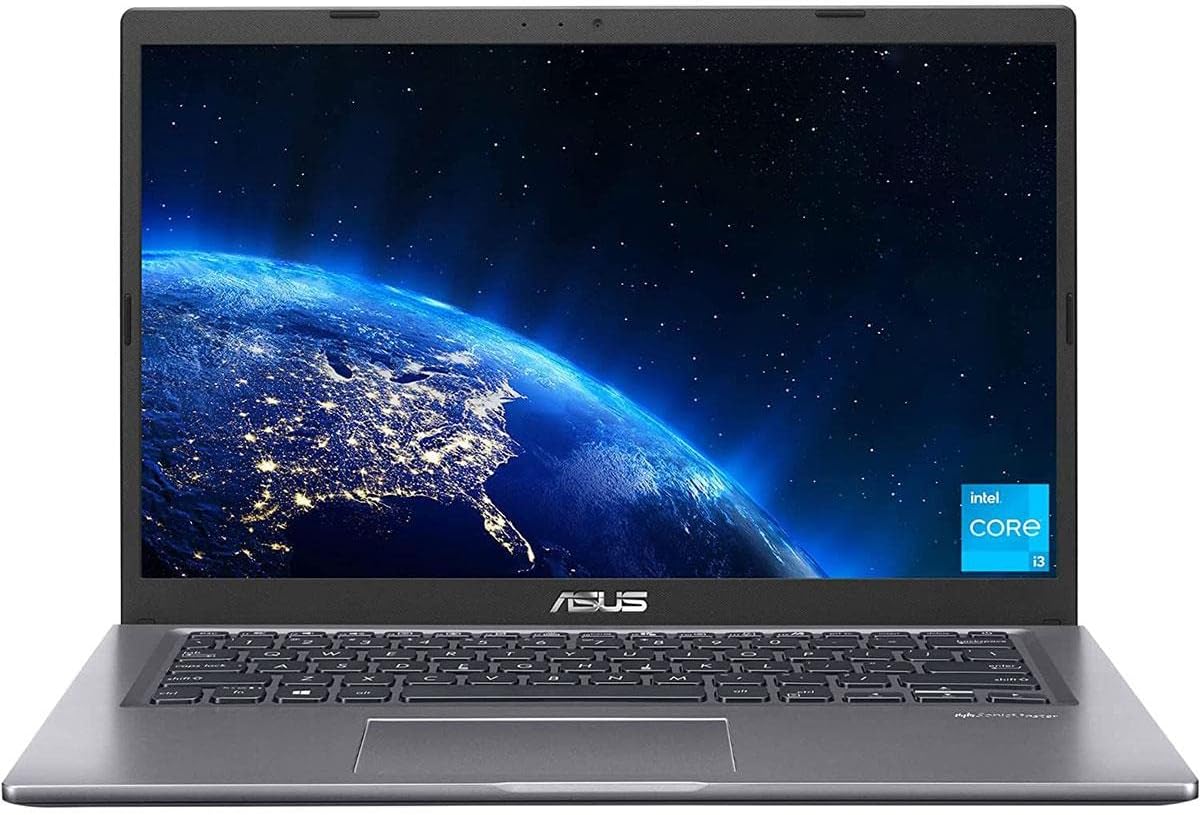
The ASUS Vivobook 14 F415EA-AS31 is a stylish, ultra-portable laptop featuring an 11th Gen Intel Core i3 processor, 4GB DDR4 RAM, and a 128GB PCIe NVMe SSD. Its 14-inch NanoEdge FHD IPS display with anti-glare coating offers immersive visuals, while the backlit keyboard and fingerprint sensor enhance usability and security. Weighing only 3.3 lbs and equipped with dual-band Wi-Fi 5, it’s designed for professionals seeking efficient performance and seamless mobility at an affordable price.


| ASIN | B09SVQG3ZZ |
| Batteries | 1 Lithium Ion batteries required. (included) |
| Best Sellers Rank | #17,817 in Computers & Accessories ( See Top 100 in Computers & Accessories ) #2,621 in Traditional Laptop Computers |
| Brand | ASUS |
| Card Description | Integrated, Integrated - 2022 Version |
| Chipset Brand | Intel |
| Color | Slate Grey |
| Computer Memory Type | DDR4 SDRAM |
| Customer Reviews | 4.5 4.5 out of 5 stars (2,743) |
| Date First Available | February 18, 2022 |
| Flash Memory Size | 128 GB |
| Graphics Card Ram Size | 4 GB |
| Graphics Coprocessor | Intel HD Graphics |
| Hard Drive | 128 GB SSD |
| Hard Drive Interface | Solid State |
| Hardware Platform | PC |
| Item Dimensions LxWxH | 12.81 x 8.5 x 0.78 inches |
| Item Weight | 3.3 pounds |
| Item model number | F415EA-AS31 |
| Max Screen Resolution | 1920x1080 Pixels |
| Memory Speed | 4.1 GHz |
| Number of Processors | 2 |
| Number of USB 2.0 Ports | 2 |
| Number of USB 3.0 Ports | 2 |
| Operating System | Windows 11 Home |
| Optical Drive Type | No Drive |
| Processor | 4.1 core_i3 |
| Processor Brand | Intel |
| Product Dimensions | 12.81 x 8.5 x 0.78 inches |
| RAM | 4 GB DDR4 |
| Screen Resolution | 1920 x 1080 pixels |
| Series | ASUS VivoBook 14 |
| Standing screen display size | 14 Inches |
| Voltage | 19 Volts |
| Wireless Type | 802.11ac |
C**S
Fantastic! (so far)
I bought this ASUS PC from Amazon for $199.99 via a Lightning Deal. I've only had it for two days but I've been amazed by all the features for so little money. I removed S Mode so I could install Brave browser and a couple other things. For privacy, I uninstalled OneDrive, turned the microphone and camera off plus I put a sliding cover over the camera lens. I uninstalled McAfee and a few apps I would never use. This PC has an SSD, an FHD non-glare screen (great picture!), good speakers with sufficient volume, plenty of ports, a fingerprint reader and a backlit keyboard!!! For $200!!! 12-6-22 UPDATE: After having the PC for nearly a week, I've discovered some weaknesses. I'll start with the 4GB RAM (3.7GB useable), it isn't enough. I had the PC freeze up when I had 9 browser tabs open, it took a while to get the browser to close. I did some testing, monitoring RAM usage via Task Manager and found RAM usage to reach up to the 3.7GB max with only 2 browser tabs open. This is a problem. I've had up to 6 tabs open without the PC freezing up since then but don't want to push my luck. I ordered an 8GB DDR4 3200MHz memory stick from Amazon for less than $30 which I intend to install myself. I've never even opened the case of a PC but I watched some YouTube videos of the upgrade procedure and it appears to be quite simple on this PC. The second weakness I've discovered is the Wi-Fi speed, it's slow. I used Ookla Speedtest to compare the speed to an inexpensive Lenovo 11.6" Chromebook I've had for a year. In the same location, testing one immediately after the other, the Chromebook got more than twice the speed of this PC. I repeated the tests several times, this PC was getting around 200Mbps while the Chromebook was getting around 440Mbps. This was on my home internet with no one else using it. Both were connected via Wi-Fi 5. I can make do with 200Mbps but I would think the Wi-Fi should be as fast as that of a Chromebook that I paid even less for. The third weakness is the battery. The PC will run for a few hours on a charge, which will probably be fine for some people. If you're on the PC most of the day, or night, you will probably need to charge it a few times per day. All things considered, I'm sticking with the 5-star rating because this PC has a lot of great features, I only paid $200 for it, and after the RAM is upgraded to 12GB (4+8) it should be a great PC. UPDATE 12-7-22: Amazon delivered the memory stick today. I had never opened the case of a PC before and it took me less than half an hour to complete the upgrade! I don't think links are allowed in reviews so I'll just say a YouTube video by Cadillac Computer Center showed me everything I needed to know. I'm no techie and this upgrade was easy, nearly anyone could do it. The added memory made the PC function much better, faster, smoother. Great upgrade! UPDATE 12-12-22: I just replaced the Wi-Fi card/adapter with a Wi-Fi 6E card ($20) and download speed doubled! Testing on my home internet with no one else using it, in the exact same location, download was 200+ Mbps just before the upgrade and 400+ Mbps just after. Upload remained about the same, 115-120 Mbps. This upgrade is only slightly more challenging than the memory upgrade because it involves replacing something rather than simply adding something but it's still very easy, just be careful with the tiny wire connector. UPDATE 12-20-22: After the two easy upgrades, this PC has been great. After updating Windows 11 to the newest version, uninstalling some things, installing others and running cleanup, there's 34.2 GB of 117 GB usable storage in use, 83.6 GB free. I'm sure that's plenty for my use but I'm going to add a 512 GB 2.5" SSD anyway, there's an empty bay for it to go into. It will be in addition to the 128 GB SSD, not replacing it. This will be my final upgrade, hopefully it will go as well as the two previous ones. The SSD and adapter/connector I've just ordered only costs $40 so I'll have $287 + tax in this PC, a fantastic bargain! I just realized I never mentioned the touchpad, I don't use them. I turned it off and use a wireless mouse so I can't comment on the touchpad. The fingerprint reader works great. I've tweaked settings, personalizing the PC (gotta have my lime green cursor, so much easier to keep track of, among other things). This will not be my primary PC once the new toy thing wears off but I've been on it several hours every day since I got it and I really like it. I'm retired, spend most of my time at home and have a desktop PC with a large monitor, 640 watt speaker system, backlit keyboard and wireless mouse that is my primary PC. This will be a great laptop to have on hand as a backup and for occasional use. Unlike the Chromebook (hate it) I bought a year ago for such purposes, I like this PC so much that I'll kinda hate relegating it to stand-by status... but my desktop PC rocks! UPDATE 12-23-22: I performed my third and final upgrade by installing a 512GB 2.5" SATA III SSD that is in addition to the original 128GB SSD. Installation was a little difficult simply because the installation kit, which was supposed to work on this PC, presented a problem. A soft plastic piece that is supposed to wrap around the SSD and fit into the PC's bay would not do both, no matter how many times I tried. Eventually, I did some trimming of the plastic piece and made it work. The SSD is isolated in that it doesn't contact anything other than the soft plastic and it fits in the bay quite snugly so it should be fine. After installing the SSD, I needed to make it do more than occupy space and a great YouTube video by Northern Viking Everyday walked me through it. In 'Settings' -> 'System' -> 'Storage' -> 'Advanced storage settings' -> 'Where new content is saved', I set new apps to be saved to the original SSD and basically everything else, documents, photos, video, music, to be saved to the larger added SSD. The original SSD will be the operating system and the added SSD will be data storage, as this old dog trying to learn new tricks understands it... Still 5 stars for this bargain PC! UPDATE 1-8-23: One final(?) note: I read some negative reviews that were based on this PC being in S Mode. It says it's in S Mode in the product title, how do you miss that? I was unfamiliar with S Mode so, before purchasing, I did a quick web search for 'Windows S Mode' and one of the first links to come up took me to a Microsoft site page with simple instructions for removing S Mode (it limits you to Microsoft software). I bought the PC (obviously) and one of the first things I did was to remove S Mode so that I could install Brave browser, Ookla Speedtest and anything else non-Microsoft that I wanted. The people who returned the PC because it's in S Mode could have removed S Mode within about a minute's time and had a very nice PC at a bargain price. It does need the previously mentioned inexpensive memory upgrade but that is extremely easy to do. The Wi-Fi upgrade probably isn't necessary, I did it to take advantage of my home internet's Wi-Fi 6. The storage upgrade probably isn't necessary if you don't intend to store many large files on the PC. I didn't need it but did it anyway, I think I was just on an upgrade kick and wanted to get 'just one more' in. As always, I recommend buying from Amazon and not a third party seller. If it doesn't say 'Sold by Amazon' (defaults to seller with the lowest price), scroll down to 'Other sellers on Amazon' and look for Amazon there. I prefer to buy from Amazon just in case there are any problems, even if it means paying a few dollars more. Due to its many features and bargain price, I really like this PC, still 5 stars! UPDATE 2-8-23: I decided to add one more update, that's because I'm still using this PC for several hours every day. I thought I would have gone back to my desktop PC before now but I haven't yet. The room that my desktop is in has been on the chilly side and I got used to using this laptop in a warmer room. My opinion hasn't changed, everything I've said previously still applies. If I were to look for a nit to pick, I would say that the speakers, while decent, lack bass, but I could say the same about the other laptops I've owned. The speakers are fine for most things but I've been using extra bass headphones for listening to music and watching movies. With all the features this PC has, it seems like a much more expensive one. A good friend just ordered this PC, I hope he's as happy with his as I've been with mine. Still pleased, still 5 stars! UPDATE 4-10-23: Still going strong, still five stars!
R**R
Perfect for me!
For clarity, this review is for the 15.6" GTX 1650 version, not the 17.3" GTX 1650Ti version. Positives! This laptop is perfect for me and what I need right now. I am currently in between homes, over the road a lot for work and have all of my stuff in storage, including my main PC, so I bought a laptop so I could continue doing work and gaming while on the go. This laptop is not top of the line by any means, it's no $2,000 laptop with an RTX 3080 or anything like that, but if you want a good mid-range laptop that can get 60FPS on some everyday gaming, this is as good as mid-range laptops get in my opinion. Even on my main, much beefier PC, I've never been one to crank up the settings and enable raytracing, 4k etc. I'm more of a framerate type of person and this laptop does a great job getting high frame rates if you're willing to adjust the settings accordingly. The screen is a clean 1920x1080, lovely quality (though the brightness isn't that great), comes with an NVME 512GB hard drive which is not a bad start if you're not trying to install a Call of Duty game with 100gb patches, but that leads into another glowing positive - this thing is upgradeable and I love it! One of the hardest things about picking a laptop for me is the eventual obsolescence, so in the few times I've bought a laptop in my life, I prefer ones you can upgrade which will allow you to skirt by the expected lifespan for a bit longer. Overall, my complaints a few, but I will point them out. Negatives! Honestly, 8GB of RAM is... well, it's not enough for any modern PC that you want to do more than browse the internet, but this negative hardly counts against it because once again, it is upgradeable! I added 32GB to mine and it runs like a dream now. The fact it ships with such low RAM is forgivable because that's probably why the price of entry is as low as it is. I also had a few problems with the Wi-Fi antenna at first, which I know is not unique to my laptop, but after a few online searches, troubleshooting and settings adjustments, it hasn't dropped the connection for a couple of days, so I think I'm over that hump. My last complaint and honestly maybe the only one that could be considered "major" is the screen brightness. To be clear, I'm talking about BRIGHTNESS, not QUALITY. The resolution is wonderful and the screen is a clear HD experience, but keep this thing away from the sunlight if you want to see it easily... I took it to the park one day and while I could see the screen, I felt like I was squinting, and I had to change my preferred dark mode to light mode just to see the Windows UI better. Once again, I consider this a minor gripe and won't take a star off, because if you're using this thing indoors or in appropriate shade, the screen is beautiful. Overall, if you're looking for an affordable, upgradeable, laptop suited for everyday gaming (as long as you're not trying to push max settings, 4k or raytracing), you won't be disappointed!
S**D
Laptop is worthy for the paid amount. There is a problem with the power adapter type (US plug), which is difficult to find here & not even mentioned on the description. Normally power adapters comes with different plug types inside box but this was only offered with US type.
E**O
La laptop presenta un acabado muy bueno, me gusto mucho el color, yo la agarre en promoción y precio muy accesible, encontre otras con menos especificaciones mucho mas caras, lo que si trae teclado en ingles pero al menos yo estoy acostumbrado a esto, en cuanto peso siento que es muy liviana respecto a otras laptop gamer que he llegado a manejar, lo que si siento que la ram se queda algo corta de inicio, por lo que yo la aumente, como dato lo maximo que aguanta son 32 gb a 2933mhz o eso es lo que dicen las especificaciones, yo por comodidad puse unas de 3200 ya que no encontraba de 2933 en existencia y funciona al 100, lo que no encontre la forma de cambiar perfil xmp o al menos no se si el modelo que yo tengo lo permita que es al F15-AS51. Lo recomendaria como pc auxiliar, o si no hay mucho presupuesto, pero como main game station sugeriria invertir en algo un poco mejor, yo solo la he usado para juegos como Smite y HOTS ya que es lo que tiendo a jugar fuera de casa , al momento no he tenido problemas con las temperaturas pero yo vivo en un lugar frio , lo que si en varios reviews si mencionan que llega a calentarse por lo que se sugiere alguna base para enfriamiento.
M**F
I like that this has upgradable ram, nvme ssd and wifi. onboard 4gb 3200mhz. battery is small at 37Wh. you can set max cpu % to 30% to limit power consumption from 30w to 7w to extend battety life. the ips screen is about 68% srgb with yellow tint. no color change when viewing from extreme angle
M**N
انصدمت انه مالوش ضمان
C**N
La computadora esta super genial, en lo estético es muy linda en un color negro cepillado. No es tan pesada como imaginé y su pantalla y sonido soy muy buenos para su precio, su webcam esta bien para ser laptop y su teclado retro iluminado es configurable ademas de que sus teclas son muy ergonómicas y no son tan ruidosas. En cuanto a su funcionamiento va super bien, no eh tenido ningún inconveniente mueve varios programas para el estudio de manera fluida como los son: Paquetería de Office. MATLAB. AUTOCAD. Simulink. Inventor. Su batería dura entre 3 a 3 horas y media dependiendo el uso. No eh corrido muchos juegos en ella pero el Fall Guys va super fluido y al máximo de sus gráficos. Lo que no me agrada es que su teclado viene en ingles y la distribución de las teclas igual en teclado norteamericano, pero eso se puede configurar, otra cosa es que no cuenta con un lector para memorias micro SD. La verdad super recomiendo esta laptop, es una chulada.
ترست بايلوت
منذ 3 أسابيع
منذ 4 أيام