Desertcart purchases this item on your behalf and handles shipping, customs, and support to OMAN.
🚀 Elevate your remote workspace—cut the clutter, keep the speed!
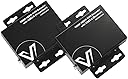
The AV Access HDMI KVM USB Extender delivers high-definition 1080P@60Hz video and USB 2.0 signals up to 260ft over a single Cat5e/6/6a/7 cable. Featuring plug-and-play simplicity with zero latency, two-way Power over Ethernet for flexible power sourcing, and a rugged metal casing for EMI protection, it supports all major operating systems and multiple USB peripherals. Ideal for professionals seeking a clean, efficient, and reliable remote workstation setup.


| ASIN | B073B84CY1 |
| Actuator Type | Push Button |
| Best Sellers Rank | #57 in KVM Switches |
| Brand | v AV Access |
| Brand Name | v AV Access |
| Circuit Type | 2-way |
| Color | 1080P (HDEX80-KVM) |
| Compatible Devices | Windows 10/8/7/XP, Mac OS, Linux, USB peripherals (keyboard, mouse), remote PCs, NVRs, DVRs, game consoles |
| Connectivity Protocol | IEEE T568B |
| Connector Type | Hdmi,usb-a,rj45 |
| Contact Material | Metal |
| Contact Type | Normally Open |
| Control Method | Remote |
| Control Type | input device control |
| Controller Type | KVM |
| Current Rating | 2 A |
| Customer Reviews | 4.2 out of 5 stars 292 Reviews |
| International Protection Rating | IP54 |
| Item Dimensions | 3.87 x 0.91 x 2.95 inches |
| Item Weight | 8.48 ounces |
| Manufacturer | v AV Access |
| Material Type | Metal |
| Model | HDEX80-KVM |
| Mounting Type | Rack Mount |
| Number of Positions | 2 |
| Operating Voltage | 12 volts_of_direct_current |
| Operation Mode | OFF-NONE-ON |
| Part Number | 766382324430 |
| Switch Type | Flow Switch |
| Terminal | Screw |
| UPC | 300692648871 |
| Unit Count | 1 Count |
| Warranty Description | We offer 1-year and 30-day hassle-free return to end-users. |
| Wattage | 6.3 watts |
S**S
Quality of your LAN, cables, and startup order is key.
I used the setup to move my noisy PC to a different location, over 50 feet away, and enable local keyboard, mouse, and MIDI / USB Keyboard / Monitors - silence is golden - and it worked great. Periodically we have to restart the system, it would take a minute to re-sync as outlined in the documentation, however, it delivered as outlined in the documentation. As it runs over IP, I could now enable over our wireless wifi6/7 - and it worked great as outlined for 4k at 60hz - letting me move equipment and connect to various systems remotely. Moving your music / noisy system to another place than your working area allows for a quiet workplace - that the KVM could be connected to multiple remote systems is just another win. The quality of the unit, and clear directions, as well as AV Access not being a fly by night place, they've been around for a while, and supported this and other products, which didn't require complex setup, drivers, etc. it just worked. Note: start the unit closest to the PC first, then turn on the "receiver" the unit to which you plug in your USB devices, I put a 4 port hub on it (keyboard, mouse, sound system, Webcam, beyond using the 3 usb ports) and all worked through same USB to LAN/IP connection :) = finally yes, standard HMDI port worked great. Has DIP switches so you can put multiple units into play. I'd looked for a number of move the PC elsewhere - wireless KVM, wireless HDMI, with bluetooth - this just works ;) and if you are doing more than 1 system, it's really a no brainer. 我使用该设置将嘈杂的PC移动到50英尺以外的不同位置,并启用本地键盘,鼠标和MIDI / USB键盘/监视器-静音是金色的-效果很好。我们必须定期重新启动系统,如文档中所述,重新同步将需要一分钟,但是,它如文档中所述交付。当它通过IP运行时,我现在可以通过我们的无线wifi6 / 7启用-它的工作原理非常出色,适用于60hz的4k-让我移动设备并远程连接到各种系统。将音乐/嘈杂的系统移动到工作区域以外的其他地方,可以建立一个安静的工作场所-KVM可以连接到多个远程系统只是另一个胜利。单元的质量,清晰的方向以及AV Access并非夜间飞行的地方,它们已经存在了一段时间,并支持了此产品和其他产品,这些产品不需要复杂的设置,驱动程序等。它只是起作用了。注意:首先启动最接近PC的单元,然后打开“接收器”,将插入USB设备的单元打开,我在其上放置了4端口集线器(键盘,鼠标,声音系统,网络摄像头,而不是使用3个USB端口),并且都通过相同的USB到LAN / IP连接工作:) =最后是的,标准HMDI端口效果很好。具有DIP开关,因此您可以玩多个单元。我曾寻找将PC移到其他地方的许多方法-无线KVM,无线HDMI和蓝牙-这行得通;)并且,如果您使用的是1个以上的系统,那确实很容易。
A**O
Easy and effective
I've been having a medical issue/pain, which is preventing me from sitting in my office chair for more than a few minutes at a time. I'm a lifelong gamer, so not only was I having to work on my iPad, but I couldn't play any PC games. I got some super long cables and ran them across the house to connect my PC to the living room TV, but I don't like clutter and it started driving me nuts immediately. My husband fabricated an amazing monitor stand to go beside the couch, and I bought these delightful things (AV Access 4K HDMI USB KVM Extender). I hooked them up and they worked immediately! I have zero lag, and have played several games, including World of Warcraft and Aloft on Steam. Even my USB headset works for Zoom calls. There have been maybe two instances where they didn't work when I started the computer, but disconnecting the Ethernet cable and reconnecting it did the trick. It has not dropped while I'm actively using it. The entire ~40' run (from the first KVM to the wall jack, from the inside of the female-female office jack to the inside of the living room jack, from the living room jack to the second KVM) is CAT6 (https://www.amazon.com/dp/B07J6NJDRV).
M**Y
**Updated my review for the positive**
Purchased the HDEX80-KVM. Was dead on arrival. USB worked correctly, however video through the HDMI did not. Tried both Cat5e and Cat6 cable, with no difference. Both test cables were less than 6' long. I noticed that the build quality seems cheap, and the components are very light and unsubstantial feeling. Incidentally, the module also seemed to run hot. this makes me concerned that even if it did work correctly, it may not last. Looks like i'll be looking elsewhere. ** Update 5/14/18** I spoke with a technician named Ryan, who contacted me hours after I sent an e-mail to tech support following the issues I had with the first module. He was extremely professional and quick to dispatch a second module which arrived a few days later. This one works! The USB seems to have little to no delay and the video at 1080P looks as good as though it were connected locally. I'm using cat6 cable at 50-ish feet with no problem. Also, the issue with the heat on the first module must have been due to the internal issue it had, as the working module does not have that issue. A couple of observations: 1) This will not pass a HDMI CEC signal. This is a niche requirement, and it was not stated to have it... My fault for net checking. 2) i would recommend applying the power to the Receiver module, as it seems to help with higher current draw USB devices. If you are using just a mouse and keyboard, then you should be fine connecting power on either end. Would recommend AV Access to anyone.
H**2
The HDMI KVM is excellent
Plug & play. Work well so far (4 weeks). Wireless mouse can be connected with the dongle.
C**H
GREAT customer care
I’m really impressed with AV Access. I originally bought eight of these KVMs that didn’t quite fit my setup, and their team just stepped right in. They patiently helped me troubleshoot, suggested a better model, and replaced all eight units. Above and beyond. The new model units work perfectly, and they followed up to make sure everything was squared away. It honestly felt like they cared about my setup as much as I did. Huge gratitude to Locky and the team at AV Acess!
S**E
No video, no wireless USB dongle functionality
Tested with multiple known-good cables (that are short and well below manufacturer's required lengths) and accessories that work perfectly with other devices, but not this KVM extender. To an HDMI monitor for testing: Blank black video with partial image flickering once every second for about 10ms. This was with both TX and RX independently powered with their AC transformers, multiple known-good short HDMI cables that each function fine when directly connected from PC to Monitor/TV, with multiple known-good CAT5e and CAT6 ethernet cables that also function elsewhere. To a receiver port that works with local devices and another KVM extender I tested today: Blank black video. Display is not recognized at all on the PC (unlike the monitor). USB: Some wired devices function (several wired mice), but no wireless USB dongles I tried worked, including a wireless mouse that works when directly connected to multiple computers, and a wireless Xbox controller adapter dongle that works when directly connected to my PC and a SteamLink. The USB ports are reportedly 2.0, but recommend 0.5A or less power draw; I was unable to confirm the exact power draw of my Razer wireless mouse dongle or the Xbox adapter, but I seriously doubt they're drawing more than 0.5A. Returning and trying another product.
S**H
Did the job!
Had a CCTV job that was wanting to have a large TV view the camera feeds. Tried other HDMI extenders over CAT6. Could not get the view through. The TV was a 52 inch Fire TV. Something in the translation of data was not compatable with the extender we normally use. Ordered this one and it was exsactly as it should be. View was clear and came though fast, no lag over a 180ft run. Really pleased to have found this extender... and will keep in mind for future installs on "Super Smart" TV's.
R**E
Works flawlessly as a 4K@30Hz KVM
I have tried numerous KVM extenders that have had numerous issues. These consisted of ones that leveraged fiber optic to dedicated CAT 7. I settled on this version the: 4KIP100-KVM. This one works over IP and is a Sender/Receiver pair that detects its partner based on dip switch settings. The pairing is a one to one pairing. You can not do one to many (for desktop collaboration). The IP version gives you the flexibility to use the Receiver which connects to the Display Output unit anywhere you have a 1Gig+ network ethernet connection. I have used this product at 4K@30Hz for about 4 weeks now, and it works reliably with no issues thus far. It even works with my wireless USB mouse and keyboard. This has been an issue on other extenders, but not this one. This unit does not work with the KVM switch (TESMart) I have. I am not sure if there is a switch this would work with. The purpose of such a setup would be to allow for connecting the transmitter to a KVM Switch and using the Receiver to switch between multiple devices connected to the KVM Switch. It would have been great if this extender did that, but I haven't found one that allows for that capability. Another capability I would like to see is the ability to have a software receiver so that you can use a computer (Linux in my case) as the output device and have the capability to have multiple software Receivers per transmitter. But those functionalities exist only in devices that are several times more expensive than this unit. You can't beat this for the price.
E**B
Text not great on the HDEX80-KVM. Get the 4KEX100-KVM
HDEX80-KVM: Games and videos look great with this extender, however, if the screen is busy with small font text, the text becomes noticeably fuzzy with compression artifacts. I'm picky so that's a deal breaker for me. I'm going to instead buy the unit that does uncompressed video. The 4KEX100-KVM video quality is uncompressed and appears perfect. I run a 2560x1440 display at 60Hz. I ran a 50M Cat7 cable. Works great.
E**S
Works great but uses a lot of bandwidth
Works really well and straight forward setup. I'm using it to connect my racing sim to my PC from across the house through cat6a. Only problem is that it uses a lot of bandwidth, 1 Gigabit switch is just barely enough for 1080p 60hz and my USB devices. Doing anything else that requires the network on the same line causes the screen to flicker (such as discord screensharing). I'd imagine i'd need to upgrade my switches to 2.5 Gigabit to resolve this issue, but it would have been nice for the merchant to mention this, or perhaps better optimization of the KVM Extender. A direct connection of the extenders would also likely eliminate this issue, but that isn't possible with my network.
B**E
This is a great KVM extender that works right out of the box.
These are actually great quality and worked well. Want to extend an HDMI monitor, mmouse and keyboard, this worked. Great packaging, solid and take a small footprint.
T**Y
Extents both HDMI and USB 2.0
Use to run a 75ft Cat6 between front stage and control booth. My USB cam and USB Audio interface works together just fine, since this thing has two usb ports. All metal housing. Power supply has locking screw for added secure power connection.
Trustpilot
5 days ago
1 month ago