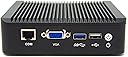
desertcart.com: Protectli Vault 4 Port, Firewall Micro Appliance/Mini PC - Intel Quad Core (Atom E3845), AES-NI, Barebone : Tools & Home Improvement Review: Excellent pfsense router platform - Review Update: 2/11/19: I now have over 1 year of run time on this device and it has preformed wonderfully. I do have to say it tends to run a little warm. I have a small usb powered fan that I didn't need anymore so I have it running on low blowing across the top of the unit. Even with the minimal air flow it makes a noticeable difference. In my environment the unit runs at approx 25% ram utilization and an average of .4 CPU. One thing to note, if you are using pFSense, it does not active the crypto support by default. To enable it you need to go to: System - Advanced - Misc - Cryptographic & Thermal Hardware. Enable the AES-NI CPU acceleration and while you are there you might as well enable the Intel Core CPU on die thermal Senor. This is a great platform to build a new pfsense router. It supports the new AES-NI so the hardware is compatible with future versions of pfsense beyond 2.4.X. Running 4gb ram and 120GB MSATA. Install was a breeze using the built-in svga port and USB keyboard. Install of the memory, ram, and pfsense install took about two hours. All of the network ports were recognized with no issues. Highly recommend for a SOHO device. Review: Great for a DIY home router - This unit is a great home router for those that need a small form factor PC to run PFsense or Opnsense. I have tested with both, and all hardware is functioning as expected. I opted to install a M.2 sata SSD on this model in order to handle the storage of the operating system. It has been running 24/7 for over a year in my home-lab environment and has had no issues so far. Simply installed my router's OS and configured. Have had to do no maintenance other than setup.The unit also supports AES-NI instruction sets, so for those that want to implement a router level VPN, you will be able to leverage hardware acceleration for OpenVPN. I'm getting full gigabit speeds on all 4 interfaces to my LAN and WAN and the unit still manages to stay cool. Some may opt to put a small fan nearby to cool the fins on the top, however i have had no issues leaving it on open air cooling as well.
| ASIN | B072ZTCNLK |
| Additional Features | Wps |
| Aspect Ratio | 16:9 |
| Brand | Protectli |
| Built-In Media | Monitor |
| CPU Model | Intel Atom |
| CPU Model Number | FW4A-0 |
| CPU Model Speed Maximum | 1.91 GHz |
| CPU Speed | 1.91 GHz |
| Cache Memory Installed Size | 2 MB |
| Cache Size | 2 MB |
| Connectivity Technology | Ethernet |
| Customer Reviews | 4.6 out of 5 stars 77 Reviews |
| Display Resolution Maximum | 640x480 |
| Graphics Card Description | Dedicated |
| Graphics Card Interface | PCI Express |
| Graphics Coprocessor | Intel integrated graphics (model not specified) |
| Graphics Description | Dedicated |
| Graphics Ram Type | SODIMM |
| Hard Disk Description | HDD, SSD |
| Hard Disk Interface | Solid State |
| Hardware Interface | Ethernet, USB, USB 2.0, USB 3.0, VGA |
| Human-Interface Input | Buttons |
| Item Dimensions | 5.25 x 5 x 1.5 inches |
| Item Weight | 3 pounds |
| Keyboard Description | integrated, simple button interface |
| Keyboard Layout | QWERTY |
| Manufacturer | Protectli |
| Memory Clock Speed | 1333 MHz |
| Memory Speed | 1333 mt_s |
| Memory Storage Capacity | 8 GB |
| Model Name | FW4A-0 |
| Model Number | FW4A-0 |
| Native Resolution | 1280 x 720 |
| Number of Component Outputs | 4 |
| Operating System | Linux |
| Personal Computer Design Type | Mini PC |
| Power Consumption | 10 watts |
| Processor Brand | Intel |
| Processor Count | 4 |
| Processor Series | Intel Atom |
| Processor Socket | LGA 1041 |
| Processor Speed | 1.91 GHz |
| RAM Memory Technology | DDR3L |
| RAM Type | SODIMM |
| Screen Size | 1.4 inches |
| Specific Uses For Product | Business, Personal |
| Total Usb Ports | 2 |
| UPC | 791512480687 |
| Video Output | VGA |
| Video Output Interface | VGA |
| Video Processor | Intel |
| Wireless Network Technology | Wi-Fi |
M**E
Excellent pfsense router platform
Review Update: 2/11/19: I now have over 1 year of run time on this device and it has preformed wonderfully. I do have to say it tends to run a little warm. I have a small usb powered fan that I didn't need anymore so I have it running on low blowing across the top of the unit. Even with the minimal air flow it makes a noticeable difference. In my environment the unit runs at approx 25% ram utilization and an average of .4 CPU. One thing to note, if you are using pFSense, it does not active the crypto support by default. To enable it you need to go to: System - Advanced - Misc - Cryptographic & Thermal Hardware. Enable the AES-NI CPU acceleration and while you are there you might as well enable the Intel Core CPU on die thermal Senor. This is a great platform to build a new pfsense router. It supports the new AES-NI so the hardware is compatible with future versions of pfsense beyond 2.4.X. Running 4gb ram and 120GB MSATA. Install was a breeze using the built-in svga port and USB keyboard. Install of the memory, ram, and pfsense install took about two hours. All of the network ports were recognized with no issues. Highly recommend for a SOHO device.
A**R
Great for a DIY home router
This unit is a great home router for those that need a small form factor PC to run PFsense or Opnsense. I have tested with both, and all hardware is functioning as expected. I opted to install a M.2 sata SSD on this model in order to handle the storage of the operating system. It has been running 24/7 for over a year in my home-lab environment and has had no issues so far. Simply installed my router's OS and configured. Have had to do no maintenance other than setup.The unit also supports AES-NI instruction sets, so for those that want to implement a router level VPN, you will be able to leverage hardware acceleration for OpenVPN. I'm getting full gigabit speeds on all 4 interfaces to my LAN and WAN and the unit still manages to stay cool. Some may opt to put a small fan nearby to cool the fins on the top, however i have had no issues leaving it on open air cooling as well.
A**E
Solid, powerful, quiet
This has worked great for me, and I'd highly recommend it as an embedded network appliance at the price point. I've tried it with both pfSense on FreeBSD and Ubuntu Server on Linux, and all hardware seems to work natively without any rough corners or weird drivers. Since I imagine most people are going to use this as a network appliance and not generally have a display connected to it, the serial COM port (and included RJ45 to DB12 cable) is a fantastic benefit that you rarely see in consumer network hardware. It gives full access to the device's BIOS setup interface and most OSs' boot consoles, and makes setup and network troubleshooting far easier than the traditional approach of repurposing a keyboard and monitor, or the embedded router hell of resetting and praying for a default network configuration. I was able to install and configure pfSense from scratch without connecting a display or keyboard. Ubuntu required video to do initial setup, but could be configured to support the serial console shortly thereafter. The chassis build quality is solid, all the ports are flush and well aligned, and access to the DIMM slot, two mSATA slots, and SIM slot (still unsupported in the US? See the Q&A section) are accessible under the bottom panel with four screws. There are pre-drilled and grommeted holes for installing antenna, though the options for equipping this device with wireless hardware are somewhat limited, so you may want to look elsewhere if homebrewing a WAP is part of your plan - the only officially supported wireless card is a USB based 802.11a/b/g only device. It comes with a bracket for hanging this off of a standard monitor VESA mount, but since it's so ill equipped to drive a modern display, I can't anticipate that this would be useful. I can see no reason why you couldn't use it as a wall mount bracket, though, as this device would probably be pretty well suited for hiding in a network closet somewhere. The link, activity, and HDD LEDs are all clustered on what I would vaguely consider to be the "back" of the device - the side with the DC in and network ports, where one is likely to have the most wires plugged in. This makes it mildly inconvenient and ugly to position the device where these LEDs are actually visible, but whether this is something you'd even want to do is mostly a matter of preference.
A**C
All in all, great looking, well-performing hardware in a power-sipping package, but with some design flaws.
This is a great little box for SOHO firewall / endpoint protection. The hardware is standardized x86-64 Intel compatible, so it will run most modern OSes. I tried out Untangle on it and performance was good. I put 8GB of RAM into this system along with a 250GB Samsung 850 EVO mSATA SSD. The console access can be hit or miss, depending on the OS you ultimately use. pfSense has a serial console installer, but Untangle does not, so if you are like me and have a monitor that does not accept a native DB15 VGA connection, do yourself a favor and get one of these: Cable Matters VGA to HDMI Scaler Converter Cable with HD 1080 Video and USB Audio Support This will allow you to convert the analog VGA signal to a digital HDMI signal that you can use for an honest video output. The biggest drawback to this unit is the spacing, or lack thereof, between the VGA and USB connections. When you have a standard size VGA cable attached, the clearance for the adjacent USB connections is VERY minimal, and will definitely dictate what you plug into this unit. I had to get creative with which USB sticks and keyboards I used concurrently on this unit. I even had to pull out a USB 3.0 hub to be able to use some different combinations of peripherals. Once you have everything installed and deployed, then the USB/VGA port clearances don't really matter, but when you have it in the back office to work on, you will likely throw a few expletives out when connecting vital peripherals. If I had one suggestion for improvement for the manufacturer, it would be SPACE OUT THE USB and VGA PORTS MORE! See my photos for some of the troubles I had. All in all, great looking, well-performing hardware in a power-sipping package, but with some design flaws.
J**J
excellent pfsense firewall, excellent customer support
I purchased this a little over a year ago and love how fast/easy it is for pfsense NATting and VPN. A little while ago I noticed the CPU cores were getting hot (80-100C) and experienced some errors on the WAN interface as reported by pfsense. I emailed Protectli and asked if that was a normal temp - it was not (supposed to be 30-40C). They treated this with urgency and sent 2-day mail a replacement with a pre-paid RMA sticker. Replacement firewall works great/cool - very happy with this purchase and company (I *never* write reviews BTW).
L**3
Running pfSense at Home? Run it Here
Update: May 2020 I tested the firewall with Fiber internet service at 500Mbps bilateral throughput (not full gigabit), and this device performs very well. Even with full gigabit service for home use, this firewall should be more than adequate for years to come. Update: June 2018 There was an IDS package running (suricata) that should not have been on when I did my CPU stress tests. Turning off suricata yielded much more accurate results since this level of DPI is not required for home use. I have a 225/20 Mbit internet connection for full disclosure when running the tests. The test results are added via pictures in this order: 1) Normal - Idle 2) Normal - Running SpeedTest 3) Normal - Running iPerf (570 Mbps) 3) Suricata - Idle 4) Suricata - Running SpeedTest 5) Suricata - Running iPerf Also the firewall logs show thousands of attempts of attempted connections that are properly blocked by the firewall. Stay safe out there folks! ---------------------------------------------------------------------------------------------------------- A fantastic pfSense box for running my home network. My review is about use in a home network, NOT a business network. During use it is warm to the touch but nothing crazy hot. Since my home network traffic does not require sustained bilateral gigabit throughput, this model will suffice. I never see that kind of real traffic load on my network; unless the traffic load is artificial. When my family runs software updates, downloads, video streaming, cloud stuff (aka hitting the network hard) this unit keeps up perfectly fine with CPU briefly hitting 33% in real-world use. The downstream LAN switches in my network are from Ubiquiti -> Ubiquiti US-8-60W Unifi Switch Purchased 8GB memory and 120GB SSD. Memory use is a paltry 500 MB and using ~2GB storage (snort cache). Could have saved more money going with 4GB memory, but extra memory never hurt anyone right? The mSata slots are labeled "MSATA" and "WIFI". Do not install the SSD into the WIFI slot and wonder why the SSD is not showing up for hours (like I did). Memory -> Kingston Technology 8GB 1600MHz DDR3L (PC3-12800) 1.35V Non-ECC CL11 SODIMM Intel Laptop Memory KVR16LS11/8 SSD -> Kingston Digital 120GB SSDNow mS200 mSATA (6Gbps) Solid State Drive for Notebooks Tablets and Ultrabooks SMS200S3/120G For home use, get this one and save yourself some Benjamins. --- For sustained bilateral gigabit throughput (Google Fiber, AT&T Fiber 1000, etc...) I would lean towards the i3 Protectli Model as a future proofing step (which contains a faster processor) -> Firewall Micro Appliance, 6x Gigabit Intel LAN, AES-NI, i3, Barebone
B**S
Great tiny firewall appliance!
I was a little bit skeptical of this device as I hadn't heard of Protectli before but I'm very glad that I bought it. The quality control on mine is good, solder joints on the board look like they were done well. The heat dissipation is good but I did remove some of the mesh on the sides to help with that. (I get why they have the mesh but it's not necessary in my setup.) The speed is far faster than the 5yo 1.6Ghz dual core intel atom it replaced. It's really a significant jump. I'm very happy thus far and I'll do some speed testing as soon as I get my gigabit internet this next week.
W**T
Excellent So Far
I bought this so that I could build a pfSense firewall for my SOHO. I added 8 GB Memory: Timetec Hynix IC 8GB DDR3L 1600MHz PC3L-12800 Non ECC Unbuffered 1.35V CL11 2Rx8 Dual Rank 204 Pin and a 32 GB SSD: Transcend 32GB SATA III 6Gb/s MSA370 mSATA Solid State Drive (TS32GMSA370) I booted of the USB image I had created from the pfSense site and I was up and running within thirty minutes tops. No issues with performance so far. I have 500/50 Mbps Internet and have gamed (Warcraft) and watched streams (Netflix / Amazon) with no issues whatsover. It does run warm, but not hot to the touch. Since it is my first time purchasing this brand hardware, I bought the four year extended warranty as it was worth the low price (I usually do not buy them). Update: A few weeks ago I moved from pfSense (Because of a specific issue I was having) to Untangle. Very easy to install. I am very happy with the hardware's performance and even more so with Untangle.
Trustpilot
1 week ago
3 days ago