🎨 Elevate your editing game—control creativity with a single hand!
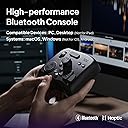
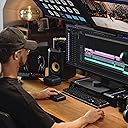
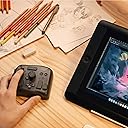
The TourBox Elite is a Bluetooth-enabled video and photo editing controller designed for professionals and creatives. Featuring dual-host Bluetooth 5.0 for seamless connection to two devices, 11 customizable buttons plus 3 rotary knobs, and subtle haptic feedback, it supports major creative software like Adobe Suite, DaVinci Resolve, and Final Cut Pro. Its ergonomic, one-hand design enhances workflow efficiency by up to 40%, while premium build quality ensures durability and comfort during extended use.


| ASIN | B0B5XCMFQD |
| Best Sellers Rank | #65,565 in Computers ( See Top 100 in Computers ) #1,775 in Computer Keyboards |
| Brand | TOUR BOX |
| Brand Name | TOUR BOX |
| Color | Black |
| Colour | Black |
| Customer Reviews | 4.3 out of 5 stars 493 Reviews |
| Display Type | No Display |
| Display type | No Display |
| Included Components | USB Cable |
| Item Weight | 376 Grams |
| Item weight | 376 Grams |
| Manufacturer | TourBox Tech Inc. |
| Material | Plastic |
| Material Type | Plastic |
| Model | TourBox Elite AMTBECA |
| Number of Items | 1 |
| Operating Temperature | 15 Degrees Celsius |
| Part Number | TBECA |
| UPC | 850040209112 |
| Unit Count | 1 Count |
| Voltage | 3 Volts (DC) |
| Warranty Description | 1 Year Warranty |
C**A
Practicidad
Es un dispositivo super útil para el flujo de trabajo en videos. Estoy muy contento con el producto y vale la pena la inversión. Es un dispositivo pesado, se siente de buena calidad y los botones vienen con pre ajustes que te facilita todo.
藤**井
直感的に操作できる最高の左手デバイス!
Premiere Proで使用していますが、正直もっと早く買えばよかったと思えるレベルです。 特にタイムラインの移動やカット編集が圧倒的にスムーズになり、作業スピードが体感で2倍以上になりました。 ボタンのカスタマイズ性が高く、作業内容に応じて自分好みに割り当てられるのもポイント。 ダイヤルやノブの操作感もとても滑らかで、触っていてストレスがありません。 Bluetooth接続も安定していて、ラグもほぼ感じないです。 動画編を本気でやっている人には心からおすすめできます。「手がもう1本増えた」感覚を味わえます!
A**R
Definitely worth it
I like this so much that this is my second unit
M**U
I love it!! Excellent user experience, highly customizable, amazing configuration companion app!
High-quality materials and construction, very heavy-weighted so it stays in place on the desk and feels solid. Haptic feedback is appreciated for feeling the dials' notches (and can be adjusted per button/dial mapping), but if you don't need that or Bluetooth connectivity, get the lower tier model. I love the concept of all buttons/dials having different shapes, positions and surfaces, it makes them all so much more unique and memorable. The TourBox Console companion app for configuring button/dial bindings is extremely well designed and easy to use. I love the fact that I can associate actions with pretty much any combination of buttons and dials, so I can get pretty creative on how I set it up for each application, and I don't feel like I can run out of mapping possibilities. That was a big criteria for me and they scored 100% there. I'm using it in Ableton Live (for audio editing and music composition), in Blender (especially for 3D sculpting) and in Affinity Photo (for hand drawing) as a complement to my Kamvas Pro pen tablet (which was bundled with Huion's Keydial Mini, but that just can't compare to the TourBox, given its even grid of similar buttons). The only downside is the price. It is slightly overpriced compared to other hardware of similar complexity (game controllers, keyboards, mice, etc), but I guess that being targeted to a rather narrow professional audience, it's probably something to expect. But even if it's rather expensive, I don't regret my purchase at all and would buy it again any time if I had to. Highly recommended to anyone involved with creative apps and workflows, with so many keyboard shortcuts to remember and trigger.
N**N
ダビンチリゾルブ&フォトショップに有効!
MacBookProでダビンチリゾルブとフォトショップを使うために購入しました。 Eliteでのデビューなので他機種との比較はできず、まだ使い込むところまではいっていません。 少し使ってみて各ボタンとダイヤルの配置については改良の余地有りかとは思って厳しく星4としましたがすでにかなり満足しています。 【機種選択:Elite←ノートPCはBluetooth】 基本的に自宅作業で使うのですがノートPCでUSB-Cは使いたくないと思いBluetooth必須としましたがレスポンスにストレスはありません。 NEOと比べた感触の違いは分かりませんが価格がけっこう違うので要検討かもしれません。 iPad(使っているのはiPadAirM3)でTourBoxを必要とする作業はしないものとしてPlusにはしませんでした。 【ダビンチリゾルブ:編集だけならSpeed Editorでも】 これまでSpeed Editorを使っていてそれはそれで便利でした。基本的に編集作業場に置いたままなのでTourBoxの小型化、軽量化はさほどのメリットとは感じません。 逆に小さいことによりボタンの数が少なくボタン同士の間隔も狭く指の動かし方が微妙だったりします。 ただ数については組合せ使用もあり、ボタン間隔も慣れの問題であろうと思います。 【ページごとの自動切り替えが良すぎる!】 TourBoxを考え始めた大きな理由の1つはカラーの使用頻度が上がってきたこと。ネット情報を見てこれはいけると思いましたが使い始めて納得です。 微調整にはキーボードやマウスの使い勝手はイマイチ以下ですがダイヤル操作は圧倒的に有効です。 オマケに自動で切り替わるのがもの凄く良いですね! カスタマイズが可能ですが当面はデフォルトを覚えながらでよさそうな感じです。 【フォトショップではカスタマイズが必須】 自動切り替えはソフト間でも有効です。私はテロップはフォトショップで作ることもあり両者は常に立ち上がっていますがその切り替えにTourBoxがついてきてくれるのは便利です。 写真の明るさや色調整などを行うにはダイヤル類が大いに役に立ちます。 またキーボードでもできる縦横移動であってもTourBoxに集約することで効率アップにつながります。 ただフォトショップはダビンチリゾルブ以上にユーザーが多様化していることもありデフォルトでは満足いく操作はできません。 使いながら自分の使用頻度の高い機能を順に割り当てていかねばならないでしょう。 以上、TourBoxは初期投資が必要ではありますが私にとっては買ってよかったツールの1つです。
Trustpilot
1 month ago
2 months ago