We remain fully operational. Our teams are working around the clock to ensure your deliveries continue safely.

قم بتنزيل التطبيق


معلومات عنا
حقوق الطبع والنشر © 2024 Desertcart Holdings Limited
قم بتنزيل التطبيق
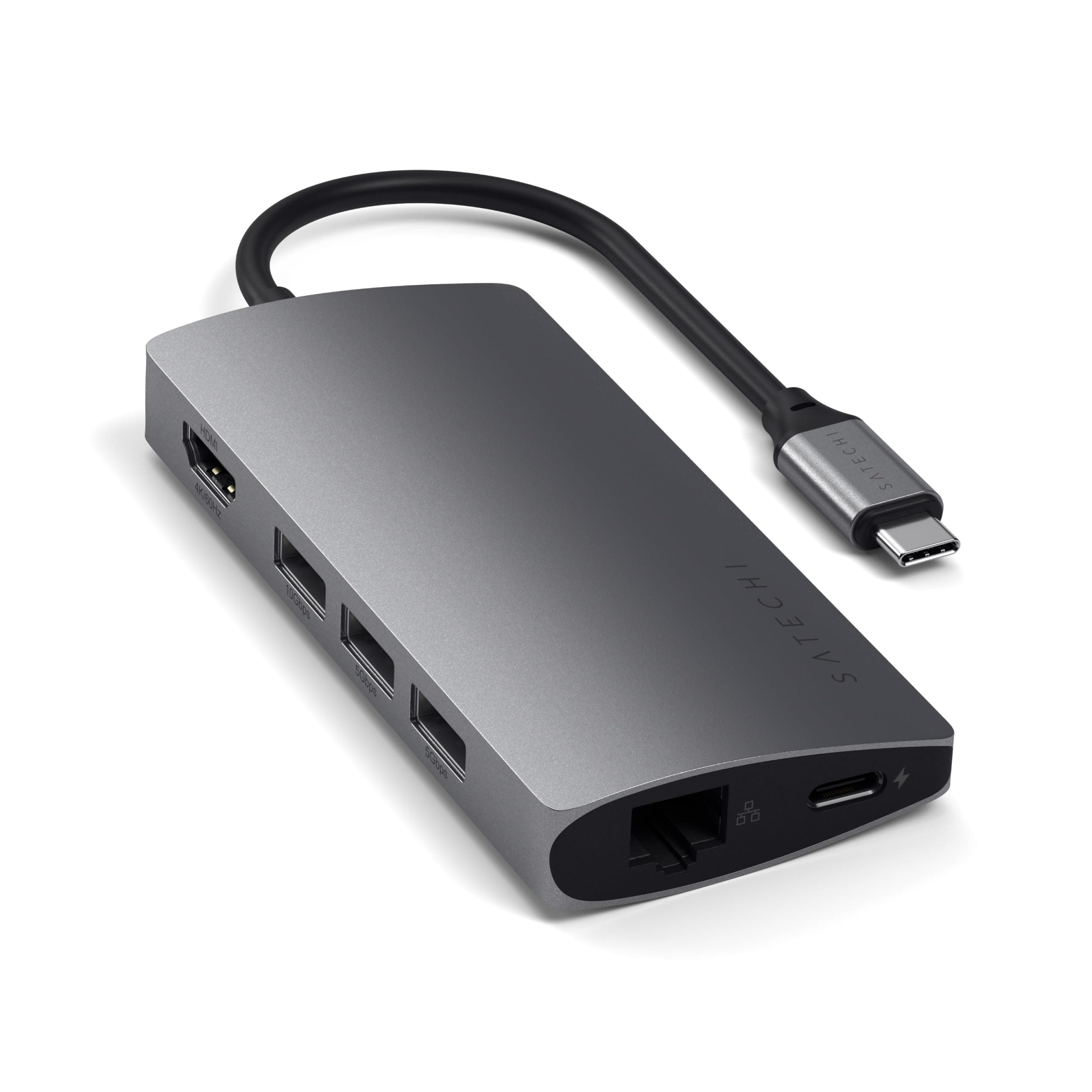
⚡ Elevate your workspace with power, speed, and style — all in one sleek hub!
The Satechi 8 in 1 USB C Hub Multiport Adapter V2 is a premium, compact docking station designed for professionals who demand reliable, high-speed connectivity. Featuring 115W USB-C PD charging, 4K HDMI output at 60Hz, and versatile ports including Ethernet and Micro/SD card readers, it ensures seamless integration with the latest MacBook, iPad, and Windows devices. Its durable aluminum build in Space Gray offers both portability and style, making it an essential tool for remote work, presentations, and creative workflows.


| ASIN | B075FW7H5J |
| Additional Features | Not_Performance_Used |
| Best Sellers Rank | #142 in USB Hubs |
| Brand | Satechi |
| Color | Space Gray |
| Compatible Devices | MacBook Pro 14/16-inch (2025 M5/M4/M3/M2/M1), MacBook Air 13/15-inch (2025 M4/M3/M2/M1), iPad Pro 11/13-inch (2025 M5/M4/M2/M1), iPad Air 11/13-inch (2025 M3/M2/M1), iPad Mini (2024 A17/6th Gen), Mac Mini (2024 M4/M2/M1), iMac (2024 M4/M3/M1), Mac Studio (2025 M4/M3/M2/M1), Lenovo ThinkPad, Microsoft Surface, Google Pixelbook, Google Pixel Pro 8/9, Samsung S24/Z Flip 5 - Google Pixel Pro 8/9 do no… |
| Customer Reviews | 4.4 4.4 out of 5 stars (4,856) |
| Data Transfer Rate | 4 Gigabits Per Second |
| Enclosure Material | Aluminum |
| Global Trade Identification Number | 00879961007140 |
| Hardware Interface | USB Type C |
| Item Dimensions L x W x H | 7.09"L x 3.94"W x 0.98"H |
| Item Weight | 78 Grams |
| Manufacturer | Satechi |
| Mfr Part Number | Label-Gray |
| Minimum Required Operating System Version | Mac OS 10.15 Catalina |
| Model Number | ST-TCMA2M |
| Number of Ports | 8 |
| Operating System | Windows, Mac |
| Total Usb Ports | 3 |
| UPC | 879961007140 |
| Warranty Description | 2-year limited warranty |
C**R
Superior Quality, NO Drops or disconnections. WORTH EVERY PENNY!
-Satechi products can't be beat in build and stability for my work environment going forward. -The connection is faster and superior than my last hub. -A plus is the mini HC slot -Super STABLE. No drops when adding or removing externals/SD drives. My last hub would kick off everything, every time I tried to plug in or remove an accessory or SD disk. I don't know if it was the connection to the mac or something in the physical build of that hub but this no longer happens with the Satechi. - Stable connection when MacBook sleeps. My externals rarely disconnect when I put my machine to sleep. I understand it is a Macbook Pro issue but it is down to about 2% whereas everytime I put my machine to sleep with my old hub, it would kick off my externals. - Direct connection for charging works. I can connect the Satechi and my external directly to my MAC with complete confidence while working. Something that the last hub would not do. The constant disconnecting of the externals disrupted my work flow, one was a scratch disk for Photoshop and when it disconnected, Photoshop would crash. It messed up my time machine backups that were in progress whereas I do not ever experience this with the Satechi while working. -Not a complaint of my Satechi but I purchased a new SeaGate drive that is ONLY recognized when it is directly connected to the Mac. It was not recognized by the old hub either. I was about to return the SeaGate when I realized I could charge my Macbook through the Satechi. My last hub could not be trusted to maintain a superior connection so I had software crashes often. I didn't buy a cheap hub last time but I wish I saw the Satechi hub in my search. I was new to needing a hub with my Macbook Pro's lack of connectivity and the unstable hub. This hub by Satechi is WORTH EVERY PENNY. I only wish they made a 4 USB slotted hub.
M**Y
Now working as advertised
After a scare with the hub seeming to brick the tablet. I got some professional help trouble shooting and got the tablet functioning again. USB and HDMI connections are working as advertised the USB-C PD port works but the charging speed varies between fast and slow. The hub gets quite hot, but the aluminum case seems to be working to dissipate the heat. The big issue comes when you try to use the ethernet port. It works briefly then ceases and then the settings app crashes and you will need to reboot the tablet. However once you shut it down it wont boot back up and you need to force start the tablet.
S**R
Works perfectly. There are others that cost less.
I'm using this Satechi USB-C Hub with my 2018 MacBook Air. The mix of ports it has is just right for me, and it works perfectly. Build quality seems very good. It gets warm after being in use for hours, but just warm not hot. Unlike some cheaper docks, it has pass-through power. If you have a computer with only one USB-C port, you don't have to choose between powering your computer or using the peripherals connected to this hub - the hub does both. However, my computer charges at a slower pace when using pass-through than when my charger is plugged directly into one of the two USB-C ports on the computer. That makes sense - the Satechi dongle is diverting some of the power from my charger to other peripherals. But you should be aware of this before buying. If you don't like this, you can get a charger that puts out more wattage than your computer's original USB-C charger. Like other USB-C dongles in this price range with an HDMI port, this one outputs 4K video at only 30hz, not 60hz. 60hz is nicer and you can get it either with a USB-C to HDMI cable or a much more expensive USB-C / Thunderbolt 3 docking station. But 30hz is very tolerable for the kind of computing I do, and I'm happy the Satechi dongle has it in case I need one of my computer's two USB-C ports for something else. I've tried all of my different peripherals, including printers with a USB-A cable, a variety of external drives, SD cards from my digital camera, Logitech wireless keyboard & mice that connect to the computer with a tiny USB-A plug, and more. There's only one thing I have that must be plugged directly into one of the computer's ports to work correctly: my KEF X300A powered stereo speakers that have their own internal DAC. These or any other powered speakers with their own internal DAC will bypass the computer's DAC, which is perfectly serviceable but not audiophile grade. I have never been able to get them to work correctly with any USB hub plugged into any computer, and I've tried a fair number, as most of the computers I've used have only 2 USB ports. If you have audiophile grade powered speakers with their own internal DAC, you will need to plug them directly into a USB port on your computer. If the cable has a USB-A plug on the end, you can get a little USB-A to USB-C adapter that works just fine. You just can't plug the speakers into a dock, any dock. For some reason, the DAC in these speakers doesn't like to share the computer's USB port with other peripherals. If you only have one USB-C port, e.g. the 12" MacBook, then you have to choose between using its port for your audiophile speakers or plugging the speakers into the computer's headphone jack - which sounds very good, but doesn't take advantage of the speakers' superior DAC. Some negative reviews criticize this dongle because it doesn't have the exact mix of ports they need. That's unfair. There are tons and tons of dongles with different mixes of ports. Criticizing this one because it doesn't have, say, mini display port output is like criticizing a pepperoni and mushroom pizza because it doesn't have Italian sausage. I'm not crazy about the price. I paid $80, and there are lots of dongles with the same or very similar mix of ports for $50-60. I picked this one because it got strong reviews, both from professional review websites and from regular folks who own and use it. It has good build quality, while reviewers of some of the cheaper ones say that they feel a bit cheap or flimsy. So I'm happy with my purchase and still recommend it over the cheaper ones to people who can afford it. But Anker has a USB-C hub with the exact same mix of ports which is currently priced $10 less than this Satechi hub, and I can't tell you any good reason why you should pay more for this one. (Search Amazon for "Anker 7-in-1 USB C Hub, 4K USB C to HDMI Adapter, MicroSD/SD Card Reader, 3 USB 3.0 Ports, with 60W Power Delivery"). I don't own it, but I own lots of other Anker products and they are all high quality, plus Anker has excellent customer service.
D**R
Great MacBook attachment.
Great solution for my son’s college computer.
L**O
User-friendly - awesome!
Usar-friendly, simple, plug and play! Awesome!
H**G
J’ai utilisé des Hub USB-C de différentes marques et c’est le modèle de satechi qui fonctionne le mieux. En HDMI 4K 60Hz l’image est stable durant de longues sessions de travail. Et je peux même utiliser une rallonge usb-c pour un rangement des cables à la péripherie de l’espace de travail.
S**S
The product was shipped quickly and the overall product is Very Good . Works very good wit the Mac. I feel the price is a little bit High.
P**S
It’s a nice product. Works really well. Sometimes gets heated up, but overall good.
M**X
Nachdem ich einige Konkurrenzprodukte gekauft hatte und diese alle qualitativ nicht zufriedenstellend waren (Verarbeitung, Funktionalität des HDMI-Ports), habe ich mir nun dieses vergleichsweise doch etwas teurere Produkt gekauft und bin absolut zufrieden. Die Verarbeitung ist sehr gut, der Farbton passt zum MacBook, die Ports sind gut (nicht zu streng und nicht zu lose), sogar neben dem MacBook macht es einen einigermaßen wertigen Eindruck und zu nicht zuletzt ist es voll funktionsfähig. Ich benutze den Adapter für meinen gesamten Schreibtisch, unter anderem ein externer Monitor (full hd) und eine externe Festplatte (HDD). Selbst bei größeren Kopiervorgängen hat der Adapter kein Problem die Festplatte mit Strom zu versorgen, während auch die anderen Geräte ohne Einschränkungen nutzbar bleiben. Hier noch ein Tipp für alle, die laufend einen externen Monitor über diesen Adapter verwenden: In osX ist der "Clamshell Mode" standardmäßig aktiviert, d.h. dass, wenn ein externer Monitor angeschlossen ist (was bei mir laufend der Fall ist) und man das Macbook zuklappt, der Standby-Modus nicht aktiviert wird, sondern das Gerät eingeschaltet bleibt und über den externen Monitor, sowie evtl. externe Eingabegeräte, weiterhin bedient werden kann. Um dies zu deaktivieren ist folgendes zu tun: - in den Recovery-Modus booten (Neustart und währenddessen command-r) - Terminal öffnen (über den Menüeintrag utilities (Dienstprogramme o.ä.) erreichbar) - folgenden Befehl eintippen: nvram boot-args="iog0x0" (dann Eingabetaste drücken) - Neustart (zurück in normalen Modus) und dann nochmal neustarten Nun sollte der "Clamshell Mode" deaktiviert sein und das Macbook nach dem zuklappen in den Standby-Modus gehen. Diese Einstellung wird aber gelöscht wenn der sog. "PRAM" zurückgesetzt wird, also muss die obige Prozedur falls dies mal nötig sein sollte wiederholt werden.
D**O
Comprei para utilizar com meu iPad Pro 11 polegadas, cumpre o que propõe.
ترست بايلوت
منذ شهر
منذ شهر