We remain fully operational. Our teams are working around the clock to ensure your deliveries continue safely.

قم بتنزيل التطبيق


معلومات عنا
حقوق الطبع والنشر © 2024 Desertcart Holdings Limited
قم بتنزيل التطبيق
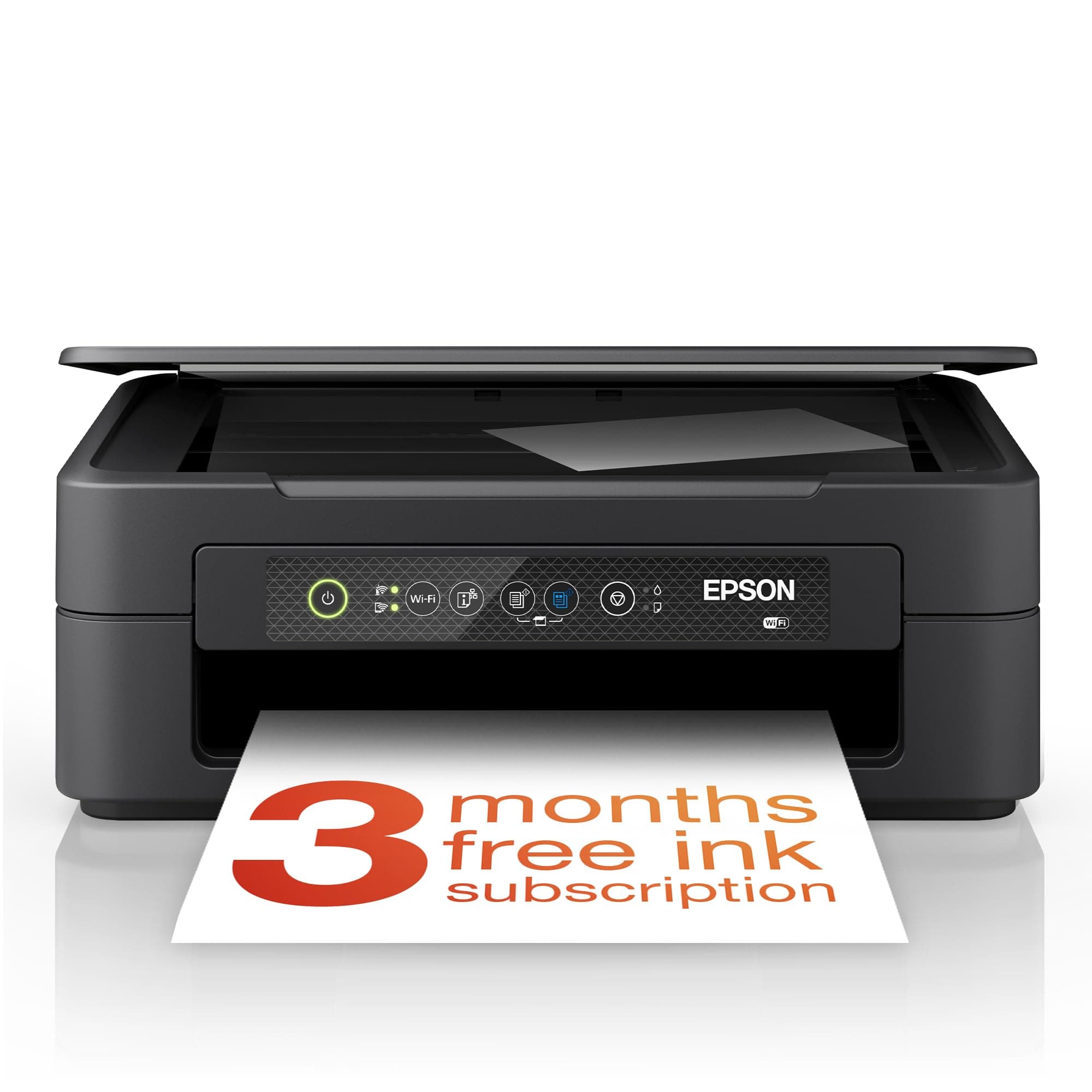
🖨️ Elevate your home office with smart, stylish, and wireless printing!
The Epson Expression Home XP-2200 is a compact, affordable 3-in-1 inkjet printer offering print, scan, and copy functions with crisp 1440 dpi resolution. Featuring Wi-Fi and Wi-Fi Direct, it enables wireless printing from smartphones and tablets via Epson’s Smart Panel app. Its cost-efficient 4-color ink system delivers vibrant prints, making it ideal for home and small office use.


| ASIN | B0BB2TV7TB |
| Additional Printer Functions | All In One |
| B&W Pages per Minute | 8 |
| Best Sellers Rank | 779 in Computers & Accessories ( See Top 100 in Computers & Accessories ) 9 in All-In-One Printers |
| Box Contents | Epson Expression Home XP-2200 |
| Brand Name | Epson |
| Color Depth | 24 bpp |
| Color Pages per Minute | 4 ppm |
| Colour | Black |
| Compatible Devices | Smartphones |
| Control Method | Touch |
| Controller Type | Android |
| Country of Origin | China |
| Customer Reviews | 3.8 3.8 out of 5 stars (3,497) |
| Dual-sided printing | Yes |
| Duplex | Manual |
| Global Trade Identification Number | 08715946702766 |
| Hardware Interface | USB |
| Ink Colour | Color |
| Is Electric | Yes |
| Item Dimensions D x W x H | 30D x 39W x 14.6H centimetres |
| Item Type Name | Colour Laser Printer |
| Item Weight | 4 Kilograms |
| Manufacturer | Epson |
| Maximum Copy Resolution Black and White | 1440 dpi |
| Maximum Copy Resolution Color | 2880 x 720 dpi |
| Maximum Copy Speed Black and White | 8 ppm |
| Maximum Print Resolution Black and White | [EO] 2880 x 720 dpi (Estimated Order of Magnitude) |
| Maximum Sheet Capacity | 150 |
| Maximum Supported Paper Size | Legal (8.5 x 14 inches or 21.6 x 35.6 cm) |
| Maximum print Resolution Color | 1440 dpi |
| Model Name | XP-2200 |
| Model Number | C11CK67401 |
| Model Series | XP |
| Network Connectivity Technology | Wi-Fi |
| Number of Trays | 1 |
| Other Special Features of the Product | Borderless Printing, Compact |
| Output sheet capacity | 150 |
| Paper Size | 9x13 / 10x15 / 13x18 / 20x25 |
| Power Consumption Size | 12 Watts |
| Print media | Card stock, Glossy photo paper |
| Printer Output Type | Colour |
| Printer Resolution Vertical Max in Color | 29.7 Centimeters |
| Printer Type | Inkjet |
| Product Warranty | 28 Days DOA -12 Months |
| Resolution | 5760 x 1440 |
| Scanner Type | Photo |
| Specific Uses For Product | Home/Office Document Printing |
| Total USB Ports | 1 |
| Warranty Type | limited |
M**Y
Quality at a budget price
very early days, but set up was pretty easy, password hide in machine guys. Printer speed is very fast compared to one it replaces, HP DeskJet 1512 what I swear just got turn off at HP end. Prints test pages perfect but will not print other stuff. Anyway back to this if works as long as the HP I will be well happy reason for buying, Epson over another Hp Ink can work out a lot cheaper
T**P
I hate this terrible printer so much I wasted 30 minutes writing this review.
It would take a thousand poets a thousand years to accurately describe how comprehensively, utterly, and relentlessly terrible this printer is. It was bought so we could do print and colour sheets and activities with our 4 year old, and it's upset her so many time we now refer to it as Jeffrey Epson. In no particular order, its many and varied faults, flaws and baffling design features include: - The instructions *constantly* reference a "Start Button". The printer *does not have* a Start button. It has a B&W and Colour Copy button, which is what it actually means, but the instruction manual, companion app, AND frustrating bloatware all fail to highlight that it wants you to use these. Printing failed? Obviously you gotta press the B&W Copy button. - The printer jams, as far as I can tell, based on whether it THINKS you are using Epson branded paper. Use paper that isn't outrageously marked up? It will fake a jam. Use home-brand ink to avoid paying a 700% mark-up, enjoy 50 unskippable pop ups telling you how bad it is (it isn't, £10 ink gives indistinguishable or better results than Epson's "premium" horribly marked up Squid Excretions.) - Accompanying Software is UNBEARABLY terrible. Want to print something? Enjoy 7000 adverts for their ink scam, help pages that don't help, guides that don't guide, and a BEVVY of attempts to sell your data for profit - Speaking of ink - don't be fooled by their Ink Subscription service, which is not a service where you subscribe to get ink delivered, but a binding legal contract to pay them to use YOUR OWN PRINTER, an agreement to have your printer disabled if it is not connected to Wifi 24/7, AND does not actually legally require Epson to deliver you ink - they will merely "endeavour to provide refills based on usage analytics data". So you can have the privilege of paying them *per page printed*... for a printer you own, using paper you own. - Print quality: if it actually printed, it would be quite good, but between the fake jams, pop ups prompting you to buy £3 worth of ink for £45, failures to initiate, failures to load paper... you'd definitely have a quicker job if you loaded up a 17th century printing press and whittled the blocks yourself while waiting for Epson to rob you - Build quality is cheap and nasty - everything is flimsy plastic, all the trays fall down, the paper feed fails endlessly - It spits ink everywhere and can't accept 95% of standard paper GSMs, so good luck printing anything - Weight is low, due to them being so tight that the sample inks are enough for a mighty 5 pages of printing before you get to enjoy 50 POP UPS FOR AN INK SCAM AGAIN! GOOD NEWS! - it's badly designed, as you can't load larger gsm papers manually, but it wouldn't work even if you could so I GUESS that's really more of a time saving feature? - Amazon is asking me about versatility, so I would say that this printer is versatile only as a hyper accurate gauge of how well one is progressing with anger management classes. I haven't yet swung it around my head like a flail and smashed it into pieces, so I feel very proud.
J**N
A really good 3-in-1 (print, copy, scan) for small jobs
Summary The Epson XP-2200 is an affordable, easy-to-use, inkjet printer, that is suitable for users who print small volumes of regular items, such as; documents; travel data; online orders and similar. Photo quality is acceptable and can be rated "good" at this price-point. Text printing (black on white) is better than expected with sharp, well-defined characters. Presentation The printer is well-packaged in a strong box with plenty of foam formers to protect while in transit. What's in the box The following items are in the box.... 1. Printer 2. A set of 4 start-up inks (Black, Cyan, Magenta, Yellow) 3. Unpacking and start-up instructions 4. Mains electricity cable Note : Epson provide a very detailed User Guide online. It is a good idea to download and read this User Guide before unpacking and setting up the printer. There are a number of very important instructions that should be followed before starting the setup procedure. Installation As with all inkjet printers, unpacking and the initial setup procedure is critical to the operation of the printer. Epson have produced a very good animated video showing the exact procedure that must be followed to setup the printer. It is imperative that this video be followed step-by-step to ensure that the unpacking and setup is carried out in accordance with Epson's instructions. Failure to do this could result in a damaged or non-functional printer. There are 4 ways in which the printer can be used... 1. As a stand-alone machine, including all functions – Print, Copy, Scan 2. Connected to a computer via a USB cable (not supplied) 3. Connected to a computer or other device via direct Wi-Fi 4. Connected to a network via a Router and Wi-Fi Notes : 1. When connecting via direct Wi-Fi a Router and network are not required. The connected device (PC, Laptop, Phone), must have a Wi-Fi Adaptor. The printer and the device can then communicate directly without the need of a network. 2. The printer does not have an Ethernet port, therefore connection to a network Router can only be achieved via a Wi-Fi link. 3. Recommend that you download (from Epson) and read the detailed User Guide before starting the installation. Practical use 1. Stand-alone. If the machine is going to be used as a stand-alone device then there is no need to download or install any software. However, control over functionality will be very limited. 2. Connected to a device. If the machine is going to be used together with a PC, Laptop or Phone, then the Epson software for this printer must be downloaded and installed. Once the software has been installed printing, copying and scanning are relatively simple tasks. For printing tasks, simply select Print in the document that you want to print and the Epson utility will activate. In the utility you can make all the normal printing function adjustments. For copying and scanning tasks, open the Epson Scan Utility and follow the simple onscreen prompts. This is a very easy-to-use printer and is suitable for even the most non-technical person.
M**S
Very good value for money
I found the P-2200 very easy to set up and link to my network. I only have light use needs for a printer and this unit fits the bill. It prints, scans and copies at a good (though not super quick) speed and the printouts are good quality too, even at moderate settings. Paper feeds through nicely without jamming up and all this functionallity at this price point is exceptional. Comes with a set of inks too!
C**E
C est le même modèle que mon ancienne imprimante en plus jolie
D**O
Ottima stampante con un prezzo contenuto e di una grande efficienza, si adatta alle cartucce compatibili. Scanner ottimo.
S**O
بطيء جداً وصعبه الاستخدام واصدارها قديم
R**K
I rarely use a printer these days so just wanted it for use 2 to 3 times per month. I have wasted so much time trying to get it to print after adding a new cartridge --and it still won't work. (I have been using home printers for over 35 years --all worked better than this.). I used it about 5 times and will likely need to throw it away. ---As a note, Epson's free months of cartridge subscription were not available in my area (Ireland - Mullingar), and they keep sending me emails to complete my enrollment after their system told me that my area was not available. I do NOT recommend.
B**O
Scanner capricieux. Il marche mais l'imprimante marche quand ça l'arrange et impossible de remplacer les cartouches par des génériques identiques mais moins chères.
ترست بايلوت
منذ يومين
منذ شهر