
قم بتنزيل التطبيق


معلومات عنا
حقوق الطبع والنشر © 2024 Desertcart Holdings Limited
قم بتنزيل التطبيق
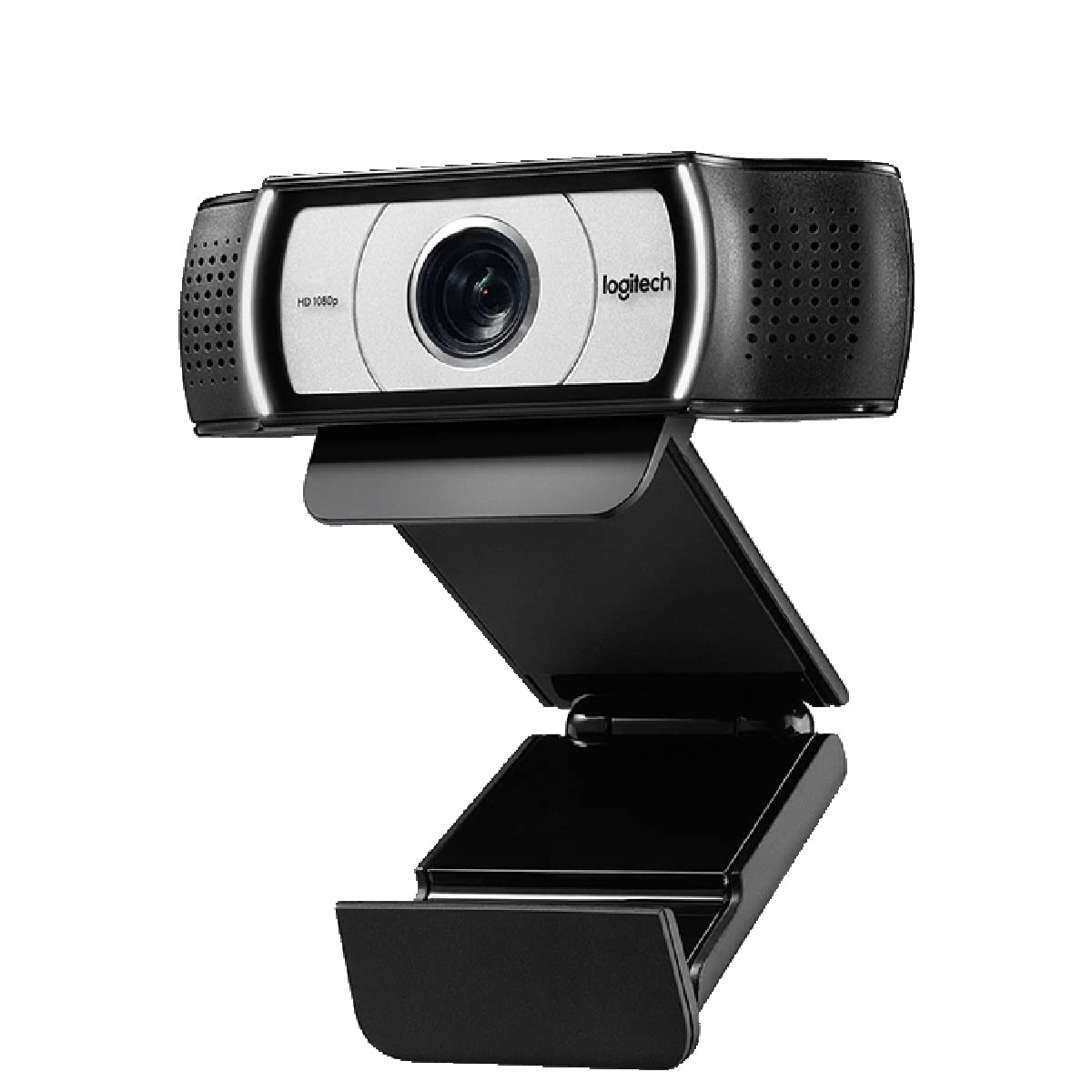
🚀 Elevate your video presence—because your meetings deserve the spotlight!
The Logitech C930-E Business Webcam is a premium 1080p HD video conferencing camera featuring 30fps smooth video, a wide 90° field of view, and 4x digital zoom with pan/tilt controls. Equipped with RightLight 2 for superior low-light correction and autofocus, it ensures crisp, bright images in any environment. Designed for professional use, it includes a privacy shade and is certified for major business platforms like Skype for Business and Cisco, making it a versatile, plug-and-play solution for high-quality remote collaboration.


| ASIN | B00CES5A60 |
| Batteries | 1 AA batteries required. |
| Best Sellers Rank | 9,198 in Computers & Accessories ( See Top 100 in Computers & Accessories ) 93 in Webcams |
| Brand | Logitech |
| Colour | Black |
| Customer Reviews | 4.3 4.3 out of 5 stars (3,034) |
| Date First Available | 1 Jan. 2012 |
| Effective still resolution | 2 MP |
| Focus type | Auto Focus |
| Guaranteed software updates until | unknown |
| Has image stabilisation | No |
| Included components | 1 |
| Item Weight | 5.71 Ounces |
| Item model number | 960-000972 |
| Model year | 2013 |
| Package Dimensions L x W x H | 25.9 x 22.3 x 7.4 centimetres |
| Package Weight | 0.22 Kilograms |
| Part number | 2228724 |
| Product Dimensions L x W x H | 9.4 x 4.3 x 7.1 centimetres |
| Size | B00CES5A60 |
| Style | Single |
| Warranty description | 1 Year Manufacturer |
| Water Resistance Level | Not Water Resistant |
| Zoom Type | Digital |
D**T
Great Product Slightly complex full set up
It really is a great product. I am a spine surgeon Zooming patients so clarity is important. The setup is simple but the full setup is a little more complex and could be simplified. So far - delighted. It has a security cover which is reassuring so the FBI can not peek in !!!! Enjoy better family Zooms with the wide-angle lens facility. The microphone and recording seem rather good so far but I will test this further with patients and family. I know it is a pricey spend but so far it seems worth it. The image is so balanced and the depth of field impressive. I hope that you enjoy it in these difficult times
C**R
Great video
I bought this logitech c930e 8 months ago to use with Zoom. I've participated in at daily Zoom meetings since then, with up to 50 people present, and my video is usually the best in the meeting. The logitech software which comes with the camera is very good, and allows video from two different sources, with picture in picture options. The auto focus is fast and responsive. The pan/tilt and zoom features work as expected and are useful. White balance is very good. The video is crisp and clear. The audio captured by the built in microphone is not so good however. I bought a blue yeti microphone to remedy this, which is also excellent. The logitech c930e along with the blue yeti microphone provide superb quality video and audio for Zoom meetings, as well as other applications. I would buy these products again.
C**R
Slightly different to the one I previously purchased.
I am concerned about the authenticity of this product, as the box and manual arrived in Chinese. I have previously purchased this same webcam and the box and manuals were all in English? Camera works great, high quality and crispy, though it is very sensitive to light and overexposes a lot more than my previous version of this same product.
M**D
Excellent webcam
Was torn between this model, the 930e, and the venerable 920. After much research, I chose the 930 primarily as the colour/image looked better in most of the YouTube reviews. So glad I went for the 930. Looks sleek in silver, with white LEDs and works beautifully with my ageing MacBook Pro (2015). Webcam Settings app sorts out the adjustments beautifully (£7 on App Store). It’s the wide angle lens that makes all the difference - plus you can narrow the view as needed. Finally, feels very well made and was a doddle to set up. Deserves fully 5 stars.
M**Y
Great external webcam for MacBook pro
I got this webcam as an alternative to the built in camera to my MacBook. It is very easy to set up (plug and play) and works great with Skype. attaches via USB2 Image quality is superb and clear. The camera clips on top of the screen, a light notch may be visible for edgeless screens, but this is not an issue. The mount also has a standard screw thread fitting so it can be attached to a tripod if you want to do blogs or other video type presentations. I like how the camera comes with a little privacy screen that covers the lens when not in use. To camera settings can be set up through a separate free app / bit of software that can be downloaded from the app store (might be different on PC). The only downside is that this app needs to be running for the settings to be applied, but this is not a mayor issue, I have it next to my Skype icon in my app bar.
G**S
Good quality for the three months that it worked!
I thought this web cam was really great. Best picture quality in any web cam that I ever owned and good software that I downloaded to facilitate camera position and other features. Unfortunately, however, it suddenly stopped working - after about three months. My computer could not detect the camera. I tried everything recommended online. In device manager it is not recognised - does not appear at all. I tried it in two computers and in myriad USB ports all to no avail. Both computers are reading the camera as a USB drive, but a drive that cannot be accessed. The drive show sup under Drives in device manager as well. I have another web cam (Microsoft) that is working perfectly on both computers so seems pretty definitely that it is the web cam that is at fault. Annoying for an expensive web cam after only three months of very limited use in Teams meetings.
D**A
Nothing Bad To Say At All!
From reading other reviews, it looks like I purchased this webcam for a slightly different reason than other peeps. Rather than work Zoom calls, I wanted the C930-E so I could use it for Discord calls with friends. I have a desktop microphone, so I really just needed the Webcam for video as my desktop hasn't got a camera. As the title suggests, I haven't experienced any issues with the webcam at all! Setup was incredibly easy, you literally plug it in and you're ready to go. It even comes with a handy detachable window/screen/flap thingy that you can flip down over the camera if you'd like to cover it and give yourself privacy. The quality of the camera is fantastic, and I feel like any limitations to the quality will come from your own personal internet speeds rather than the webcam itself. I've used it to talk to folks multiple times, and haven't received any complaints. All in all, 100% satisfied!
ひ**む
お値段ぐらいのスペックはあるのかな。 こちらも、非常に役になっています、3脚つけて、高さ調整とかしてます。
A**M
Kendim yayıncıyım ve kameram bozulmustu 30 fps olduğu için alırken çekingen davrandım youtubeden çok video izledim bu kameranında videoları çok beklediğim gibi değildi riske girip aldım ve hiç pisman degilim 30 fps gibi degil 60 kalitesinde goruntu cok net yayın yapıcaklara kesinlikle tavsiyemdir hiç sorunu yok FOV çok geniş buda arka plan yapmak için bire bir oluyor
M**N
Excelente definição e produto.
W**T
Mi Primer camara web no me decepcionó, excelente imagen fácil instalación en un tripié con el que ya contaba gracias al clip que incluye, tapa de privacidad; la utilizo para streams en twitch en un xbox series X directamente conectada a la consola sin ningún problema solo la conectas y en automatico la detecta y puedes comenzar a transmitir
R**F
Ich benutze WebCams am Mac u.a. um auf meinem Youtube-Kanal "wforkel" Gitarrenaufnahmen zu posten. Leider lässt die aktuelle Generation der internen Mac iSight-Cams bezüglich Bildqualität immer noch zu wünschen übrig und full HD geht gar nicht. Deshalb habe ich mich bei Logitech umgeschaut. Bereits die C910 war deutlich besser und lief sowohl unter Windows 7 als auch Mac OSX 10.8 ohne Treiber. Ich habe dann noch die C920 und später die C930e gekauft und alle 3 verglichen. Alle 3 Cams werden vom Retina-Macbook und vom iMac unter Mountain Lion und Maverick ohne weitere Treiber sofort erkannt und man kann mit Quicktime sofort Filme in full HD aufnehmen. Am Windows-PC geht Quicktime leider nicht, man muss AVS4YOU oder etwas ähnliches nehmen, aber es geht auch hier ohne Treiberinstallation. Für Skype sind alle drei ohne Einschränkung geeignet. Die Unterschiede liegen im Detail (siehe unten). Wer Wert auf einen großen Zoombereich legt, soll die C930 wählen. Die Bildqualität ist bei allen 3 Modellen sehr ordentlich und übertrifft alles was ich bisher bei Webcams gesehen habe: Gestochen scharfe Full-HD Videos und schneller Autofocus bis in den Makrobereich. Audiomäßig sind alle drei Modelle mit 16 kHz PCM-Samplingfrequenz ziemlich eingeschränkt trotz ordentlichem Stereomikrofon. Für Musikaufnahmen sollte man sich ein externes USB-Interface mit guten Mikrofonen gönnen. Am besten ein einfaches Stereo-Interface, das wird im Gegensatz zu manchen Mehrkanal-Interfaces von Quicktime problemlos erkannt. Unterschied C910 - C920 - C930e: Bei der C920 und C930 wurde die Befestigung verbessert, sie wackelt nicht mehr so und hat auch ein Stativgewinde, was der C910 fehlt. Die Mikrofonausrichtung wurde ebenfalls verändert um den Stereoeffekt zu erhöhen. Die Linse scheint bei allen 3 Modellen gleich zu sein, die Unterschiede kommen vom Sensorchip. Die C930 hat laut Datenblatt einen Sichtwinkel (FOV) von 90 Grad, während die C920 einen FOV von 78 Grad hat. Bei der C930 muss man also etwas näher ran für gleiche Bildgröße. Die 930 hat eine weiße Frontbeleuchtung, was bei schwachem Licht nicht so auffällt wie die blaue Beleuchtung der älteren Modelle. Alle 3 Kameras unterstützen Full HD 1080p bei 30 FPS (Bilder pro Sekunde) mit H.264 bei ca. 25 Mbit/s Datenrate. Apple Pro Resolution ist auch möglich bei ca. 200 – 400 Mbit/s und Motion JPEG bei ca. 1Gbit/s. Laut Anzeige der Logitech WebCam App haben die C920 und C930 den gleichen Sensorchip, ich vermute es handelt sich um einen 3,7 Megapixel Chip mit (2304 x 1596, 3:2). Allerdings ist es mir nur gelungen, Videoaufnahmen mit Full HD 1080p (1920 x 1080, 16:9) zu machen, d.h. die Kameras nutzen nur einen Teil der Sensorfläche aus. Die Bildqualität unterscheidet sich nicht wesentlich, die C930 schärft nur stärker. Die C910 funktioniert hingegen auch mit voller nativer Auflösung noch mit 10 FPS. Die C910 hat laut Datenblatt einen 5 MP chip (2592 x 1944, 4:3 sodass das älteste Modell auch die höchste Auflösung bietet. Außerdem liefert sie nach meiner Erfahrung bei schwachem Licht das beste Bild, während die C930 bei Tageslicht am besten wirkt. Hier noch ein paar Software-Tipps für den Mac: Zum Aufnehmen von Filmen mit der Webcam am Mac eignet sich neben Quicktime z.B. die App RecordMe, welche eine größere Auswahl an Formaten bietet. Unter Windows habe ich die Kameras mit AVS4YOU und VLC ausprobiert. Leider habe ich für den Mac keine App gefunden, die alle verschiedenen Aufnahmemodi ermöglicht. Quicktime X arbeitet entweder mit H.264 oder Apple Pro Res, Quicktime 7 und die App Record Me mit H.264 oder Motion JPEG. VLC bietet u.a. MPEG TS. Logitech bietet zwar ziemlich versteckt eine Kamera-Software für Mac an, aber die ist genauso schlecht wie die Windows-Software. Also: Die Logitech-Software auf beiden Betriebssystemen gar nicht erst installieren!!! Etwas besser ist da schon die kostenlose Webcam-App von Logitech im Appstore mit der man die wichtigsten Einstellungen verändern kann. Die Zoomfunktion funktioniert allerdings nur mit der C930 und die App kann nicht mehrere Cams verwalten. Deutlich mehr kann die App namens "WebCam Settings" aus dem Appstore. Damit kann man unter OSX alle Einstellungen wie Blende, Focus, Zoom, Farbsättigung, Weißabgleich etc. komplett manuell einstellen und abspeichern (funktioniert auch mit mehreren WebCams). Diese kann auch schärfen. Die kostenpflichtige App "iGlasses" hat zusätzlich noch komische Effekte eingebaut, kann aber nur 720p. Dafür aber wird sie auch von Final Cut Pro X erkannt, so dass man nun direkt von der Webcam in FCPX importieren kann. Das ging bisher nur mit der eingebauten iSight Kamera. Mit mehreren Cams kann man Videos herstellen mit verschiedenen Blickwinkeln. Ich habe drei Webcams (2x C920 und 1x C910) mit dem Mac verbunden und jeweils eine Quicktime-Aufnahme gestartet (jede in einer eigenen Instanz). Alle 3 Cams wurden ohne Probleme gleichzeitig aufgenommen, allerdings ging maximal 720p, darüber wird der Datendurchsatz zu groß. Selbst USB3 ports unterstützen maximal 480 Mb/s bei Cams mit USB2 Schnittstelle. Auch ein Hub hilft da nicht weiter, höchstens ein zweiter USB-Chip im Rechner.
ترست بايلوت
منذ 3 أيام
منذ أسبوعين