

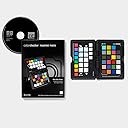


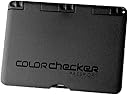
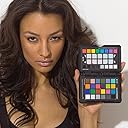
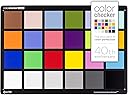



X-Rite Color Checker Passport (Mac/PC)
Product ID: 48087440
Details
- BrandX-Rite
- ColourBlack
- MaterialPlastic
- PatternSolid
- StyleColorChecker
🎨Industry-standard ColorChecker Classic
📏Pocket-size portable design
⚙️Includes camera calibration software
🎯 Nail perfect color every time — because your vision deserves precision.
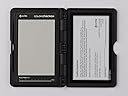
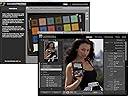
The X-Rite ColorChecker Passport is a professional-grade color calibration tool combining three photographic targets in a compact, portable case. It ensures accurate white balance and consistent color capture, integrates seamlessly with Adobe software, and includes calibration software to create custom camera profiles. Trusted by photographers to save time and deliver true-to-life colors across diverse lighting conditions.
| ASIN | B002NU5UW8 |
| Age Range Description | Adult |
| Brand Name | X-Rite |
| Colour | Black |
| Customer Reviews | 4.5 out of 5 stars 1,250 Reviews |
| Form Factor | Slim |
| Global Trade Identification Number | 07387809240688 |
| Item Dimensions D x W x H | 21.6D x 27.9W x 4.5H centimetres |
| Item Weight | 0.22 Pounds |
| Manufacturer | X-Rite |
| Manufacturer Part Number | MSCCPP |
| Material Type | Plastic |
| Model Name | Msccpp |
| Model Number | MSCCPP |
| Number Of Pockets | 1 |
| Number of Sections | 3 |
| Pattern | Solid |
| Pocket Description | Stash Pocket |
| Product Care Instructions | Dry Cloth Clean |
| Special Features | Mac Compatible, Minimum RAM: 512 MB |
| Style Name | ColorChecker Passport Photo |
| Target Audience | Unisex-Adults |
| Theme | Rainbow |
| UPC | 764011192283 780746734352 710762440005 |
| Wallet Compartment Type | Credit Card |
R**N
You need this
I bit the bullet and reluctantly stumped up the price for this x-rite colour checker. Prior to this I had been trying to calibrate with a cheaper printed card version. I had given up and ended up using the adobe 4.4 profile in lightroom as it seemed to do a far better job. Once I opened the x-rite I realised immediately how inaccurate the spurious printed card was and why I had had so many problems. Also how much time I had wasted. It's also very easy to create profiles in lightroom and I now have one for each studio light set up. It works, the colours on my calibrated monitor look spot on and I can relax in the knowledge they are accurate. With the time it saves and the accuracy it adds I feel silly for not having this before. I couldn't work without this and I have gone from thinking it was overpriced to an essential tool for which I would be prepared to pay double.
A**R
Good quality colour checker
I liked it when I got this colour checker in this nice box, with disc to set up software and plug in to your computer, well I downloaded everything straight from the site, they send you links when You register your product. It doesn’t look cheap as many people tell, and yeah it’s expensive, overpriced? Maybe, but I believe it makes its job, the colours are true and checked by this company who works specific with colours for years, and for me it’s another purchase to minimise my time for corrections, especially when you are that kind of perfectionist and time saver, this one not for video but I’ll use it for both ways anyway.
M**E
Good as expected, but a little fragile!
I believe the package is very good with the software to make the custom profiles. I am pretty sure about the accuracy of colours (not that I am, by any means, an expert). My only complaint is about the 'plasticy' nature of the passport. I think it's fairly easy to carry and pack in this format but when it comes to opening the passport it can be a little stiff. One day I tried opening it my fingers slipped onto the actual colour pads and my finger nails scraped one of them ruining the surface. They are not hard wearing and I am hoping that the little scratch I made has not effected the accuracy of the colours. I had already read about this in other reviews and still managed to do this by accident. All I will say is that: if you do use this, then please use it with care, because it's not really built for all weathers!
M**T
Good product and easy to use
The ColorChecker Passport is a great upgrade to the older, and much larger, A4 sized ColorChecker card which I have used for some years now. I photograph original artwork, often in oil or watercolour and there is always a subtle colour shift somewhere that is difficult to isolate and correct without affecting other colours. Using the profile generated by the software included with the colourchecker via Lightroom really does have an effect on specific hues. It is also a good tool for setting white balance and warming up, or cooling the final image when needed. This was also a very good price for this product.
J**M
A good tool
An interesting tool to improve your photography workflow. Had some reservations about getting the product partly because of the cost and looked cheap. However, having used them in various lighting conditions, am able to get consistent colours and WB. A great addition.
N**Y
Satisfactory!
Perfect colortoolkit for color management. It has three targets to use in an protective case, very handy to have with me all time. The combination to create custom whitebalance and calibrate my cameras sensor with this color referenses in different lights, saves lots of editing time. This kit can be used with Lightroom and Photoshop, very easy to create profiles in there, and apply to all the other pictures. It is allso easier to add warmth to skin tones, or boost the deep greens or blues in a landscape, with the creative enhancement target. Thats the digital attitude it can make you happy, or it can make you sad. I use my tools to get satisfaction.
A**M
With caution
Not quite what I was hoping for. I had a test shoot for a client who gave me some sample products to photograph before deciding to hire me. I bought this little thing hoping it would save me time and give me accurate colour. I ended up spending so much time trying to figure out why the colours were so inaccurate and oversaturated! The fuchsia looked purple and the coral looked red. Even my husband - who walked by me as I was working on the photos on my MacBook Pro computer - said, "Those colours really are strong." Yeah, way too much. I ended up reverted to the Adobe standard and worked th colours from there. I have read of other photographers having similar problems on the photography forums. Over saturation and resultant colour noise. Also, that it's great for outdoor shooting, but studio setups are more unpredictable. Wish I had read that before before I wasted so much time in what should have been a couple of,hours shooting. My set up was in the studio, using godox pioneer 300di softbox and extra diffusers and reflectors, Nikon d800 and Nikkor lens and Rokkinon lens. I have written to XRite to ask for more info. We'll see what they say.
J**R
Great device for colour matching cameras. Just a shame about the free software
Having several cameras I need to colour match them, which this product does with Adobe software. It is a shame that it is impossible to download the Affinity Photo software due to an error on the website application page (looking for input on a field that does not exist). Will be upgraded to 5 star if web page fixed.
V**R
Essential Tool for Accurate Color Calibration
The X-Rite ColorChecker Passport is an absolute game-changer for anyone serious about photography or videography. This compact color calibration tool has streamlined my workflow and significantly improved the accuracy of my color editing. The quality of the color targets is outstanding, and the passport fits easily into my camera bag. It’s incredibly easy to use—simply take a shot of the passport in the lighting conditions you’ll be working in, and you’re set! The included software makes it a breeze to create custom camera profiles, ensuring that the colors in my images are spot-on. I’ve noticed a significant reduction in time spent correcting colors during post-processing. The difference in color accuracy is remarkable, especially for portrait and product photography where true color representation is crucial. If you’re looking to elevate your photography to the next level, the ColorChecker Passport is a must-have. Highly recommended for both amateurs and professionals alike!
P**Y
Almost a necessity for serious photography
This is the best color calibration standard and white balance system for non-studio uses. It's totally portable, very sturdy and does a superb job. Not only does it provide a basic white balance capability but it also: * Allows subtle tweaking of white balance for portraits and landscapes by selecting a different white balance target that will warm up or cool down your photo for a more subjectively pleasing result. This is very fast and easy to do and is also easily reproduced across multiple sessions. This capability is valuable regardless of format you are shooting - RAW or JPEG. * You can compare the targets to your final prints or monitor output to help do color management on those devices. * Allows you to create a color correction profile for Lightroom for processing raw images for your particular camera and optimized for either a specific light source (single light source profile) or for a range of light sources (where you take two photos, one cool and one warm, and your raw processor interpolates the correction based on color temperature - this is the standard for most raw profiles) There's a Lightroom plugin to do this, or a standalone program. Both are exceedingly intuitive and easy to use. The color standards cover the center-point of most real-world color situations, so it is a solid color correction table that results from using this. And even if you don't use the color correction profiles, the white balance portion is extremely useful, especially with the slightly tweaked spots. It's small enough to easily carry, and it's durable enough in its plastic case to actually be able to use it and not destroy it. I take mine everywhere, and if I am in an unusual lighting situation, a couple of shots is all it takes to make color management dramatically easier. Caveat - if you care about color, you also need to color manage your displays. Get a color calibrator such as X-Rite or Datacolor. If you are printing critical color, you will likely need to do the same for your printer. Commercial printers are pretty good at color management. (And you don't have to worry about buying ink!)
U**Z
Perfection is the Nick name of X-Rite Colorchecker Passport.
Hi, I'm a photographer and studio cum lab owner and it's the best buddy for on the go color correction on photoshoot. Best when working on Camera RAW format. It's magic starts from Adobe Lightroom. Where we can make a single profile for a particular location and take great shots without any hassle. X-Rite is my favourite brand. Update : 3rd July 2021 - A sudden rise in price from 8k to 18k on discount (Original Price 20k INR) is unnatural and looks overpriced form a product that's for a minimal purpose. With current transition of x-rite to Calibrite i hope to see a good build quality which doesn't break the hings and shatter in two piece as previous build. But as a part of photography workflow it is a important tool and for that reason doing monopoly with price and interest is not right. Currently the price is higher than 8K and loosing interest in buying another one.😮💨☹️
A**N
Muy útil para ajustar color
Muy conveniente para crear perfiles de cámara y asegurarse de que los colores de las fotografías están lo más próximos a la realidad posible. Muy fácil de usar. Si bien las instrucciones dicen que conviene cambiarlo a los dos años, mi experiencia es que conservándolo bien y si no se usa de forma frecuente ni se expone al sol de forma frecuente, dura y es fiable durante bastante más tiempo, vamos que no obtienes diferencias apreciables de resultados entre uno nuevo y otro con seis años, por ejemplo.
N**T
INDISPENSABLE
Tout simplement indispensable quand on travaille avec des images au quotidien... Je m'en sers uniquement en vidéo, pour rattraper les quelques petites erreurs de balance des blancs qu'il peut y avoir entre celle enregistrée sur la caméra et la réelle... Processus d'utilisation (Pour enregistrement Prores ou autre format compressé) : - On check la balance des blancs au sekonic ou au posemètre doté de la fonction white balance. A ce propos l'application iphone nommée "posemètre" donne un résultat plutôt pas mauvais si assez de lumière et correctement exécuté ... - On règle alors dans la caméra la balance des blancs mesurée à l'étape précédente. - On pointe alors le colorchecker devant la caméra, puis sans couper la caméra on enregistre son plan. - En post prod, grace au logiciel GRATUIT Davinci Resolve lite, on corrige ses couleurs automatiquement en 1 clic ou 2 avec l'outil adapté... (Le logiciel fait la différence entre les couleurs enregistrées par la caméra sur le lieu de tournage, et la charte couleur X-rite préenregistrée dans le logiciel... L'ajustement se fait alors automatiquement par comparaison entre les deux... Efficace !!!!!) Le résultat est juste exceptionnel... Surtout pour les formats compressés comme le Prores ou le H264 basique genre celui des Canon 5DIII et autres DSLR. Avec cette façon de procéder, on peut récupérer des couleurs fidèles sans trop de problèmes, meme avec un codec en 8 bits sur la luminance. (DSLR...) Idem pour la photo. Récupérez des teintes de peaux idéales... des couleurs justes et calibrées... Mais je m'en sers moins en photo et je ne connais pas bien le processus sur photoshop ou lightroom. En définitive, je conseille ce colorchecker à 100% aux photographes et autres vidéastes désireux de conserver des couleurs justes tout le long de leur process. Depuis que je l'ai, je me demande comment je pouvais bien faire avant... au jugé... A l'oeil... C'était faisable quand on a un oeil exercé... mais avec le colorchecker ca devient rapide et sans tergiverser... Service amazon toujours sans reproche depuis plusieurs années... Félicitations.
Trustpilot
2 weeks ago
1 month ago