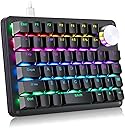
🎮 Elevate your command center with the ultimate one-handed powerhouse!
The Koolertron One Handed Mechanical Gaming Keyboard is a compact 45-key USB macro keypad featuring a fully programmable rotating knob, 16 macro keys, and customizable RGB backlighting. Designed for Windows PC gamers and professionals, it supports 4 layers of saved configurations and integrates mouse control functions, making it a versatile tool for gaming, creative workflows, and productivity.


| ASIN | B0B824GDD9 |
| Best Sellers Rank | #26,453 in Video Games ( See Top 100 in Video Games ) #140 in Mac Gaming Keyboards |
| Customer Reviews | 3.7 3.7 out of 5 stars (572) |
| Date First Available | October 5, 2022 |
| Item Weight | 1.3 pounds |
| Item model number | AE-AMAG50-CLA |
| Manufacturer | Koolertron |
| Package Dimensions | 10.63 x 6.65 x 2.24 inches |
K**N
The best programmable keyboard value, sturdy, easy enough to use
This is currently the best value for a programmable keyboard. It's a solid piece of a equipment with reasonable software. While it's not as easy to switch functions for different applications, like the Elgato Stream Deck, it's just a huge number of keys. The tool contains a large number of options for the keys including the basic "work like a key" and "press a hotkey". There are more ways to handle a keypress than the Stream Deck, but no special streamer features. If you want more advanced features, I recommend combining with AutoHotkey to do roughly anything. The software is a little quirky for some thing, but usually won't get in your way. Hard to mess up too bad. I do have trouble with the device if I don't use a USB 2.0 port (or a 2.0 extension cable). The software doesn't handle hi-res monitors well, but I can still use it. But none of these things are a big deal when you're going. I would prefer if the device came with all light keycaps. I bought a set of blank lighter keycaps. This is because I like to use clear printable stickers on the device. You'll get two sets of stickers with the device, they are OK. You also get a key puller because why not? This is great because you'll change your mind about where you want keys and it's easy enough to move them around. The device is really pretty thick for a keyboard, for better or worse. It works real well flat. If you want to prop it up you'll need a really thick stand. I currently have one for Photoshop, one for editing in Premiere, I could imagine having more for more functions. The alternate choice would be to get more Stream Decks. 3-4 Streak Decks would probably keep you from ever needing any more of these things. Personally I recommend trying some of all of it ;) Other options include MIDI devices and MIDI Midi Translator pro - that's a good way to get some reasonably priced programmable knobs and switches, but isn't likely to be more affordable than this in the long run. oblitum/Interception will allow you to program anything, but that requires a real programmer. This is the best way to get programmable keys at a good price, and I'm real happy with the ones I have.
D**N
absolute garbage
Don't waste your money. Bought this for my CAD station to save keystrokes and having to use the full QWERTY kb to enter coordinates & common commands. Constantly loses connection if it syncs at all and their configuration software constantly fails to find it in "configuration" mode. The configuration software is complete junk. Fails to save any of the 8 supposed macros or 2-key/ hotkey combinations following their instructions. It (basically) only accepts what you select from their onscreen kb which DOES NOT have the full range of standard QWERTY symbols. Not wasting anymore working time. Its being returned.
N**O
Unique product and it works well.
First of all it's not a product for everyone. Not going to work for everyone as it has no magic in it. One needs to know what to do with it. It does all it is supposed to do. Some learning may be required. All keys are removable for color /pattern customization. All keys are programmable for any key/key combination/macro. Actually macro has its own library and any macro can be assigned/reassigned to any key/keys. I use it for Shortcuts for General/Office applications and it helps alot to speed up the things and also more accuracy. It can type frequently used sentences with one press of button. It can remember names/numbers/email (and physical) address and types with one key press. It has onboard storage so it can be moved to other PC keeping all settings. Software works with Windows 11. No installation is needed either. Only poor side is the ancient style mini USB interface. That means it is really many years old product. The newer model do have USB C but not with 45/46/48 keys version.
M**.
Fully programmable and full of features!
This is really more like a 4.5 out of 5 star review, more on that below. My desk has a keyboard drawer with full size keyboard on it, which I use most of the time. For PC gaming however, it's less than ideal to have on hand on top of the desk (mouse), and the other under the desk on the keyboard, so I got this Half-size keyboard from koolertron for my gaming needs. I used to use a cheaper one-handed keyboard for a while, which was okay, but only had basic features. The koolertron (while more expensive) comes with a lot of extra features that the others don't have, such as a volume knob, an extra column of keys, and includes arrow keys. The keyboard is also fully programmable with a web-based interface (VIA I think), which is fantastic. You can remap keys to anything you want, including keys that are not included in this "half" of the keyboard (like Enter, delete, etc). Basically it allows for mapping of any character that would normally be on a full size keyboard, and more. Even the volume knob is remappable. It allows you to set up multiple layers if you need to, and allows you to program macros as well. it has many available slots for layers and macros, more than you will probably ever need. You can also change the lighting scheme, colors, patterns, brightness, speed, etc. The switches themselves are basic outemu switches, so not top tier, but okay. I actually intend to swap these out with nicer switches soon. You will have to use a soldering iron if you want to do this though. The ONLY reason i'm giving this 4 stars (really 4.5) is because a lot of keybaords have hotswap sockets to make changing out your switches very easy. I really hope Koolertron starts making these keyboards with hotswap sockets, because that would just be icing on the cake, and make a really good keyboard, an absolutely great keyboard.
C**S
Quick delivery, well within the stated period. As stated, you will need a Windows machine to program the keys via a downloadable software. After that, I had no trouble getting it to work in Mac or Linux. The key caps are all of a single size. Would have loved to have have more colours. Thankfully I have some Cherry MX numpad keys I can swap out and macro them. The USB port on the device is a USB mini and they are on both sides of the keyboard. I actually much prefer they make it to come out the back like other keyboards. They also provide two good quality adjustable screws which I presume you can swap out the existing ones to tilt the board to your liking (no mention of this in the instruction booklet).
G**S
I wanted a small one handed keypad for using z-Brush, which is a world of hurt with it's keyboard shortcuts, especially when you use a custom UI. After looking around I went with Koolertron and overall I could not be happier. Setup was a little bit of a PIA, as I had to install a Windoze VM on my Mac, but once running, the Koolertron software was easy to work out and programming the keys to what I wanted was simple enough. As advertised, the actual unit stores the config, so once I plugged it into the mac, there was no more messing around with something like Karabiner, the keypad just worked as I set it up -– which is the way I like things to be. Overall quality is good, and the unit has enough weight to not feel flimsy. The keys, being Gateron Reds, are maybe a bit light and linear when compared to the Cherry's on my WASAD keyboard, but as it's only being used for shortcuts, I don't see it being an issue at all; though I might install some bumpers to give the down stroke a bit of a firmer feel. I will swap out some or all of the keys with custom ones I'll design and order from WASAD. All in all, this was a great buy and if you are a professional creative, I could not recommend this more.
S**.
Super facile à configurer et ergonomiquement agréable. Je recommande
N**I
Absolutely fantastic product. I have 2 of them right now and more on the way. I use 1 for gaming, I have it mapped to adapt to most common control schemes. I use another for content creation. My only gripe is the dated software used to program it. It works perfectly reliably though so no issues on my end.
M**P
I used this as a gamepad, where it works quite well once you remap some keys. The supplied keycaps don't cover this use perfectly, but you can get most of the ones you want in position. The configurator is clunky and fairly basic, not as fully featured as the open source qmk or tmk firmware. Also, one of the supplied keycaps is randomly a different profile to the rest.
ترست بايلوت
منذ 3 أسابيع
منذ 3 أسابيع