We remain fully operational. Our teams are working around the clock to ensure your deliveries continue safely.

قم بتنزيل التطبيق


معلومات عنا
حقوق الطبع والنشر © 2024 Desertcart Holdings Limited
قم بتنزيل التطبيق
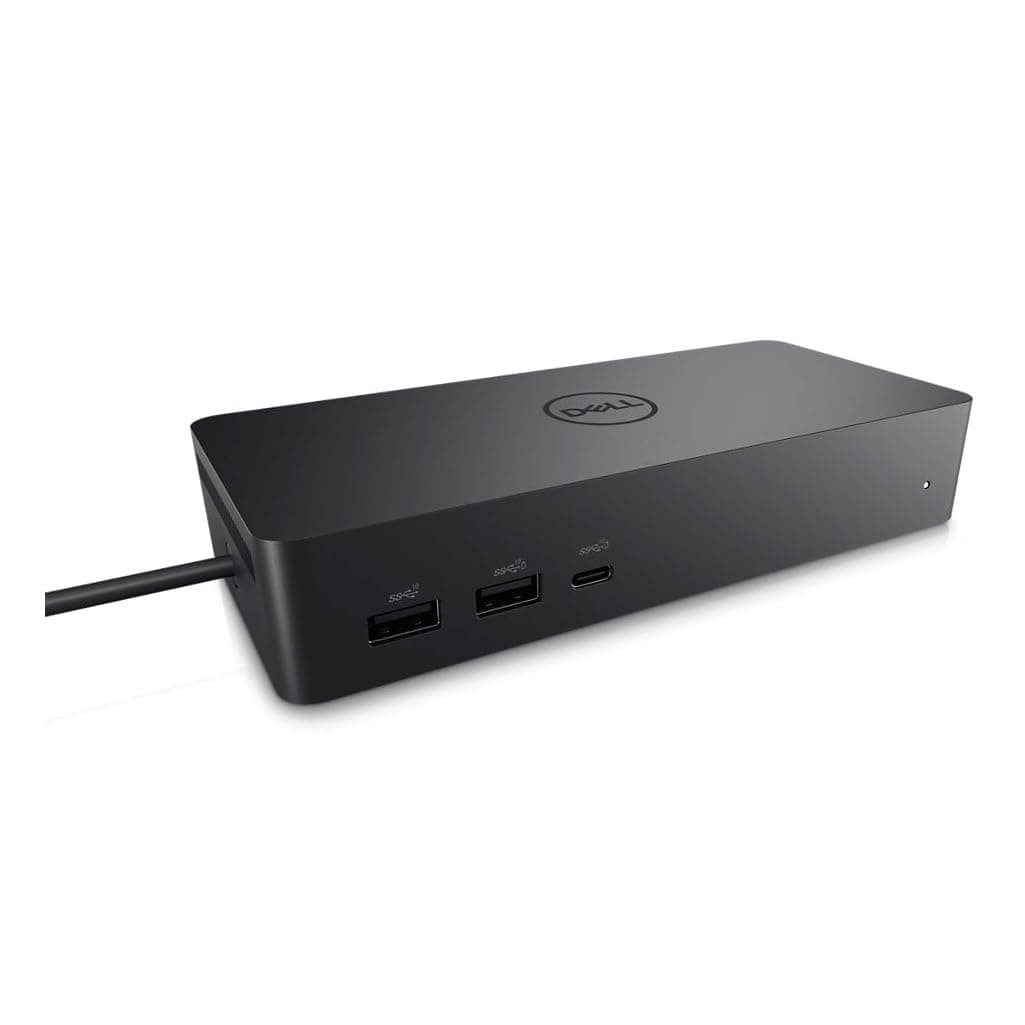
🚀 Dock into the future of flexible workstations!
The Dell Universal Dock UD22 is a sleek, black docking station featuring 10 ports including HDMI and USB 3.0, designed for universal USB-C laptop compatibility. It supports multi-monitor setups and offers fast deployment with DP Alt mode, making it ideal for dynamic coworking and hoteling environments.
| ASIN | B0B5YC6TS4 |
| Best Sellers Rank | 8,307 in Computers & Accessories ( See Top 100 in Computers & Accessories ) 78 in Docking Stations |
| Brand Name | Dell |
| Colour | Black |
| Compatible Devices | Laptops, Monitors |
| Customer Reviews | 4.4 4.4 out of 5 stars (525) |
| Hardware Interface | HDMI, USB 3.0 Type A |
| Item Dimensions L x W x H | 16.6L x 3.2W x 7.6H centimetres |
| Item Weight | 14.7 Ounces |
| Manufacturer | Dell Computers |
| Number of Ports | 10 |
| Total HDMI Port | 1 |
| Total USB Ports | 6 |
| UPC | 884116431442 |
| Unit Count | 1.0 count |
| Wattage | 130 |
A**T
Works great
This works great with a Latitude 5450 and a Precision 5540.
M**B
Docking station
Easy to set up great product
D**T
Very good
My work laptop is now also my “gaming PC”. For those who want to know, I connected 2 monitors to my alienware and they work at 144Hz. In addition, I also have a graphics tablet and everything works very well.
M**Y
Fire Hazard Do Not Buy
The adaptor just caught fire and covered the room in acrid smoke, had I not been at my desk it would have caused a major fire incident. This product is shipped from China and Dell Support won’t support it and Amazon refer you back to Dell. This is a seriously dangerous product and this supplier needs to be investigated.
N**Y
Plug
Would be better if it came with a 3 pin plug.
A**R
Great product and works great with my laptop
Links both screens and laptop perfectly with no lag. easy to set up and keeps my desk tidy from loads of cables
S**M
Worked great, than it didn't
This was easy to set up and start using but after 6 weeks, it stopped turning on. I contacted dell support (as this is a third party seller item) and they said it was fine to get a replacement UNTIL I told them the serial number. At this point they said it did not match their records and I could not get a refund - I pushed to try to work out what this actually meant but I was given no further information except I cannot get a refund. So I don't know what is going on between Amazon & Dell in relation to these products but there is some sort of issue, it may be that I am in the UK and the product shipped from France? Who knows. Anyway, I was able to take advantage of Amazon's A-Z guarantee to get my money back directly from them. And as I said, the product worked well when it did so I have bought it again directly through Dell this time (incudes 3 year warrantee). In summary it worked well but broke quickly, and there was a lot of faff around getting a replacement so I cant rate any higher than 3 stars.
F**R
14 months and broken
I’ve spent 5 hours chasing Dell round today. Apparently because I’ve bought off Amazon the product is registered to Amsterdam. I’ve been to every county I think is possible. Directed to websites and chats in languages I can’t understand and I think I’ve been fobbed off. Apparently 14 months and broken is classed as ‘normal wear and tear’ - I don’t understand how something that isn’t ever moved is wear and tear. £170 down the drain. They’ve sent me a link to buy another one I went for Dell because I recognised a respected brand, but I bought a keyboard from them at the same time as this dock and that’s broken too Looks good, but it’s tat
D**N
Had multiple scuffs on the exterior, but functions well as intended so far. It seems likely a refurbished set or rejected set due to minor defects (exterior scuffs) rather than brand new in perfect condition, though not unexpected given the price.
S**R
Needed HDMI and USB-C ports plus a RJ-45 gigabit. These new superthin laptops have very few ports so a dock like this is really necessary. I've looked at other smaller docks but they need you to buy a 90-100Watt power brick. This Dell dock comes with the power brick that can provide up to 96Watt power delivery via the USB-C port. This fits the bill nicely. Genuine brand new DELL OEM packaging with Dell Service Tag S/N. Looks like the date of manufacture is: 06/05/2024. Lots of connectivity -- tested USB-A, USB-C, HDMI and RJ-45 ports. All working fine. Will be attaching external SSDs via USB-C later. Setup was a breeze and the dell ports and connectors are heavy quality and seem to be durable. Very similar to the WD19tbs I used at work.
U**K
This is fantastic - high resolution, supports up to four monitors simultaneously, but take care to note that the way you connect to the dock dictates how many, and which of, the four monitor ports will work. In driverless mode (Display Port Alt Mode - found on most laptops that have a display icon next to the USB-C port or that advertise "USB-C with data and display" for the connecting USB-C port) only the HDMI port - and - EITHER DisplayPort #1 OR the USB-C Port will work. If you want to use more ports than this (up to and including all four ports simultaneously) you'll need to install the DisplayLink driver. I got this dock because my employer won't let me install software on the work laptop, so I can't install the DisplayLink driver, therefore I'm stuck with two screens maximum. If I change jobs and the new job lets me install the DisplayLink driver, then I'll be able to move to a three or four monitor setup. This has been a major step up from my previous Dock (which only supported 1080p resolution) and, as advertised, works driver-free with my work Dell laptop and my personal Asus laptop, as well as working with DisplayLink drivers with my Mac laptop. This is the only dock I've found that lets you connect BOTH DisplayPortAltMode and DisplayLink computers to the same dock. The cable length is good (80cm) which was enough to mount the dock in a cable tray hidden under the desk while still allowing enough length to comfortably reach up to the top of the desk to plug into the laptop. So after getting over the confusion of which ports work in which mode - it's a great bit of kit.
J**N
Quedo genial para la laptop, tengo una dell, por lo que solo conectarla la leyo, ahora ahi tengo conectado mause, teclado y monitores, ademas carga la bateria de la lap
P**D
Content du produit
ترست بايلوت
منذ شهر
منذ شهرين