Desertcart purchases this item on your behalf and handles shipping, customs, and support to OMAN.
✈️ Elevate your cockpit game with pro-level precision and style!
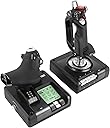
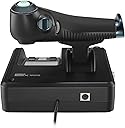
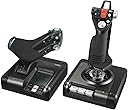
The Logitech G Saitek X52 Pro Flight Control System delivers professional-grade flight simulation with magnetic non-contact sensors, a customizable LCD display, and an ergonomic adjustable handle. Designed for serious sim pilots, it features 3D twist rudder controls and programmable software, ensuring precise, comfortable, and immersive flying experiences.


| ASIN | B01M5F8SB6 |
| Best Sellers Rank | 7,629 in PC & Video Games ( See Top 100 in PC & Video Games ) 1,193 in PC Accessories 1,351 in PlayStation Legacy Systems |
| Customer reviews | 3.6 3.6 out of 5 stars (1,600) |
| Guaranteed software updates until | unknown |
| Is discontinued by manufacturer | No |
| Item model number | 945-000003 |
| Product Dimensions | 17 x 17 x 27.8 cm; 1.63 kg |
| Rated | Not PEGI rated |
| Release date | 11 April 2019 |
D**F
A Very Good Joystick and Throttle
My old Saitek Cyborg Evo finally gave up the ghost so it was time to replace it with something new. I definitely wanted a joystick with a Z rotation and having read many reviews after some deliberation (as the comments were mixed) I decided to go with the Logitech branded X52 Pro. I did ensure that I got the Logitech rather than the older Saitek version which has had some very poor reviews. The two units are mainly plastic but feel robust and the cable that joins them seems to be good quality. On plugging into a USB port the drivers are automatically downloaded and you’re ready to go. There is some software as well that you can download but I haven’t bothered with it as the units already have more buttons than I need. The joystick action has a nice light feel which I particularly like, the button placement is good and being lit with LED’s you can change the colour and intensity. With deadzones set to 0 I couldn’t see any evidence of drift from the properties page but running in X4 Foundations with zero deadzone there was an almost imperceptible drift on the X axis. Upping to 1% in X4 Foundations stopped it but it was really not enough to worry me in first place. The throttle is a little stiffer than I would like ideally. There is an adjustment wheel which helps but it doesn’t seem to make a huge amount of difference. I soon got used to it though as the action is very smooth. The lower detent seems mainly imperceptible, the upper one is noticeable which I quite like though it’s not to everyone’s taste. Again there are a number of buttons, well placed on the handle and a MFD display that I don’t see the point of myself, but if you’re in MS Flight Sim it’s probably very useful. The units also come with some rubber sucker feet to hold the units in place on a desktop. I found I didn’t need them myself as the units are quite large and stable but if you’re someone that twists and turns a lot when you play a combat sim then no doubt you would find them useful. I have been very pleased indeed with both these units and would certainly recommend them based on my experience with them so far
L**.
Good
Decent budget hotas, simple single usb connection to pc and "ps2 pin to connect throttle andstick. Would be nice if the throttles detents were at 50/middle rather than 25 and 75%. Overall sensitivity is OK once game settings are in place
R**Y
Several flaws but works.
It’s a good controller and thruster with lots of buttons but is too loose with no inbuilt way to change this. One tiny touch and it will start directing your movement that way. I had to buy a 4mm spacer on eBay and create a “dead zone” in the game to account for it. Much better now with those mods. The thruster controller movement can be adjusted but it has no centre point where it will settle, which is not good when you have to use it for both forward and backward motion. I managed to fix this manually by using a slice of my cycle handlebar tape at the centre point and then covering it with a longer piece of the tape so that it created a little bump you can feel as you move it backwards. Also had to create a small “dead zone” there for safety. The controller pc Ui is way too small with no way to adjust the size. With a 3840 resolution it’s about the size of a folded A4 envelope. The icons and buttons are so small that I had to use my mobile phone camera on zoom mode to see them. 3rd party profiles for games are available but there is no real way to identify the button numbers so it’s trial and error to discover what it’s doing. Could be such a great controller if they did more design work and programming on it.
J**E
Awful build quality - no longer works after 1 year light use
Great stick for the few months (at most) you'll get out of it. Then the known faults will appear. Pot luck what will go wrong with yours but for mine it was the dodgy ps/2 port which renders the stick unusable. There's a million and one threads online with numerous different faults, most of which require disassembly and soldering to fix, and Logitech still sell them and refuse to acknowledge fault. Buy at your own risk.
T**E
Ideal for Elite Dangerous - other space-sims might become available soon(TM)
This HOTAS replaced my second X52 Pro from the pre-Logitech era. The second one had lasted nearly 18 months, better than the 3 months of the first one. They do have a reputation for having poor build quality, and my experience bore that out, so why would I buy a third? Firstly, because I was given a full refund when I returned the broken one to Amazon UK. So financially I wasn't loosing out. Secondly, for all it's poor reliability record the X52 Pro is ideal for playing Elite Dangerous. It has enough buttons (although I still need to use the pinky switch to double up a lot of buttons). I can play all night, including wing combat (so selecting wingman and then switching to their target) all regular flying, landing, menu navigation... and I don't have to touch a keyboard unless I need to type (so to search a system in the system map or respond to text chat. For Elite Dangerous it's fantastic. My only concern is that now my four year-old is using it to fly his Asp Explorer I might be advised to keep a spare handy, he's a little stronger handed than me which is worrying. Thirdly, it's size. I've tried a TM Warthog and it's huge. My hands are small and I just couldn't get on with the Warthog over the weekend I borrowed it. The X55/X56 is bigger than the X52 Pro and I've heard friends describe it as a big stick, so that's not an option. Since Logitech have bought Saitek I think the space-sim community is hoping that they produce a new HOTAS product that has improved quality and suits the needs of flying in space. Until then, I'll keep replacing my broken X52 Pros with more X52 pros.
J**L
Below Average
This is very average to below average. The throttle handle is heavy so the throttle will not maintain position without your hand constantly holding it in place it will slide forward/backwards, really annoying. The joystick is very loose but also very sensitive so it has a wobble zone that will impact your controls. Additionally it is not well balanced so the centre point is slightly skewed which means in something like msfs you are never truly centered by a fraction of mm. The Logitech software to setup the controller is rubbish and extremely outdated. It is not easy to setup. If you can find an alternative go with that.
J**R
Well worth the investment in my opinion
I read a lot of bad reviews about how these units seem to fail pretty quickly. I've deliberately held off posting a review about it until now, to give me plenty of time to put it through it's paces. It's worth noting at this point that I did void the warranty within a week of unboxing it. I bought this primarily for use with flight simulators, which meant I had to get rid of two things, both of which I had researched and planned before even buying the product: 1) The centring spring on the stick; 2) The throttle detent. Depending on what you want to use this product for, the setup out of the box may be suitable for you. For me, however, a self-centring joystick is unrealistic for flight simulators, especially when the centring spring has heavy tension and is not adjustable. So I removed it completely. With the throttle (in my case, used primarily as the collective lever for helicopter simulation), it had a nasty detent which prevented smooth, precise input required during flight, especially hovering. These mods are easy to do and the details can be easily found online through various forums. Bear in mind that ANY modification WILL void your warranty! Now onto the important stuff. I've clocked up around 200 hours of usage on this product, and it's still going as strong as the day I unboxed it. The build quality is great and is as to expected with any other Logitech product, and the ergonomics feel comfortable and natural. Anyone planning long sessions using this product should be able to do so without worrying about fatigue or aches and pains. All of the buttons and switches are within easy reach, and it doesn't take long to get used to their respective positions, so you can find them easily even if you happen to be wearing a VR headset. The Logitech profiling software could really use a HUGE update to make it simpler and easier to use. Again, searching online for tips and advice was the way forward for me, as the software really lacks any sort of help or guidance regarding it's usage. Ultimately, this product continues to perform above and beyond my initial expectations. It's precise, it's responsive, and I don't think it's possible to run out of fingertip control with the huge array of buttons and switches available. It's completely transformed my flight simulation experience!
P**K
An upgrade from a basic Thrustmaster HOTAS but it has a few flaws.
I like the construction, everything feels robust and it is a big step-up in build from my creaky old T-flight HOTAS (that was more than good enough to get me to Elite combat status). The interconnecting cable is long which gives me more freedom for controller placement with larger keyboards. It is more erogonomic , easier to reach buttons. It has a display which I use to check the correct configuration is loaded. Almost all buttons can have their colour configured (either red, amber, green) and global brightness can be adjusted. Windows 11 installs driver automatically , and its in the properties that you adjust dead zones, set button colours. It has a few gotchas that prevent me giving it 5 stars, things that for the price I did not expect to see: 1. If I power-up my PC with it plugged in, the X52 does not startup correctly - the button LEDs light-up but the display is blank and teh driver isnt loaded. I must unplug then plug it back in when Windows is up. 2. If it is plugged in it will sometimes conflict with mouse operations on the windows desktop. This is probably solvable but I havent found the solution yet,. 3. The configuration app is not very user friendly and poorly documented - there are some good post on reddit that help. I cant see how to load a button configuration automatically, I must select my elite settings from the docked app. 4. The thrust control is notched at around 25% and 75%, this gets in the way of smooth operation. I read of people modifying it. I would have preferred a middle dedent for zero-thrust like my old HOTAS. 5. The default button configuration uses some buttons for profile selection (a feature no one seesm to use), this is confusing and conflicts with Elite configurations. You must use the X52 Pro app to change the mode of operation. 6. Make sure you download the X52 Pro button app and not the X52 app and have a web-browser handy!
I**L
Super
Deuxieme hotas acheté ! Et pas deçu du tout ! Il est juste exceptionnel, il est parfait pour dcs et mfs et bien plus. Je conseils grandement.
R**.
Horrible
The throttle doesn't work
E**Y
Faulty. Returned
Arrived faulty. Throttle worked fine but stick recognised no input but had ghost inputs. Have to return item.
O**X
Ottimo rapporto qualità prezzo
Ottimo lo uso su un gioco chiamato star citizen e devo dire che si interfaccia bene, non è un prodotto serie top perché cmq ha dei difetti piccoli ma reali... ad esempio le basi secondo me dovevano essere più pesanti tendono ad alzarsi avvolte... e un lieve clic nella manetta lo avverto già... ma nulla di serio per il resto molto bello.
L**S
bra HOTAS uppsättning
fungerar bra efter att man har installerat drivrutinerna, lätt glapp i kontakterna på själva spaken som går att sjystera med dödzonser. lite större än vad jag hade velat men annars väldigt bra. använder den till DCS, WarThunder, och elite dangerous
Trustpilot
2 days ago
1 month ago