Buy anything from 5,000+ international stores. One checkout price. No surprise fees. Join 2M+ shoppers on Desertcart.
Desertcart purchases this item on your behalf and handles shipping, customs, and support to OMAN.
🚀 Drive Smarter, Not Harder — See Your Speed Like Never Before!
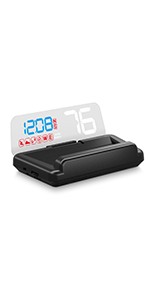
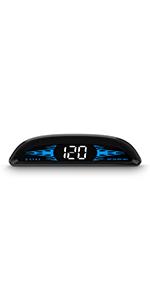
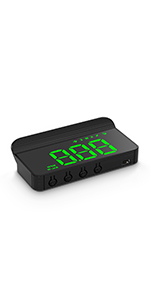
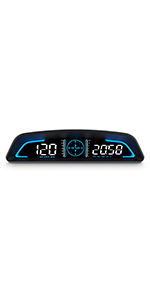
The AMROOLOO M1 WHITE Heads-Up Display is a compact, GPS-powered digital speedometer that mounts on your windshield to project real-time driving data including speed, direction, and safety alerts. Compatible with all car models, it enhances driving safety and convenience by keeping your eyes on the road and your data in sight.


| ASIN | B0BMQM8KMH |
| Best Sellers Rank | 7,279 in Automotive ( See Top 100 in Automotive ) 8 in Car Instrument Panels |
| Brand | AMROOLOO |
| Country Of Origin | China |
| Customer Reviews | 4.0 out of 5 stars 386 Reviews |
| Included Components | machine, USB cable, a piece of reflective film, manual, double-sided tape. |
| Item Dimensions | 8.9 x 3.9 x 2.5 centimetres |
| Item Weight | 130 Grams |
| Item dimensions L x W x H | 8.9 x 3.9 x 2.5 centimetres |
| Item weight | 130 Grams |
| Manufacturer | AMROOLOO |
| Manufacturer Part Number | M1 WHITE |
| Material | Plastic |
| Model Number | M1 WHITE |
| Number of items | 1 |
| Product Warranty | 1 year |
| UPC | 723497750554 |
| Unit Count | 1.0 count |
| Unit count | 1.0 count |
R**S
Dead simple and very effective
I'm really pleased and impressed with this little gadget. I was caught speeding recently. Very annoying, because I'm careful to drive within the speed limit normally. But I was accelerating up a hill, and the car I drive – a Fiat Panda – has an incredibly badly designed dashboard in which the speedometer is 100% obscured by the steering wheel, so to check my speed I always have to crane my neck downwards to peer through the wheel, which is a deliberate action (I can't just glance) and quite a distraction from driving. I took the National Speed Awareness course, and it was the tutor on this course who made me aware that digital speedometers like these were available; it probably wouldn't have occurred to me to look for such a thing otherwise. However, the model he recommended (which cost £55) was no longer available, so I looked at the alternatives and opted for this much cheaper one. (It cost me only pennies over £20, as there was a small discount on it when I bought it.) I didn't want anything over-complicated; I just wanted to be able to see my speed easily at all times. And that's exactly what this device gives me, very easily and with minimum fuss. That's all it does, but I want no more from it. I tried it out for the first time today. I plugged it into the USB port on my Panda dashboard and positioned it in place. Starting up, it took just a few seconds (three or four) to find a GPS signal and start working, so there was no lengthy wait for to find a satellite; it was working very quickly. It comes with an optional reflective panel to stick on the inside of your windscreen, but I found this unnecessary; the reflected display is perfectly clear on the glass with no additional assistance. The number appears within my normal line of sight while driving, but I don't find it distracting. On the contrary, it's helpful to have the number superimposed digitally on the scene I'm looking it, so I don't have to glance away to see my speed. It's no more distracting than any other reflection on the windscreen would be. There are various options that can be tweaked, and you can adjust the unit if it's inaccurate. However, for me, it worked perfectly from the outset with no intervention. I found that the speed it reported exactly matched the car's own speedo, so it seems to be very accurate, and there was no setup to be done other than finding a good place for it and sticking it on the dashboard with a sticky pad. Everything required was supplied. The manual's not great (and you can download it as a PDF from the Amazon page if you want to preview the printed copy that comes in the box) – but you can make sense of it, and you probably won't need to use any of the functions it describes in any case. I found that I just plugged the unit in and it worked perfectly with no adjustment. You don't even have to turn it on and off. It comes on when you turn on the ignition, and goes off of its own accord a few seconds after you've switched the car off. Perfect. It's a really nice, neat little unit. I suspect the case is 3D printed, as it has that 'made of contour lines' appearance in places, but it's good quality 3D printing with a nice, smooth, textured bottom surface. All in all, it really couldn't be better value.
G**R
Good but not really a substitute for an OE HUD
This is a simple, stand alone, device. The good bits: It works straight out of the box and starts quickly when it has a clear view of the sky. It is reasonably accurate but does over read slightly but not enough to be a problem. The not so good bits: It needs a mount unless the top of the dashboard is flat, most aren't. Thick double-sided pads work better than the supplied tape. It isn't bright enough in sunlight but does dim as ambient light falls. Unfortunately the image is distorted by the curvature of the windscreen and it isn't focused at infinity. Overall, better by far than no HUD but not as good as an original equipment system.
B**I
A must add on to Car!!
The AMROOLOO Heads Up Display (HUD) is a fantastic addition to any car! Its GPS speedometer is highly accurate, matching my car’s speedo perfectly without needing calibration. The build quality is solid, with a sleek, compact design that looks stylish projected onto the windshield, blending seamlessly into the driving experience. It’s easy to install—just plug into a USB port, stick it on the dash, and it connects to satellites in about 15-20 seconds for real-time data like speed, direction, and fatigue reminders. The display is clear day or night, with auto-brightness that adjusts well, though it can be slightly less reflective in intense sunlight. For this price it’s a great value, enhancing safety by keeping your eyes on the road. Definitely a must-buy if you’re considering it�
K**R
Simple and effective
Bought because of our local police force who now have a tendency to hide in bushes and issue fines for 32mph. I realised I spent more time looking at my speed, and far less time looking at the road, so a HUD was the obvious answer. This one was easy to fit, just needed a USB that operates from the ignition. Within 15 seconds of startup it finds the satellites and displays your speed. Simple and uncluttered, just shows speed and direction and that's it. Blends in with the dash quite well, not that noticeable. Looks quite OEM really, and I'm fussy about accessories, if it looks tacky, it's going nowhere near my car! There is a hint of ghosting, which can be eliminated with the included screen sticker, it makes it really sharp, but looks awful from outside, so I'm not using that. I can live with a slight double image. Now I don't have to take my eyes off the road! Quite happy! Would recommend!
P**Y
Faulty
Used display for a couple of weeks green figures very bright and always flickering very distracting, have returned and bought cheaper model with white figures works perfectly.
M**R
Works OK, but ...
HUD car speedometer. A grudging 3 stars - the basic idea is sound, the device does work and the GPS receiver is reasonably sensitive. BUT the detail design is exceptionally stupid:- a) the control buttons face the windscreen, so once the unit is installed, the only way to operate them is by groping blindly with your hand over the display, this makes the On/Off button unusable (just disconnect the USB cable from the power); b) the power-in socket also faces the windscreen so the cable has has to make a 'U' turn towards the 12V to USB adaptor; c) the supplied power cable is 2 metres long - the excess has to be coiled up and stowed somehow; d) the power socket is an obsolete USB mini-B socket so only a limited choice of alternative cables; e) the instructions are almost incomprehensible, a 4 page-leaflet with pages the size of a playing card and printed with page 2 on the front, followed by 3 & 4, with 1 on the back! I ought to have knocked off another star star for the incomprehensible instructions, but it's a cheap device and instructions aren't essential as it works (in MPH) out of the box. I wouldn't have bought the device if there had been a better alternative! I need the device to work in both mph and kph (for France). It took me a whole evening to discover (by systematic experiment) how to change the settings - particularly MPH to KPH (some reviewers claim it's not possible) and the over-speed alarm down from 150mph(!!) to 70mph. In the process, writing myself easily understood instructions. ACCURACY - provided a good GPS signal is being received, the vehicle speed displayed by the HUD will be far more accurate than a vehicle speedometer. If the HUD doesn't agree with the vehicle's built-in speedo, it's the VEHICLE speedometer that's wrong. U.K. Construction and Use Regulations (and their equivalents in most of the world) require that original speedometers must not show a slower speed than the actual speed, but may over-read by a maximum of 10%. To meet this legal requirement, vehicle manufacturers ensure that production speedometers will over-read by a small margin with the largest diameter combination wheel/tyre that will be factory fitted. In other words, all fitted car speedometers over-read - frequently (with not-new tyres) by the full 10%. The HUD unit is preset at 107% of GPS (true) speed to ensure that more-or-less agrees with the minus-zero, plus-10% legal requirement. To have GPS speed displayed, change Option 1 (from 107) to 100. The buttons are marked:- M [Mode] - [minus] + [plus] [On/Off symbol] but as you won't be able to see them... POSITIONING On a bright sunny afternoon, the digits reflected off a freshly cleaned windscreen were lost against the background view unless the HUD unit was close to the screen. Use of the provided semi-mirror in the 'wiped' area of the screen is illegal in the UK. I mounted the HUD unit close to the base of the screen with the centre of the driver's wiper-blade as background to the reflected digits. The semi-mirror is essential to kill double reflections. INSTALLING You get one chance to get it right! Once its stuck, it's pretty permanent; don't fix anything until you've done a few miles in both daylight and dark to make sure the HUD is positioned and configured as you want - the chances are you won't be able to get at the buttons once it's stuck down! To keep the HUD unit and the semi-mirror in place while you experiment, use small dots of something like Blu-tak under the HUD, and masking tape on semi-mirror's vertical edges. It's essential that both screen and dashtop are absolutely clean (any trace of silicone 'cleaner' so beloved of 'valeters' will be a disaster as the double sided tape won't stick properly) - use neat screen-wash concentrate and kitchen roll and keep turning the paper. Then wipe thoroughly with clean paper to remove any screen-wash residue. Stick the tape (grey side) to the HUD first. UPDATE 20/6/25 I've found that when driving under trees, the HUD struggles to get a reliable GPS signal and the displayed speed changes rapidly. To get full benefit from the device, you will probably want to change a couple of settings BEFORE installation: Menu Option 1 "Speed" - the percent of GPS speed to be displayed: 100 = real GPS speed. See explanation above. Menu Option 2 "Over speed alarm" - 150mph!! (in effect disabled). Reset to 32 (Instructor) or 72 - otherwise it'll be going off all the time! If you drive in London, )or Wales, BAINS, Bristol or anywhere else with 20 limits) you can set it for 20! TIP: The first time a new unit is powered-up there will be a delay before it shows a speed, even zero! That's because the GPS chipset has to download new satellite position data (many months and half-the-world away from when and where the device was made). This may take many minutes if the HUD doesn't have a wide view of the sky. But if you're sensible, before installing it you're first going to test the unit (to make sure it works); to do that you need to give it time to download, so experiment with where to mount it while waiting for it to download, then take it indoors to change the settings (using a USB charger).
M**T
Just plug in and use . Perfect
Excellent. I just sat it on a glove ,for now, plugged it in and used it without having to touch any of the buttons ! It connected up to a satellite within 3 seconds and the speed indicated was the same as the normal car speedometer. Brightness was perfect. I didn’t use the piece of plastic provided for the windscreen because the second image was only just visible. First image very clear and bright. At night it goes dimmer which is really good. I’ve decided to buy two more. One as a spare and another for my friend who also loved it. Definitely recommend this HUD speed indicator
A**R
It works and clarity good
My vehicle is a 2023 Ford Kuga and in the area I live we do get regular mobile radar vans mostly in 30mph zones so I wanted something more ' in my face' speed information. Looked at several options and their reviews and decided on this one. Delivered very quickly and on inspection I was abit sceptic as it looked and felt cheap and plasticky. To me the instructions were not that clear but the video was more instructive. I only wanted this to inform me of my speed but it also gives compass direction and other such information. Installed it in the vehicle following video instruction and was really impressed how well it worked. Within the pack there is a mirrored plastic sheet that fixes on the windscreen to enhance the clarity but I found I did'nt need it because you could easily read it on the reflection on the screen. The only negative point is the buttons on the device face the windscreen so if taped to the dash it is really diffcult to access them. The speed on the device was exactly the same to the car and it works. Thinkiing of buying one for my wifes car. Impressed. Gave it four stars only because of the buttons are on the wrong side of the device.
S**M
لا اعرف
لا اعرف كيف استخدمه وغير ثابت
G**T
Très Pratique
Recherche des satellites très rapide , facile à installer avec une grande longueur de fil d'alimentation , s'éteint et ce rallume à chaque démarrage, pas besoin du film réfléchissant , très satisfait de mon achat , seul bemol l'écran total se reflète un peu dans le pare brise.
S**G
Een uitkomst!
Deviatie wat moeilijk in te stellen.
A**R
not okay
night time, clearly visible.... day time, not visible...... also there is a deviation in speed measurement.... So, not okay for me....
P**N
Hud
Bra köp,går att justera hastighet👍
Trustpilot
2 weeks ago
1 month ago