🖨️ Elevate your home office with smart, stylish printing that keeps you connected and efficient.
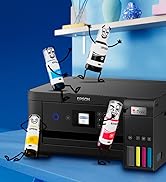
The Epson Expression Home XP-4205 is a compact 3-in-1 inkjet printer designed for home and small office use. It offers wireless printing and scanning via WiFi and WiFi Direct, a 2.4-inch LCD for easy control, and automatic duplex printing to reduce paper waste. With a maximum print resolution of 1440 dpi and affordable individual ink cartridges, it delivers crisp color and black-and-white prints while keeping running costs low. Ideal for occasional to moderate use, it supports A4 paper and integrates seamlessly with mobile devices through Epson’s Smart Panel app.


| ASIN | B0BT2694FM |
| Additional Printer Functions | Copy, Scan |
| B&W Pages per Minute | 33 |
| Best Sellers Rank | 308 in Computers & Accessories ( See Top 100 in Computers & Accessories ) 5 in All-In-One Printers |
| Box Contents | Inkjet Cartridges |
| Brand Name | Epson |
| Color Pages per Minute | 15 |
| Colour | white |
| Compatible Cartridge | Epson inkjet cartridges for XP-4205 model |
| Compatible Devices | Tablets |
| Control Method | App |
| Controller Type | Android |
| Country of Origin | Japan |
| Customer Reviews | 4.3 4.3 out of 5 stars (283) |
| Display Type | LCD |
| Dual-sided printing | Yes |
| Duplex | Automatic |
| Global Trade Identification Number | 08715946702490 |
| Hardware Interface | USB |
| Initial Page Print Time | 6-8 seconds |
| Ink Colour | Color |
| Is Electric | Yes |
| Item Dimensions D x W x H | 30D x 37W x 17H centimetres |
| Item Type Name | Inkjet Printer |
| Item Weight | 4.3 Kilograms |
| Manufacturer | Epson |
| Maximum Copies Per Run | 100 sheets |
| Maximum Copy Resolution Black and White | 600 |
| Maximum Copy Resolution Color | 600dpi x 600dpi |
| Maximum Copy Speed Black and White | 33 ppm |
| Maximum Print Resolution Black and White | 5760 dpi |
| Maximum Sheet Capacity | 10 |
| Maximum Supported Paper Size | A4 |
| Maximum print Resolution Color | 5760 x 1440 dpi |
| Model Name | C11CK65402 |
| Model Number | C11CK65402 |
| Model Series | Expression Home 11 |
| Network Connectivity Technology | USB |
| Number of Drivers | 2 |
| Number of Trays | 1 |
| Other Special Features of the Product | Flexible, Wireless, reliable |
| Output sheet capacity | 10 |
| Paper Size | a4 |
| Print media | Card stock, Glossy photo paper |
| Printer Output Type | Colour |
| Printer Type | Inkjet |
| Processor Count | 1 |
| Product Warranty | 1 year manufactuer |
| Resolution | 5760 x 1440 |
| Scanner Type | Photo |
| Series Number | 11 |
| Specific Uses For Product | home office, small business, personal use, photo printing |
| Total USB 2.0 Ports | 1 |
| Total USB Ports | 1 |
| Unit Count | 1.0 count |
| Warranty Type | limited warranty |
| Wattage | 4.8 watts |
A**E
Easy to set up
Received today, easy to set up and connect to Wi-Fi and smartphone. It is lightweight and not so big, so it doesn’t eat up so much space on the table, and print quality is awesome. Just right for occasional use at home. It comes with ink, so it’s ready to use. It doesn’t come with a USB cable, but overall, I believe it’s a good buy.
A**R
crisp printing
paid £73.99 for this 5 days ago. wish I'd have waited. because I much prefer the current price of £59.99. at time of purchase I wasn't offered the set up service, which might have saved me days trying to set this printer up. the printer did have connection issues which took me 4 days to fix, the Epson software on windows 11 couldn't find or connect to the printer. once up and running the print quality is really good and crisp. I have previously used a cannon pixma which is so much easier to set up (less than an hour), I wanted to move away from the pixma because the inks are so expensive. The Epson once up and running offers a better quality print and allows alternative compatible inks making it more affordable in the long run. the only downsize is it doesn't have adf and it cost more than I wanted but seeing the printed pages I am pleased that I made the change to Epson. also it does also offer a subscription for ink and other supplies but this is not compulsory allowing freedom. Update: both the printer and my pc are set up to wifi (the same network) wireless on this printer quite literally relies on your location being turned on all the time. Update: printing normal documents give a nice print. I haven't seen a review for printed photo's on this device, I have just printed my first photo from this device, the print quality of photo's is not the best, I used premium glossy photo paper and Epson original ink for the photo's, the lighter back ground photo came out ok but not photo quality and the darker background not so good, it looks more faded and hasn't really picked up the colours of the photo. The starter ink prints around 200 pages, I got roughly 200 pages, 4 of those pages were Photo's, my documents were both colour and grey scale.
M**K
Budget printer with EASY wireless printing for my iPhone & Mac
After my old printer stopped working, I’d been getting by with a cordless thermal printer which I think is okay for occasional use but it was time to upgrade to something more permanent with reliable print quality for my home office set up. I wanted something simple to use that would let me print wirelessly from my Mac and iPhone, do occasional scanning and I didn’t want to spend a lot of money either on the printer OR the inks, the price of which I researched BEFORE choosing this printer (I’m using cheaper compatible cartridges rather than official Epson ones). I actually think this is a very decent product; nothing wrong with the printing quality, it's easy to use the features via the control panel screen and it’s been reliable for me with the WIFI connectivity. Just to add, I was anxious about the setup from the outset but this was straightforward: you download the Epson Smart Panel app and it guides you through the process, step-by-step. It includes alignment/ink testing which was actually like a fun quiz to do (hehe) and felt very thorough for quality control. The only thing I got briefly stuck on was when it asked for a product PASSWORD (this is actually printed on the inside; just lift up the top, as if you were going to install the inks and you’ll see it in there). It’s a bit of a noisy beast but I can put up with it for the budget price (under £60 during Black Friday sale); I do think it’s great value for money for the functionality it offers and the ease of use. I really like the white colour too (much easier on the eyes in my white workspace).
L**C
Simple and reliable
Really great for the price. It was easy enough to set up and it’s the first printer I’ve had that actually just prints without lots of hassle.
J**S
Good everyday printer,
Good printer for home use. Attractive and not too big. No fax facility, but I cannot recall how long ago I ever needed that. 4 Cartridge system, so less wasted ink than using a 3in1 cartridge. Print quality is good. It can print double sided to save paper. It runs a bit slower when getting started than my old epson (WF series). But not seriously slow. Good value. Does the job.
A**R
Good little printer, ultra slow scanner
Despite everything supposedly being online these days, some printing is still required so a home printer is somewhat essential. I also needed a scanner for all my personal documentation and mail since I don't have room to store paper. This printer/scanner had good reviews, so I purchased it. Despite being inundated with emails to subscribe to the ink - which I still haven't done - it does what it is supposed to do when it comes to printing. It doesn't jam, there are no errors in printing (smudges, etc.) so in that respect it's fine. The con for me is the excruciatingly slow speed at which it scans. I have resorted to using the app on my phone for scanning as it is one click. Even the quality of the scans isn't that great with text from double-sided letters coming through. Honestly, I wouldn't recommend this printer if you need it to work as a scanner as well.
W**I
Most disgusting printer I have ever seen they gave me half way filled ink and they are saying it 3 months ink I only had it yesterday and the ink is already gone and the paper got stuck inside so many times I’m sick of it and I only had it yesterday and it doesn’t print very well
ترست بايلوت
منذ شهرين
منذ 4 أيام