🚀 Elevate Your PDF Game with Perfect PDF 9!
Perfect PDF 9 Premium is a comprehensive PDF editing software that allows users to create, edit, convert, and protect PDF files. It features seamless integration with popular office applications, advanced OCR capabilities for scanned documents, and offers free technical support, making it an essential tool for professionals looking to enhance their document management.


| ASIN | 3959828160 |
| Best Sellers Rank | #1,779 in Software ( See Top 100 in Software ) #69 in Document Management (Software) |
| Customer Reviews | 3.7 3.7 out of 5 stars (314) |
| Date First Available | August 23, 2016 |
| Is Discontinued By Manufacturer | No |
| Item model number | 43222-4959 |
| Manufacturer | Markt+Technik |
| Package Dimensions | 7.56 x 5.35 x 1.42 inches; 3.2 ounces |
A**.
The product is excellent
--- After having done some testing of "Perfect PDF 9", I conclude that it deserves the highest ranking. The program includes much more features than may be needed by a non-professional user, like myself. It is easy to convert a Microsoft Office file to PDF format. Creating a PDF file using a scanner can be done with no difficulties. One can even save in PDF format pages from internet sites. --- I successfully carried out a few simple document modifications. According to the manual, complex editorial operations are also possible. --- The manual accessible in the program window is very comprehensive. Understandably, it is a protected document. However, it would be nice to copy some parts of it to the clip-board and paste them in a user's file. In conclusion, I am happy to have purchased two copies of the article, for my two computers.
A**R
Quick and intuitive editing
Great for my purchase reason of editing pdf documents. It would have been good be able to convert back to Word but if this is possibleI could not see how.
H**A
OK and powerful, but I find it very complicated ...
OK and powerful, but I find it very complicated to use - but I find my cell phone very complicated as well.
J**P
Perfect? Far from it!!
Hardly "Perfect! " Combined files into one pdf to upload to self publishers and the Perfect PDF 9 system kept crashing and therefore unable to upload anything! Seriously - don't bother and save your money!!! Doesn't really deserve one star due to the stress and hassle it's caused me.
F**N
Not great on protecting files
Primary reason for buying this was to protect PDF's. Perfect PDF 9 does everything else I would want it to just as well as another well known PDF program, but the protection function I find to be confusing and quite often it either doesn't work or more often than not, if I set it to be encrypted for editing / read only, it starts asking for the password just to view... No idea why as I can repeat the process again and the second time it works fine!
T**A
... well-known product on the market and this one had good reviews so thought I'd give it a go
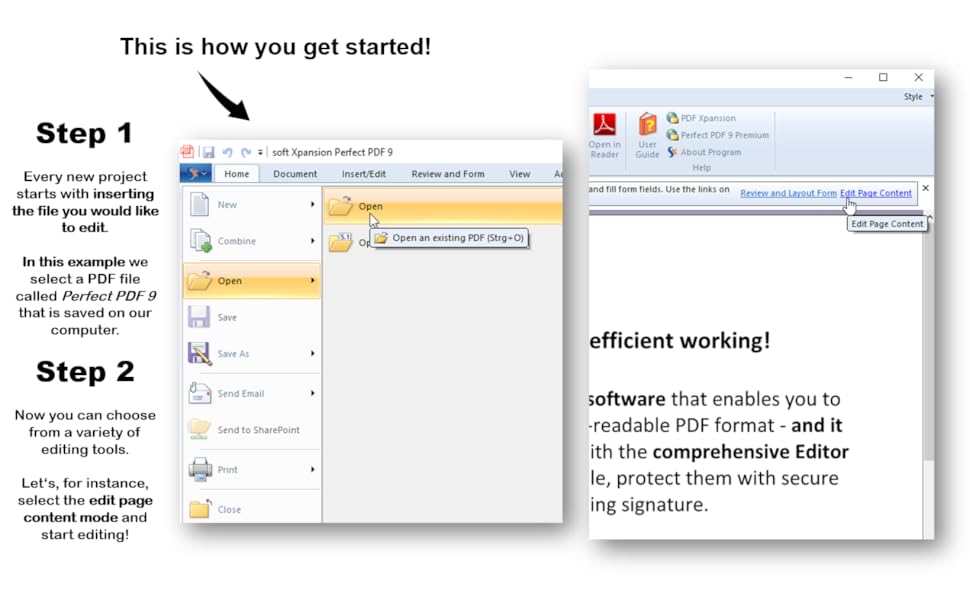
I needed a new PDF program for work purposes and did not want to pay loads of money on the more well-known product on the market and this one had good reviews so thought I'd give it a go. Loading the program was easy, but finding how to use the program, not so, it needs a bit of getting used to. I wanted a program where I could create pdf's, this function is easy to do, but also I needed to import and export documents from technical specifications. Every now and then I would go into the program to find out how to do this and failed, until yesterday when I finally had a breakthrough and found the functions I needed in the program. It's like they say "once you know how to do something, it's easy". I've even found that I can put a jpeg or scanned file straight into the document without having to pdf it first. Ease of use, initially I would probably give it 2 stars, but now I've found the functions that I need it is quite easy. To import documents - on the lefthand side of the page and under the main toolbar you have "pages" and then folders under that, click downward arrow and click the format of document you want to include and it brings up a box. Opposite the file you have another box Value with 3 small red dashes, click on them and find the file you wish to import and then where you want to insert the document. Export - easy enough, click the page, then click the red cross again under the "pages" icon and delete. The program is excellent value for money and once you learn how to edit documents it's easy to use.
K**W
Very happy with this product so far
Very happy with this product so far, does everything I need it to do at a fraction of the price of the Adobe version. Agree with previous comments though, that it is not intuitive and it definitely helps to have used Adobe before using this.
J**N
Good programme
Registered programme originally link set me to german site but pushed UK flag then registration straight forward ☺
K**7
Nice Reader but other functions may be harder to use.
Adobe Reader quit working on my computer so I bought this. Worked great right after setup. advanced features may take some effort to learn, but overall very nice.
C**R
Functionally Similar to My Win7/Acrobat Standard v8
Purchased after upgrade from old Win7 computer to new laptop/Win10, and no interest in purchasing Adobe's subscription service for Acrobat DC. The CD comes in four languages (English,German,French,Italian), and is easy to install. If you have a working knowledge of Acrobat Standard (v8 stand-a-lone in my case), you will find Perfect PDF 9 Premium easy to adapt to your workflow. I was up an running in less than 5 minutes opening and combining pdf files created previously with my copy of Acrobat Standard 8. Comes with both 32 and 64 bit versions. There's a product update to v9.0.1.3 available on the support website. Not as intuitive as I'd like. Most operations are straight forward; sometimes what appears to be a software glitch really turns out to be something less than intuitive, requiring a bit of head scratching to figure out. This is a very robust tool and worth taking the time to dig into.
F**S
Bewährtes unter neuem Namen
Dieses Programm habe ich für meinen neuen Rechner zugelegt. Auf dem alten habe ich noch ein Programm von DATA BECKER welches praktisch mit PDF 9 identisch ist. Die Möglichkeiten damit zu arbeiten sind umfangreich. Ich brauche das Programm hauptsächlich um Bemerkungen, Notizen usw. in PDF Files einzufügen. Das funktioniert ganz gut und alles andere ist für mich zweitrangig. Für das reine umwandeln in PDF gibt es günstigere Programme (Freeware), aber da sind Einfügungen und Zusammenfassungen/Trennungen nicht möglich. Fazit: Für diesen Preis und Möglichkeiten empfehlenswert.
S**T
Nicht empfehlenswert
Lief rund ein Jahr lang so einigermaßen unter Win7pro - gelegentliche Abstürze beim Öffnen komplexerer PDFs inbegriffen. Der virtuelle Drucker war nicht benutzbar, da musste ich auf Ghostscript/FreePDF ausweichen. Nach dem aus beruflichen Gründen erforderlichen Wechsel auf Win10Pro das totale Desaster: Der virtuelle Drucker ist erst gar nicht installierbar. Das Programm arbeitet nicht mit Office 365 zusammen, aus Word und PowerPoint lassen sich mit Perfect PDF 9 premium keine PDFs erzeugen. Nach zwei Tagen dann der Totalausfall: Beim Öffnen jeder Datei, in der entweder eine größere Grafik eingebettet ist oder mit ABBYY FineReader eine Texterkennung durchgeführt wurde, stürzt Perfect PDF 9 premium sofort ab. Fazit: Ich hielte statt "Perfect PDF 9 premium" eher "Defekt-PDF 9 despair" für eine treffende Produktbezeichnung.
V**S
Works ok but instructions are nonexhistant! Not KISS compliant! Comes in 4 languages!
You need to beware of buying PDF 9. If you are not an experienced software user just pass this by. There is nothing in the box besides the CD with the program on it. There is no instruction book and what little I did find online "how to", was sketchy. It seems that the program has many steps you have to go though first before you even get to edit your document. No steps are intuitive, everything is convoluted. But it beats the $399 Adobe version. I don't do enough with PDF's to warrant the cost of the full Adobe version. Be aware too that it takes over your computer like a combat general and turns every PDF into it's own version!! I think there has to be easier and better PDF editor software out there. Usually when I need it, I'm in a hurry and do not have the time for multiple steps. It should just be, open the PDF in the program, select edit PDF and then pic the tool you want to edit it with. Simple, easy done!! I'll mention it here once I find such software. BTW I was sent a question by Amazon if it came in Spanish. It has Spanish, German, English (both US and Great Britian, and French.
Trustpilot
4 days ago
2 weeks ago