Buy anything from 5,000+ international stores. One checkout price. No surprise fees. Join 2M+ shoppers on Desertcart.
Desertcart purchases this item on your behalf and handles shipping, customs, and support to OMAN.
🚀 Unlock storage power with QNAP TR-002 — your RAID-ready, plug-and-play capacity game-changer!
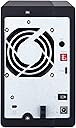
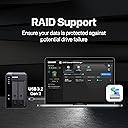
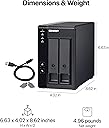
The QNAP TR-002 is a diskless 2-bay external RAID enclosure featuring USB 3.2 Gen 2 Type-C connectivity, supporting up to two 2.5" or 3.5" SATA drives. It offers hardware RAID 0, 1, and JBOD modes for enhanced data protection and performance, compatible with Windows, macOS, and Linux. Designed for easy NAS expansion or direct-attached storage, it includes lockable drive bays and comes with essential accessories for quick setup.


| ASIN | B0BVCXFMDH |
| Additional Features | LED Light |
| Best Sellers Rank | #187 in External Hard Drives |
| Brand | QNAP |
| Built-In Media | AC power adapter x 1, Drive tray keys x 2, Power Cord x 1, Screws for 2.5-inch drives x 6, Screws for 3.5-inch drives x 8, TR-002 external RAID enclosure, USB Type-C to Type-A connector cable x 1, USB cable clip x 1 |
| Color | Diskless |
| Compatible Devices | Desktop, Laptop |
| Connectivity Technology | USB |
| Customer Reviews | 3.9 out of 5 stars 47 Reviews |
| Data Transfer Rate | 7200 Megabytes Per Second |
| Digital Storage Capacity | 2000 GB |
| Form Factor | 3.5-inch |
| Hard Disk Description | Diskless |
| Hard Disk Form Factor | 3.5 Inches |
| Hard Disk Interface | Serial ATA |
| Hard Disk Rotational Speed | 7200 |
| Hardware Connectivity | USB 3.2 Gen 2 |
| Hardware Platform | Mac |
| Installation Type | External Hard Drive |
| Manufacturer | QNAP |
| Media Speed | 937.5 to 1000 MB/s |
| Mfr Part Number | TR-002-A-US |
| Model Name | TR-002-A-US |
| Model Number | TR-002-A-US |
| Number of Items | 1 |
| Special Feature | LED Light |
| UPC | 885022025749 |
| Unit Count | 2.0 Count |
| Warranty Description | 2 year warranty |
R**N
Hardware Based RAID 1
This enclosure worked for WD16tb drives in raid 1 array. Easy to setup, flip dip switches to raid 1, insert drives power up format for OS. tested removing a single drive putting in a toaster and it was read just fine with all data there. Erased drive and reinserted in enclosure it automatically started rebuilding array. The only negative I have is when the array is degraded the enclosure beeps very loudly 3 times every 5 minutes, there is no control to shut it off or silence it. Even tho their raid software is not necessary I highly recommend installing it for more visibility (for instance will give you % complete while rebuilding array). It also allows you to upgrade firmware on the enclosure, read logs, etc... The enclosure also has hardware raid support chips onboard so it offloads some of the work from the CPU. I previously used a major mfg pre-built raid DAS units, but this is better because the disks can be read directly without enclosure encrypting disks limiting them to only being used in that specific enclosure. it was also cheaper to buy disks and this enclosure than their pre-built models. 👍
M**O
Super sensitive to USB cable, TR-002 is great, TR-004 is a dog
I've now tried the TR-002 and TR-004. They are much different in their performance: **TR-002 Review** I did some initial speed trials using two identical Seagate EXOS drives in RAID 0 (striped) mode. I used Amorphous Disk Mark on a Mac to measure speeds. The cable that came with the enclosure gave different results depending on which orientation I inserted the USB-C side of the cable into the enclosure. Read speeds were the same for both orientations (~350 MB/sec), but write speeds were 20 MB/s in one orientation and 300 MB/s in the other. This same cable gave 500+ MB/s read and write speeds in either orientation when attached to a Samsung T5 SSD. I got similar results for a few other cables, and finally came across a cable in my inventory that gave consistent high read and write speeds in either orientation on the USB-C side of the cable. There was nothing special about that cable. Bottom line is that as other people have said, this enclosure is very finicky about which USB cable is used. Cable issues aside, its a gets-the-job-done kind of enclosure. Its mostly plastic, but seems solid. Its a tool-free enclosure. QNAP has Mac, PC, and mobile apps to manage the enclosure, including the ability to update the enclosure firmware. I give the TR-004 4.5 stars. **TR-004** This thing is advertised as USB-C 3.2 gen 2 with 10 gbps speeds, but it does not operate at this speed. It only operates at 5 gbps = 625 MB/s. This seems ok, but then the next issue is that the controller is only SATA II which operates at max 3 gbps = 375 MB/s. Still not horrible. However, in practice, it doesn't do better than 250 MB/s no matter what drive configuration. A single drive does the best at 250 MB/s R/W. Everything else is slower. RAID0 with 2 drives gives a few MB/s slower, and RAID0 with 4 drives tops out at 225 MB/s. So amazingly 4-drive RAID0 is obviously slower than a single drive configuration. What's worse is that the TR-004 in RAID10 with 4 drives is super slow - only 110 MB/S R/W for large files. In comparison, my TR-002 with the same brand/model/size drives does 400 MB/s R/W for large files in RAID0. What a disappointment for the TR-004. I don't understand how QNAP flubs something like this. Sending it back for a refund. I give the TR-004 1 star.
B**M
Dead on arrival
Dead on arrival. I originally bought the 4-bay TR-004, and it arrived completely dead. I returned it and ordered the 2-bay TR-002, only to experience the exact same failure right out of the box. The enclosure simply refuses to establish a USB connection. The USB light stays completely unlit, and it is not recognized by any computer. I extensively tested this across 4 different machines, including my HP EliteDesk, 2 laptops, and a Mac, using multiple cables. The computers never even register a handshake. To make sure I was not crazy, I pulled my hard drives out and plugged them into a basic Sabrent docking station, and they work perfectly fine. I even tried a hardware master reset on the QNAP unit, but the internal controller would not even boot up to register the command. Running into the exact same hardware lockout across two completely different models points to a serious quality control issue. Save yourself the time and look at a different brand, because I am sending this straight back for a refund.
C**.
Fantastic!
I have bought several QNAP devices, and each one I love. QNAP is just reliable, I have never had issues with anything they have made. The 2-bay drive is super easy to set up. Just download the software, plug it in, and it automatically recognizes it. There are sometimes it doesn't; if that is the case, you might need to go into disk management and format the drives. This is a great DAS for anyone who just needs a little extra drive space for their computer but doesn't want to go through the hassle of setting up a NAS.
J**E
Excellent DAS Solution!
Easy to set up, using as individual drives (not RAID or JBOD) for redundant backup to external 4TB Crucial X8 SSD drives. Used two 8TB Western Digital white label drives (WD80EMZZ and WD80EDAZ) I had shucked from WD Elements enclosures. Transfers are not impacted in any negative way, averaging 200MB/s within Windows and on Mac. 70mm fan keeps drives nice and cool, only reaching 38C max when transferring over 2TB of data. There is fan noise though as you can see in the video. You can hear it slightly more so from the rear of the unit than from the front. The TR-002 is hollow inside and the shell is plastic so any serious drive activity (seeking, random writes, etc) will echo internally. When going into standby the drives and fan shut off so no issue with constant noise - only during use. Didn't test hardware RAID features but haven't read about any issues with that.
R**.
Works well with Linux
Reviewing QNAP TR-002 for Linux/Ubuntu (Kubuntu) Setup: Installed two 4TB drives, preset mode to raid1, followed instructions, and two beeps after Set button, it was ready for setup. Ran partitionmanager, formatted it as ext4, with mount-point /backup, which took only a few minutes Test: Copied a few hundred MB files. Removed first harddrive, copy/pasted some more files, read/write was fine with only one drive in bay. Re-inserted the drive (after a few minutes (recommended)), and raid started rebuilding. That took several hours, was completed sometime overnight. Issues: Unmounts randomly after some time, even though computer is not suspended/sleeping. Fix: google GRUB_CMDLINE_LINUX_DEFAULT usbcore.autosuspend=-1 Nice to have: Would be nice to have some basic software for Linux, which provides status information, such as raid rebuild time.
A**B
Great empty 2-bay RAID enclosure
I had a hell of a time trying to find an empty 2-bay RAID enclosure that wasn’t already pre-loaded with hard drives (I already had two hard drives, just needed an enclosure), or a NAS. This one fit the bill. It’s reasonably priced and doesn’t come with hard drives (if you have your own drives). The software is pretty easy to use, and setup was quick. Once you set it up, it pretty much runs seamlessly in the background. Couple reasons to knock it a star: 1) It’s not the fastest. I’ve found it to be a little slow when it has to read/write continuously. B) It’s got these little easy-mount rails, but they’re these flimsy plastic things, and I’m not sure if I fully trust them to be sturdy
C**N
Most unreliable enclosure I've ever used
Do not waste your time or money buying this enclosure. I'm on my second one after an RMA and it's filled with problems. USB connectivity is extremely finnicky, the included USB cable would refuse to connect the device to any PC I tried. I had to go through a number of cables before I found one that it liked. The first unit I had prior to requesting the RMA would constantly disconnect and reconnect when USB was connected, and it would trigger a RAID array rebuild each time. The replacement unit I got just started showing both drives failed even though they both fully pass all extended health tests from the manufacturers tools (Seatools). The first unit also did this and said a drive was bad when it wasn't. Just today the enclosure said both drives were now randomly unformatted. I panicked thinking it wiped out all my data, but upon restarting, fortunately everything is still there and they started showing up again. Initially as normal, then after about an hour started showing bad drives (again, drives are not bad per the manufacturers diagnostic tools). I'm past the return period, so I'm probably just going to throw it in the trashcan. Complete waste of nearly $200 which is upsetting. You would be better off just buying a cheap Western Digital Passport. At least those work.
F**N
Muito bom
Muito bom, fácil configuração, atendeu expectativas.
G**R
Working Well But Challenging to Get Set Up
Setup in software RAID1 and has been performing fine with a pair of 6TB WD Red Pro HDD's. Getting this set up on my M4 Mac Mini took some effort, but with the help of Google Assistant we eventually got things up and running and also downloading and getting the QNAP App onto the MacOS was again challenging due to Mac security settings not openly allowing the app to be downloaded and installed but we go there in the end.
Trustpilot
3 weeks ago
1 month ago