


🚀 Elevate your workflow with precision, speed, and silent power.
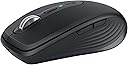
The Logitech MX Anywhere 3S is a compact, wireless Bluetooth mouse featuring an ultra-precise 8K DPI Darkfield sensor that tracks on virtually any surface, including glass. It offers quiet clicks for a distraction-free experience, a MagSpeed scroll wheel capable of 1000 lines per second, and multi-device connectivity across major OS platforms. With up to 70 days of battery life and rapid USB-C charging, it’s designed for professionals on the move. Plus, its eco-conscious build incorporates up to 78% recycled plastic, making it a smart, sustainable choice.


| ASIN | B0BPY4ZQXG |
| Additional Features | Wireless |
| Antenna Location | Office |
| Battery Average Life | 70 days |
| Best Sellers Rank | #41 in Computer Mice |
| Brand | Logitech |
| Button Quantity | 6 |
| Color | Graphite |
| Compatible Devices | Personal Computer |
| Connectivity Technology | Bluetooth |
| Customer Reviews | 4.5 out of 5 stars 2,279 Reviews |
| Enclosure Material | Plastic |
| Hand Orientation | Right |
| Hardware Platform | PC |
| Included Components | Logitech MX Anywhere 3 Compact Performance Mouse, USB Receiver, Cable For Recharging (USB-C to USB-A), User Documentation, Limited 1-Year Hardware Warranty |
| Item Dimensions L x W | 3.96"L x 2.56"W |
| Item Weight | 7.04 ounces |
| Manufacturer | Logitech |
| Mfr Part Number | 910-006925 |
| Model Name | MX Anywhere 3S |
| Model Number | 910-006925 |
| Mouse Maximum Sensitivity | 8000 dots_per_inch |
| Movement Detection | Optical |
| Movement Detection Technology | Optical |
| Number of Batteries | 1 Lithium Polymer batteries required. (included) |
| Number of Buttons | 6 |
| Operating System | Chrome OS, Linux |
| Power Source | Battery Powered |
| Range | 10.0 meters |
| Special Feature | Wireless |
| Style Name | USB-C Charge |
| UPC | 097855184009 |
| Unit Count | 1 Count |
| Warranty Description | 1 Year Limited Hardware Warranty |
M**D
one of my favorite purchases this year
I was reluctant to purchase this given the higher price point but theres a reason its the one thats consistently written on blogs everywhere. It is SO SEAMLESS when you move the mouse and I appreciate that it works on nearly any surface (dont need the mousepad). The scrolling wheel is effortless and works so fast, the mouse itself is really ergonomic / comfortable on your hand and for a piece of equipment you use for 8+ hours a day its definitely worth the splurge. I also appreciate how it has multiple bluetooth options to pair with different computers if you have a shared office or multiple computers.
S**N
My new favorite mouse
I really thought I could never love another mouse more than my first gen MX Anywhere, but its official, I love the 3S more. Its easy to turn on/off, the bluetooth connection to three devices works SO easily and flawlessly and eliminates the need for USB dongles freeing up a port, the mag scroll wheel that automatically switches between clicky scroll and smooth scroll when it detects a long scroll is so intuitive and helpful, and I don't need AA batteries anymore with the USB recharge. I fully charged this mouse when i first got it and its now 16 days later with nearly 8a-5pm daily use without a recharge. The shape and size is the same as all MX anywhere mice and is perfect for travel, office work, or daily general use. Obviously not for gaming and probably not a good fit for people with really large hands. But for me, its mouse perfection
J**R
The BEST Mouse, I Own Two! 🖱️
Hands down, this is the BEST mouse! I love it so much that I use the same one at home and at the office. Once I found a mouse that worked this well for me, I saw absolutely no reason to use anything different between my two setups. It’s comfortable, responsive, and the MagSpeed scrolling is probably one of my favorite features. Scrolling through long documents, spreadsheets, emails, and everything else I deal with during the workday is incredibly smooth and fast. I also love the compact size, it doesn’t take up a ton of space but still feels great to use all day. If you spend a lot of time working on a computer like I do, a good mouse makes a bigger difference than you would think. This one has absolutely earned its place on BOTH of my desks!
C**N
Great for fingertip grip and small hands
Posting this because I could never find a review that helped me so hoping this will help someone else lol. I think I'm a fingertip grip but not the kind that hovers. My palm never touches the mouse but rests on the mousepad and never leaves unless I type. I move the entire mouse with my fingers, not move my whole hand/arm. I have very small hands. For instance, I wear the smallest adult size for gardening gloves because kids gloves are too tight, but the adult glove fingers are too long. It's a compromise. So I was looking for a very small mouse for working (not gaming). I'm coming from the M325c which I love but has no fancy features. I wanted a mouse with various buttons I could program. After trying many different mice, I've realized that gaming mice are not a good fit for me because I'd grown so accustomed to the scroll wheel on the M325c that a rigid ratchet wheel was painful (not literally but figuratively). So that narrowed the options down pretty quickly. After trying various mice, I realized I enjoyed the Logi Options+ software that comes with their office line mice. Very neat. I'm sure there are other programs out there but I was looking for ease. That combined with the awesome free spin scroll wheel and the amazing compact size, and I'd found my mouse! I was originally skeptical of the mouse based on reviews but I think those reviews aren't applicable if you grip the mouse how I do. Some of the reviews that made me anxious: • The sides are sharp. I totally get what people are saying but that has never been something I've noticed while actually using the mouse. Probably something that could affect one person but not the next. • It's heavy. Because I use my fingers, I set my sensitivity pretty high and hardly move it at all. Again this is for work, not gaming. I only notice the weight when I pack it up to travel. • The top scuffs/gets dirty. I am starting to see the beginnings of that (had it about 5 months) but it's very minor for me. Probably because I don't rest much of my hand/fingers on it at all. I was also initially wary of the mouse for some of its features, but those proved to be a non-issue too. • Bluetooth/no receiver. I had absolutely zero issue connecting to my laptop and love not worrying about losing the receiver (ADHD lol). • No batteries. To be fair, I wanted to move away from batteries but wasn't sure how the battery life would actually be. I use this mouse heavily and have only charged it three times in about 5 months. So yeah if you have small hands and a fingertip grip, this is an excellent office mouse! If you use any grip style where your palm rests on the mouse, this is not a good moue. Even with my tiny hands, that grip feels awful and I imagine an average hand the fingers would be beyond the mouse.
R**E
great ouse but a little pricey.
The Logitech MX Anywhere has always been my go to for a mouse to carry with my laptop. This version was not a disappointment. it feels good in my hand, and connects w/o a problem. It also is mostly responsive (it will disconnect when idle for a while, but connects again with just a noticeable delay). It also is mostly ambidextrous . It fits well in either hand, but you do loose use of the side buttons. my only complaint is the price. $90 is a bit pricey for a mouse like this.
M**L
Small, well built mouse, great for travel.
Great mouse. Fairly small but feels pretty good in my (man) hand. Because of its small size, this mouse it great to travel with. For daily use at your desk, it may seem a bit too small although I've gotten used to it.
V**L
Best Mouse I’ve Ever Had
Best mouse I’ve had! It connected effortlessly right out of the box, and the scrolling is incredibly smooth. It glides across the screen with no lag or hesitation, and it feels really comfortable in my hand. The MagSpeed scrolling is especially nice. Overall, it just feels smooth, responsive, and well made. Very happy with it!
M**X
Excellent Small Mouse With A Couple Of Flaws
The Logitech MX Anywhere 3S is a compact mouse that feels surprisingly premium for its size. The plastic body has a solid, high‑quality feel—lightweight but not cheap—and it holds up well during long work sessions. The quiet clicks are one of the standout features; they’re soft, muted, and perfect for shared spaces or late‑night use. The scroll wheel is also excellent, especially with its ability to automatically switch between tactile step‑scrolling and smooth free‑spin. It makes moving through long documents or spreadsheets feel effortless. Where the mouse falls short is in the side buttons. They’re positioned in a way that makes them a bit finicky to use, and even once you get them configured, they don’t consistently work across all applications. It’s frustrating when you expect a back/forward action and nothing happens. Another drawback is that Logitech now requires a new software program to configure the mouse. Even if you’ve used their older devices, you still have to download and set up this new software, which feels unnecessary and adds extra steps. Overall, it’s a great little mouse with excellent build quality and smooth performance, but the side button behavior and software requirement keep it from being perfect.
K**L
ممتاز
استخدمته من قبل عدة مرات
A**R
Compact and efficient
I purchased this to replace my apple mouse that kept disconnecting. So far so good!
M**.
Muy útil
Muy útil para desplazarse a través de documentos largos.
A**R
Replacement mouse
My wife had to replace her Logitech MX Anywhere 3 after it was damaged by a monkey who didn't like the taste! She feels this one is much smoother and is happy with it.
F**N
Excellent Compact Mouse
I am extremely satisfied with the Logitech MX Anywhere 3S. It delivers exactly what it promises and works very well. However, it is a compact mouse, so if you prefer larger mice, you may be better off considering the Logitech MX Master instead.
Trustpilot
3 weeks ago
1 week ago