Description
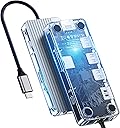
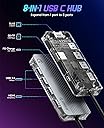
- 【8 IN 1 Docking Station】: This Orico type-c semi transparent expansion docking station entends your one usb C port to 8 ports with 3*USB3.0 interfaces(5GGbps), 1*gigabit network interface, 1*HDMI(4K@30Hz), 1*Type-C charging(PD 100W), 1SD/TF(480Mbps) Card Slots supporting many mobile phones and computers to use and connect.
- 【5Gbps High-speed Transmission】: 3*USB 3.0 ports are compatible with USB 2.0/1.1 and others with a transmission rate of up to 5Gbps. A 1G file can be transferred in 3-4 seconds. And 1*USB2.0(480Mbps) port connecting wirelless mouse and keyboard are more stable. The Orico type-c semi transparent expansion dock uses various functional independent chips internally, supporting multifunctional operation and maintaining stable and smooth use.
- 【4K HDMI+PD 100W】: This docking station supports 4K@30Hz Video transmission, mobile phones and computers can be connected to televisions or projection devices, transforming our small screens into large ones. You can enjoy a cinema-like visual feast at home. The PD interface can achieve an output power of 100W, without worrying about the host device running out of power during use
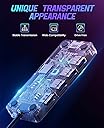
- 【Transparent Docking Station】:The docking station is made of transparent PC and aluminum alloy. It can clearly see the internal components and feel a full sense of technology. The linear design accelerates heat dissipation and can stably and safely operate multiple devices.
- 【Wide Compatibility】: Orico USB C docking station is widely competible with Windows/Linux/Mac OS systems,and most of USB C devices like Dell XPS13/15/17, HP, Mac book,Huawei, Lenovo, Surface, Samsung, etc.
Buy
Review: Very cool hub with decent transfer speeds on USB at least - The video shows exactly what you get and my initial impressions of build quality as well as a quick overview of the ports, so I won’t go into all that here. Instead, I’ll go into what I consider most important: the transfer speeds and the port functionality. Full testing methodology included below for your information, but really, the summary is all you need to know. Summary: This is a really cool hub, but you pay for the design! £50 is a big ask for a hub that only has 5Gbps ports. Benchmarks also showed that the SD card reader is not the fastest at all and the network benchmark was also a little slow. Everything else worked fine though. Bottom line - if you love the design, go for it, but you can get a better hub for less if you forego the clear shell and just go for a standard hub. This hub is capable of outputting video to an external display, although you should remember that the USB C port on your computer or device must be able to display video over USB C to use the display features (not all USB C ports do). Pros & Cons: + Good/expected: Very little drop in performance for the USB 3 Type A and Power Delivery ports compared to plugging into the computer directly. + Good/expected: HDMI port worked without issue. - Bad/disappointing: A clear drop in performance for the Micro SD and Network ports compared to plugging into the computer directly. ----------------------------------------- Testing methodology: - USB 3 type A: Control - 10 GBps SSD enclosure containing 3300 MB/s NVMe SSD plugged directly into a USB 3.2 Gen 1 (5Gbps) Type A socket on the test PC (CrystalDiskMark benchmark 464.13 MB/s); Test - Same drive plugged into the 5Gbps USB 3 type A port on this hub. - Micro SD: Control - 128GB Lexar V30 Micro SD plugged into Transcend USB 3.1 reader (CrystalDiskMark benchmark 95.44 MB/s); Test - Same card plugged into the SD slot on this hub. - Network (Ethernet): Control - Average of 5 x DownTester file copy benchmarks (359.13 Mbps), connected to server on home network using 1Gbps eth ports routed via 1 Gbps network switch; Test - Same cable, same PCs but one connected to the ETH port on this hub. - Power Delivery: Control - Measured using inline Type C Power monitor connected to 100W charger delivering power directly to a power bank capable of max 18W (9V 2A) charging; Test - Same, but through this hub instead of directly. - HDMI: Tested (display and audio) via connection to Samsung monitor and LG 4K TV using known good HDMI cable Results: - USB 3 Type A speed: 462.51 MB/s (1.62 MB/s slower than control) - Micro SD speed: 23.46 MB/s (71.98 MB/s slower than control) - Network speed: 235.05 Mbps (124.08 Mbps slower than control) - Power Delivery: 17.30 W (0.4 W less than control) - HDMI out: OK (including audio delivery over HDMI)
Review: Works well - I've tested all the features except for HDMI thus far. It really does do multiple USB's and Ethernet and VGA all at once, reliably continuing to do so for a full remote-workday without getting hot. USB PD works well even if you have a less than 100W adapter to plug it into. I used the 45W adapter that came with my work laptop and it still charged while all the functions I tested worked. Works fine with Chrome OS and non-Google Linux. I did not need to do anything special. One caveat: it cannot read both full-size SD and micro SD (TF) cards at once. Also, you most likely want to use the USB PD if you can, since otherwise any hard drives you plug in will be powered off the USB-C port.