We remain fully operational. Our teams are working around the clock to ensure your deliveries continue safely.

قم بتنزيل التطبيق


معلومات عنا
حقوق الطبع والنشر © 2024 Desertcart Holdings Limited
قم بتنزيل التطبيق
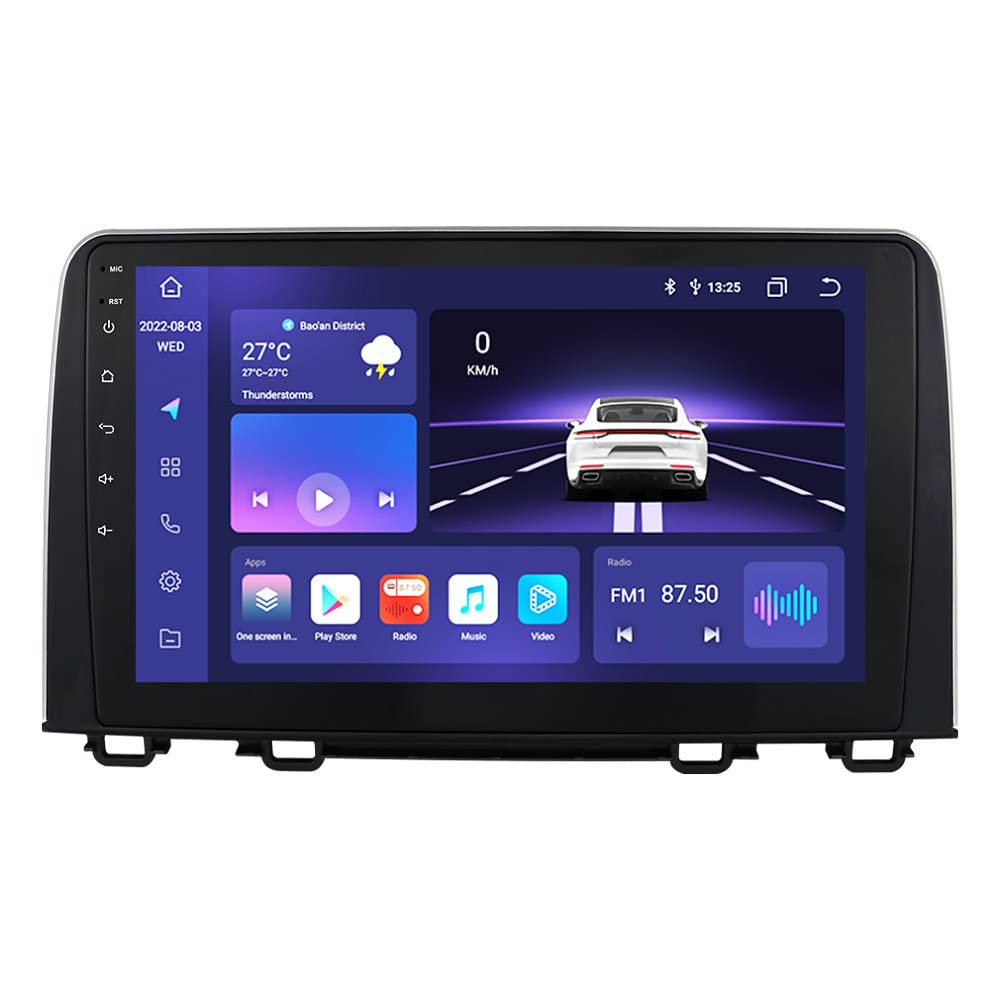
🚘 Upgrade your drive with smart tech that keeps you connected, safe, and ahead of the curve!
This 10.1-inch HD touchscreen Android 14 car stereo is tailor-made for Honda CRV models 2017-2021, featuring an 8-core processor, 4GB RAM, and 32GB storage. It supports wireless Apple CarPlay and Android Auto for effortless smartphone integration, Bluetooth 5.0 for hands-free calls, and built-in GPS with offline navigation. The QLED display delivers vibrant visuals, while steering wheel controls enhance safety and convenience. Backed by a 1-year warranty and free returns, it’s a premium upgrade designed to transform your driving experience.


| ASIN | B0BVM997W9 |
| Best Sellers Rank | #76,925 in Electronics ( See Top 100 in Electronics ) #1,469 in Car In-Dash Navigation GPS Units |
| Customer Reviews | 4.0 4.0 out of 5 stars (22) |
| Date First Available | February 13, 2023 |
| Display Size | 10.1 Inches |
| Item Weight | 4.89 pounds |
| Product Dimensions | 10.1 x 10.1 x 10.1 inches |
| Voice command | Microphone, Touchscreen |
| Warranty | 1 year |
O**E
Fairly easy to install
Initial impressions: - build/material quality is great - after install, fitment looks to be perfect on my wife’s 2020 CR-V (LX model, not EX) - instructions were ok, but there’s videos of similar units that can help with installation. 30mins tops to install. - display looks nice and crisp and touch screen is decently responsive. (Not super fast, but not slow where it’s noticeable) - functionality, all buttons work on steering wheel and backup cam looks great (takes up the whole screen). Another user mentioned in their review that the antenna reception isn’t the greatest, I didn’t have that issue, our unit has great reception. That’s all I can think of with initial impressions. If there’s any cons I have, I’ll update the review. Hope this helps!
R**E
Great head unit, but not without problems
I have a 2019 CR-V LX, the radio was pretty plain, no nav, no apps, small screen. I found the installation to be easy with all connectors plug and play. The instructions are lacking both for install and operation. It took some trial error to find all the correct connections. There onboard usb connector ( in the center console) could not be connected due to the lack of a proper adapter. I did find one on Amazon, I ordered it and installed at a later date. I would also recommend wrapping the shifter with a soft cloth or towel to prevent scratches on the new screen. Good stuff, The fit and finish on the unit are really good and looks factory. The screen is a bit taller than OEM, nut doesn’t seem to block the vent enough to affect its performance. The audio controls (DSP) are fantastic. I was planning on replacing the factory speakers at a later date, but now will keep ,100% better sound. The unit integrated with the steering wheel controls and back up camera out of the box, no fussing around. The z connect app connected to my I phones with no trouble. If the app is open when shutting off the car, it will automatically reconnect when started and the same phone is in range. The desktop has many built in options and looks, the touch screen is clear in bright light and not too bright in the dark. There are 2 extra usb ports, I ran the cables into the glove box. Not using them yet, but may find something for them. Not so good, There is a thin mask that has to be mounted to the back of the head unit. I found one of the mounting tabs broken off. A dab of super glue to fix, stuff happens. The user manual does not cover many set up issues. Did a lot of fooling around just to set the date and time correctly. Hint, it’s not in the gps section of the nav menu. I had to change the desktop to one that had window with the date and time on it, click the window to open the menu. Then I could change the desktop back and found the settings to be correct. I did find the settings to remove the heater controls menu and right turn camera fairly quickly. All in all spent a couple of hours just messing with the settings to get what I wanted. No matter what changes I have done setting the metadata on music files the music app still gets the songs out of order. Sometimes backwards even. I still haven’t sorted this out. When choosing Artist, all files by them are jumbled together, even from multiple albums. I do not believe this was here out of the box, but after an update on the head unit, I got a droid-like widget on the desktop that I can move around, but not remove. It appears to be a “Smart Center”. A pay app that I can’t see how to remove. The guy is cute I guess, but I don’t want him. See photo. The bad, Radio reception sucks, like AM radio? Forget about it. I live about 40 miles SE of Chicago and can not pick up Chicago stations. I have set and reset the options for the radio, no improvement. I ordered and installed a booster, no help. The shark fin antenna is powered, the connections are correct. I even pulled a power supply from the vehicle side ignition to replace the supply from the head unit. The radio just sucks. I will amend if I find a solution.
K**O
Súper recomendable calidad super bueno 10/10.
Z**S
The rest of the story..
I installed this device into a 2017 Honda CRV LX. My primary goal was to get wireless CarPlay working. At a high level, installing this new unit involves removing the environmental controls panel underneath the old radio to get to the 2 screws securing the radio to the inside of the dash. Then pull the old radio out. Connect a bunch of cables to the new unit, install it into the dash and replace the environmental controls panel. While technically it’s true that this is a “plug & play” install, what to plug in where and if a given cable needs to be plugged in isn’t always apparent. And the documentation, or lack thereof, that comes with it is not very helpful in that regard. I’d say roughly 50% of the cabling was easy. Plug the new wiring harness into the new device and plug most of the cables that were plugged into your old system into the new wiring harness. Then there are some cables that come with the new unit that fit into other connectors on the new unit, and the other end plugs into cables on the new main wiring harness bundle. When it was all said and done, there were still over half a dozen cables that came with the new unit that either were not used and/or one end of some cables weren’t plugged into anything. Your mileage may vary. There’s a 6” metal housing on the back of my old radio that made the old unit backend heavy. Because of that, there were 2 metal brackets attached to that old radio housing that also attach to the car inside the dash. I assumed those brackets would be needed on the new unit, but none of the mounting holes lined up, so I didn’t use the brackets. The new unit isn’t nearly as deep or heavy as the old (not backend heavy), so I don’t think this will be an issue. The clips that hold it into the dash should be enough. Fingers crossed. Before I installed the new unit, I contacted the seller asking for an install video. They responded quickly but didn’t have a video. They did send a single picture of all the wires that they called a “wiring diagram” (it’s not). Some of the labels on my wires were labeled differently than what the picture showed. All this is to say, it wasn’t a simple plug and play project for me. I ended up taking over an hour to install with a lot of testing and disconnecting and reconnecting of wires. At first my back up camera and steering wheel controls didn’t work. I eventually figured things out so all is working, but there was some trial and error involved. The new unit comes with additional USB connectors which I routed into the glove compartment. That’s handy since my older CRV only came with 1 USB port. Once installed, it looks great (see attached photo) and so far works perfectly. However, the lack of useful installation documentation and/or video prevents me from rating this item higher than 3 stars. There is a lot the seller could do to make this an easier item to install correctly.
D**D
I RECOMMEND TO ANYONE
Very easy to install, looks amazing, compare to the one from factory.
V**R
Se conecta sin problema, solo que en mi caso me costo realizar una instalación ya que fui muy meticuloso, pero la pantalla es de muy buena calidad, no tiene problemas con la luz del día, hay que destacar que viene instalado el GPS Primo de Israel, pero en general buen producto
E**O
10.1 inch Radio/GPS
Reception was really bad to the point that I could only get a few stations. Also the screen displays during day light hours was very dark and at night was really bright and I couldn’t find any way to adjusted. The GPS signal was on and off every were, I even tried to move the antenna to different areas and it didn’t help.
ترست بايلوت
منذ 4 أيام
منذ شهر