Desertcart purchases this item on your behalf and handles shipping, customs, and support to OMAN.
🎮 Elevate your desk game with the ultimate wireless mechanical keyboard experience!
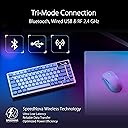
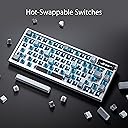
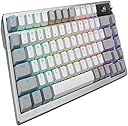
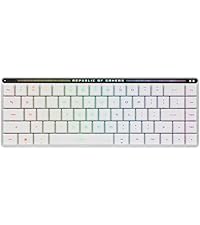
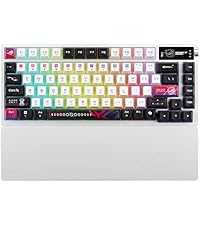
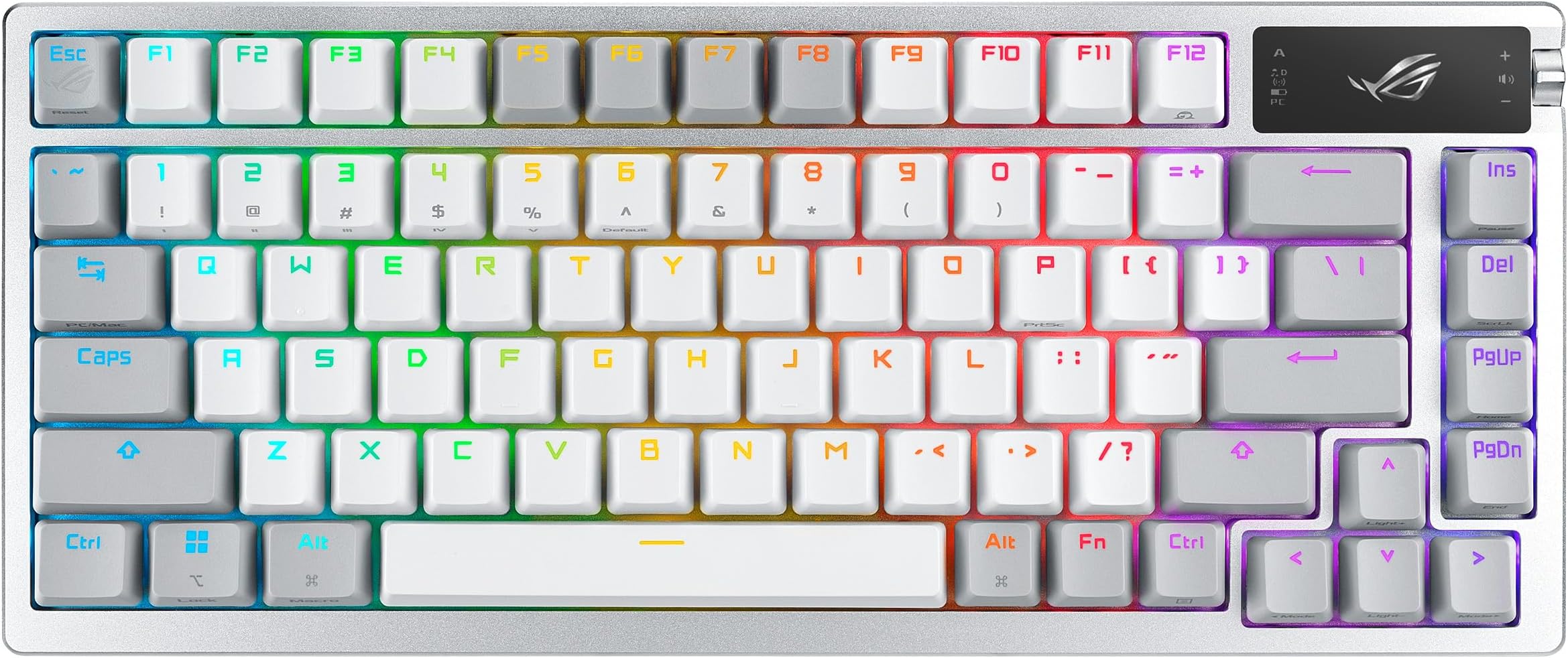
The ASUS ROG Azoth is a premium 75% wireless mechanical gaming keyboard featuring tri-mode connectivity (Bluetooth, 2.4 GHz RF, and USB), hot-swappable pre-lubed ROG NX Snow linear switches, and a silicone gasket mount with triple-layer dampening for superior sound and feel. It includes a vibrant RGB backlight, a 2-inch OLED display for real-time monitoring, and a full DIY customization kit, making it ideal for gamers and professionals who demand performance and personalization in a sleek white design compatible with both PC and Mac.


| ASIN | B0CLF3WYGC |
| Additional Features | 75% Wireless, Backlit, Customizable Display Keys, Volume Roller |
| Antenna Location | Business, Education, Gaming |
| Best Sellers Rank | #932 in Video Games ( See Top 100 in Video Games ) #98 in PC Gaming Keyboards |
| Brand | ASUS |
| Built-In Media | ROG AZOTH/NXSW/CA/PBT/WHT Gaming keyboard, ROG keycap & Switch puller, ROG switch opener, lube Brush, lube station |
| Button Quantity | 78 |
| Color | White |
| Compatible Devices | PC |
| Compatible Operating System Family | MacOS, Windows |
| Compatible Tablet Computer Models | AAUB P30 |
| Connectivity Technology | Bluetooth, USB 2.0 |
| Customer Reviews | 4.4 out of 5 stars 449 Reviews |
| Enclosure Material | PBT Keycap |
| Global Trade Identification Number | 00197105209428 |
| Hand Orientation | Ambidextrous |
| Item Dimensions L x W x H | 12.8"L x 5.3"W x 1.5"H |
| Item Weight | 2.6 pounds |
| Keyboard Backlighting Color Support | RGB |
| Keyboard Description | Gaming |
| Keyboard Layout | QWERTY |
| Manufacturer | ASUS |
| Mfr Part Number | M701 ROG AZOTH/NXSW/CA/PBT/WHT |
| Model Name | M701 ROG AZOTH/NXSW/CA/PBT/WHT |
| Model Number | M701 ROG AZOTH/NXSW/CA/PBT/WHT |
| Number of Items | 1 |
| Number of Keys | 82 |
| Number of Packs | 1 |
| Number of Sections | 8 |
| Power Source | Corded Electric |
| Recommended Uses For Product | Business, Education, Gaming |
| Series Number | 701 |
| Special Feature | 75% Wireless, Backlit, Customizable Display Keys, Volume Roller |
| Style Name | Azoth |
| Switch Type | Clicky |
| Theme | Gaming |
| Total USB 2.0 Ports | 1 |
| UPC | 197105209428 |
| Unit Count | 1 Count |
| Warranty Description | 1 year |
_**_
Premium keyboard
The ASUS ROG Azoth White is easily one of the most premium keyboards I’ve used. From the moment you pick it up, the weight and solid build quality make it feel like a high-end product. The ROG NX Snow switches are incredibly smooth, and the typing sound is satisfying without being overly loud or obnoxious. The dampened sound gives each keypress a clean, deep feel that makes typing and gaming enjoyable. The white design looks fantastic as well, especially in an all-white setup. Overall, it’s an expensive keyboard, but the build quality, typing experience, and premium feel make it feel worth it.
T**U
Solid Keyboard
Just note, I'm a gamer, I don't do programming and all I do with my keyboard at home is chat with friends, play games or sometimes type up documents. I rarely use function keys like home/end/pgup/pgdn etc etc. I'm the type of guy that is ok as long as we have the F-keys and arrows keys available. I'm not a big backlit keyboard guy, nor do I really care of being fully customizable program or hardware wise. So I've been looking around keyboards, buying and returning, or keeping it and disliking it by the time the return window is closed for around a couple of years now. I've touched a few of the cheaper brands, the logitech wireless G915 low profile, Ducky Keyboards, and the Asus ROG Falchion. General review was logitech feeling sort of cheap, ducky keyboards were wired :'(( , Asus Falchion was way too compact for me (not an ASUS issue, just "it's not you it's me" issue) and the metal back plating reverbed with metallic sounds when typing. Ducky keyboards were honestly really good but they do not have any wireless options that I know of which, as a person who wants as minimal cords and wires visible on the desk, it was just a no-no. I couldn't settle myself to seeing the keyboard wire stretching all the way to the back of the desk, even with those aesthetic cords. I was hesitant on getting this Azoth keyboard as the Falchion wasn't that great of an experience. I preferred the cheap felt G915 over the Falchion, which I don't mean to disrespect either keyboards/manufacturers, but they both had their pros and cons. The G915 cons were more forgiving in comparison to the Falchion, but I just decided to give it another go for this keyboard and I definitely do not regret it the slightest. The Azoth keyboard is amazing on the physique, it feels really heavy and solid, the snow switch is quiet but has the most relaxing and satisfying tactile and audible feedback. They completely solved the issue of the backplate reverbing metallic sounds as they described and they really isolated the sound of the keys. The snow switches sound so soothing, I made my friend listen to the keyboard and she's the type to judge harshly, but even she was like, "Oh my god, that sounds so good." The keycaps feel pretty nice too, unlike the G915 I have. The G915 felt flimsy, as it was low profile, but there were reviews talking about the material and build for the keycaps. I did feel it was cheap but didn't think much about it. I used the keyboard for about 6 months and as I sweat a lot on my hands, it does give a toll on the keyboard. The w-key's black coating/paint was chipped and as much as it doesn't affect the performance of the keyboard, it was disappointing that the keycap coating chipped after not even a year. This Azoth keyboard definitely has a keycap that feels more solid and I definitely do not feel it'll be chipping anytime cause of my hands sweating so much. I'll update the review if it does go under my expectation but, I can already feel it's going to meet my expectation. The customization is really in-depth and there's a lot of lighting patterns you can customize to. The top right OLED display is pretty nice, kind of hard to see when you set your keyboard on the desk but that's whatever. You can put any picture you want on the top right display, which is pretty awesome. The control knob isn't bad, it's very easy to control but it'll probably take time for me to get used to. Yet, as earlier I explained, I haven't really checked in depth cause I don't really give a care for these but I'm pretty sure if you enjoy these details, you'll have quite a bit of fun. Battery life, I'll be honest, I fell in love with this keyboard the moment I started using it, I'm only on day 2 writing this review, so if I experience anything in the future, I'll come update but if there's no update, I'm probably still with this baby with no complaints for it being unreasonable. **update/1.5month - The battery life is long enough, I have the OLED screen on, dim backlighting on and I probably charged it maybe twice throughout this span. Definitely good battery life. They also have customizable keys, lubes and what not, so if you're interested in changing keys, lubing keys or doing customized keyboards, maybe this might be a good way to start since it lets you do some maintenance on your own? It seems to be a good introductory/starter kit for if your interested in the customizing the keyboard physically. Only a few cons I can think of right now, such as how the ArmoryCrate UI (the keyboard program on the PC) is pretty jumbled and hard to maneuver around in my opinion. The other one might be the connectivity switch being a small hassle because if you charge your keyboard while using it, the keyboard must be swapped to the wired setting from the wireless setting or it won't connect properly. Yes again, just have to get used to it and if the battery life is long, how many times will you be doing this procedure? Not much so depending the battery life, this QoL issue may be very miniscule. ***update/1.5month - It definitely is very miniscule, because of the good battery life and rather, it doesn't bother me that I have to change positions of the switch. There's three modes, wireless, wired, and bluetooth. I don't use bluetooth so I just had to remember two modes, the switch to the left is wireless, the switch centered is wired. *3months update: I found the one, is all I can say. I usually start looking around Amazon for different keyboards on the market because I feel there's something always better, but I've yet to browse the market. Which really says a lot because I feel I was always on the hunt for keyboards. It seems I found my one true keyboard before I found my one true love LOL.
E**Y
Very Impressed
As a dedicated PC gamer, I've used my fair share of gaming peripherals, but the ASUS ROG Azoth 75% Wireless DIY Custom Gaming Keyboard has taken my setup to a whole new level. This is a well-thought-out product. Build Quality and Design: The build quality is solid and feels incredibly durable. The PBT keycaps are not only high-quality but also give the keyboard a premium, textured feel that’s a joy to type on. The RGB lighting is customizable and vibrant, creating an amazing atmosphere, whether I'm gaming in the dark or just enjoying some downtime. Performance and Comfort: The hot-swappable ROG NX Snow switches are a game-changer. They offer a crisp, tactile feedback that makes every key press satisfying and responsive—perfect for both fast-paced gaming and long typing sessions. The three-layer dampening system does an excellent job of minimizing noise and adding an extra layer of comfort, making the keyboard quiet yet efficient. OLED Display: The OLED display is a nice touch. It’s not just a gimmick, it’s incredibly functional. I love having my system stats, media controls, and other important info displayed right on the keyboard. It adds a level of customization and usability that I didn’t even know I needed until I experienced it. Wireless and Wired Flexibility: The wireless connectivity is flawless. Whether I'm using Bluetooth or the dedicated dongle, the keyboard offers smooth and responsive performance without any noticeable latency. This flexibility is perfect for both my gaming rig and when I want to switch over to my laptop. Battery Life: Great battery life, but I mostly use it plugged in. Overall Verdict: The ASUS ROG Azoth has quickly become my go-to keyboard for all my gaming and productivity needs. It combines fantastic performance, premium features, and a sleek, customizable design. If you’re looking for a keyboard that not only looks great but performs exceptionally well, this is the one to get!
A**R
Must have gaming keyboard
Very nice indeed, no problems so far. A little pricey but worth it. Looks amazing, sounds amazing. :D
V**R
Pricey, but really solid and works well for me.
TLDR: Build quality is strong, it's also pretty heavy. Wireless connectivity has had no issues. Screen is clear, no lag or issues. Control wheel is solid. Keyboard size is good for its... size? Setting up was easy. Keys are smooth and the sound is still that of a mechanical keyboard (Snow) but not loud. I wish lighting was a bit brighter but it's decent. No issues with software. Experience: Coming from a full, low profile keyboard to a 75% took a bit getting used to. -The keys are SENSITIVE. Some claim you get double key registry, no. It's just that sensitive. -Not having a numpad was probably the most annoying thing to get used to, but now I don't even think about it. -Not having some keys was rough getting used to, but macros work well with this keyboard. -Yes, some hate Armoury Crate, but no issues with setup, keyboard or software. -It felt a bit too tall (some might need a wrist pad), but I was used to my slim keyboard (Corsair k100 AIR Wireless). Once you get used to it, it's a solid keyboard. While I do recommend it, I still think you should get it on sale. If you want to spend the full tag on it, by all means. Reason I went for a 75%? Because I kept hitting my mouse on my 100% when gaming. Annoyed me enough to pull the trigger on this lol. If you know you know.
A**W
Piece of Junk
This keyboard was awesome for a couple weeks. Then I started to notice double typing and chatter. I had to install a chatter blocker and even the chatter blocker can't keep up with the terrible double typing. For a keyboard this expensive, I'd expect much better performance and quality. I'm really upset that I bought this piece of junk.
W**C
Ultimate Customization Experience, Exceptional Typing Feel!
After getting the ASUS ROG Azoth 75, I was truly impressed by its build quality and overall experience! As a high-end 75% wireless mechanical keyboard, it meets almost all my expectations for a customizable keyboard. Pros: ✔ Stable Wireless Connection – The low-latency 2.4GHz wireless mode performs flawlessly. Whether for gaming or daily work, there’s no lag or disconnection. It also supports Bluetooth and wired modes, making it highly versatile! ✔ Smooth Typing Experience – The pre-lubed mechanical switches provide an incredibly smooth and quiet keystroke feel, making long typing sessions comfortable and effortless. ✔ Extensive Customization – Comes with an OLED screen that displays battery life, system info, and even customizable animations! It also supports hot-swappable switches, perfect for DIY enthusiasts. ✔ Excellent Keycaps & Silent Typing – The PBT keycaps feel premium and are resistant to oil buildup. Combined with a three-layer dampening structure, keystrokes are crisp and satisfying with excellent noise control. ✔ Ultra-Long Battery Life – A full charge lasts over 200 hours, offering incredible battery performance with minimal need for recharging! 🔋 Areas for Improvement: 🔹 A bit pricey, but considering its build quality and features, it’s definitely worth it. 🔹 OLED screen customization could be expanded, as there’s still room for more creative functionality. Conclusion: The ROG Azoth 75 is a high-end wireless mechanical keyboard with virtually no drawbacks, ideal for those who demand premium typing feel, customization, and stable wireless connectivity. Whether you’re a hardcore gamer or a mechanical keyboard enthusiast, this keyboard will not disappoint! 💯 Highly recommended! 🔥
C**R
Nice Keyboard.
Great keyboard, very responsive, came in great condition, comes withneeded wites and tools, comfortable to tyoe with, led lights are great, not too loud, good size great color, and the small screen on the corner is nice.
J**H
Good Hardware, Bad Software.
Replaced Logitech G13 for double-type. Like the full-scale better. Software flaky. H-2004 error most-times. OLED screen often has issues loading custom images.
A**M
Buena calidad constructiva
Los materiales son de muy buena calidad. La parte superior es de aluminio maquinado y la parte inferior es de plástico. En el interior cuenta con varias capas de diferentes materiales que mitigan muy bien el sonido. Pedí la versión con los switches snow, los cuales son suaves y no producen mucho ruido. Las teclas tienen buen espesor y tienen una textura que en lo particular, me desagrada bastante y no dejan pasar bien la luz RGB. La batería le dura como 1 mes (siempre lo tengo encendido). La pantalla es oled y cuenta con varias animaciones y también de puede asignsr información variada del sistema usando armory crate. Otras cosas molesta que he encontrado son que al conectar el cable para recargarlo, pierde la configuración de la pantalla y lo mismo pasa al desconectarlo, además de no poder cambiar el color del RGB de forma individual en cada tecla, cosa que otros teclados gamer de gama baja traen por defecto y por último, es extremadamente caro. La verdad yo simplemente lo compré por ser comprador compulsivo, pero no creo que valga gastar tanto dinero en un producto como este. Literalmente es para fans de la marca y para ellos, está la versión extreme, que es aún más ridículamente cara.
R**Y
Asus rog azoth keyboard wireless
It is very good but price is too much
J**S
El equipo es bueno sin embargo llego incompleto
Llego abierto e incompleto, el chasis del equipo llego laminado y eliminaron la pieza para lubricar switches
M**H
Disappointed!
The box has some dust and threads of fabric within it because it is NOT SEALED!!! Given that one of the photographs shows that the keyboard's LCD section has already been scratched, it doesn't feel brand new. There are signs of wear or folding on the accessory box. Box is not the same when you buy from the mall, I wonder if this is a display unit or refurbished unit.
Trustpilot
2 months ago
5 days ago