

Desertcart purchases this item on your behalf and handles shipping, customs, and support to OMAN.
🚀 Elevate your presentations with ultra HD clarity and zero lag — don’t get left behind!
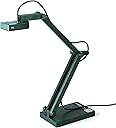
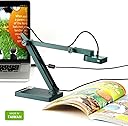
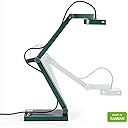
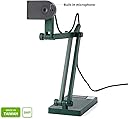
The IPEVO V4K is a premium 8MP USB document camera delivering ultra high definition images and smooth 30fps streaming. Featuring fast autofocus with Sony CMOS sensor technology, it excels in low-light conditions and quick material switching. Its durable multi-jointed stand ensures stability during heavy use, while broad compatibility with Mac, Windows, and Chromebook makes it the go-to tool for live demos, remote teaching, and professional presentations.

| ASIN | B079DLTG9F |
| Aperture Modes | F3.5 |
| Aspect Ratio | 16:9, 4:3 |
| Best Sellers Rank | #3,304 in Office Products ( See Top 100 in Office Products ) #2 in Document Cameras |
| Brand | IPEVO |
| Built-In Media | V4K document camera with attached USB cable (4.90ft/150cm) |
| Camera Flash | no flash |
| Color | Green |
| Compatible Devices | Mac, PC, Chromebook |
| Connectivity Technology | USB |
| Continuous shooting speed | 30 frames_per_second |
| Customer Reviews | 4.5 out of 5 stars 3,809 Reviews |
| Effective Still Resolution | 8 mp |
| Exposure Control Type | Automatic |
| File Format | JPEG, MP4 |
| Flash Modes Description | No Flash |
| Flash Type | Internal |
| Focus Type | Autofocus |
| Global Trade Identification Number | 04712098410895 |
| Hardware Interface | USB |
| ISO Range | 100 |
| Item Dimensions D x W x H | 1.9"D x 3.1"W x 10.9"H |
| Item Weight | 1.3 pounds |
| Light Sensitivity | High |
| Manufacturer | IPEVO |
| Maximum Aperture | 3.5 millimeters |
| Maximum Shutter Speed | 1/4000 |
| Media Type | HDD |
| Mfr Part Number | 5-880-4-01-00 |
| Minimum Shutter Speed | 0.03 |
| Model Name | CDVU-08IP |
| Model Number | 5-880-4-01-00 |
| Model Series | V4K |
| Number of Items | 1 |
| Photo Sensor Resolution | 8 mp |
| Photo Sensor Technology | CMOS |
| Real Angle of View | 72 degrees |
| Screen Size | 0.01 |
| Self Timer | 10 |
| Sensor Cleaning Method | Sensor Blower |
| Sensor Type | CMOS |
| Shooting Modes | Automatic |
| Unit Count | 1 Count |
| Video Capture Format | MP4 |
| Video Capture Resolution | 2448p, 3264p |
| Viewfinder Type | LCD screen |
| Warranty Description | All IPEVO products come with a one-year warranty from the date of purchase. |
| Water Resistance Level | Not Water Resistant |
| Zoom Type | No Zoom |
J**E
Very reasonable price for a terrific product!
I have been using this overhead projector for the last 3 years in both my home and my classroom. I originally purchased it so I could teach at home during COVID protocols. I ended up using this, my desktop computer AND my cell phone while teaching, giving me multiple angles and possibilities while in Zoom sessions. I was even able to use the Ipevo as a camera to show kids at home the Smartboard while I lectured or student actions during labs when we were in hybrid learning (some kids in class, others still at home due to COVID). The camera is quite clear and easy to view for those who were at home. The Ipevo is terrific for its job and price. It is quite small and lightweight. I can easily toss it in my purse or my small briefcase that I use to carry papers and my laptop to and from school. I have used it several times a week, nonstop and can do nothing but rave about it. I far prefer it to the Elmos I have used to teach with as well as other brands. I use this almost entirely to do live casting of guided notes, manipulatives, diagrams, formulas, etc on my Smartboard in my high school classroom. I also use it on microscopes to show students what they should be looking for during labs (while teaching them about air bubbles, microscope technique, etc). I can use it as a secondary web cam for online teaching and I can use it for Zoom sessions as well. I love that you can rotate the head almost 250° allowing this left handed teacher to not have a large mounting arm constantly in the way (ahem, other screen caster companies take note!). Mild negatives: -You will need to download the Visualizer software, but be warned, it has a bit of a learning curve. Once you "get it", it's super easy to work with. -You will need a USB to USB-C adapter to use it on your Apple desktop. -I wish the cord that it comes with was about 30 cm longer, so it would be easier to use in labs. -For a really wide field of view, sometimes you will need to put the Ipevo on top of a mug or kleenex box. No biggie, but just be aware of that.
K**R
Incredible camera at an excellent price!
Wow! I'm actually excited to write this review. I'm a homeschool co-op teacher and I needed a document camera that was within my budget to use during class so students could see what I write on worksheets or do during lab demonstrations. I didn't want to spend too much, and hoped for the best when I ordered the lower-priced IPEVO V4K. I just received it today and tried it out. When I plugged it in the USB port of my Lenovo laptop, my computer automatically loaded the device driver so I didn't have to install any software. However, in the case your computer does not automatically download and install driver software, the camera has the URL of the website with the software, printed right on the base of the camera. Once the camera software was installed, I opened my camera app on the laptop, chose the IPEVO camera, and the camera started working. I used a projector with the camera/laptop setup and had an incredible clear, crisply-focused image on the wall. I am SO VERY HAPPY with this camera. I planned to use it for documents, but decided to try looking at some other objects, and found that the focus and clarity of the items was beyond my best expectations for a $99 camera! The camera has a button for choosing either single focus (if you have a static object such as a document and do not need to change the item's distance from the camera) or continuous focus (if you are doing a class demonstration or moving objects around, and the distance to the camera changes). The focus for moving objects takes about 3-5 seconds, but once the item is in focus, it is very clear and detailed. Another feature is the exposure adjustment. You can increase or decrease the exposure so the object has more detail, or is brighter. The color of the background affects the exposure, so when I had a black background, my object (a sea star) was kind of washed out. Using the exposure button to decrease the exposure brought the fine detail of the sea star right into perfect focus. The opposite worked excellently with a white background. You would probably want to use higher exposure on documents, and lower exposure on items with detail, such as sea shells. The camera also has a microphone, which will be helpful if I need to do any recordings with voice. I have not yet tried the microphone. This camera does not have its own light source, however it worked very well in a dimly lit room. Small print was easy to see and there was no blur around the letters on the projected image. This camera is a teacher's dream. I can use it for hands-on demonstrations, white boards, worksheets, video recordings, photos, and dissections. I love the features included in this camera, and the price was within my budget. I highly recommend this camera.
R**T
A Teacher's Dream: Compact, Clear, and Classroom-Ready!
As a fifth-grade teacher, I've always struggled with the clunky, ancient document cameras provided by the school. They were so big and cumbersome that I hardly ever used them. This year, with teaching math on my plate, I knew I needed a reliable way for my students to see clear, neat work, especially from a notebook. Enter the IPEVO V4K – and let me tell you, it's a game-changer! From the moment I plugged it in, I was impressed. No annoying software downloads, no complicated setup. I simply Googled the camera's name and was immediately directed to a website where I could use the camera right in my browser. This "plug and play" functionality is absolutely brilliant. I know getting software approved and installed on a school computer can be a nightmare, so the fact that I can just connect this and go is a huge win for the classroom. Beyond school, I also have a Twitch stream, and I was hoping this camera could pull double duty. It absolutely can! The resolution is fantastic, providing crisp, clear images that will be perfect for showing off art or notes during my streams. I purchased mine in "used - very good" condition for $74, which was a steal compared to the current $124 price. While there's a small sticky area where a sticker was removed, it's a minor cosmetic detail that doesn't affect the camera's performance one bit. Overall, the IPEVO V4K offers excellent resolution, true plug-and-play convenience, and a compact design that makes it incredibly practical. Whether you're a teacher looking to elevate your classroom presentations or someone like me who needs a versatile camera for other uses, this is a fantastic investment. Highly recommend!
S**H
Ok for a standard 8MP web cam. Nothing special. Not 4k, not latency free, noticeable ghosting.
Pros: Well designed arm and base. Base has good weight and arm is easily asjusted Good auto-focus and gain adjustments. Decent 8MP still frame capture. Plug and play. Works well out of the box with Camera app built into Windows 10 and no additional software/drivers to install Cons: Not 4k, which is misleading Noticeable latency and ghosting using high end NVIDIA gaming GPU The product description is misleading in a few aspects, There are some confused reviewers who think this camera is 4K. It's not. 4k resolution means 4k pixels wide give or take (3840 x 2160 pixels or 4096 x 2160). This camera has a max resolution of 3264 x 2448, which is not 4k. However it's close enough for it's intended purpose, just don't expect to shoot decent quality 4k video or you will be disappointed. Additionally, I purchased this because it claimed to be latency free. It's not. I was hoping to use it for fine work on electronics. I have a high end NVIDIA gaming GPU, and there is still pretty bad latency and ghosting that is typical of any other webcam I've used, no worse, no better. This is the nature of USB camera in general, so they shouldn't call it latency free. I set the resolution to the lowest setting and there was still the same amount of ghosting and latency, so my hardware is not the issue. Ghosting also shows up pretty bad in recorded image, so the 30fps dose not do it any justice. Ther than that, the over all mechanical design is great and Autofcus and gain adjustments works well and it takes good 8MP still frame pictures.
C**W
Works with Linux, acts like webcam
Bought this as a replacement for my scanner for occasionally digitizing personal documents. Unfortunately all good scanners are huge and expensive because they're attached to a printer, and all cheap scanners sound like they're crap. Very happy with this. It's small, folds nicely and can stay in the drawer. Despite being compact, it's got enough weight to not tip over if you don't angle it too much, and joints stay reasonably stiff. Computers see it as a generic webcam, which is great. No need to deal with annoying scanner software and actually capturing an image takes a second. Once you have it unfolded and aligned, you can quickly flip page, capture image, and repeat. Works out of the box even in Arch Linux without installing anything extra (other than Cheese so I can actually capture the image). The drawbacks are mostly what should be obvious: It doesn't have its own light source so if your desk is poorly lit the contrast won't be as nice as a scanner. It's basically fine though if you run it through the autobalance in Krita, and you can always go somewhere better lit. Besides that, because it doesn't flatten the page, if you have a crumpled document it will be a bit fiddlier. If any parts bend up more than 1cm or so, it can confuse the autofocus. If this is a problem for you, I would recommend just getting a pane of glass and laying it on top of the thing you're scanning. The resolution is not as good as a good scanner. However, I'd say it's good enough to capture 600 dpi or so. I could do business cards with small font and get reasonable quality/resolution. Again, if your goal is to just turn the paper into a readable jpeg, it's plenty good enough. If you're doing some kind of document forensics and fine detail matters, probably get a real scanner for that.
E**T
Great for teaching
I use this camera for online university teaching, to create classes that are more interactive than when using slides. I point the camera down at a plain white pad of paper, which I use as an online whiteboard. It's simpler and more fault-tolerant than an electronic whiteboard for online classes, and the retro feel appeals to my students, who recently rediscovered vinyl records. Three features of this particular make and model stand out. First, the included software is incredibly simple to use. Rather than using this document camera as a second camera in Zoom, and toggling between cameras (which takes a few seconds), I run the camera using their app, and I can just Alt-Tab between the document camera / whiteboard view and my PowerPoint slides. The transition takes a split second and can be done with two keys, rather than going through menus. Second, the camera can be set to fixed focus, so you can lock the focus on the page you're writing on and the camera won't keep trying to focus on your hand or pen. Third, the camera doesn't have a built-in light. This might seem like a drawback, but for my use, document cameras with built-in lights cast distracting shadows from my hand and pen. I found that diffuse room light works better, so why pay for a built-in light? Keep it simple, and cheaper. This camera has allowed me to bring some of the spontaneous, interactive feel of a physical classroom to my online classes. It has exceeded expectations.
K**R
Small but mighty
Works great! I love that I can record what I am presenting and then upload it to my students’ Google Classroom for them to watch later. My virtual tutoring students are able to see my materials with ease and can even “write” on the screen. It fits nicely in a drawer when not in use and seems sturdy. The scanning feature took a bit to figure out and I had to watch YouTube videos for help. But it scanned the documents I needed right to my computer without having to use my printer.
H**T
IPEVO Document Camera Unboxing Review, From the Linux World.
Consider this a neophyte review., an hour after unboxing and my first document camera. Wow! This changes everything. I use a table top scanner, and digital microscope., but now this. Wow! A few minutes unboxing, and searching for pre-installed ubuntu software and there is my picture. Auto focus works. I am going to rearrange my work area. My little scanner and its fussy software will be less prominent. By the way, my space appropriate 10 inch monitor is smaller than yours and the picture I get is still super useful Later, Update: this document camera is a keeper in my shop. Alignment of paper and camera turns out to be the limiting problem for my purpose. Very likely the camera is going to end up on a cart with a precise arrangement of paper holder and camera stand. But the quality of the camera and the usability of the linux software is still remarkable in my use case. ..
L**A
Eficiencia
Soy profesora de nivel básico, en secundaria. El aparato me ha sido sumamente útil para llevar a cabo con eficiencia mi labor docente en la modalidad de clases en línea. Estoy muy satisfecha con el producto.
E**4
facile d'usage, qualité satisfaisante
Je l'utilise dans le cadre de mes cours à distance. Quel bonheur de pouvoir délaisser l'écran tactile d'un ordinateur ! Pratique aussi pour montrer des manipulations d'outils de géométrie !
C**Y
Excellent
Excellent product
T**R
Dé oplossing om fotoboeken te digitaliseren.
Werkt direct en eenvoudig te bedienen. Voor grote boeken is een 'opstapje' nodig. Handige software.
G**A
Tremendamente útil
Desde el Covid19 he tenido que trabajar online, y para dar clase a mis alumnos es fantástico, ya que pueden ir viendo en cada momento lo que escribo/dibujo etc con una calidad extraordinaria propia del 4K. La instalación tanto en mac como en un Lenovo (son los que yo uso) ha resultado muy fácil, y tiene muchas capacidades añadidas: puedes invertir de negro sobre blanco a blanco sobre negro, -y otras mezclas de color-, graduar la luz, incluso puedes grabar a la velocidad normal o cámara lenta... es genial, y es muy fácil de transportar... para cuando sea necesario. Si mi información te es útil, indícalo pro favor :)
Trustpilot
3 weeks ago
1 week ago