Buy anything from 5,000+ international stores. One checkout price. No surprise fees. Join 2M+ shoppers on Desertcart.
Desertcart purchases this item on your behalf and handles shipping, customs, and support to OMAN.
🎬 One Remote to Rule Your Entertainment Kingdom
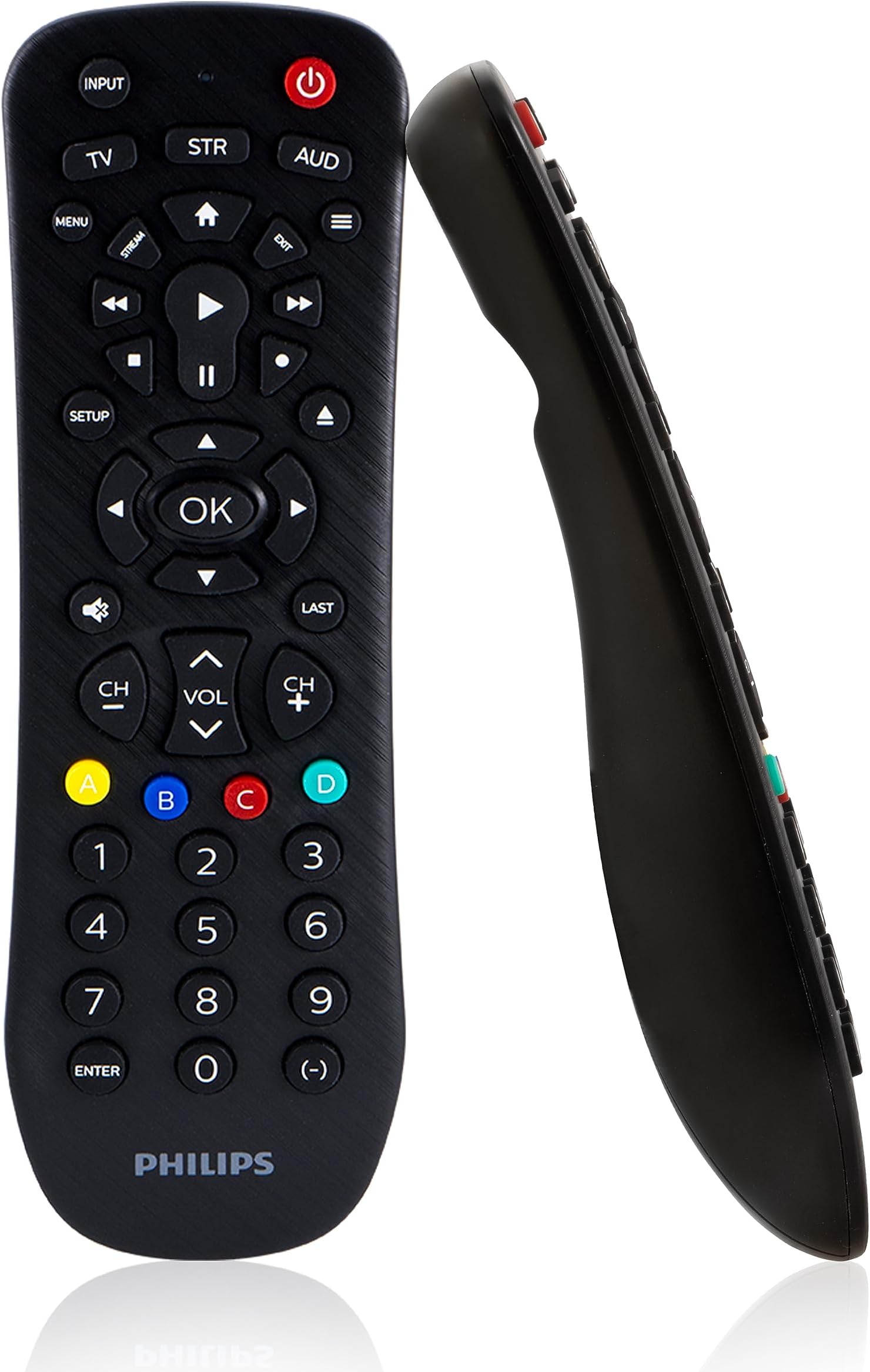
The Philips Universal Remote SRP9232D/27 is a compact, black infrared remote designed to control up to three audio/video devices including TVs, Blu-ray players, and soundbars. Preprogrammed for Samsung TVs and Roku media boxes, it offers easy setup with auto code search or direct code entry. Powered by 2 AAA batteries (not included), it features a 30-foot range, primary audio control for volume across devices, and dedicated buttons for streaming apps and DVR functions, making it the ultimate clutter-buster for your home entertainment system.


| Additional Features | Universal |
| Asin | B07B4P1DK9 |
| Battery Type | Alkaline |
| Best Sellers Rank | #11,540 in Electronics (See Top 100 in Electronics) #576 in Remote Controls (Electronics) |
| Brand | Philips |
| Button Quantity | 46 |
| Color | Black |
| Compatible Devices | Sony, Samsung, Hisense, Westinghouse, LG, Toshiba, Sharp, Vizio, Insignia, Philips, TCL, Panasonic, Roku, Apple TV, Smart TVs, Streaming Players, Blu-Ray, DVD, VCR, Home Theater |
| Compatible Television Models | Sharp 4T-C50EQ3EM2AG, Sharp 4T-C70BK2UD, Sharp 8M-B80AX1E, Sharp LC-32HI3322E, Sharp LC-40CFE6242E, Sharp LC-40CFE6351E, Sharp LC-40CFG4042E, Sharp LC-40CFG6022E, Sharp LC-40CFG6352E, Sharp LC-40CFG6452E, Sharp LC-40FG3342E, Sharp LC-40FI3012E |
| Connectivity Technology | Infrared |
| Controller Type | Button Control |
| Customer Reviews | 4.3 4.3 out of 5 stars (15,233) 4.3 out of 5 stars |
| Global Trade Identification Number | 00030878405980 |
| Item Dimensions L X W X H | 7.08"L x 2.17"W x 1.06"H |
| Item Weight | 132 Grams |
| Manufacturer | Jasco Products Company, LLC |
| Maximum Number Of Supported Devices | 3 |
| Maximum Range | 30 Feet |
| Mfr Part Number | SRP9232D/27 |
| Model Name | SRP9232D/27 |
| Model Number | SRP9232D/27 |
| Number Of Batteries | 2 AA batteries required. |
| Unit Count | 3 Count |
| Upc | 030878405980 |
| Warranty Description | 90 day limited |
User
I am now in control. And lovin' it.
The remote for one of our TVs died, so I purchased the Philips Universal Remote Control to replace it. After a brief set-up I found that it controls the volume and channels. Works well, easy to set up, and does all I would expect it to do. It is very reasonably priced.I did find one quirk, when looking at the on-screen guide, if I wish to go from channel 43 to channel 45 it is necessary to press the '-' button as opposed to what I would expect, the '+' button. I have resolved this problem by holding the remote backwards and upside down during such operations.I have done some additional experimentation as to the universality of the remote. For example, I have found it has no apparent effect as a remote starter for my car, is of no value whatsoever with PowerPoint presentations during ZOOM meetings, and it cannot operate a lawn mower. In this I am bitterly disappointed and suggest revising the name to "Philips Universal Remote Control FOR TELEVISIONS AND CABLE AND STREAMING STUFF" (emphasis added) to avoid similar future disappointments to others.To close with positive notes, it does a fine job controlling the TV and Roku box in the kitchen, and that's great. And to my delight I have found it has a profound effect on my neighbor, R. Philips, who has just finished mowing my yard (the 'A' button), and next will be washing our cars (the 'B' button). I've yet to assign the 'C' or 'D' buttons, but I think leaf and snow removal may be good candidates, come fall and winter.
User
Replaced all the functions except one
Woks well. Be careful not to press the AUD button that is just below the power button or you will need to reprogram it. Not a big deal. I have the code memorized. Has all the functions I need except I seem to remember the one before had a closed caption button. Not a big deal and my memory might be wrong.
User
Good compatibility, weird button mapping
Got this to work with an Sharp TV and Roku Soundbar. Setup was easy and quick. Work well with both units. Can access settings menu's etc. Full control of both units it's connected to.Like another reviewer, I find the button mapping kind of sub par. For the Sharp, navigating the menu can be difficult as some of the buttons don't actually do what they are meant for (i.e. the back button). For the Roku, the back button get's mapped to the "exit" button which is a tiny button surrounded by other buttons. However, with the Roku the fast forward / rewind buttons work!There is no light, and since many of the buttons used are quite small, it is hard to use in dark settings.
User
Saving Grace After Roku Remote
I have a Roku TCL TV and was worried this wouldn’t be compatible. Thankfully it absolutely is. I was relieved to see my TV listed on the code area. First code worked off the bat. The Roku remote is HORRIBLE. Like sheesh, redesign it, Roku. I had to press the volume buttons until my fingers were sore because it wouldn’t budge without an aggressive press down. Finally, I can save my fingers the trouble. It’s clunky and old school, but I recommend it over the Roku remote any day!!Update: decided to update my review to five stars because, though it's not modern (my only caveat), it's perfectly workable, easy to set up, and way better than my previous Roku remote (if you don't already see my extreme upset with it above!!). Definitely recommend it.
User
.
Gets the job done
User
This Remote doesn't do what I bought it for
I bought this remote specifically to use with the Spectrum TV app on a Roku streamer. The Roku remote has no numbers or last chan button or even chan +/- buttons. This remote has all of those, but they don't work on the Roku, or at least they don't work on the Spectrum app. So, this remote turned out to be useless to me. The only way to change the Spectrum/chan on a Roku is by going through the chan guide and finding the one you want - every time. Voice commands don't work for Spectrum on Roku either, so I can't just tell it what chan to go to. I was hoping I could at least type in the number of the chan I wanted and then use the Last button to go back and forth between two chans or use chan +/- to bypass the chan guide, but none of that works with this remote. Also, the Exit button on this remote does what the back arrow button does on the Roku remote, but the Exit button is tiny and hard to find, so the Roku remote actually works better for Spectrum than this remote. If this remote cost more, I would return it. But for $10 I might as well keep it. Maybe I'll have a use for it in the future.
User
Just what I needed for travelling
I bought this so that I can connect my laptop to the HDMI input of TVs at hotels and resorts and select that input. The Hospitality Network remote and setup used at many hotels and resorts does not allow you to switch the input. The remotes don't have input selection capability and if their is an input button on the TV is is disabled unless you disconnect the digital connection from the Hospitality Network box hanging off the back of the TV. I bought this remote for TVs that do not have an input button. Many new TVs do not even have a power button and cannot be used at all without a remote. Samsung seems to be the most popular TV brand used by the hotels and resorts I visit and this remote works with those out of the box without setup. I do have to disconnect the digital connection cable from the back of the TV to use the remote but then I am golden and the remote can even be used to change channels and adjust the volume for the hotel provided choices. The Hospitality Network remote doesn't work with the digital cable disconnected but I don't need it with this remote. When I am ready to checkout I try to remember to reconnect the digital cable so the crippled Hospitality Network remote will work for the next guest.
User
Works as advertised
Easy to set up. Works with our Phillips TV, Samsung TV, and Roku streaming devices. Works better than the Roku remotes, which occasionally do not work at all. Reduces my stress and that means a lot.
User
Excelente funcionamiento en TV Philips
Se configura fácilmente y es de mejor calidad que Steren.
User
Amazing
I have been using this remote it's a very good product definitely recommended
User
Very impressed!
It took me less than a minute to program the remote for my TV and cable box, and now one inexpensive remote does it all. Minor inconvenience is that you need to select TV or Stream to choose between the TV and cable box, but that is expected and better thn having to pick up a second remote.
User
control universal
exelente producto ya he configurado varias televisiones sin problema y todo funciona al cien
User
Muy práctico
Preinstalado para Samsung tv, pero fácil de instalar para otras marcas y versátil a la vez, ya que es también para barras de sonido como la que yo uso H&K con un solo botón cambias entre tres dispositivos
Trustpilot
2 days ago
2 weeks ago