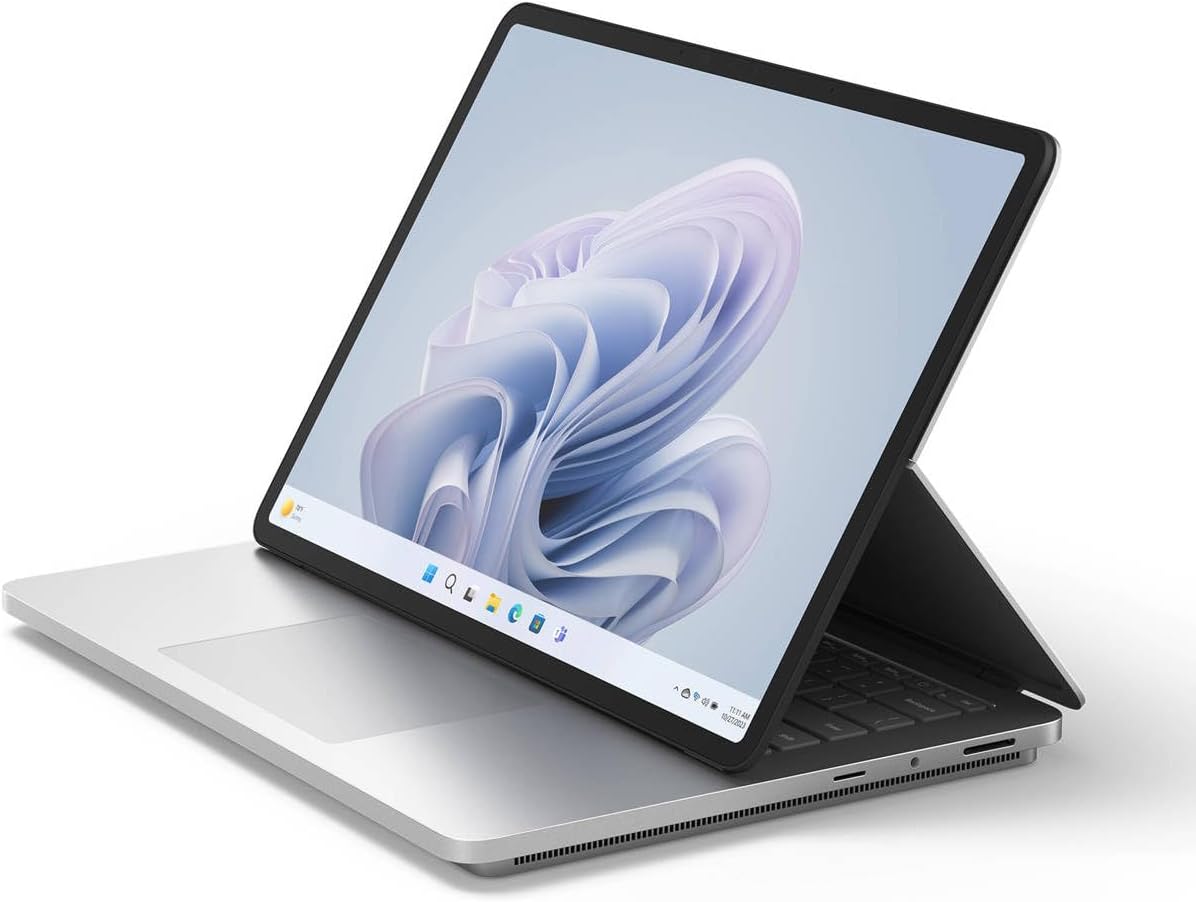
🚀 Elevate your workflow with power, precision, and style.
The Microsoft Surface Laptop Studio 2 is a cutting-edge 2-in-1 convertible laptop featuring a 14.4-inch 2400x1600 PixelSense touchscreen, powered by a 13th Gen Intel Core i7-13700H processor with 14 cores. It boasts 16GB LPDDR5X RAM, a 512GB SSD, and an impressive 19-hour battery life, designed for professionals seeking high performance, versatility, and all-day productivity in a sleek, innovative form factor.
| ASIN | B0CMZKZ1KF |
| Audio Output Type | Speakers |
| Audio features | Built-in stereo speakers |
| Automatic Backup Software Included | Adobe |
| Battery Cell Type | Lithium Ion |
| Battery Life | 19 Hours |
| Best Sellers Rank | #37,784 in Computers ( See Top 100 in Computers ) #172 in 2 in 1 Laptops |
| Bluetooth support? | Yes |
| Brand | Microsoft |
| Built-In Media | Power Supply, Quick Start Guide, Safety And Warranty Documents, Surface Laptop Studio 2 2 in 1 Notebook |
| CPU Model Generation | 13 |
| CPU Model Number | Intel Core i7-13700H |
| Camera Description | Front |
| Cellular Technology | Wireless lan |
| Chipset Type | Intel |
| Color | Platinum |
| Compatible Devices | External displays, keyboards, mice, storage devices, printers, and other accessories with Thunderbolt or wireless connectivity |
| Connectivity Technology | Bluetooth, USB, Wi-Fi |
| Control Method | Touch |
| Customer Reviews | 4.5 4.5 out of 5 stars (16) |
| Display Resolution Maximum | 2400x1600 |
| Display Technology | LCD |
| Display Type | PixelSense |
| Form Factor | Convertible |
| Graphics Coprocessor | Intel Iris Xe Graphics |
| Graphics Description | Iris Xe Graphics |
| Graphics Ram Type | Shared |
| Hard Disk Description | Solid State Hard Drive |
| Hard Disk Interface | Solid State |
| Hard-Drive Size | 512 GB |
| Hardware Interface | Bluetooth, USB |
| Has Color Screen | Yes |
| Human-Interface Input | Touchscreen |
| Item Dimensions L x W x Thickness | 23.1L x 32.3W x 2.2Th centimeters |
| Item Weight | 4.17 Pounds |
| Keyboard Description | Gaming |
| Keyboard Layout | QWERTY |
| Lithium-Battery Energy Content | 4000 Milliampere Hour (mAh) |
| Manufacturer | Microsoft Corporation |
| Microphone Form Factor | Integrated microphone |
| Model Name | Surface |
| Model Number | ZRG00001 |
| Model Year | 2024 |
| Native Resolution | 2400 x 1600 pixels |
| Notebook Pointing Device Description | Touchscreen |
| Number of Drivers | 1 |
| Number of Ports | 1 |
| Operating System | Windows 11, Windows 11 Pro |
| Optical Storage Device | No Information Available |
| Other Special Features of the Product | Touchscreen |
| Power Device | AC adapter |
| Processor Brand | Intel |
| Processor Count | 1 |
| Processor Series | Core i7 |
| Processor Speed | 2.5 GHz |
| RAM Memory Installed | 16 GB |
| RAM Memory Technology | LPDDR4X |
| RAM Type | DDR5 RAM |
| Ram Memory Maximum Size | 64 GB |
| Refresh Rate | 120 Hz |
| Resolution | 2400 x 1600 |
| Screen Finish | Glass screen surface |
| Screen Size | 14.4 Inches |
| Speaker Description | This product has built-in speakers. |
| Specific Uses For Product | Business, Student |
| Total Thunderbolt Ports | 2 |
| Total Usb Ports | 1 |
| Touch Screen Type | capacitive |
| Touchpad Feature | Present |
| UPC | 196388205127 |
| Video Output | Thunderbolt |
| Video Processor | Intel |
| Voltage | 240 Volts |
| Warranty Type | Limited |
| Webcam Capability | Yes |
| Wi-Fi Generation | Wi-Fi 6E |
| Wireless Compability | Bluetooth |
| Wireless Technology | Bluetooth |
A**E
good laptop
this is a good laptop. I bought in Sep 2024 with same specifications mentioned here but how come I got it 50% discounted price. It was new …
R**S
5 Stars. Perfect for my client. A+++
T**Y
I have owned several Surface Pro computers, with the most recent one lasting me for many years. As I do a significant amount of graphic art, the hardware on my old machine couldn't keep up with my needs, prompting my switch to the Studio model. Although I've only been using this new device for a few days and can’t provide a full review yet, there is one aspect I find inconvenient: the position of the capital key on the left side of the keyboard. It is smaller and sits lower than on other keyboards I’ve used, while the caps lock key is actually in the more conventional capital position. I’ve never encountered a keyboard quite like this one, and there are numerous possibilities for many of the keys. As I continue to work with the machine and familiarize myself with all the keyboard options, I will share more insights later, especially regarding the lower placement of the caps key.
B**N
Very nice
J**P
fast service and shipping. product is great so far. :) happy
R**Y
It does what we hoped it would. Came in a timely manner.
ترست بايلوت
منذ شهرين
منذ 3 أسابيع